Anime Dice How to Get Lucky Spins: Every Source, Frame-Read
Every way to get Lucky Spins in Anime Dice, read off frames: the Quests Shop card at 20 tickets, codes that pay +2, group rewards, and the Auto Roll trap.
常見問題
How do you get Lucky Spins in Anime Dice?
What does a Lucky Spin actually do?
How many tickets does a Lucky Spin cost in the Quests Shop?
How can you tell which number on the ticket badge is the price?
Which codes give Lucky Spins in Anime Dice?
Why did my Lucky Spin disappear right after I claimed it?
Does the Daily Rewards board give Lucky Spins?
Can you buy Lucky Spins with Robux?
How Do You Get Lucky Spins in Anime Dice?
A Lucky Spin is the free half of Anime Dice’s spin economy: a consumable that loads 100x luck onto your next roll and then vanishes. It is not sold in the Robux shop — the shop’s spin section sells the 1,000x Jackpot Spin instead — so every Lucky Spin comes from somewhere you earn.
Three sources are proven on our frames, and they are the three this page covers:
- The Quests Shop — the Shop tab inside the Quests panel sells a
Lucky Spincard for 20 Tickets. Tickets come from the quest boards, so this is the repeatable route. - Redeem codes — the Shop panel’s Codes tab pays spins outright. Our frame of one code redemption shows
+2 Lucky Spinlanding as a toast. - Group Rewards — the panel that asks you to join the group and like the game pays
+2 Lucky Spinalongside Gems and Trait Rerolls.
A fourth candidate, the daily login board, stays out of that list until a screen names it — the section on it below explains why.
Sources: every frame on this page was read frame by frame at full resolution on 26 September 2026, from RexonSIM’s I Spent ROBUX For *NEW* UPD 4 Units in Anime Dice Roblox! (the Codes tab, the Quests Shop and the Backpack), Superlex Plays’ MY JOURNEY TO ETERNAL TRAIT! + REBIRTH 10 (uploaded 24 September 2026 — the same Quests Shop, on a much larger Ticket balance), and Xou Blox’s CHASING the IMPOSSIBLE ROLL in ANIME DICE!! (the Group Rewards claim), plus RustScroll’s GOING NOOB 2 SECRET IN ROBLOX ANIME DICE!!! (PART 1…) (uploaded 13 September 2026 — the Group Rewards panel with the Lucky Spin tooltip open at 5:46). All four are clean gameplay capture — no facecam, no burned-in captions — so every screenshot is the game’s own pixels and each one deep-links to the second it came from. One further session, LenzoBlox’s Anime Dice tips run, talks about Lucky Spins directly and we quote what he says, but its frames carry large burned-in captions, so we took no images from it. The developer publishes no changelog and no item documentation.

The session whose Codes tab, Quests Shop and Backpack supply most of the frames on this page
What Does a Lucky Spin Actually Do?
The item’s own tooltip is the whole specification, and it is printed on the Group Rewards panel when you hover the clover tile: Lucky Spin, rarity Exotic, and the effect line Applies 100x luck to your next roll.
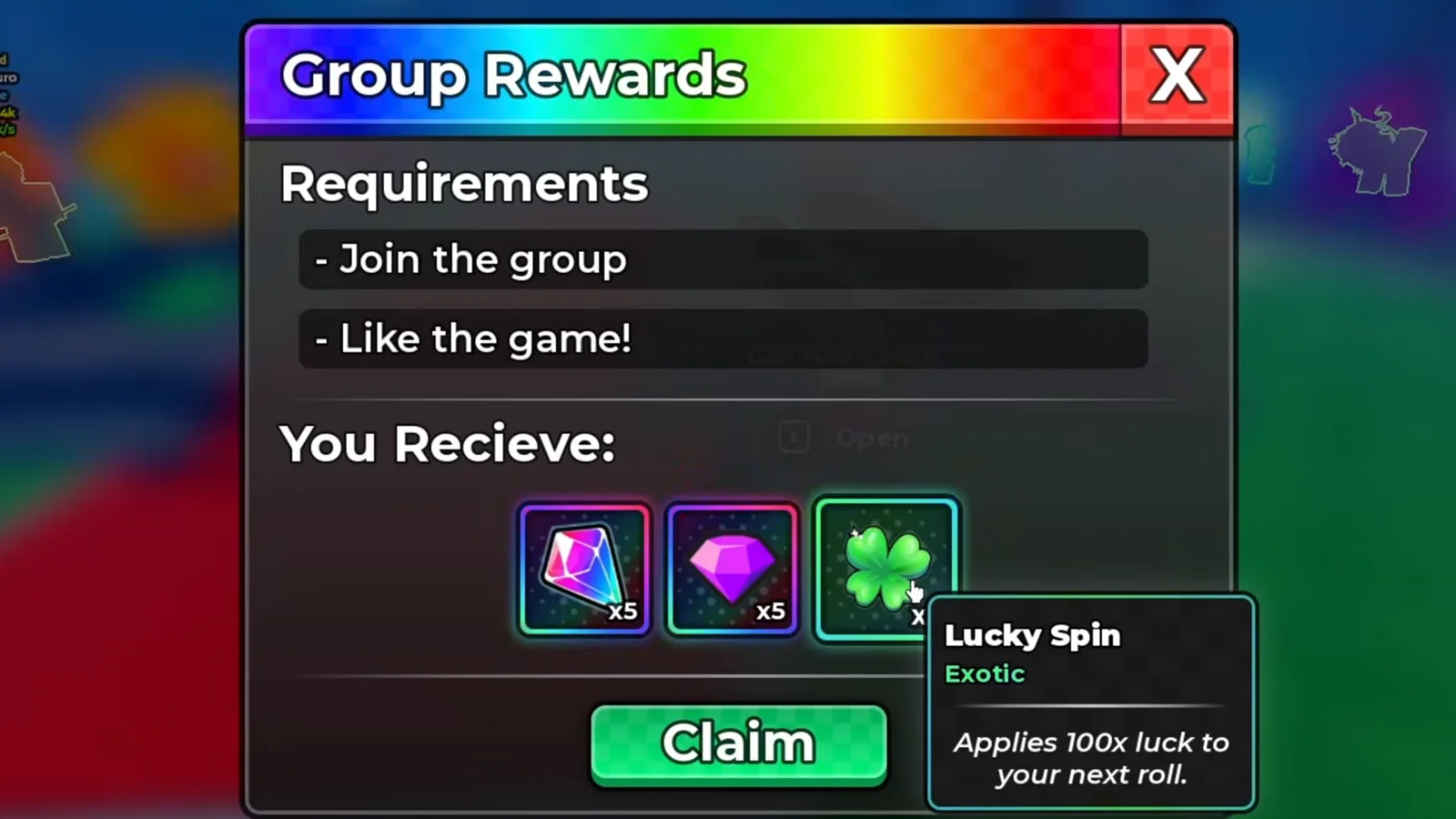
Exotic rarity, one roll of life — the tooltip is the only place the multiplier is ever printed.
Watch the Lucky Spin tooltip at 5:45
Three words in that line carry the whole mechanic, and each one is worth holding onto:
- Next roll, singular. A spin is not a timer and not a session buff. It attaches to one roll and is consumed by it, which is why the game prints a consumption banner rather than a duration.
- 100x, not 1,000x. This is the smaller of the game’s two spins. A creator walking through his own tips says it plainly while stacking potions: Lucky Spins “give out x100 multiplier… and if you stack it with potions… you can get a really good unit”. That is a spoken line from a video we did not screenshot, and it agrees with the printed tooltip above.
- It multiplies, it does not add. The 100x lands on top of whatever luck is already running, so the same spin is worth far more after potions and dice upgrades. Our luck guide collects those stacking sources and deliberately refuses to add them into a single total.
While a spin is waiting, it lives in the Backpack’s Items tab as an ordinary stack in the grid — in our frame, two of them sitting between a 137 stack of trait crystals, a 5 stack of Tickets and a 1k stack of Gems.
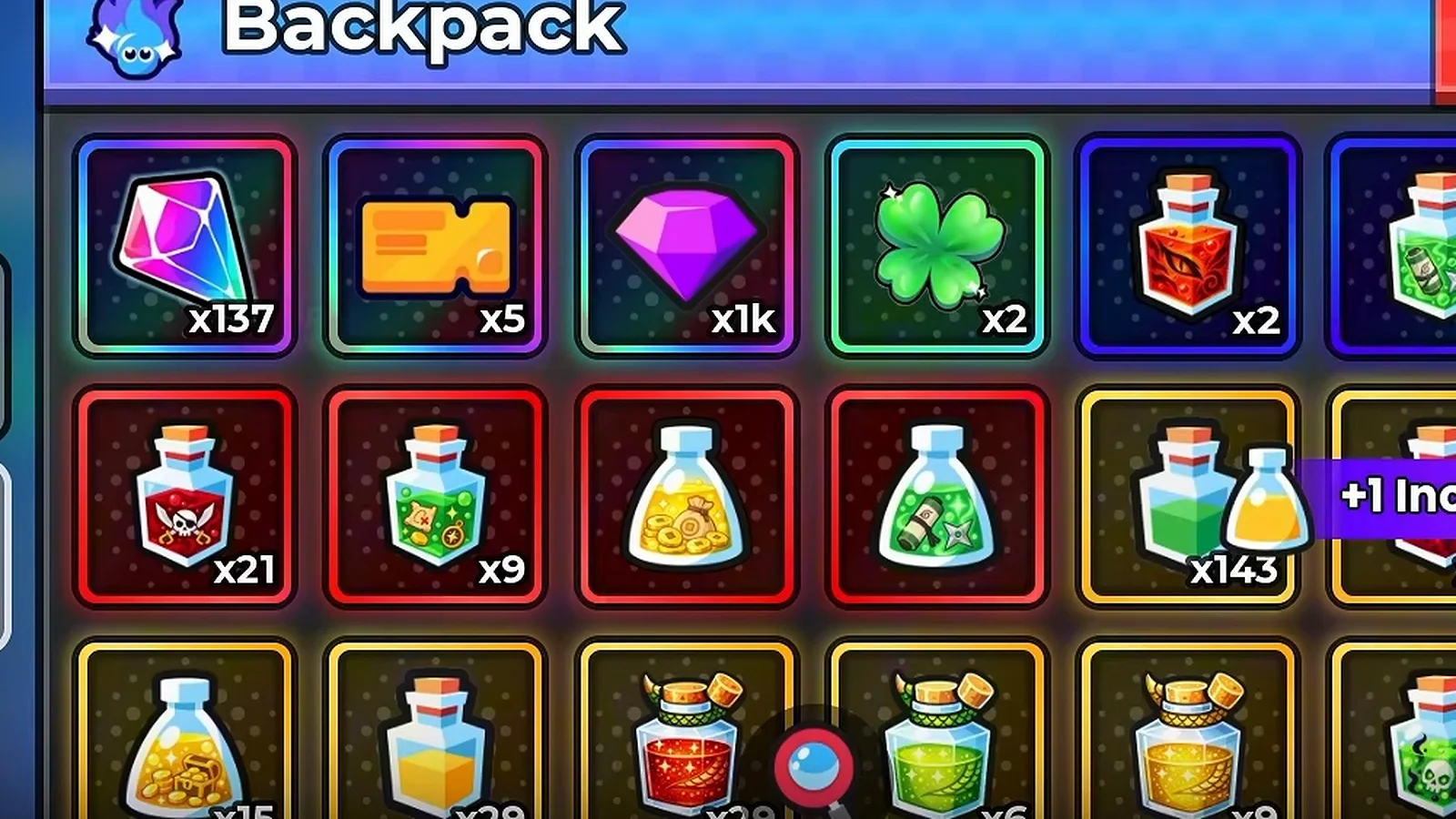
Held spins sit in the same grid as Tickets and crystals — the game gives them no separate counter.
Watch the Lucky Spin stack at 6:00
Does the Quests Shop Sell Lucky Spins?
Yes. Open the Quests panel, click the Shop tab down its left edge, and the first card is a Lucky Spin — a green four-leaf-clover tile whose badge prints an orange ticket icon followed by two numbers. In the frame below, taken on an account holding five Tickets, that badge reads 5 / 20.
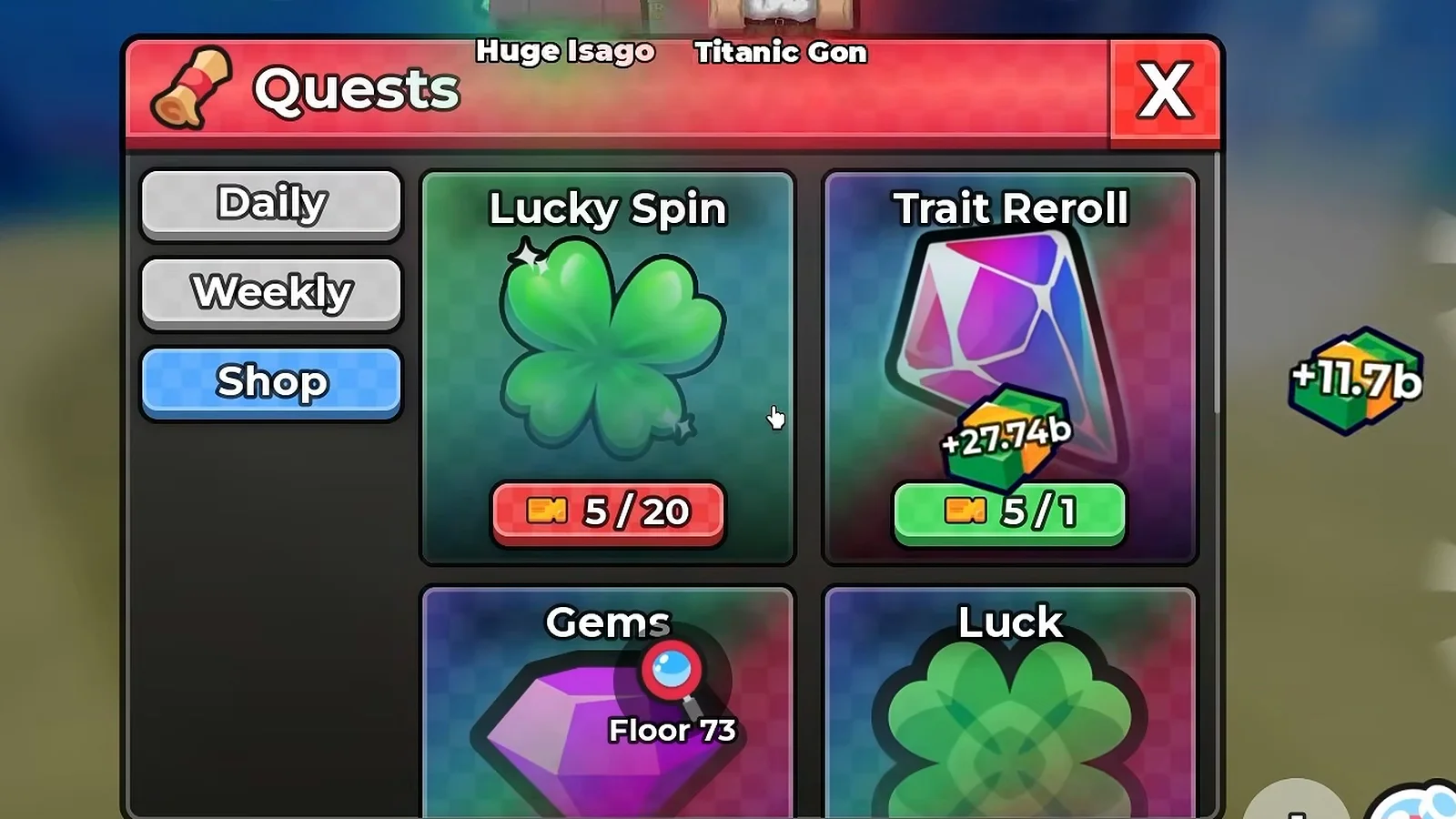
The clover card on the left is the spin; the badge under it is the Ticket price.
Watch the Quests Shop tab at 5:05
Which of the two numbers is the price? This is the question three of our published pages deliberately left open, and the Shop tab itself answers it once you look at a second account. Every card in that grid carries the same left-hand figure and a different right-hand figure — because the left-hand figure is your Ticket balance, repeated on each badge, and the right-hand figure is that card’s cost.
Our two frames make the case between them. On the 210-Ticket account below, the badges read 210 / 1 on the Gems card and 210 / 599 on the Ultra Luck card: one shared balance, two very different prices. The badge colour tracks the same split — green when the balance covers the cost, red when it does not, which is why the 1-Ticket card is green and the 599-Ticket card is red on an account holding 210.
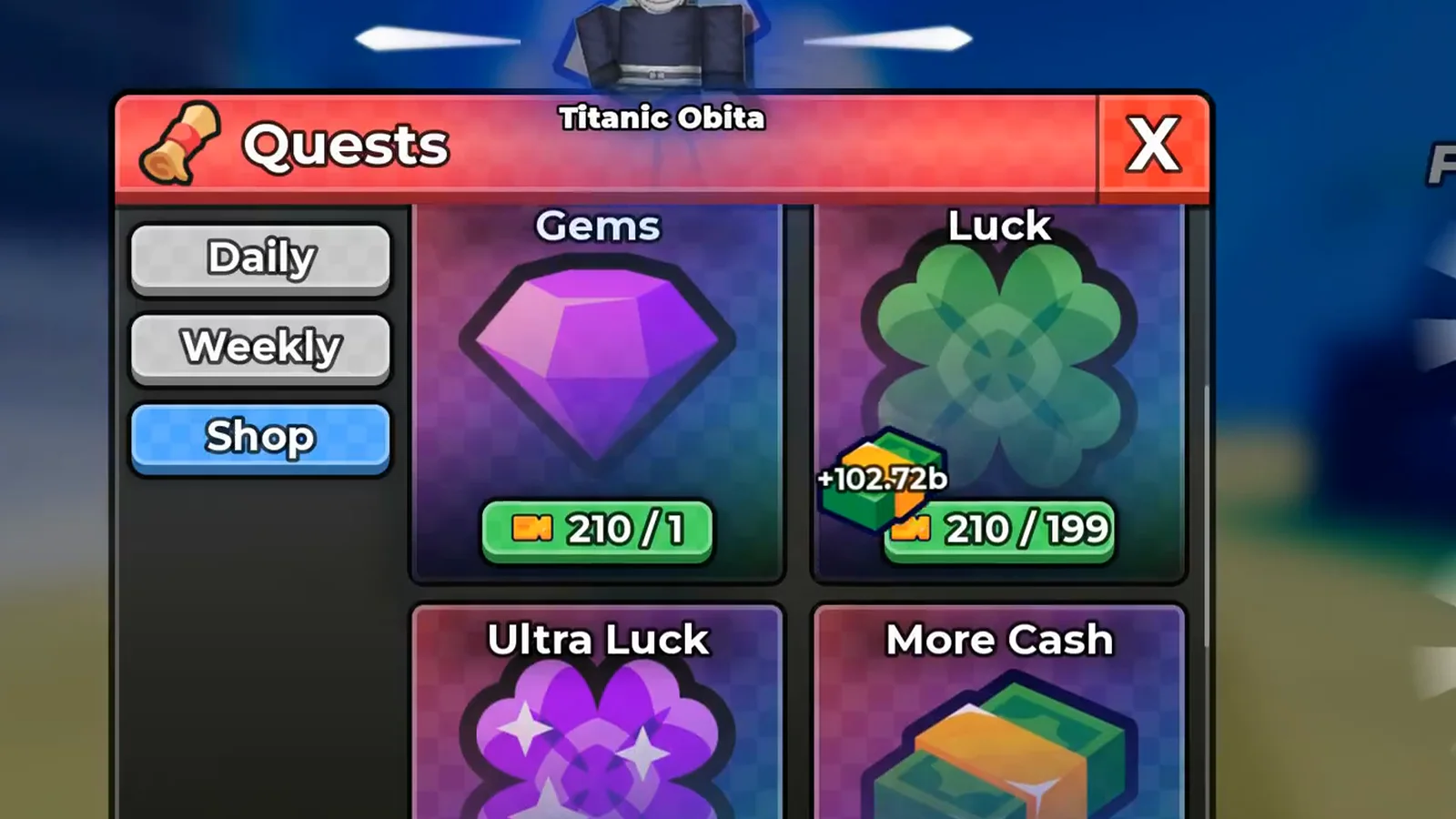
Same balance on every badge, different price on every badge: that is how the two figures separate.
Watch the badge layout at 5:00
Then the arithmetic confirms it. Seconds later the same session buys a card priced 199, and the balance drops from 210 to 11 — the new badges read 11 / 1 and 11 / 199, and the card that was bought flips to Owned under a green More Cash unlocked! banner. 210 minus 199 is 11. No other reading of the badge survives that.
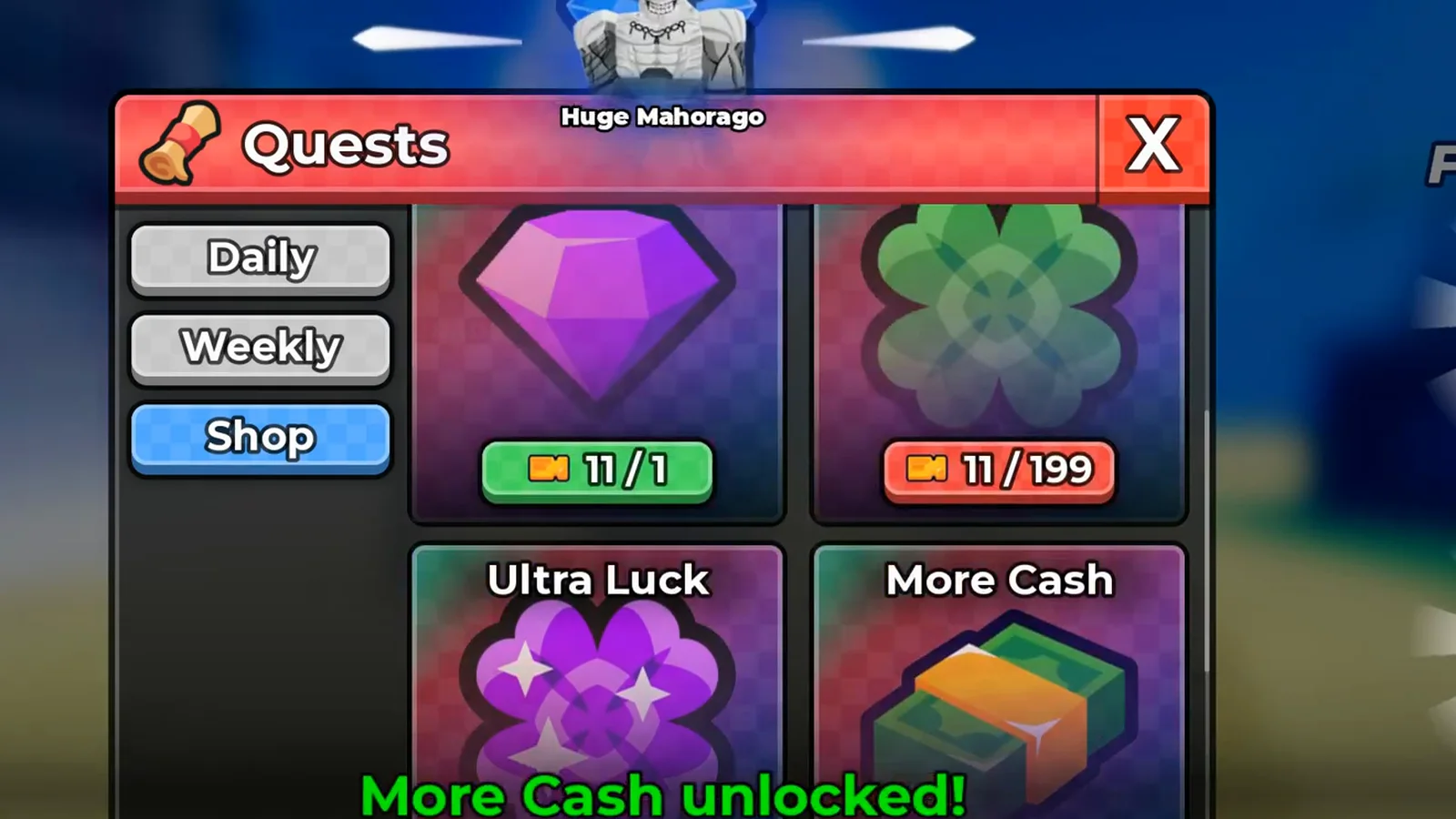
The balance moved by exactly the right-hand figure: 210 tickets became 11.
Watch the balance change at 5:10
So on every frame we hold, the Lucky Spin’s price is the number after the slash: 20 Tickets. The three snapshots our site has recorded across patches are 60 / 20, 5 / 20 and 210 / 20 — three different balances, one unchanging price. The Shop tab’s full inventory, and where Tickets themselves come from, belong to the Quests and Tickets guide; the point here is narrow and settled: a Lucky Spin costs 20 Tickets.
One thing worth lining up against our own earlier reporting, because the two reads look like a contradiction and are not. Our Lucky Spin vs Jackpot Spin guide recorded a UPD 5 client whose Shop tab led with a Jackpot Spin card at 25 / 100 in the slot that used to hold the Lucky Spin — and we wrote then that the Lucky Spin card had been replaced. The 24 September session above shows the board still carries a Lucky Spin card: in those frames the grid has scrolled past its first row, with Gems and Luck at the top of the visible area, Ultra Luck and More Cash below them, and Roll Speed and Lucky Spin on the last row. So the accurate sentence is narrower than the one we first published — the first slot changed, the card did not leave the board. On a client where both cards exist, a Jackpot Spin is the 100-Ticket item and a Lucky Spin is the 20-Ticket one.
Which Codes Give You Lucky Spins?
Codes are the zero-grind route, and they arrive through the same Shop panel. Its Codes tab is a small box at the bottom of the panel with a text field and a green Redeem button, and the payout arrives as pickup toasts rather than a list.
The frame below catches one redemption end to end: the code 10KCCU sitting in the field, the reward toasts stacked at the right of the screen reading +2 Lucky Spin, +10 Trait Reroll and +10 Gems, and — stretched across the panel — the banner +1 Lucky Spin Consumed! Roll to use it! [x2] over Code redeemed!.
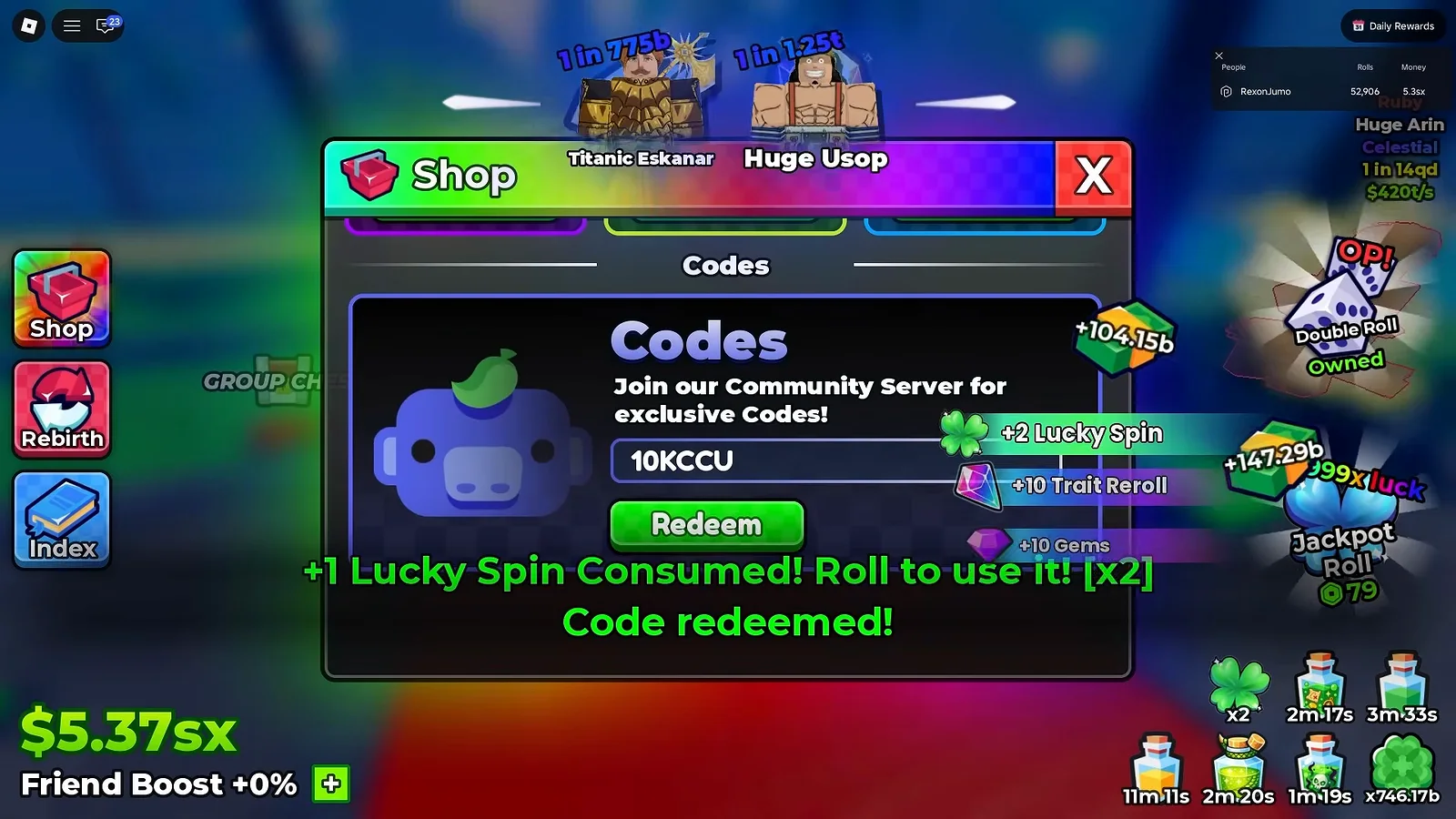
A code grant and a spin consumption sharing one screen: the next section is about why.
That is the only code we can print a spin value for, because it is the only one we have redeemed in front of our own camera. Codes are the fastest-moving part of this game, so the live list lives on its own page: our Anime Dice codes page tracks what is active, and it follows the same rule this page does.
What Do Group Rewards Pay?
The second free faucet is a panel that asks for two things and pays out in one press. The Group Rewards window prints a Requirements heading over - Join the group and - Like the game!, then a heading the client spells You Recieve: over three tiles, then a green Claim button. Claiming answers with the game naming every item itself.
The frame below is that answer: a green Group rewards claimed! banner across the bottom of the hub and three pickup toasts beside the GROUP CHEST reading +2 Lucky Spin with a clover icon, +5 Gems with a purple gem and +5 Trait Reroll with a pink crystal.
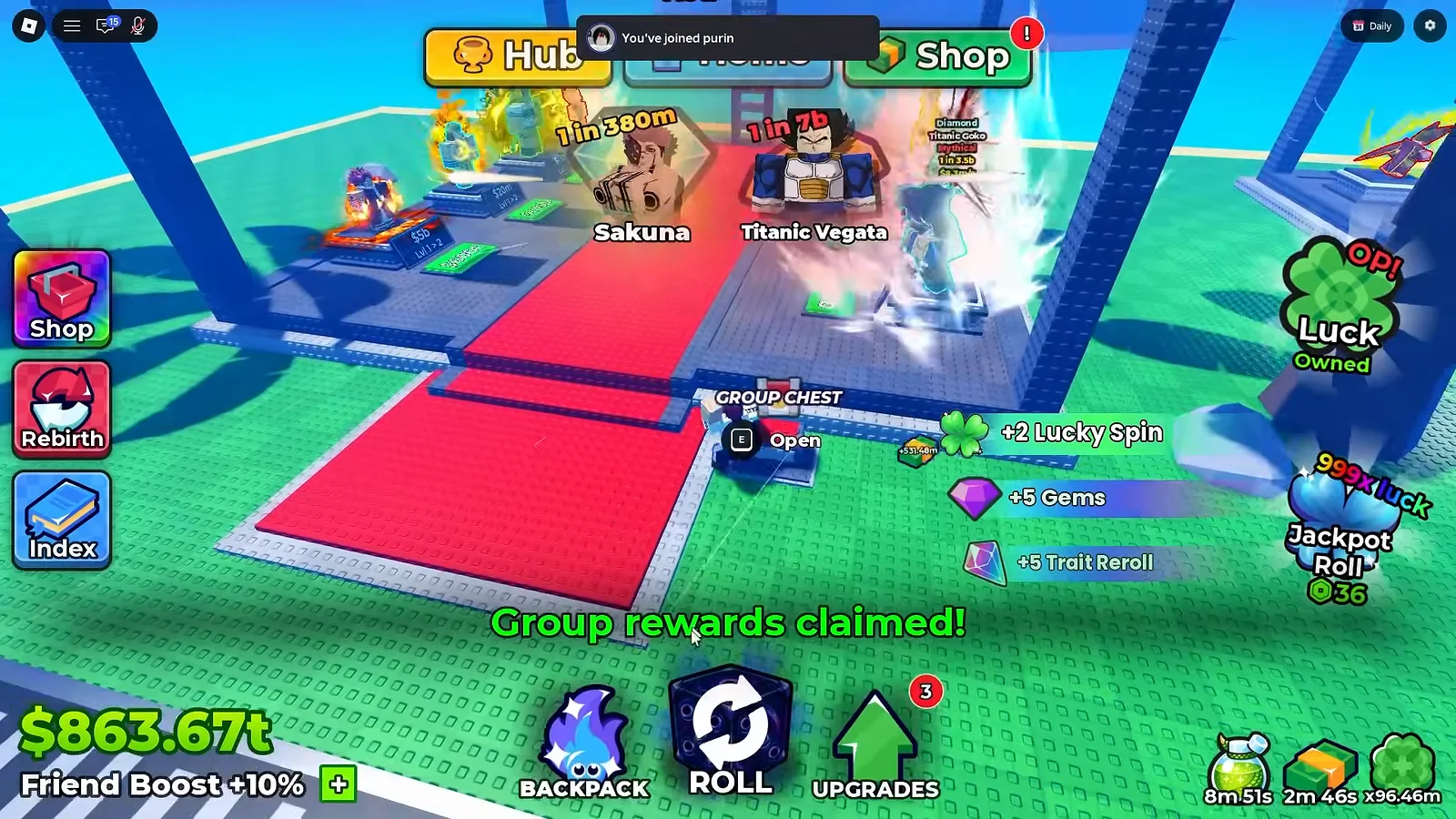
Two spins for joining a group and liking the game — and the clover icon is the only label they get.
Watch the group claim at 16:04
The panel is written up in full — its two requirement lines, the spellings it ships with, and the separate chest standing in the hub — on the Group Rewards guide. What matters for a spin budget is the count: +2 Lucky Spins, once, from a panel that asks for no in-game task at all.
Why Do Lucky Spins Vanish the Second You Get Them?
Because a spin applies to your next roll, and if Auto Roll is running, the next roll is about a second away. That is not a bug report — it is what the frames show, twice, in the same session that earns the spins.
Go back to the code frame above and read it as a sequence rather than a payout: +2 Lucky Spin granted, and +1 Lucky Spin Consumed! Roll to use it! [x2] already on screen with it. The grant and the spending happen inside one second, before the player has touched anything. The [x2] tag carries the two he queued; each roll burns one.
Both creators we watched lose spins this way, and one of them says so while it is happening. RexonSIM, mid-redemption: “did it automatically use my lucky spins? … Oh my, it did. Okay, man. You know, that’s kind of disappointing.” That is a spoken line, and it matches the banner on his own screen.
The fix costs nothing and takes one click. Turn Auto Roll off before you redeem a code or press Claim on Group Rewards, and the spin waits in your Backpack’s Items tab until you choose which roll it lands on. Then stack first and spend second — the multiplier multiplies luck you already have, so a spin burned on a bare account is a spin wasted. Our Lucky Spin vs Jackpot Spin guide carries the same trap with the queued-spin version of the banner, and the Settings guide covers the rows this client actually gives you.
Does the Daily Rewards Board Pay Lucky Spins?
Probably — and we are not going to print it as a source until a screen says so. The seven-day login board shows a green four-leaf clover on its Day 4 tile at x3 and a blue clover on Day 6 at x2, and those are the same clover shapes the game uses for spin and luck items. But the board never names a single tile: the only reward it ever identifies on screen is the Day 1 toast reading +2 Luck III.
So the honest position is a gap, not a claim. The board’s tiles, its one named payout and its Next Reward In: 23h 0m countdown are read tile by tile on the Daily Rewards guide, and if a future frame shows a Lucky Spin toast coming off that board, this section becomes a fourth row in the list at the top.
What Could We Not Read?
What Should You Read Next?
- Lucky Spin vs Jackpot Spin — the 100x item against the 1,000x one, and the auto-use trap in full
- Anime Dice codes — the live list, with reported codes clearly separated from redeemed ones
- Quests and Tickets — where the 20 Tickets come from, and what else the Shop tab sells
- Group Rewards — the claim that pays two spins, read line by line
- Daily Rewards — the seven-tile login board, including the clover tiles we cannot name
- Luck — every luck source the 100x multiplier lands on top of
相關文章
guides
Anime Dice Leaderboard: The Three In-Game Boards Explained
The Anime Dice leaderboard read frame by frame: three ranked in-world boards headed Rarest, Rolls and Money, plus the server roster the game also shows.
guides
Anime Dice Friend Boost: The HUD Bonus That Reads +10%, Then +0%
Frame-verified Anime Dice Friend Boost readout: where it sits in the bottom-left HUD, the +10% and +0% frames, and what no screen ever explains.
guides
Anime Dice Luck: Dice, Potions, Rebirth, Gamepasses and Server Luck
Anime Dice luck sources read off full-resolution frames: dice rows, potion stacks, rebirth, Luck hex nodes and gamepass cards — plus the server luck gap.
這篇對你有幫助嗎?
感謝你的回饋!