Anime Dice Group Rewards: What the Panel Pays and What It Asks For
Anime Dice's Group Rewards panel read off frames: two requirements, a claim that pays 5 Trait Reroll, 5 Gems and 2 Lucky Spin, and the hub's GROUP CHEST.
FAQ
What are the group rewards in Anime Dice?
How do you claim the Group Rewards panel?
What does the group rewards panel give you?
What is the GROUP CHEST?
Which Roblox group do you join?
Is the Anime Dice group reward a one-time claim?
Why does the panel say You Recieve instead of You Receive?
What Are the Group Rewards in Anime Dice?
Group Rewards is a window, not a place you walk to. It is a panel with a rainbow-gradient title bar reading Group Rewards beside a red X, and it prints its whole contract in two blocks: a Requirements heading over exactly two lines — Join the group and Like the game! — then a You Recieve: heading over three reward tiles, with a green Claim button under them.
That is one of two group things on screen in this footage. The other is a physical object: a small red-and-grey chest standing on the hub floor under a sign reading GROUP CHEST, with an E Open prompt printed in front of it. We watched the panel pay out — a Group rewards claimed! banner, three named toasts, and the chest still sitting there offering its prompt in the same second — so this page can state the payout and still not merge the two objects into one system.
Sources: the four frames below are captures from Xou Blox’s CHASING the IMPOSSIBLE ROLL in ANIME DICE!! (1 in 4 Septillion) (uploaded 2026-09-20, 22 minutes 07 seconds, Portuguese narration with auto-translated English captions), checked frame by frame at full resolution on 22 September 2026. The recording is clean of creator furniture — no facecam, no burned-in subtitles, no channel watermark — which matters here, because the big 3D TRADE, GRADES and TOWERS lettering and the GROUP CHEST sign are all in-game world signage rather than overlays. The narration is machine-translated and the video is not about this panel, so we quote nothing from it: every line on this page comes off a screen. The developer publishes no changelog and no reward documentation — see our update history for how thin the official record is.

The session whose Group Rewards panel and GROUP CHEST this guide is built from — the panel is on screen from about 16:00
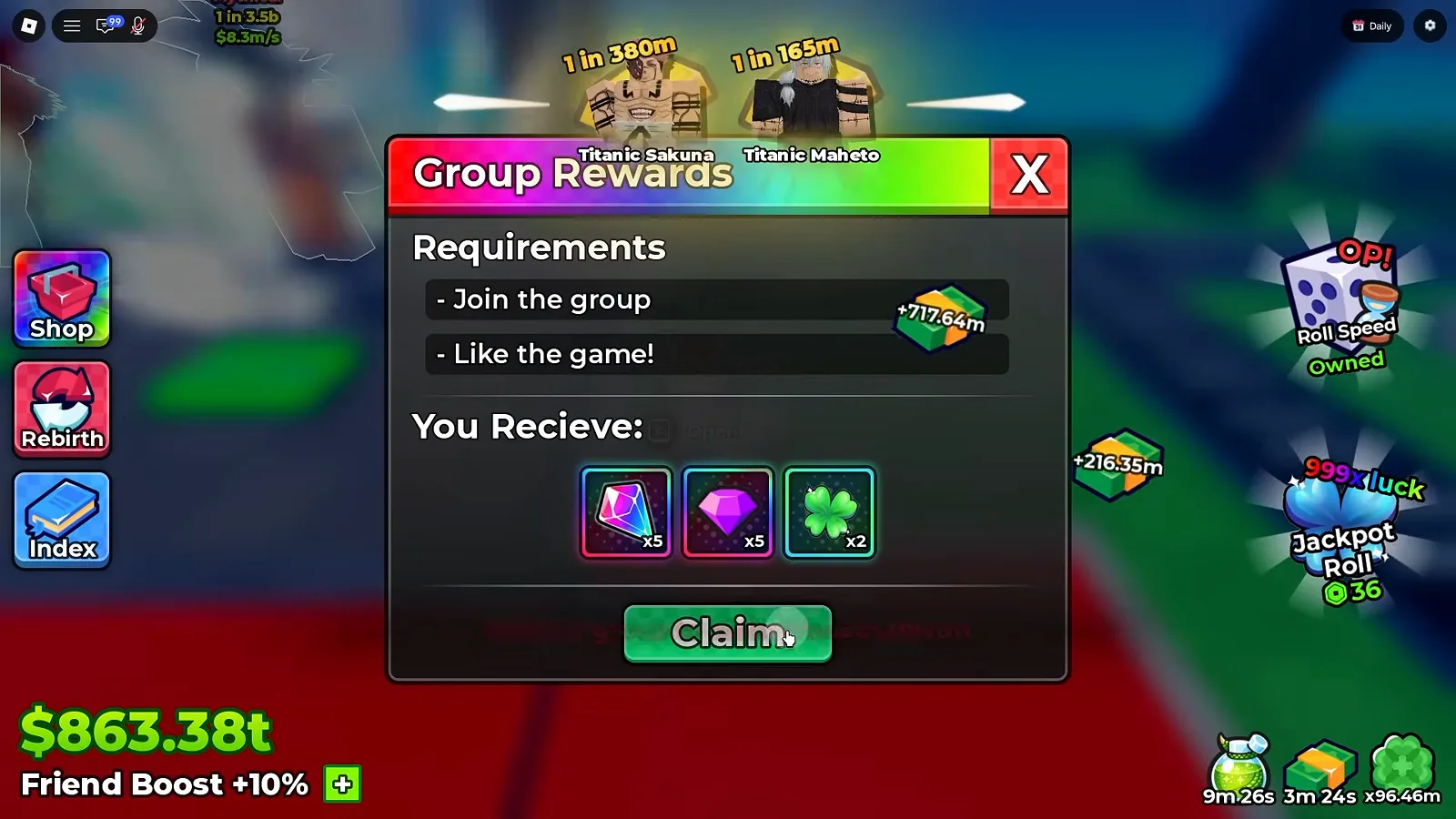
The panel’s entire content in one frame: requirements above, payout below, nothing between them explaining either.
Watch the Group Rewards panel at 16:00
Behind the panel the hub carries Titanic Sakuna and Titanic Maheto nameplates, and the HUD’s bottom-left reads cash $863.66t above Friend Boost +10% — an early-to-mid game account by its own numbers, with unit odds cards in the 1 in 110m–1 in 300m band. The 999x luck Jackpot Roll widget sits at the right edge of the same frame, carrying the same clover glyph as the third reward tile — which is worth noting, because that glyph turns out to stand for a spin, not for luck.
One caution about that bottom-left readout while this screen is up. Friend Boost +10% sits in the same frame as the panel, and that is the only relationship the frames support. No frame states that the Friend Boost and the group have anything to do with each other, so nothing here suggests they do. A shared screen is not a shared mechanic.
What Does the Group Rewards Panel Ask For?
Two lines, and no third:
- Join the group
- Like the game!
That is the complete printed list. What the frames will not give us is the rest of the sentence. Neither line ever appears in a completed or ticked state — no checkmark, no strikethrough, no colour change on either row — and we never see the panel before the requirements are met, so we can report what the panel asks and not what satisfying it looks like. Whether the Claim button is gated on those two lines at all is not on any screen we have.
One of the two questions people ask first under this heading got answered by accident, four seconds later. The frame that carries the claim banner also carries a Roblox client toast reading You’ve joined purin — the only group name that appears anywhere on screen in three recordings. It is not the panel speaking; it is the Roblox client confirming a join, and it lands in the same second as a Group rewards claimed! banner. That is about as close as footage gets to tying the panel’s Join the group line to a specific group, and we treat it as that rather than as a published statement from the developer. What we still cannot give you is the group page itself: no frame shows it, so there is no member count here and no claim about who owns it.
The other question stays open. “Like the game!” is never expanded — we cannot confirm from a screen that it means the Roblox like, and no frame says whether either requirement can be revoked once you have qualified.
What Does the Panel Pay Out?
Five Trait Reroll, five Gems, two Lucky Spin. That is the answer, and it comes from the claim itself rather than from reading tiles.
The panel’s own row is three unnamed icons. The heading above them is the client’s — You Recieve:, with the e, spelled that way in every frame we captured, and we reproduce it rather than correct it, because a typo reproduced exactly is evidence that somebody actually looked at the screen.
| Tile, left to right | Icon as printed | Count on the tile | What the claim toast calls it |
|---|---|---|---|
| 1 | a pink holographic crystal | x5 | +5 Trait Reroll |
| 2 | a purple gem | x5 | +5 Gems |
| 3 | a green four-leaf clover | x2 | +2 Lucky Spin |
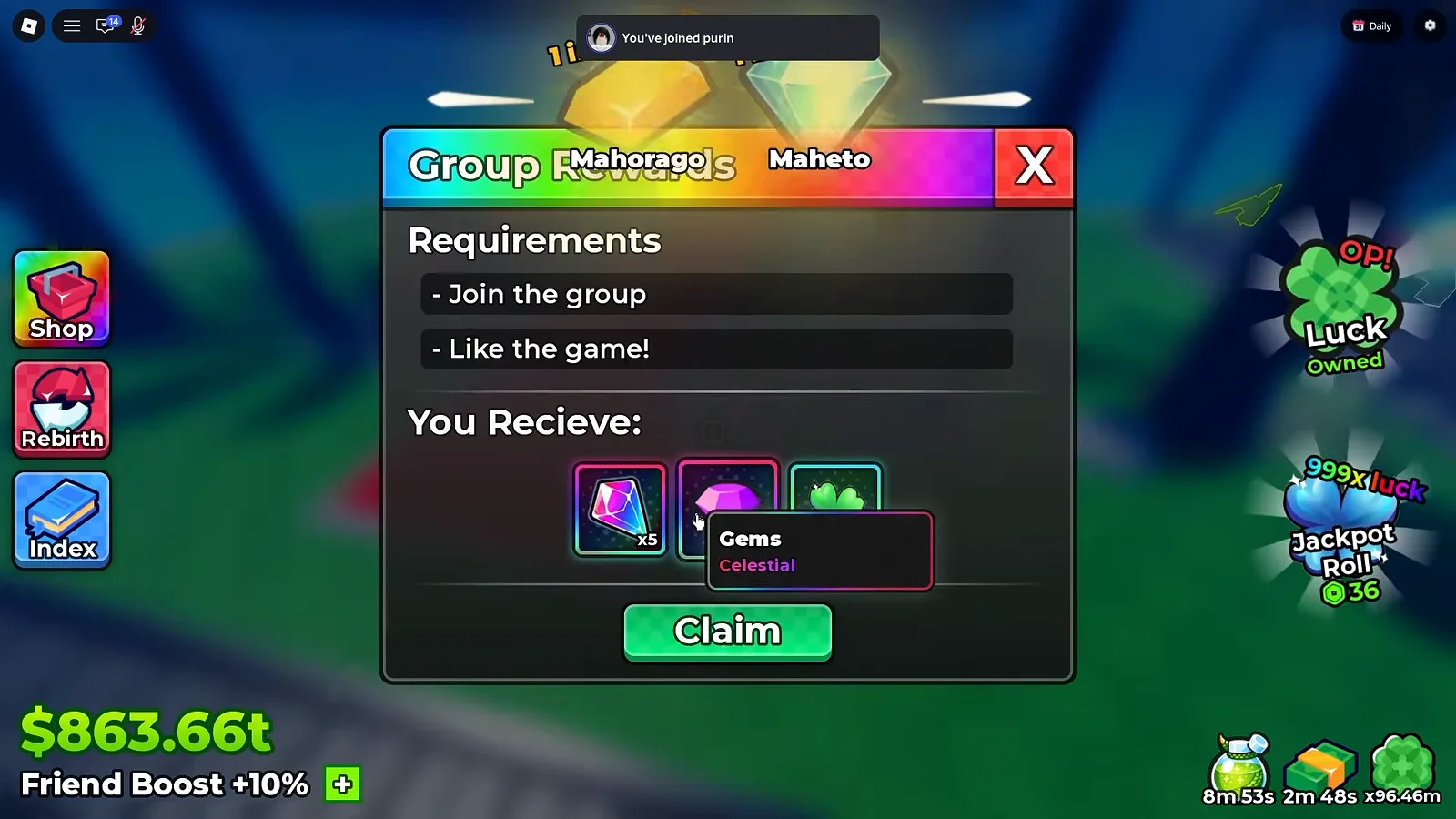
Two lines of tooltip, one tile identified before the payout. The other two name themselves four seconds later.
Watch the Gems tooltip at 16:02
Gems, and under it the rarity word Celestial — the currency our gems guide tracks through the rest of the economy. That hover is the only tile the panel lets speak for itself. What settles the other two is the claim frame.
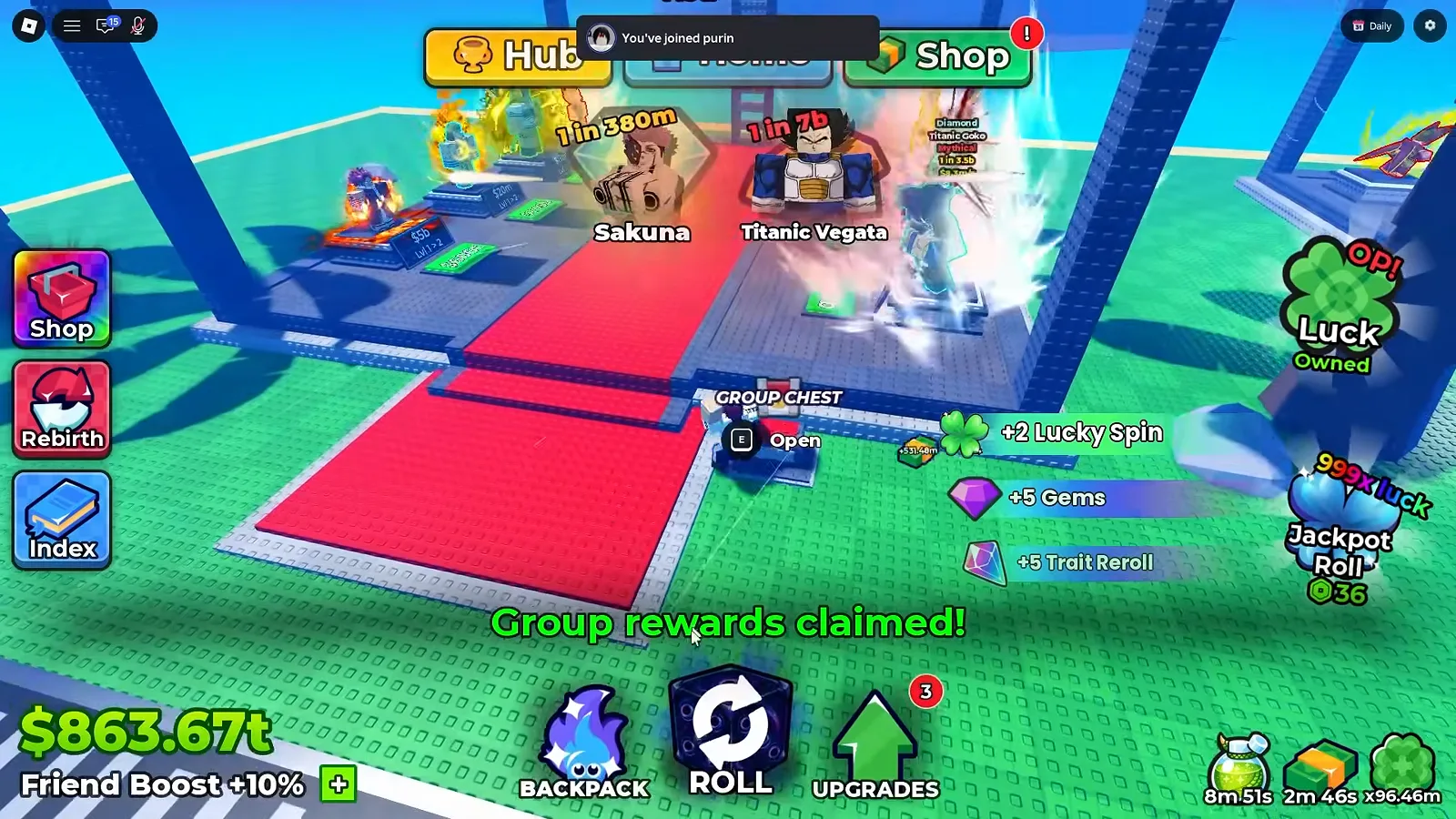
16:04. The banner, the three named toasts, the join toast, and — four seconds after the claim — a chest that still says E Open.
Three things fall out of that one second, and they are the reason this page exists.
- Every tile is now named by the game, not by us. Each toast carries its own glyph next to its own words, so the mapping runs icon → name rather than icon → our guess. The pink crystal is the Trait Reroll item — the same crystal whose tooltip our tower rewards page and Slayer Tower guide read on the Drops columns, and five of them feed straight into the reroll priority order.
- The clover is a Lucky Spin, not a luck boost. This is a correction to our own first read of the frame. The glyph is shared with the
999x luckJackpot Roll widget and with the luck potions on our potions guide, so shape alone pointed the wrong way. Two of them arrive as spins, which is why the spin trap below matters before you claim rather than after. - The counts match the tiles exactly — x5, x5, x2 against +5, +5, +2 — in the same left-to-right order. Nothing had to be assumed to line the two frames up.
What Is the GROUP CHEST in the Hub?
The chest is not a menu entry. It is an object in the world, and the game labels it in the world: a sign reading GROUP CHEST above a small red-and-grey chest on the ground. In the frame below it sits between the player and two nameplates — Huge Jogu at 1 in 175m and Titanic Todoh at 1 in 110m — under the Hub, Home and Shop buttons.
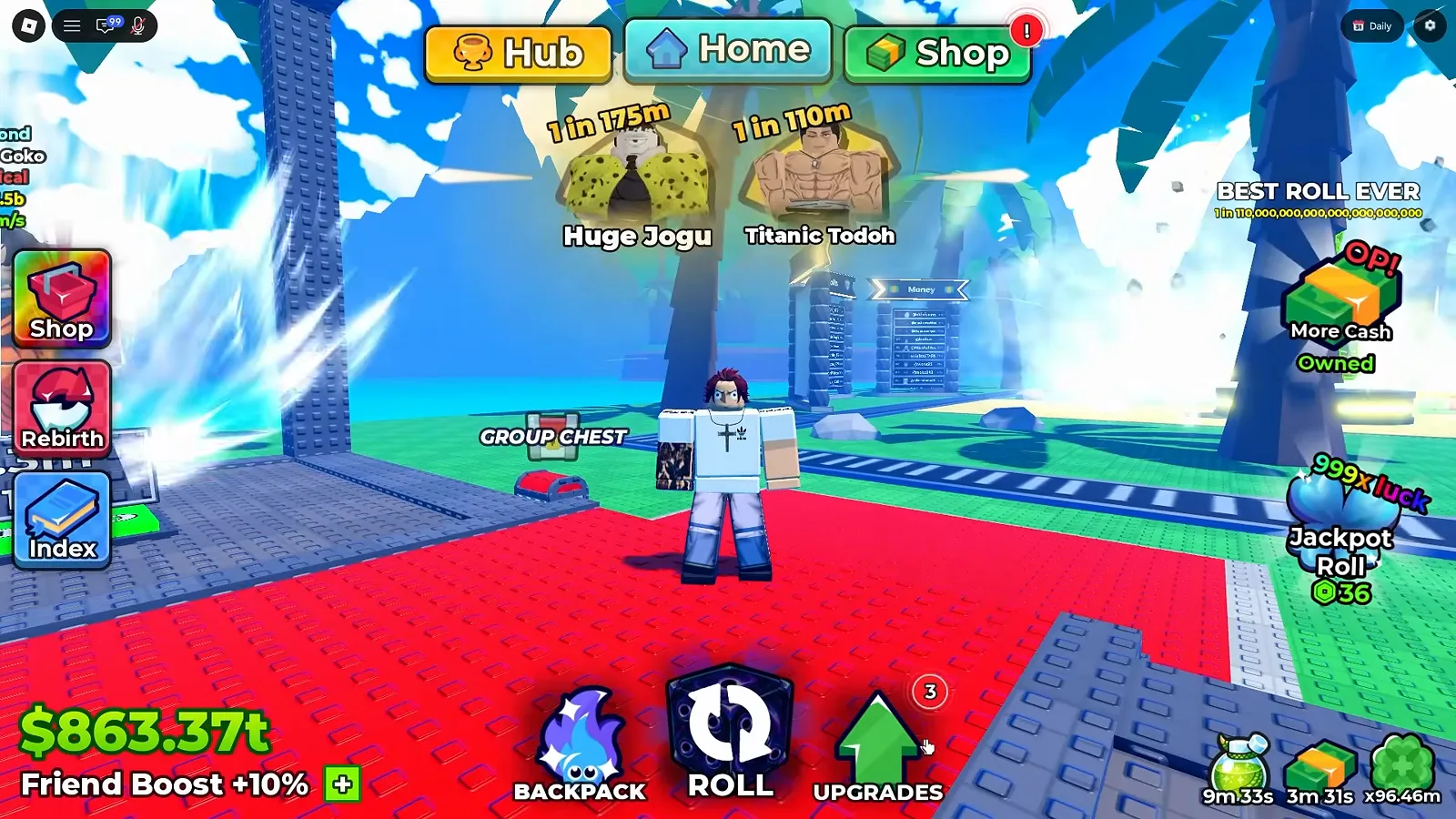
Nothing on the chest prints a timer, a counter, or a contents list.
Watch the GROUP CHEST sign at 15:58
The prompt is the second frame’s contribution, and we have already looked at it from above: the 16:04 shot puts E Open directly in front of the chest, with Sakuna and Titanic Vegata carded behind it. Nothing about the chest itself changes across those seconds. There is no timer on it, no counter, no contents list, no partial-open state, and no mark showing it has been used.
That sign is not unique to this recording, which is the only reason we treat the chest as a fixture rather than a one-off prop. A GROUP CHEST sign is visible in the hub at 4:42 of Plique Games’ session (uploaded 2026-09-21), standing behind the roll feed, and again at 0:13 and 0:38 of Superlex Plays’ recording (uploaded 2026-09-16), next to the Settings panel. We cite those two by timestamp only: no image on this page comes from either video, and neither of them shows the chest opening either.
Where Do Group Rewards Fit the Rest of the Free Income?
Every reward source on this site’s map asks for something, and the group panel asks for the least. Live codes pay currency for typing. The quests and tickets board pays Tickets for goals, those Tickets buy tower entry, and the towers are where the tower drops columns come from. The daily rewards board pays for opening the game once. This panel pays for joining a group and liking the game — two asks, neither of them a task you perform inside the game.
The other thing worth placing is the odds you keep seeing in the background. Huge Jogu, Titanic Todoh, Titanic Sakuna, Titanic Vegata — those nameplates, and the 1 in … figures printed above them, belong to our Huge and Titanic units page. The group panel tells you nothing about any of them.
What Could We Not Read?
The section that keeps the page honest. Every line below is a real gap, not an oversight:
- Repeat claims. Whether the panel can be claimed more than once. We filmed one claim and no frame prints a cooldown, a counter, or a claimed state on any tile.
- The chest, almost entirely. What the GROUP CHEST gives, how often it spawns, whether it is per-player or per-server, and whether it needs the same group join. The claim frame proves it is not the panel’s payout; nothing proves what it is.
- Who owns the group. The toast prints the name purin and nothing else. No frame shows the Roblox group page, so there is no member count, no verification badge, and no statement here that this is the developer’s official group rather than the one the join happened to point at.
- What “Like the game!” is. Whether it means the Roblox like or thumbs-up, and whether either requirement can be revoked after you qualify.
- How the panel opens. Whether it hangs off a button in the client or arrives only through the Roblox menu — no frame shows it being opened, so this page describes an open panel and not a click.
- Whether the payout is fixed. One claim, one set of counts. The tiles printed x5, x5 and x2 on this account at this patch, and we have no second claim to compare against.
If your client closes one of these — a second claim, an opened chest, a group page reached from inside the game — a dated screenshot through the contact page settles it and gets credited here.
What Should You Read Next?
- Live codes — the other free faucet, and the one that changes most often
- Daily rewards — the seven-tile login board, read tile by tile
- Quests and tickets — the hub stall that pays tower currency
- Tower drops — every Drops column we can read, side by side
- Lucky versus jackpot spins — the trap that catches a spin claimed at the wrong moment
Related Articles
characters
Anime Dice Titanic & Huge Units: What the Game Actually Prints
Huge and Titanic in Anime Dice, transcribed off the frames that print them: the Index panel's three buttons, hub nameplates, and the roll feed's word slots.
characters
Anime Dice Unit List: What the In-Game Index Actually Prints
The Index unit list in Anime Dice, read frame by frame: the blue book button, the None, Huge and Titanic labels, and the odds ladder from 1 in 2 to 1 in 40qd.
guides
Anime Dice Settings Menu: Roll Cutscenes, Auto Sell and What They Do
Anime Dice's Settings panel has four rows — Roll Cutscenes, Performance, Music and Auto Sell — plus two skip-confirmation dialogs. Read frame by frame.
Was this helpful?
Thanks for the feedback!