Anime Dice Grades: The 11-Tier Income Ladder and Gem Cost
The Anime Dice Grades ladder read frame by frame at UPD 7: infinity at 100x income, god at 50x, Z+ at 25x, S at 7x, and the one-Gem roll price.
Perguntas frequentes
What are Grades in Anime Dice?
What is the highest Grade in Anime Dice?
How much does one Grade roll cost?
What is the Grade Skip Confirmation screen?
Why do other sites print different odds for the same Grade?
What Does the Grades Panel Actually Show?
Grades are one of the stations in the hub: the world carries a GRADES stall sign, and the earlier UPD 3 session this page was built from walks up to it, which is how we first documented the station. The UPD 7 frames below catch the window already open over the world — palm trees behind the panel — so we can describe what it prints without claiming which step opened it.
Read the window left to right and every part has a job:
- The unit slot on the left — a portrait of the unit standing there, with a white
+button in the middle of it that opens the roster. - The grade box under the portrait — the letter that unit currently holds. It reads
Nonewhen nothing is selected and prints the live letter once a unit is in the slot:A+in our UPD 3 frame,Ain our UPD 7 one. - The cost badge at the bottom-left — a gem glyph and a fraction such as
62k/1, your Gem balance over the price of one roll. Auto Rollbeside it — fires the rolls for you.- A settings gear to its right — the only other control on the panel, and we could not read what it opens.
- The ladder down the right edge — every legible grade letter with its odds and its income multiplier.
Every screen on this page was read frame by frame from no-facecam screen recordings:
Sources: the UPD 7 frames below come from Xou Blox’s UPD 7 launch session (uploaded 2026-10-05), checked at full resolution on 2026-10-11; its Grades panel is open from about 5:34 to 6:22, and we found no channel watermark in that upload’s corners. The UPD 3 frames labelled as such come from 9Z6zKXqAt60 and uNj4tVkPySw, the two sessions this page was originally built on. The developer publishes no grade table — everything here is what the panel printed.

Xou Blox's UPD 7 session — the Grades panel is open from about 5:34
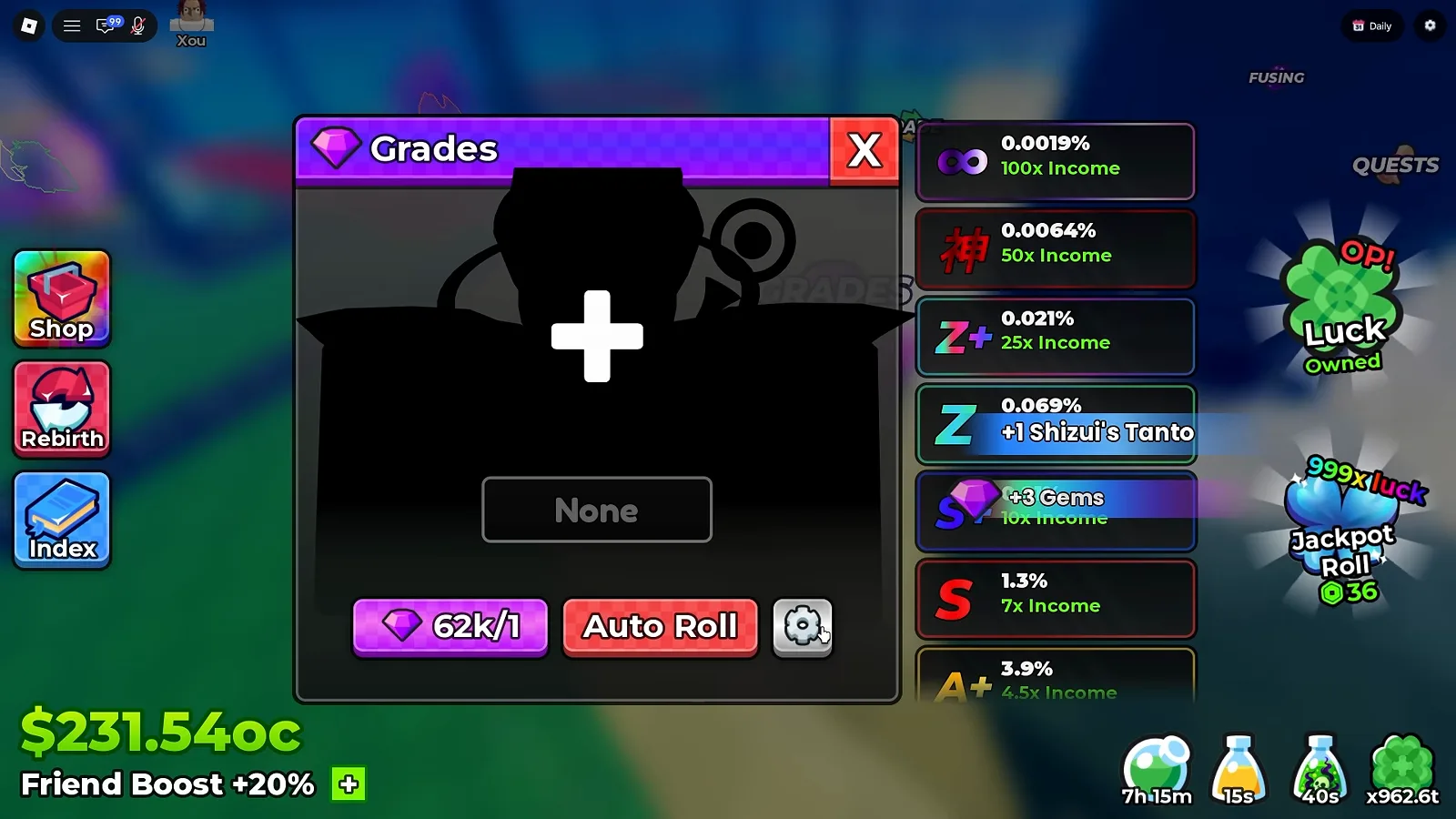
An empty slot: nothing selected, and the full ladder already on screen.
Watch the Grades panel at 5:50

With a unit in the slot, the box prints the letter that unit holds — here an A.
Watch the selected-unit state at 6:18
What Is the Grade Ladder at UPD 7?
Seven rows were legible without scrolling in our frame, and they are the seven that matter most. This is the ladder exactly as printed, top row first:
| Grade | Odds | Income |
|---|---|---|
∞ infinity | 0.0019% | 100x |
神 god | 0.0064% | 50x |
Z+ | 0.021% | 25x |
Z | 0.069% | 15x |
S+ | 0.21% | 10x |
S | 1.3% | 7x |
A+ | 3.9% | 4.5x |
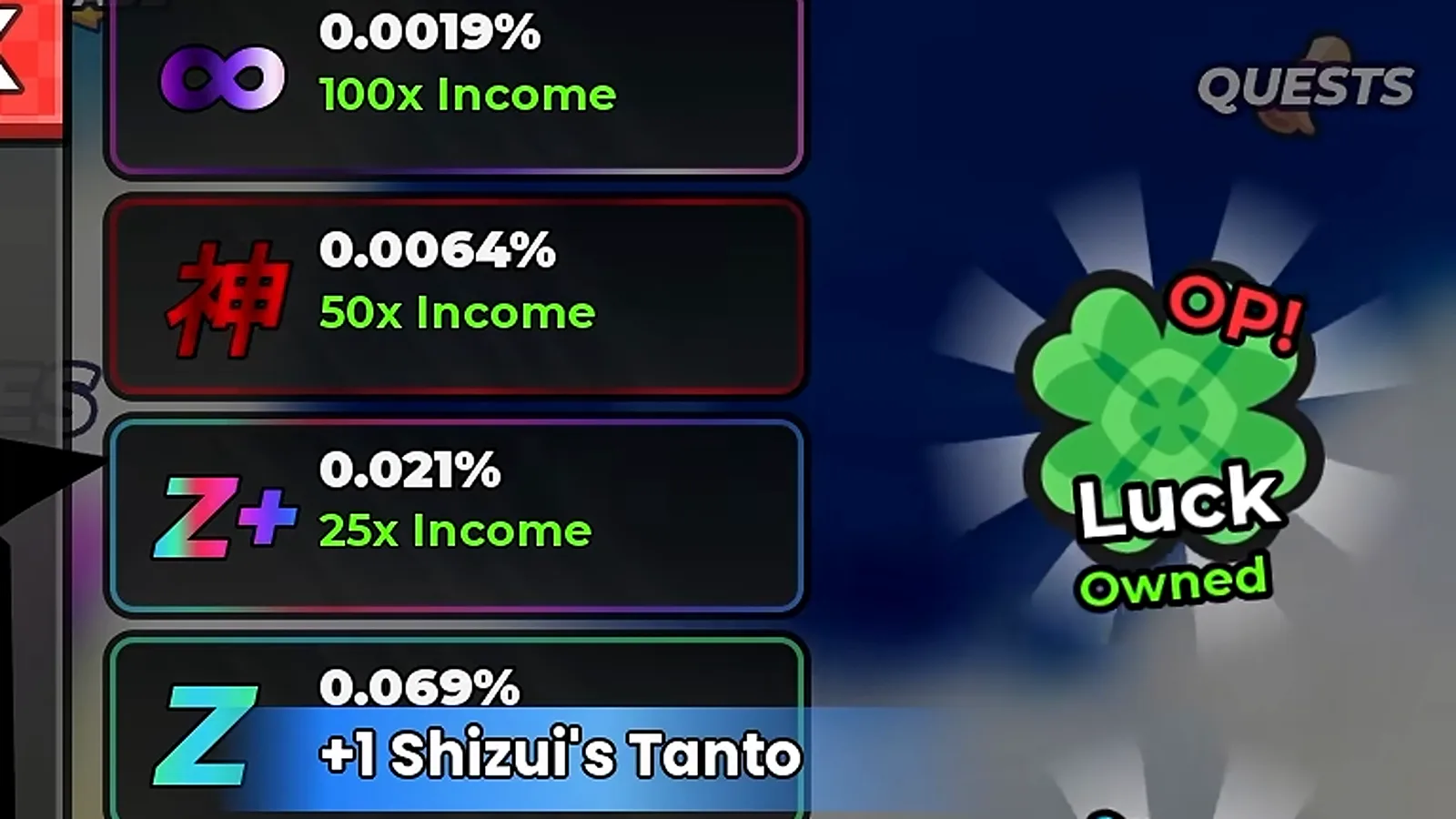
Two rows above Z Plus: infinity at 100x and the god kanji at 50x.
Watch the top of the ladder at 5:50
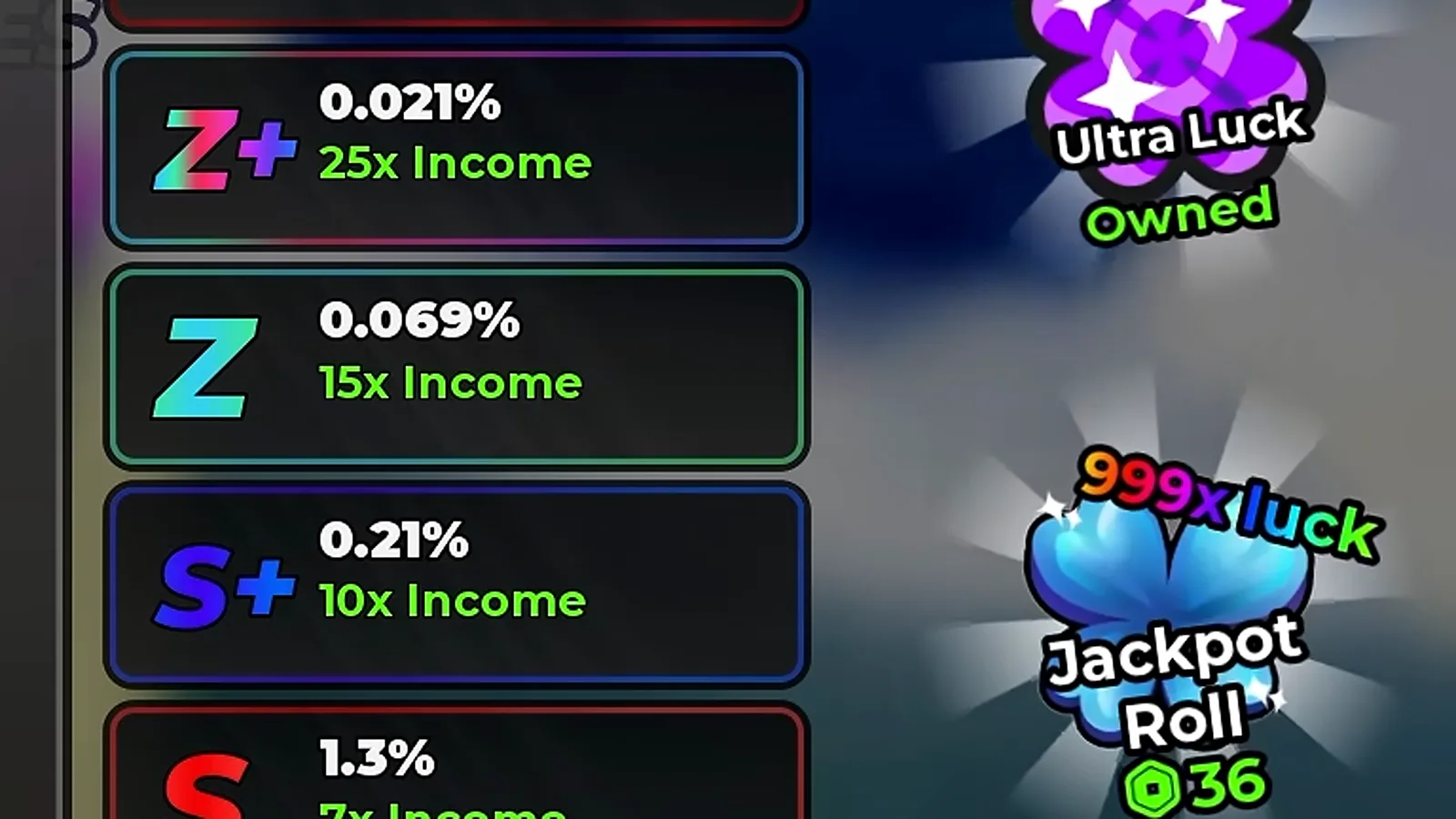
The middle of the ladder, unobstructed: Z Plus, Z and S Plus.
Watch the middle of the ladder at 5:55
Two things are worth saying plainly about that table. First, the odds are not stable across builds. Our UPD 3 frames print S+ at 0.1%, S at 0.89%, A+ at 2.9%, A at 7.9% and B at 14.9%; UPD 7 prints S+ at 0.21%, S at 1.3% and A+ at 3.9%. Second, the multiplier column is the half that held: S is 7x in both, S Plus 10x in both, A Plus 4.5x in both. If you are budgeting Gems, the multiplier is the safe half of the row.
One cell of that older ladder we will not settle, and it is worth printing both ways. The row directly above S+ reads 0.029% in both of our September captures, but one of them prints it as Z paying 15x Income while the other’s letter sits behind a stall marker and its multiplier reads 25x. Nothing we hold separates a re-tag from a misread, so both readings stay on the record.
How Many Grades Are There?
Eleven. The ladder only shows the rows that fit on screen, but the Grade Skip Confirmation view prints the full set as buttons, and that is the clearest inventory of the system we hold:
D · C · B · A · A+ · S · S+ · Z · Z+ · 神 · ∞
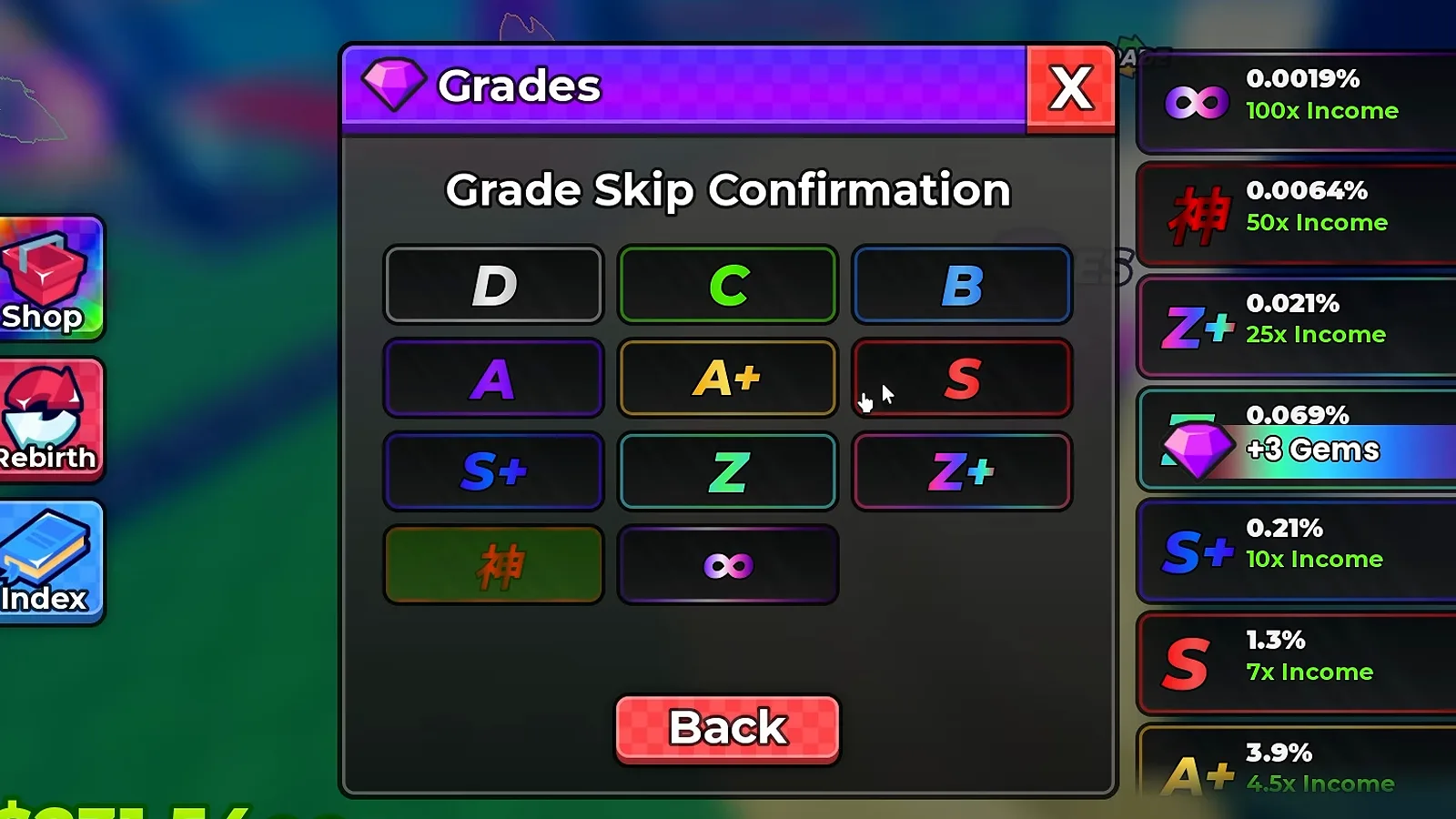
Eleven buttons in four rows, Back underneath — and the ladder still on screen to the right.
Watch the confirmation grid at 6:00
How Do Gems Pay for Grade Rolls?
One Gem per attempt, and the badge under the panel is the receipt: a gem glyph, then your balance over the price.
| Frame | Badge reads | Reading |
|---|---|---|
| UPD 3 session, first capture | 302/1 | 302 Gems banked, 1 per roll |
| UPD 3 session, mid-session | 275/1 | wallet stepping down as rolls fire |
| UPD 3 session, later | 249/1 | same price, smaller wallet |
| UPD 7 session | 62k/1 | 62,000 Gems banked, 1 per roll |
The same fraction format holds across all four captures, so we read the slash as balance-over-price: the panel never prints the words “per roll” anywhere, which is why we describe this as a read rather than a quotation.
The UPD 3 panel is also the frame that shows the earlier build whole, with a unit in the slot and the whole ladder running down the side:
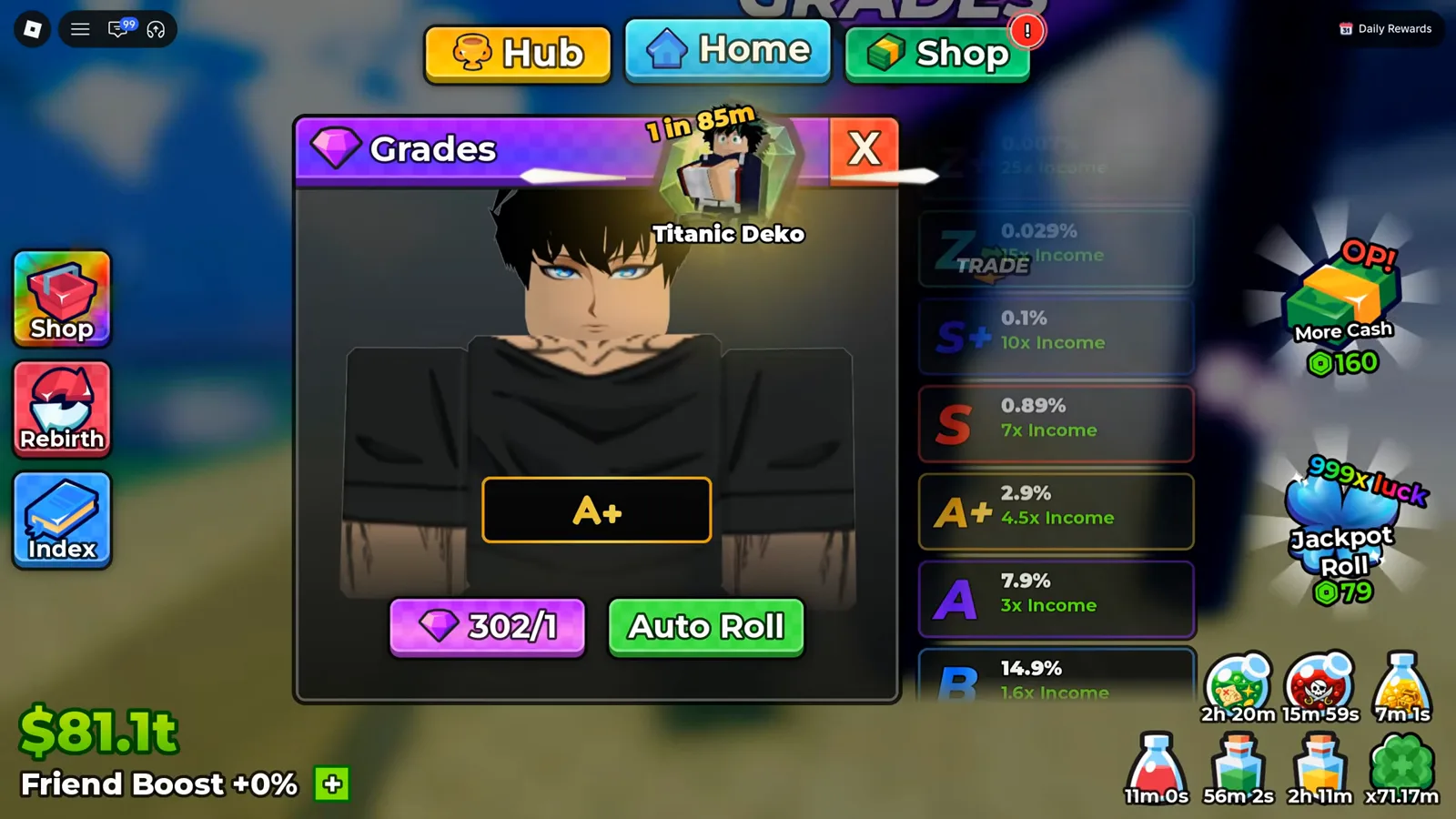
The UPD 3 build for comparison — same window, same badge, different odds down the ladder.
Gems come from quests and pickups rather than from cash: the Gems guide follows where they come from, and the Shop tab inside Quests and Tickets is the other place they turn up.
What Does Auto Roll Do?
Auto Roll sits beside the cost badge and does exactly one thing: it keeps rolling. Both creators we captured state that it does not stop on a good result — the ladder keeps cycling and the slot keeps taking whatever the last roll landed on, which makes grading a watching game rather than a leaving-it-alone game.
Can a Grade Roll Downgrade a Unit?
Yes, and the panel prints the low letters as plainly as the high ones. A roll overwrites the unit’s current Grade with whatever it lands on, so a D or a C is a real outcome on a unit you already graded — which is why the confirmation grid keeps the bottom of the ladder on the board instead of hiding it. Both creators describe refusing to roll a keeper below a target letter for exactly that reason: the next Gem can land you lower than you started.
Where Does the Grade Show Up on a Unit?
On the unit’s own card, beside everything else the unit carries. Our UPD 3 capture of the Select roster prints it plainly: hovering a unit opens a tooltip reading its rarity, level, mutation, Grade: S, its income and its roll odds, all in one block.
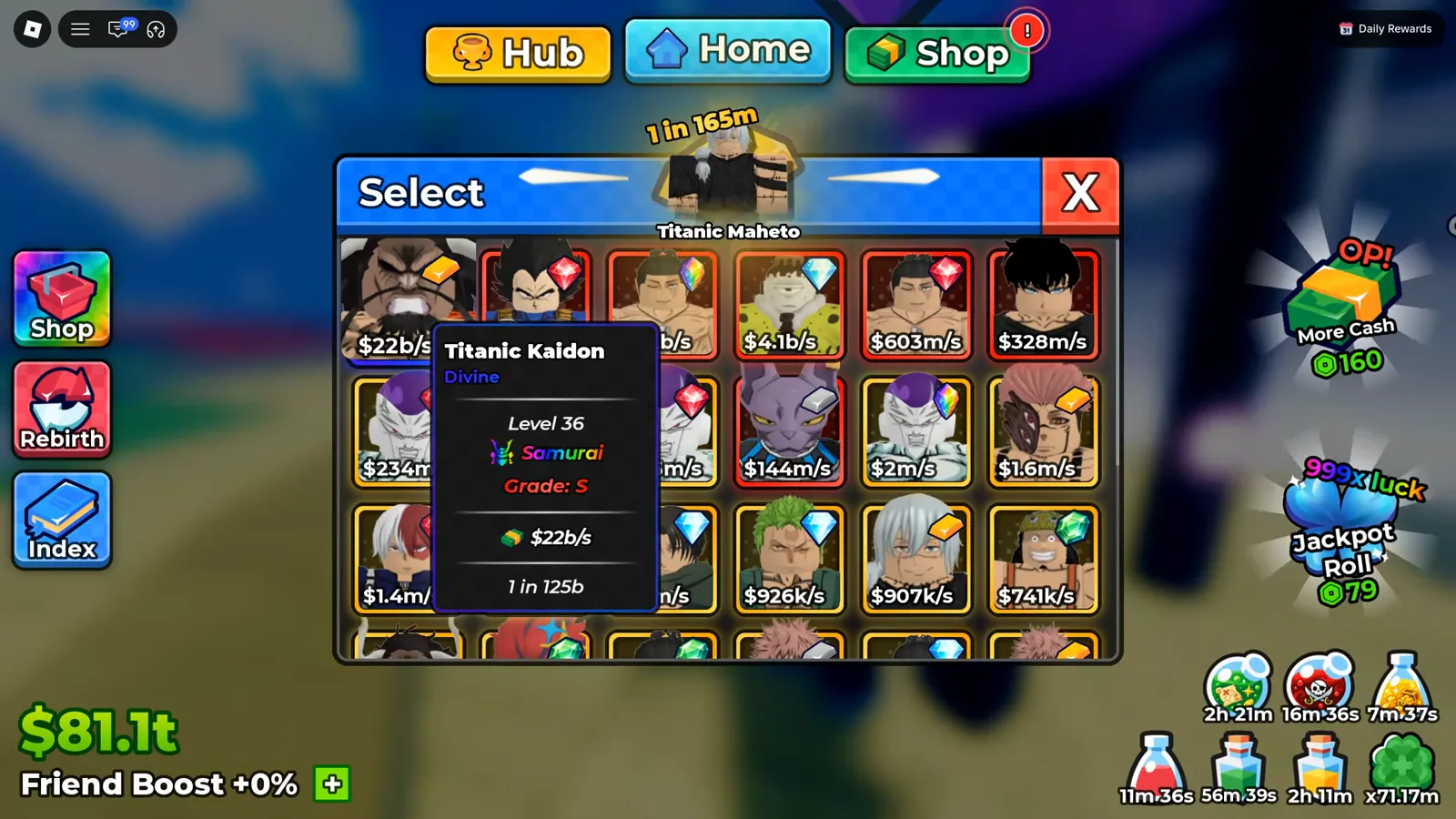
One tooltip carries the whole card — rarity, level, mutation, Grade: S, income and odds.
That is also why rebirth now matters here: UPD 7 gave the Rebirth Stats panel a Grade Luck path, so points spent on rebirth can push the odds this panel rolls against.
Which Units Deserve Your Gems?
The ladder answers this indirectly: the multiplier applies to the unit’s own income, so a 10x Grade on a unit earning 1.3k per second is worth less than a 7x Grade on the unit earning 1.9t per second that our money frames show on a late account. Grade your highest earners, leave the rest ungraded, and check the character tier list before committing a wallet to a unit you are about to replace.
Numbers We Deliberately Did Not Print
No official grade table exists, so everything above is a frame read and nothing else. We did not print a Grade Skip price (no frame shows one), an odds curve between the printed rows (the panel does not interpolate), a per-unit odds modifier (every capture we hold prints the same ladder regardless of what is selected), or a confirmation that infinity is the final tier. This revision also corrected rather than carried one figure from the previous version: it printed the top row as 25x at 0.007%. No frame we can still re-open prints 0.007% anywhere on the ladder — both of our UPD 3 captures print 0.029% on the row above S+ instead — so that number is withdrawn, and the Z / Z+ ambiguity on that same row is printed above rather than resolved. If your panel shows a row we have not seen, the contact page takes screenshots and credits them.
Artigos relacionados
guides
Anime Dice Update 7: Rebirth Upgrade Points, Third Base Floor and New Dice
Anime Dice UPD 7 read off frames: the developer's own patch notes, the 6-path Rebirth Stats panel, and a purchase confirmation. Checked 7 October 2026.
guides
Anime Dice Money: Where Cash Comes From, Read Frame by Frame
Anime Dice money read frame by frame: the cash counter's k-to-oc suffix ladder, the $/s income every unit card prints, and the breakdown no screen ever shows.
guides
Anime Dice Probability and Roll Odds: The 1 in N Screens
Anime Dice prints unit odds as 1 in N and trait odds as percentages, never as one drop table. Frame-by-frame readings plus the arithmetic the game leaves out.
Isso foi útil?
Obrigado pelo feedback!