Anime Dice Money: Where Cash Comes From, Read Frame by Frame
Anime Dice money read frame by frame: the cash counter's k-to-oc suffix ladder, the $/s income every unit card prints, and the breakdown no screen ever shows.
FAQ
How do you get money fast in Anime Dice?
What do the letters after a cash number mean in Anime Dice?
How do I see how much a unit earns in Anime Dice?
Does Anime Dice have a cash multiplier?
Why does this page not list money per hour?
How Do You Make Money in Anime Dice?
Cash in Anime Dice comes off the units you place, and the game tells you the rate on the unit itself: a placed unit carries a floating nameplate in the hub that ends in a green $X/s line, and the Backpack’s Units tab prints the same $/s figure on every card. The counter in the bottom-left corner of the screen then climbs as you play — and that counter, plus the units’ own per-second lines, is the whole of what the client prints about your income.
There is no income panel in the game. No screen we captured breaks your earnings down by source, and none prints a per-hour total or a rate for the account as a whole. So the honest shape of this page is: what the counter prints, what a unit’s $/s means, where each source of cash lives on this site, and a plain list of the numbers the client never shows.
Sources: the frames below come from three no-facecam recordings. Cx’s Noob To PRO session (uploaded 2026-09-18 — the UPD 4 window, one day before UPD 5 landed; 24 minutes 47 seconds) is the cleanest source we have used this round: we screened the whole file at 24-second steps and every frame we published from it was re-read at native 1920×1080, with no burned caption, channel watermark, facecam or desktop overlay in any of them. Xou Blox’s 1 in 4 Septillion session (uploaded 2026-09-20 — UPD 5; 22 minutes 06 seconds) is valid frame by frame rather than as a whole: it carries the creator’s own burned overlay cards and a corner watermark in other stretches of the file, so every second we publish was checked individually and none of our frames contains one. JuniorGummy’s 202-second UPD 6 session (uploaded 2026-09-27) supplies the three top-tier price tags; its cleanliness screening is described on our Update 6 page. Frames are other people’s recordings of the game; every word of analysis here is ours, and we quote no narration. The three sources record three different builds — UPD 4, UPD 5 and UPD 6 — so each number below carries its own date, and see what we could not determine for why we refuse to flatten those builds into one ladder. One rung of the suffix table comes from a fourth recording we do not build on otherwise: Superlex Plays’ session of 2026-09-24 (
7no0WtTqIZ8), cited by timestamp through the friend boost page, which owns that frame.
What Does the Cash Counter Print?
The bottom-left corner carries two lines and a button. The top line is the cash figure itself, printed in yellow-green with a dark outline and a $ sign, always followed by a unit suffix and never by a word. The second line is a white bold Friend Boost +0% or Friend Boost +10%, with a small green + beside it. That is the entire income readout the client gives you.
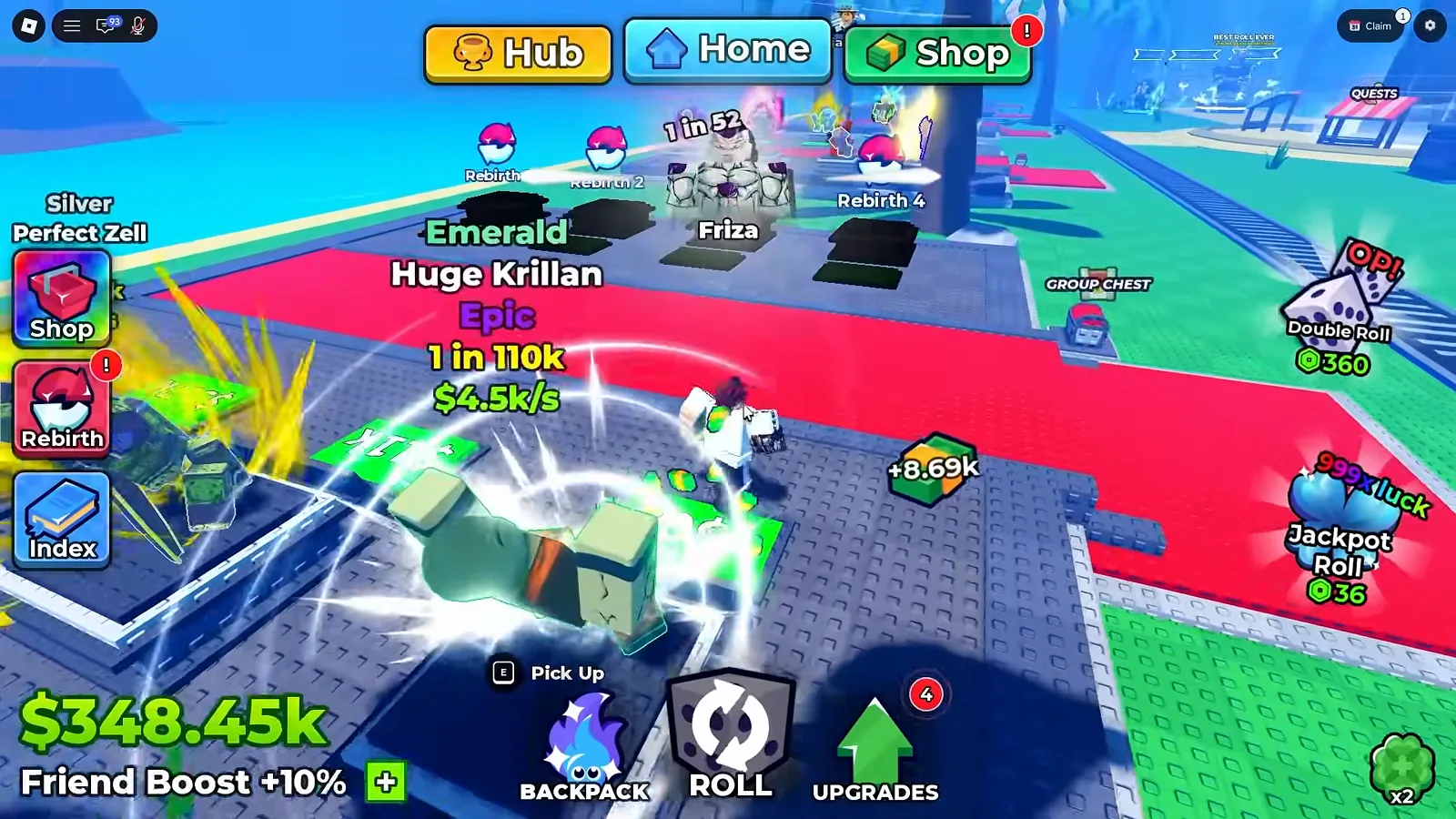
The counter is the only account-level money number in the game, and it moves constantly — the same recording prints $807.94k at 5:48 and $250.02m at 10:36.
Watch the counter and the Krillan nameplate at 3:36
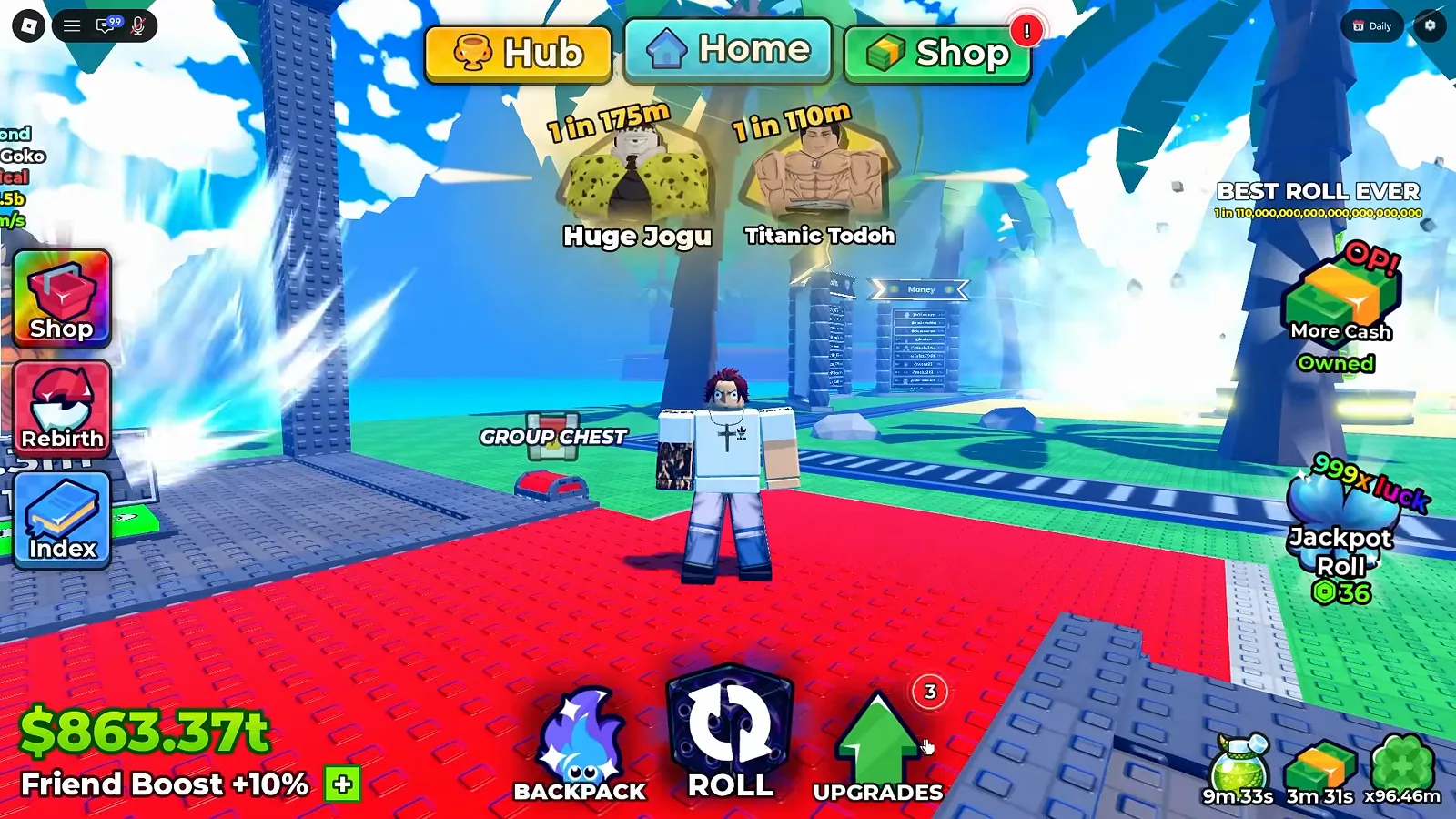
On the right-hand side of the HUD, one badge sits above the effect timers: a cash-cube icon with More Cash printed over it and Owned underneath, under a small OP! banner — clearest in the $863.37t frame further down this page. It is the only place on screen that names a cash purchase at all, and everything else about it belongs to the Robux shop page.
The bottom-right corner is also where the game stacks its active-effect timers: that same frame prints 9m 33s, 3m 31s and x96.46m, each over its own icon, and none of them is labelled with what it boosts.
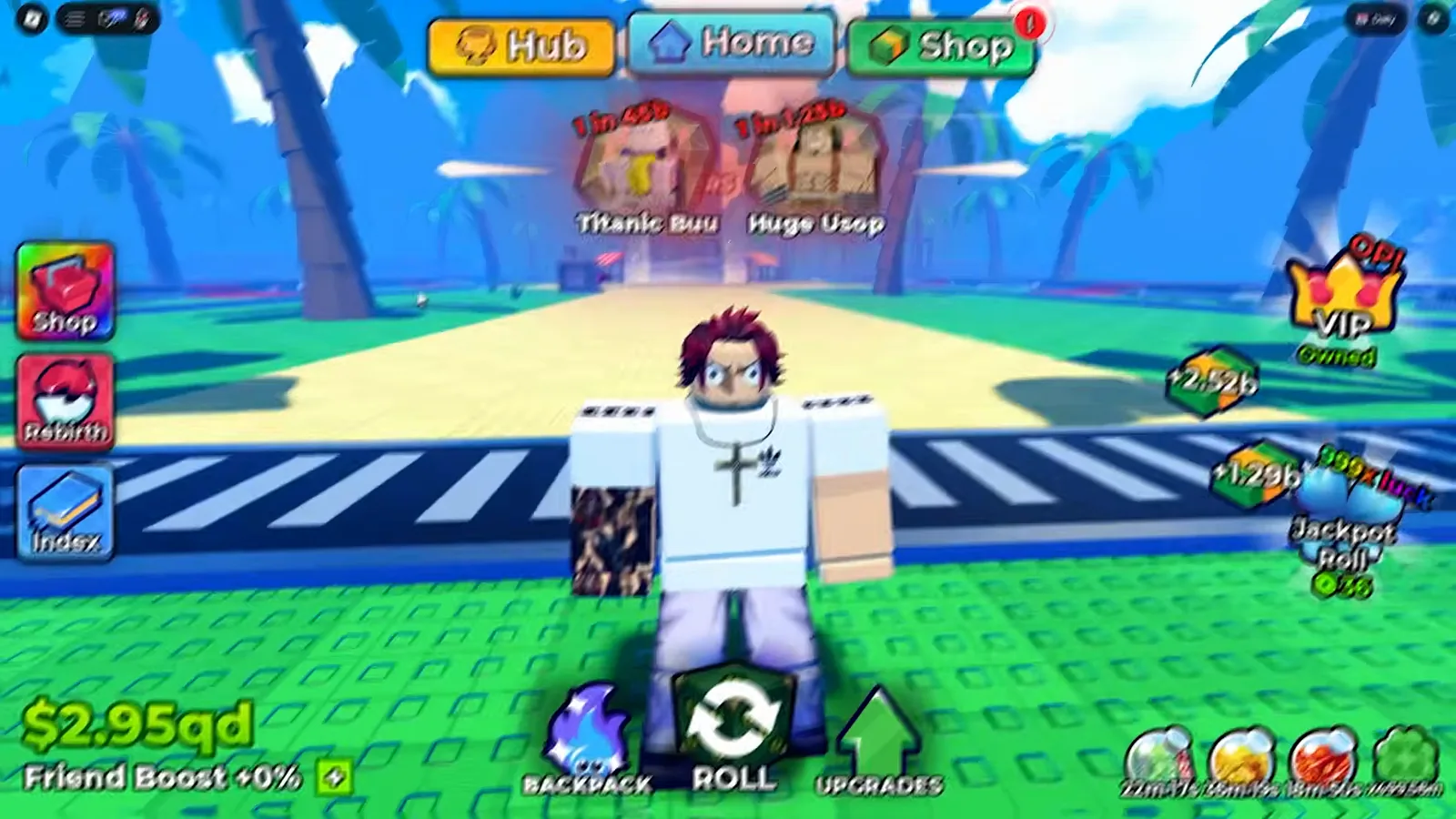
A qd counter and a +0% boost line in one frame: two independent lines, and no frame says what the percentage multiplies.
Watch the counter at qd scale at 0:12

Cx's clean session — the cash counter climbing from $0 to the billion scale, and the unit nameplates that carry the $/s lines
The Suffix Ladder, One Printed Instance Per Rung
The suffix scale is the part of this system the game never explains: no frame prints a key, a legend or a definition for any of the letters. What we can do is pin one printed instance to each rung, each bound to the recording and second it came from. No single frame shows this ladder — the rungs come from three sessions across three builds (UPD 4, UPD 5 and UPD 6), and they are printed here as our reading order, not as a progression the game displays.
| Rung as printed | One printed instance | Where it is printed | Source |
|---|---|---|---|
k | $348.45k | the hub cash counter | 7o8_jwTZ3Rc @3:36 (2026-09-20) |
m | $31.57m | the hub cash counter | 5ciWl3L3u9g @12:24 (2026-09-18) |
b | $2.38b | the hub cash counter | 5ciWl3L3u9g @23:12 (2026-09-18) |
t | $863.37t | the hub cash counter | 7o8_jwTZ3Rc @15:58 (2026-09-20) |
qd | $2.95qd | the hub cash counter | 7o8_jwTZ3Rc @0:12 (2026-09-20) |
qi | $426.81qi | the hub cash counter | 7no0WtTqIZ8 ≈11:00 (2026-09-24) — frame on the friend boost page |
sx | $242.16sx | the hub cash counter | nggNvSUH7Nk @0:08 (2026-09-27, UPD 6) |
sp | $250sp | a Dice Shop price tag | nggNvSUH7Nk @0:04 (2026-09-27, UPD 6) |
oc | $5oc and $100oc | two Dice Shop price tags | nggNvSUH7Nk @0:04 (2026-09-27, UPD 6) |
Two things about that table are worth stating plainly. The rung order — k, m, b, t, qd, qi, sx, sp, oc — is our ordering of the printed instances on the standard short scale, and it is the same order our leaderboard page reads off the client’s own boards; the game itself prints the letters without a key. And the counter is not monotonic across a session: in the clean recording it steps down as well as up ($3.3m at 8:40, $473.22k at 9:04), and no frame labels either direction.
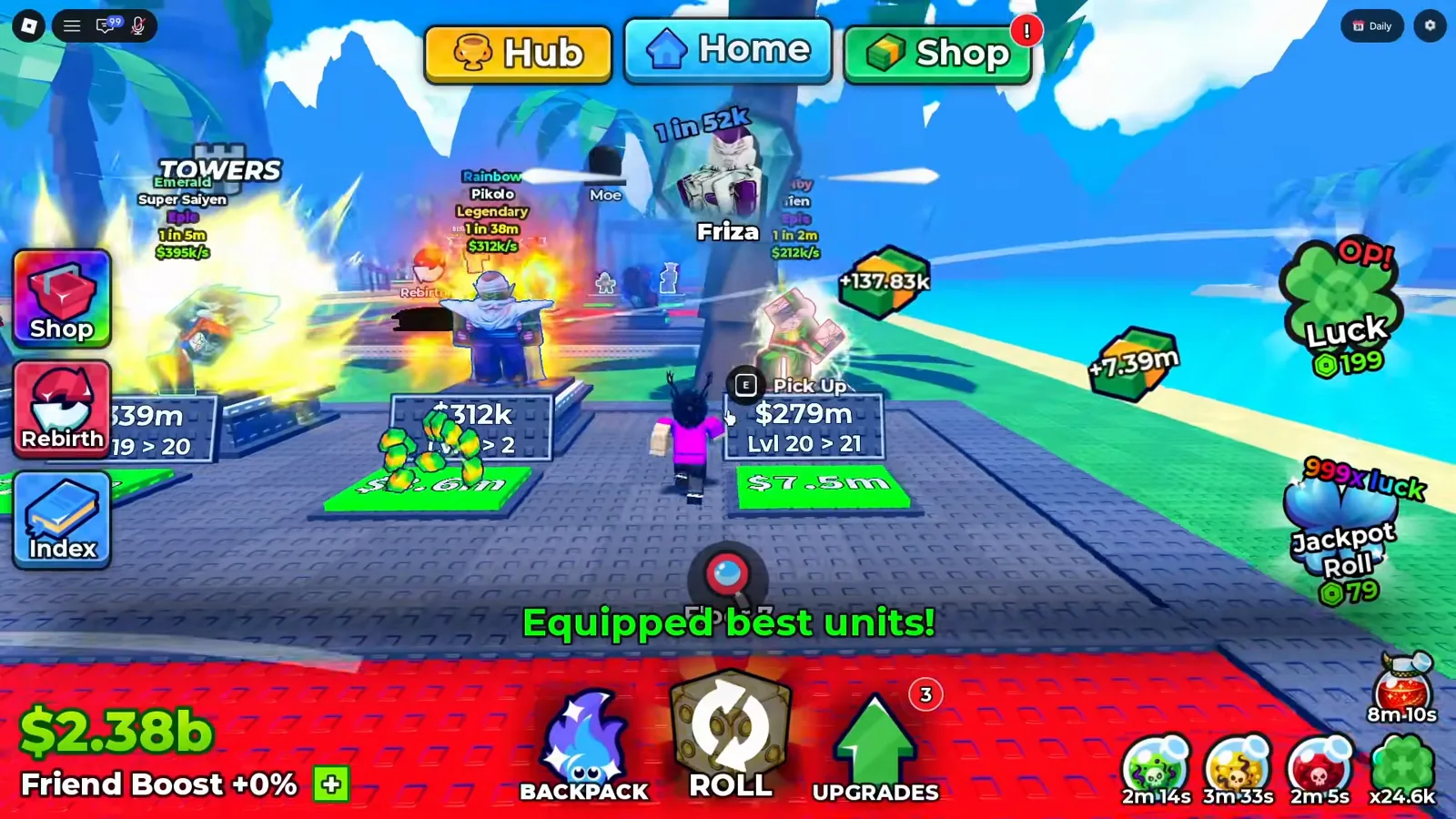
The same session reaches b scale with the boost line untouched at +0%: the two lines are independent.
Watch the counter cross into billions at 23:12
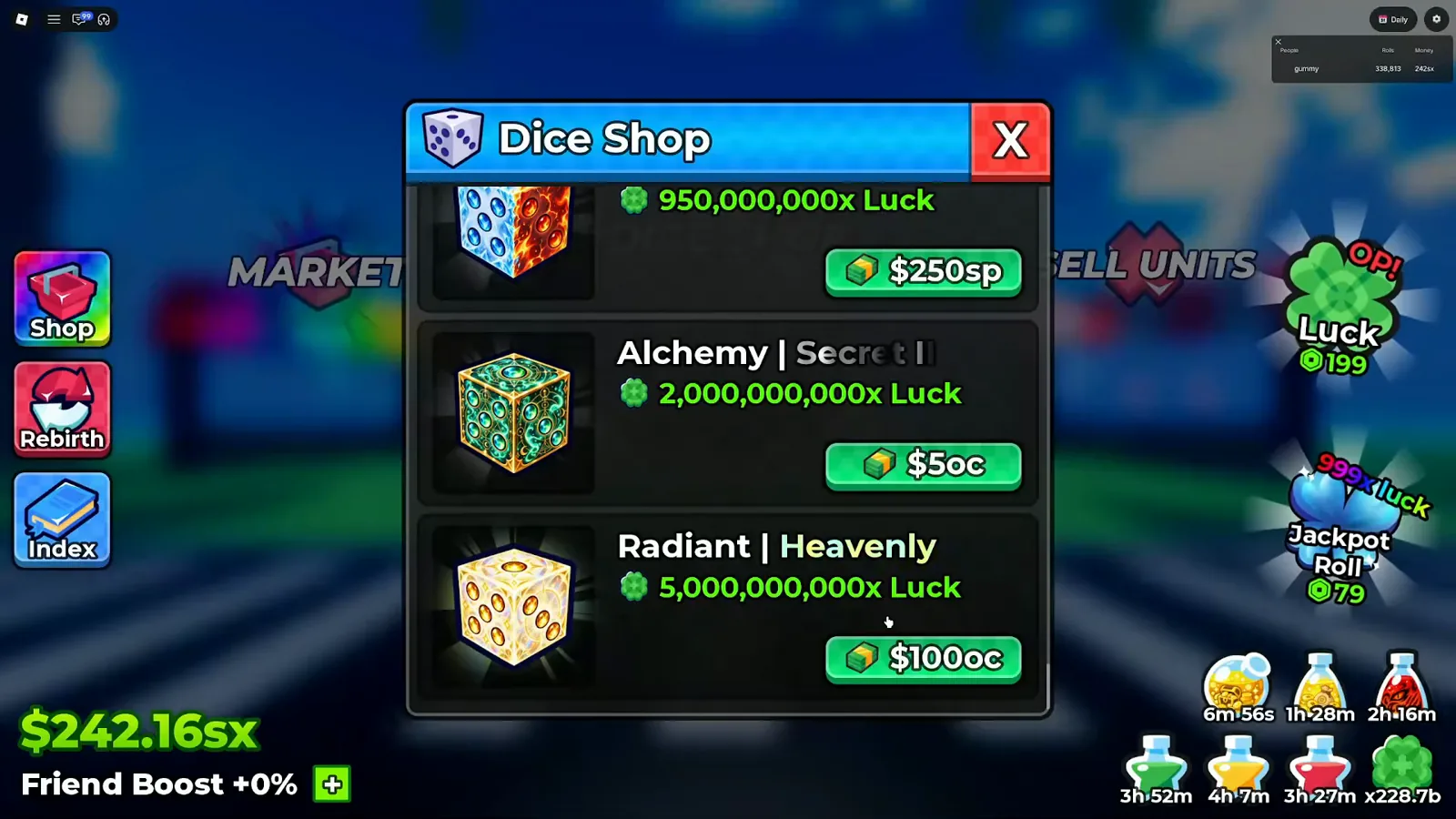
One frame carries three rungs at once — $242.16sx in the counter and $250sp, $5oc, $100oc on the tags — which is why it is the only image on this page that shows the scale stacked rather than one rung at a time.
Watch the UPD 6 Dice Shop top rows at 0:04
Where Does the Money Actually Come From?
Every source below is a page of its own on this site, and that is deliberate: this page summarises the money system and links out, rather than reprinting another page’s table to pad its own. Each entry is only what our frames or those pages already establish.
Units standing on your plots. This is the one source the client prices for you, continuously and per unit. A placed unit’s hub nameplate ends in a green $X/s line under its rarity word and its 1 in figure, and the Backpack’s Units tab prints the same figure on every card. The tooltip adds nothing to it except the unit’s Level 1 and odds.
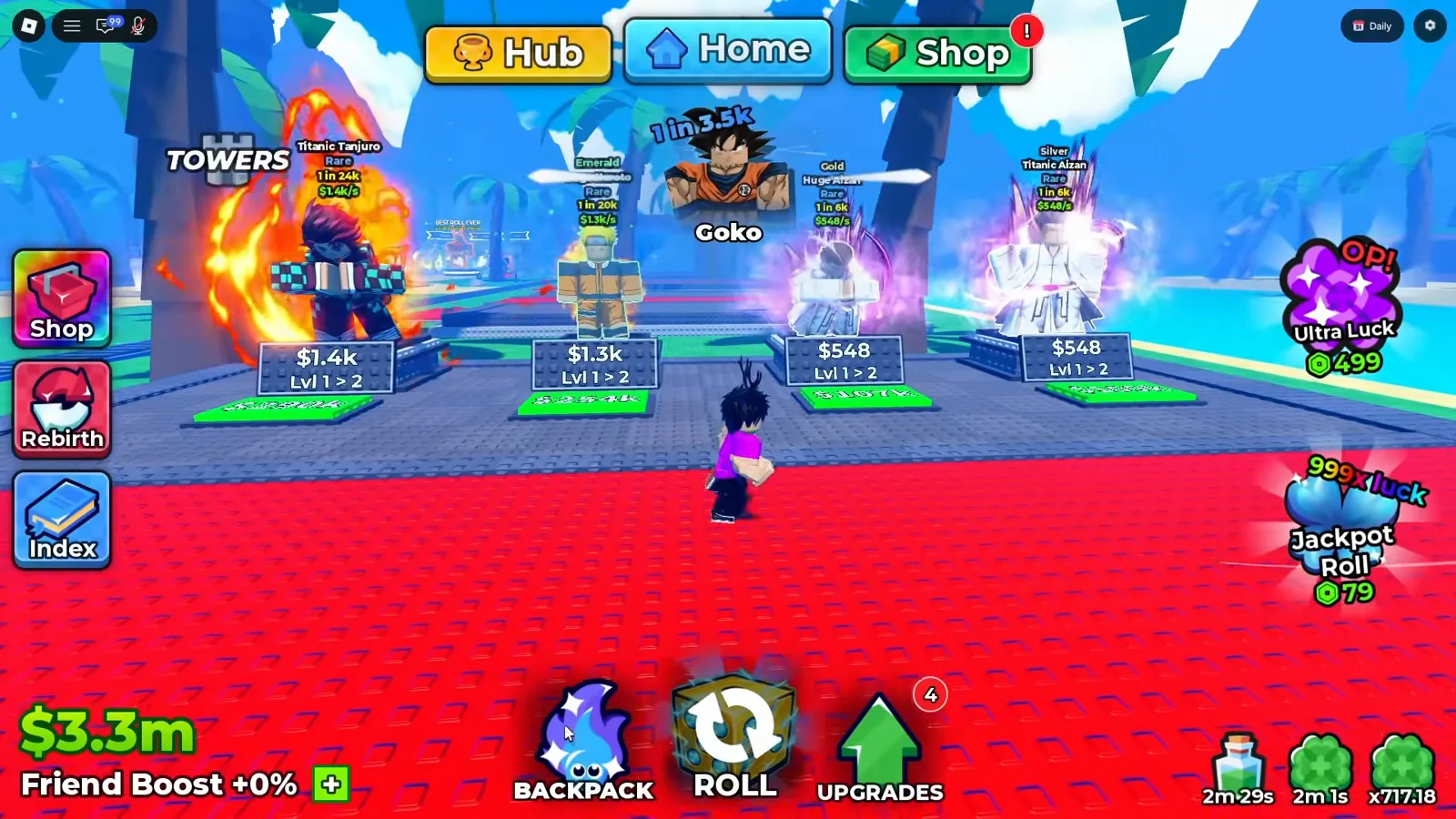
Four plots in one frame, four different $/s rates, and under each one the plot’s own upgrade plate reading Lvl 1 > 2 with a price — the counter at $3.3m behind them.
Watch four plots and their income plates at 8:40
Backpack cards. The Units tab prints $/s on the card itself, so the rate travels with the unit even before you place it: the grid shows $40/s, $42/s, $37/s, $34/s, $30/s, $19/s and $17/s, and hovering one adds a tooltip reading its name, Common, Level 1, $19/s and 1 in 60.
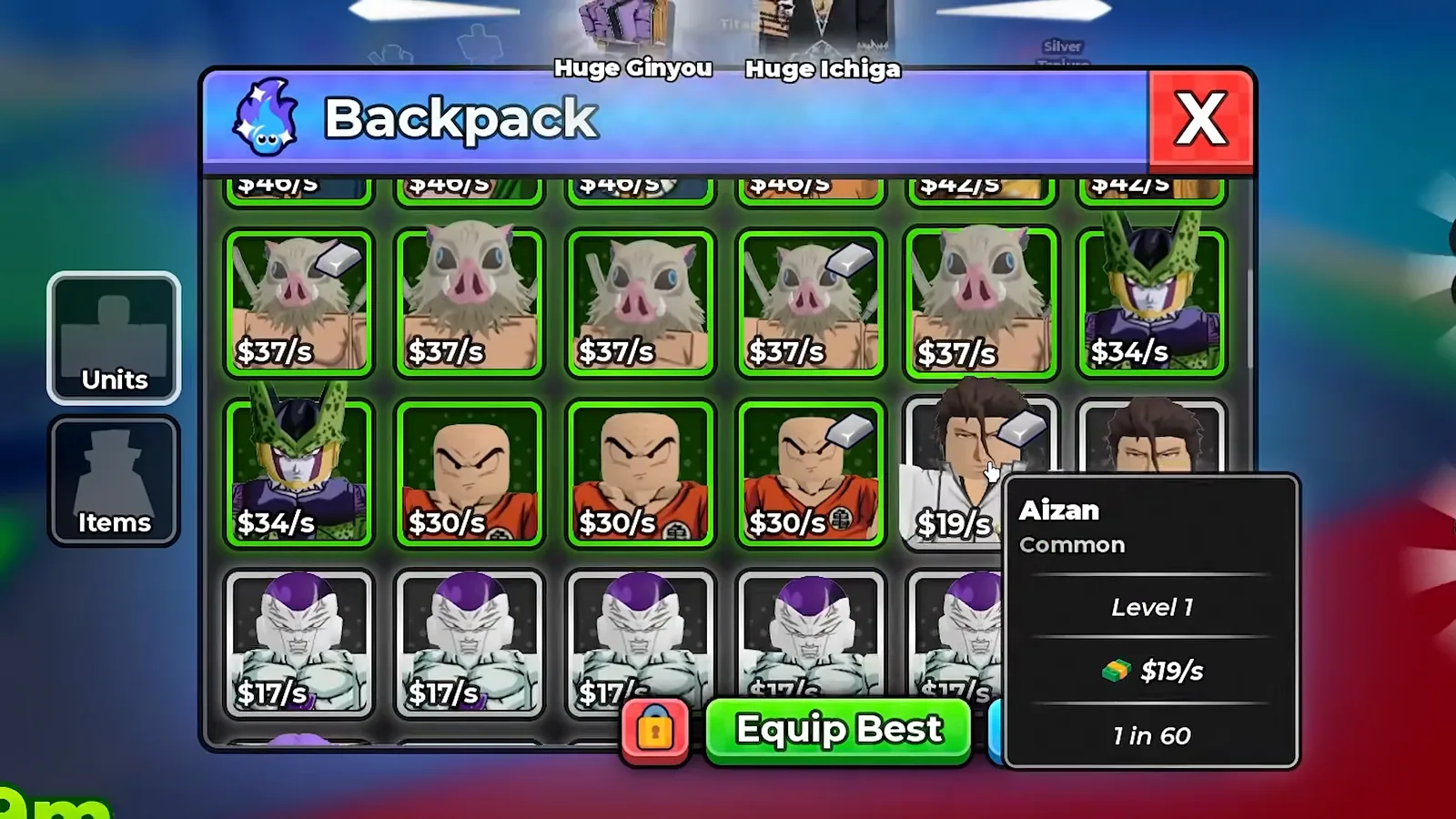
The Backpack is where a unit’s $/s is legible at your leisure; the hub nameplate is the same number, in the world, over the unit.
Watch the Backpack income cards at 5:00
Collecting in the Home area. The game prints Collect your cash! in the world in the Home area, over the unit and its plot, and our earliest frame in that sequence shows the counter sitting at $0 with the prompt up: cash is something the game asks you to pick up, not something that silently arrives.
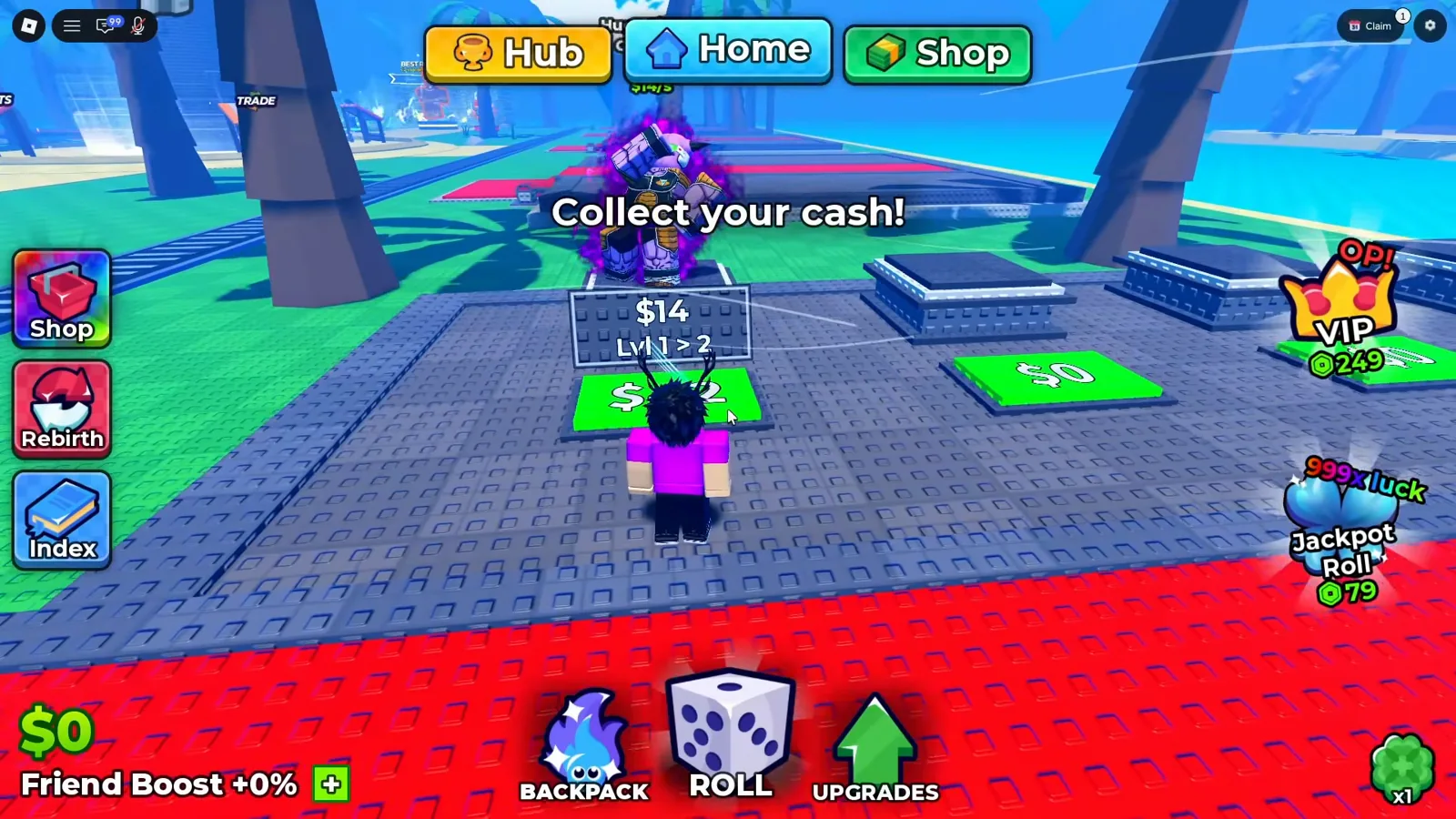
The prompt and the plot plate in one frame — the only place the game tells you to go and get the money.
Watch the collect prompt over a zero counter at 0:24
Selling units. The SELL UNITS stall converts units into cash and asks for confirmation before it does; the selling units page has the full confirmation frame and the auto-sell settings that decide what the game is allowed to sell for you. This page keeps no copy of its numbers, because the price you get depends on the unit, not on a table.
Upgrades taking money out. The counter falls as well as rises, and the frames show where it goes: in the four-plot frame above, the plate under each unit reads $1.4k, $1.3k and $548 with the next level step printed underneath, and the earliest frame of the clean session shows a smaller plate at $14. Every one of those plates is a cost with the level step it buys printed below it — money leaving the counter, in the same surface that shows money arriving.
Rebirth. The Rebirth panel prints an x Cash perk on both sides of its comparison — our frames of it read 14x Cash becoming 17.5x Cash — and the panel itself warns that Rebirthing resets your cash! before the cost line. That is a printed cash multiplier, and it is the rebirth guide’s subject, so this page states only the shape of it.
Traits and Grades. Both systems print an income multiplier rather than a fixed amount: every row of the Traits ladder carries an x Income value beside its Damage and Health numbers, and the Grades rail prints a % Income figure per letter. Those tables live on the best traits page and the grades page, and we deliberately reprint neither here.
Friend boost and potions. The white line under the counter reads Friend Boost +0% or Friend Boost +10%, and it changed inside a single recording we hold — +10% early, +0% twenty minutes later — so it is not a permanent account stat, and no frame says what the percentage multiplies. That table is the friend boost page’s. Active potion timers appear in the bottom-right of the HUD as unlabelled counters like 9m 33s, and the potions page covers what they do.
Robux purchases. The More Cash badge in the HUD is marked Owned, so a permanent cash purchase exists and the game shows it beside the counter. What each gamepass costs and grants is the Robux shop page’s work, not this page’s.
Farming while you are still at the screen. Auto Roll is the game’s volume lever, and more rolls means more units, which is where the $/s comes from in the first place. The AFK farming page covers the toggle, the confirmations it asks for and the auto-sell rules that stop the Backpack filling up.
Tower runs. The towers are the other half of the loop, and the counter climbs across a session that includes them — but no frame we hold splits that climb between the hub and the floors. What a floor lists when you open its Drops panel is the tower drops page’s reading, and the Infinity Tower and Slayer Tower pages cover those ladders.
Reward surfaces. Group rewards, the daily sign-in board and the quest shop all hand out currency on their own schedules — the group rewards page, the daily rewards page and the quests and tickets page cover them. Gems are a separate currency and the gems page treats them as such.
Offline earnings. The game banks some income while you are away, and no frame in this round’s sample shows the panel that reports it, so this page prints a sentence and a link and no figures: the offline earnings page is where the mechanic lives.
Why Is There No Income Breakdown in Anime Dice?
Because the game does not print one. This is the reason this page exists rather than a table of money-per-hour, and it is worth being exact about what we checked.
The practical consequence is that the only way to compare two money methods in this game is to watch the counter move while you do them, which is also why the popular how-to-make-money videos are all narration over a counter rather than screenshots of a panel.
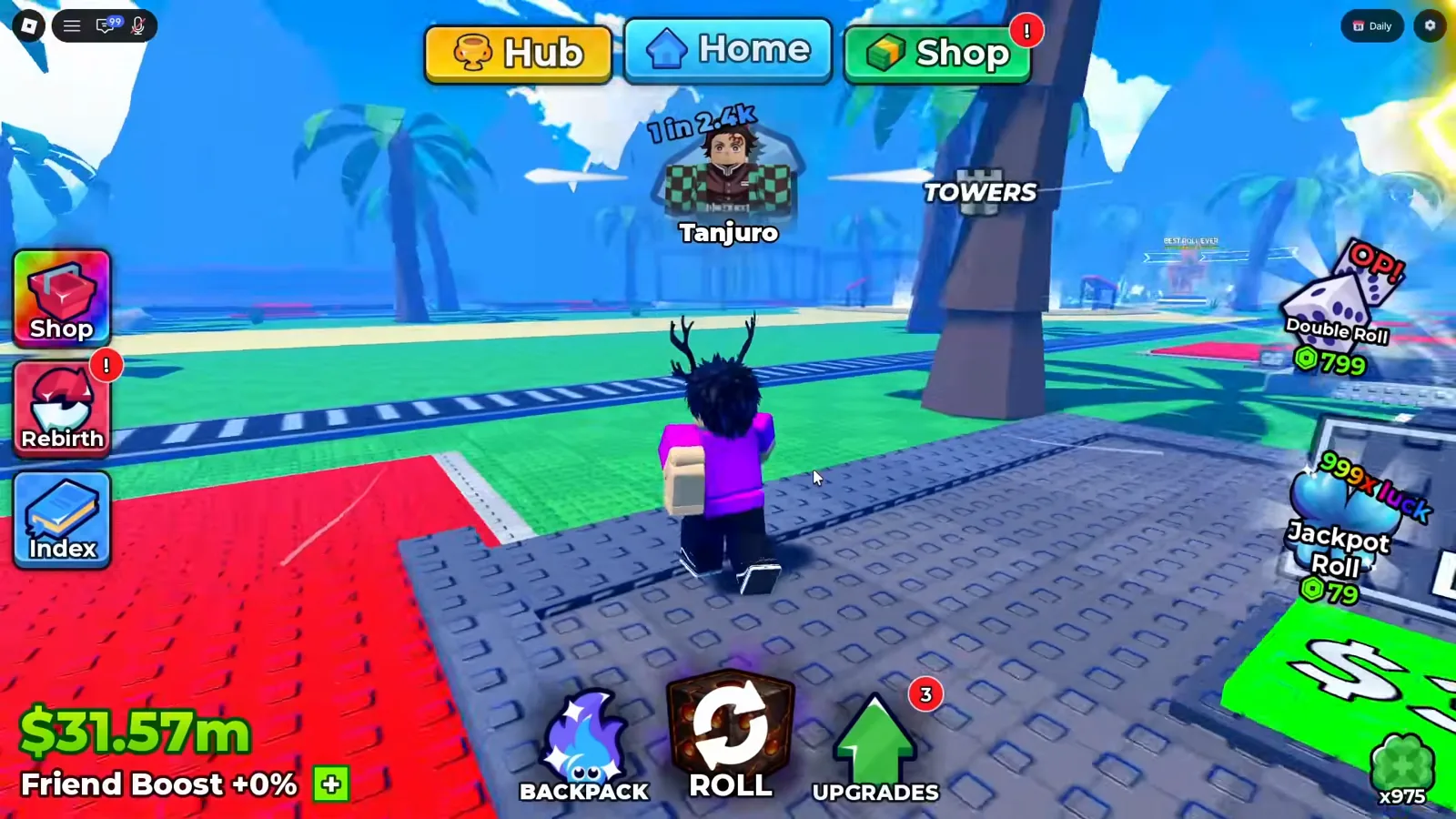
A whole frame of play at $31.57m, and the only money figure in it is the counter: there is no panel, no total and no per-source row to crop out, because there is none to show.
Watch a full mid-session frame at 12:24
What Does the Money Board Print?
The hub has a ranked in-world board headed Money on a teal tab with a gold ingot icon, standing on the floor to the right of the centre, with the ranked rows cut into the stone beneath it. Our frames show the rows as a rank badge, an avatar, an @username and a value column — nine of them — which is the same board structure our leaderboard page reads on the Rarest and Rolls monuments beside it.
What our frames do not show is a single legible value on it. This is the honest state of the board in the recording that was supposed to unlock it: the value column is washed out by the world’s bloom in every second we checked, not covered by a floating shop widget as in our earlier captures. Named, not measured is therefore the position this page takes, and we link the leaderboard page rather than reprint the two figures it read from a different recording.
Whether the board ranks every server or only the one you are standing in is not printed anywhere on it: no scope word, no refresh timer and no reset counter appears on the monument, and the game separately ships a panel that lists the players in your own server under People, Rolls and Money columns. The leaderboard page documents both surfaces; this page adds only the money reading.
The board is named and its rows are there — and in this recording its numbers are a blue smear, which is what this page is willing to say about them.
Watch the Money board across the hub at 15:58
What Could Not Be Determined From These Frames?
- The Money board’s values. The header, the ingot icon and the nine-row layout are legible, but the value column is overexposed in every second we checked across two recordings, so we hold no value from it at all. Scope, refresh period and reset behaviour are printed nowhere on the monument.
- A field called
cash multiplier. No frame prints those words. The closer the game gets is the Rebirth panel’sx Cashperks, the traits’x Income, the Grades rail’s% Income, theFriend Boost +N%HUD line and theMore Cashbadge — five different surfaces, none of them labelled a multiplier. We list it as unverified rather than promote it to a field. - Any account-level income rate. No screen prints a total
$/s, a per-hour figure or a per-source split. This is the absence the whole page is built around; it is a statement about our three recordings, not a proof about every screen in the game. - What the HUD’s bottom-right timers boost.
9m 33s,3m 31sandx96.46mare printed as icon-over-value pairs with no labels in any frame we read, so we cannot say which of them touches income and which touches luck or damage. - Cross-build Dice Shop prices. A 2026-09-18 session prices
Water | Uncommonat$10k; a 2026-09-20 session shows the same row already owned, so it printsEquipand no price at all. The two sessions are also different builds and different accounts, so we cannot tell a rebalance from a re-priced row or from a different row entirely, and this page keeps the readings apart and defers to the dice shop page. - Offline earnings. This round produced no frame of the offline panel at all, so the mechanic gets one sentence and a link on this page and nothing numeric.
- Sampling boundary. “No frame shows it” here means no frame in the three recordings named in the Sources block, sampled as described — one UPD 4 session from 18 September, one UPD 5 session from 20 September and one UPD 6 session from 27 September. It does not mean no such screen exists in the game.
What Should You Read Next?
- Plots and slots — where the units that print
$/sactually stand, and what a plot costs to level. - Offline earnings — the one money source we could not put a frame to this round.
- Rebirth guide — the panel that prints an
x Cashperk and warns that rebirthing resets your cash. - Best traits — the
x Incomecolumn that decides how much a single unit’s$/sis worth. - Selling units — turning units into cash, with the confirmation frame and the auto-sell settings.
- Leaderboard — the
Money,RarestandRollsboards, including the two Money values read from a different recording. - Update history — which build each of the frames on this page belongs to.
Related Articles
guides
Anime Dice Update 7: Rebirth Upgrade Points, Third Base Floor and New Dice
Anime Dice UPD 7 read off frames: the developer's own patch notes, the 6-path Rebirth Stats panel, and a purchase confirmation. Checked 7 October 2026.
guides
Anime Dice Probability and Roll Odds: The 1 in N Screens
Anime Dice prints unit odds as 1 in N and trait odds as percentages, never as one drop table. Frame-by-frame readings plus the arithmetic the game leaves out.
guides
Anime Dice Calculator: Cash per Luck and the Next-Dice Wait
Every Anime Dice dice price re-read at native resolution, turned into cash-per-Luck arithmetic from the 42x rung to 5,000,000,000x, plus the wait formula.
Was this helpful?
Thanks for the feedback!