Anime Dice Gems: How to Get Them and What They Buy
Where Anime Dice Gems come from and what they buy, read off the screen: tower Drops bands, Rewards payouts, the Quests Shop card, Group Rewards and Grades.
FAQ
What are Gems in Anime Dice?
How do you get Gems in Anime Dice?
How many Gems does a tower give?
Can you buy Gems with Tickets?
What do Gems actually buy?
How do Gems differ from Lucky Spins, Trait Rerolls and Tickets?
Should you spend Gems on your best unit?
Is there a Gems shop or a Gem-to-Robux exchange?
What Are Gems in Anime Dice?
Gems are the purple faceted jewel that shows up on the right-hand counter rail, in tower drop lists, in the backpack, and as a floating pickup on the ground. The naming is not our interpretation: in the frame below the player walks over a drop and the toast prints “+4 Gems” beside that purple jewel icon, which settles what the item is called in-game.
One correction to that frame, because it is the sort of thing that gets copied around. The panel open at the right of it is not a leaderboard. Read at native resolution its columns are People, Money and Rolls, its rows are players in the session, and the values do not run in order — 15b, 9.4t, 11b, 53k, 78k down the Money column. That is the server’s player roster, the same panel our leaderboard guide documents under the same three headings, and the TOWERS lettering behind it is separate in-world signage for the tower area, not the title of that list. Nothing in this frame ranks anybody.
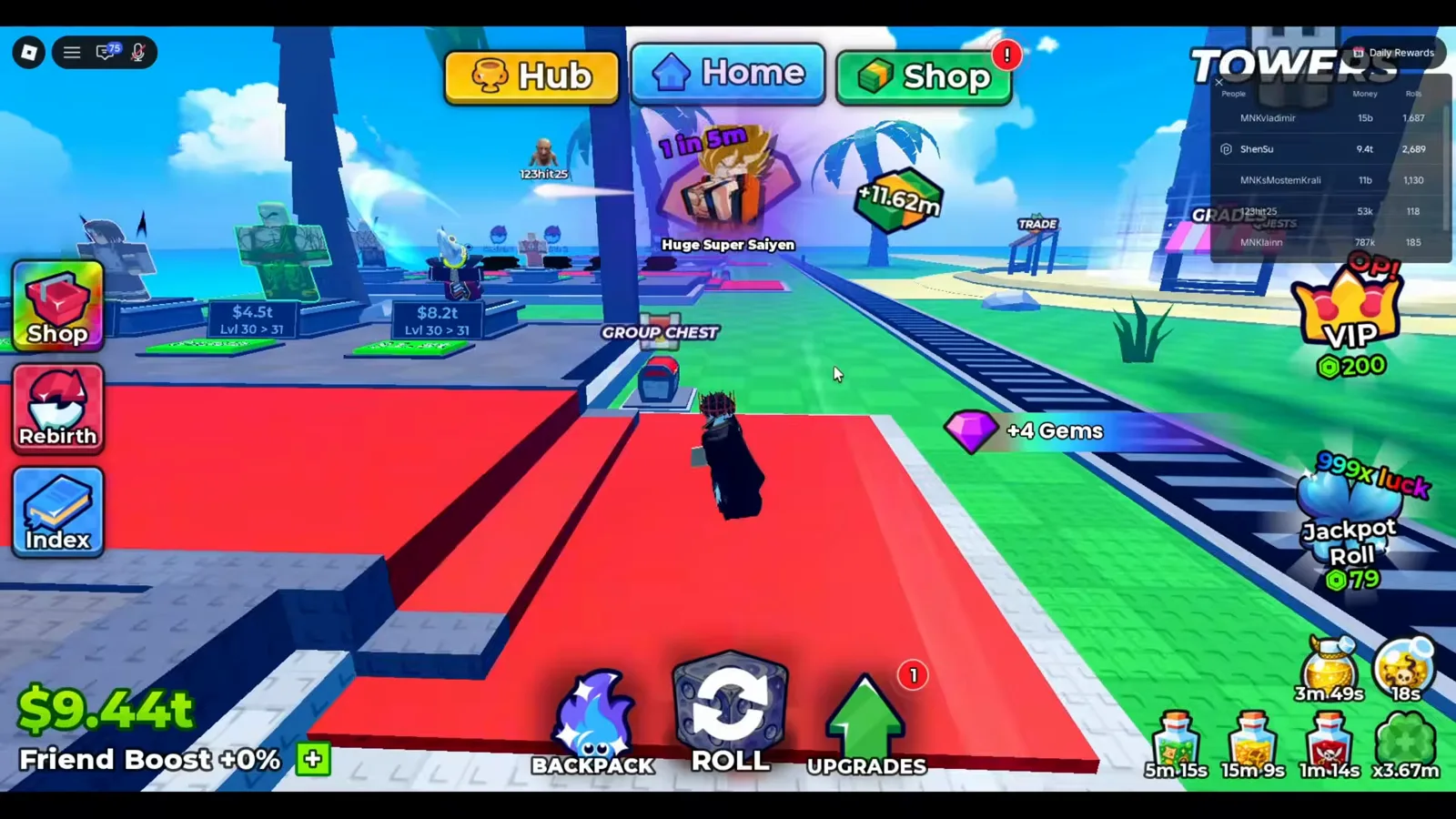
Whatever else guides call it, this is the label the client uses. The list behind it is a roster.
Watch the +4 Gems toast at 9:00
The screens on this page were read frame by frame from five sessions. Two of them produced the frames the previous version of this page was built on, and three are new for this rewrite:
Sources: the existing captures are frames from Shensu’s I Went from NOOB to PRO in Roblox Anime Dice! and Superlex Plays’ How to become OVERPOWERED in Anime Dice (both September 2026). The new captures come from Cx’s UPD 5 tower and Hub session (24m 47s, clean screen capture — the Dragon Tower Drops column), Superlex Plays’ later UPD 5 account session (24m 44s, clean — the Grades counter and the Quests Shop tab), and LenzoBlox’ beginner walkthrough (9m 26s — the Quests Shop Gems card). That last recording carries burned-in caption text along the bottom of the screen; the card frame below is cropped above it, and no overlay text sits inside the crop. Every number on this page is read off a screen we opened ourselves, and the currency overview is cross-checked against games.gg’s Anime Dice guide (2 September 2026).

The UPD 5 session whose tower Drops column and Quests Shop frames this rewrite adds
How Do You Get Gems in Anime Dice?
Five sources, and they are not equally repeatable. Ordered by how often you can pull on them: towers pay every run if the column rolls your way, the Quests Shop converts a currency you already earn, Group Rewards and the Daily board pay on a fixed schedule, and codes are a one-time burst.
Tower Drops Lists: The Chance Printed On The Panel
Every tower panel carries a Drops column on its right, and the purple gem is a line item in it. The column is banded by floor, which is the part most summaries miss: the same tower prints one set of chances in its open band and a second, usually rarer set behind a higher floor gate.
In the UPD 5 session below, the Dragon Tower panel shows its open Floor 1+ band as three potions at 2% each and a purple gem at 3% — no stack multiplier, just the chance — with a Floor 20+ band underneath printing more potions at 1.5%. That is the acquisition story in one screenshot: the gem is a drop, the odds are printed, and they move when the band changes.
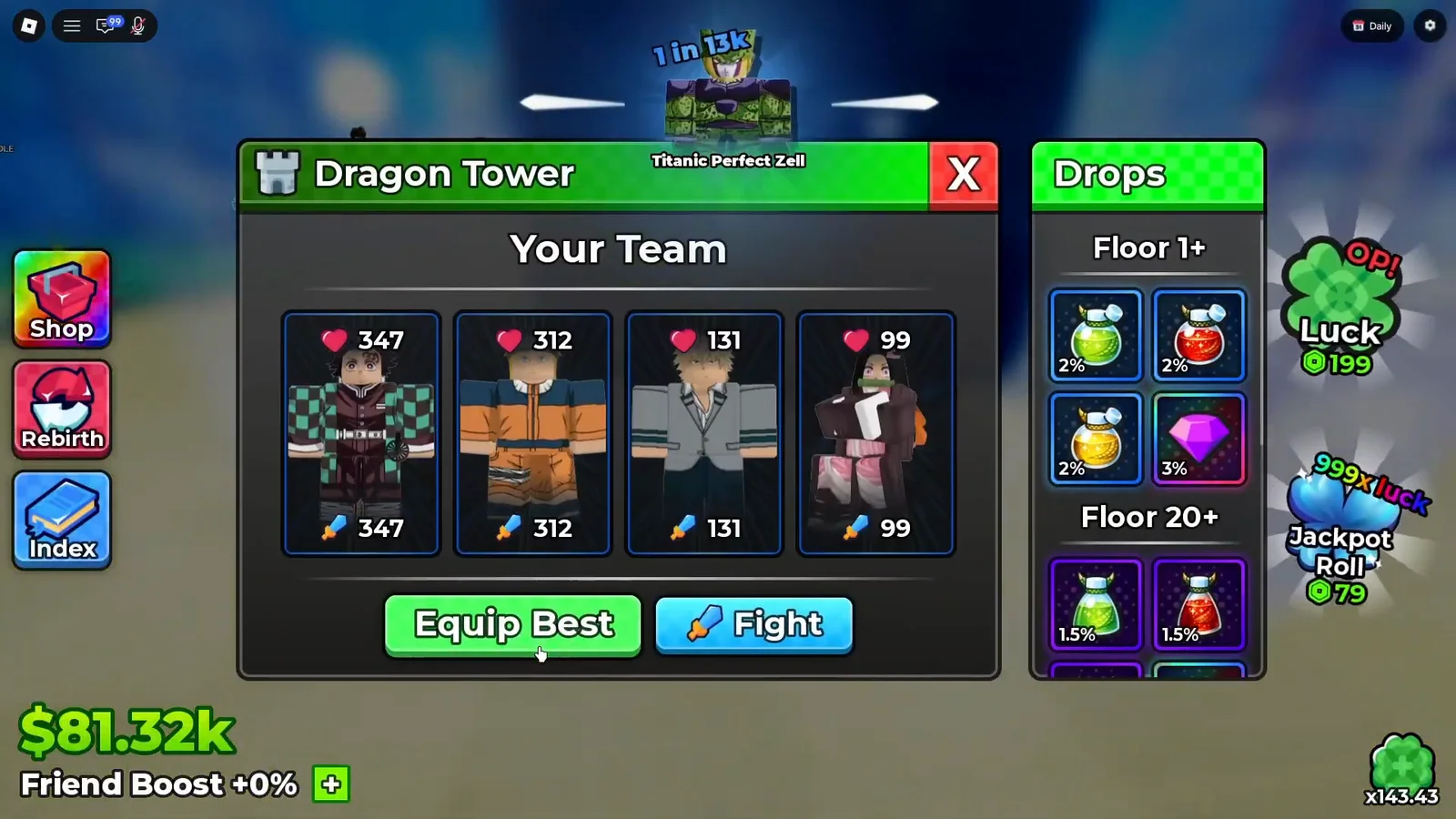
Read the band header before you read the number: this gem chance can change at the next gate.
Watch the Dragon Tower Drops column at 7:00
The earlier capture of the same tower disagrees with it — and we print both rather than picking one. There the open band showed the gem at 1% with an x2 stack badge, the Floor 50+ band repeated it at 1% with x3, and the pink holographic crystal in the same band introduced itself on hover as Trait Reroll at Celestial rarity.
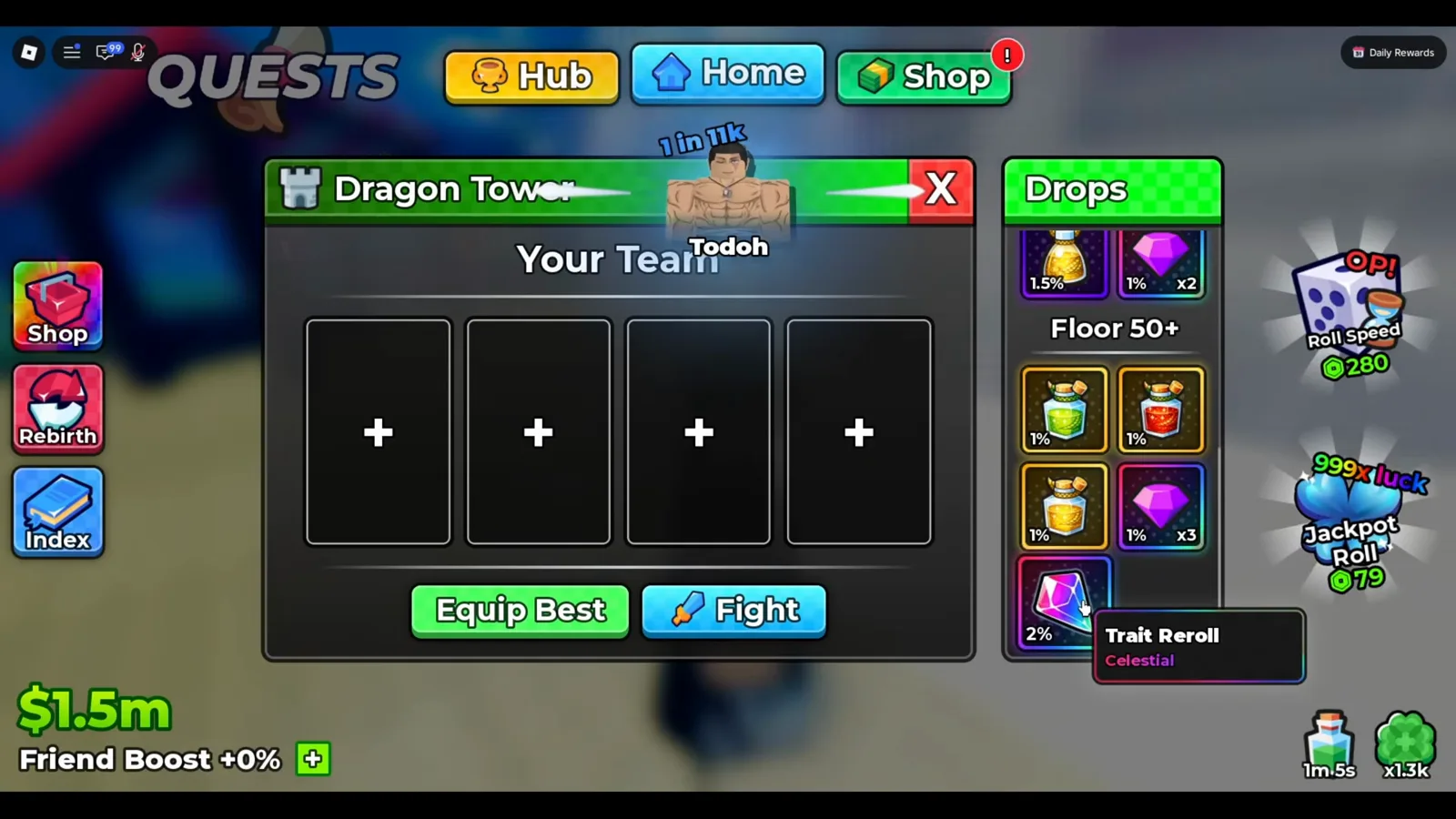
Read the drop list before you spend the entry, and read the tooltip before you assume.
Watch the earlier Dragon Tower drop list at 4:45
Not every tower lists a gem in its open band at all. A Cursed Tower panel captured in the same UPD 5 session prints three cursed potions at 2% each and an unnamed holographic crystal at 1% in its Floor 1+ band, with the Floor 25+ band below it still gated. Per-tower and per-patch differences like this are exactly why the tower drops comparison prints whole columns side by side instead of one headline number.
Post-Run Rewards: What You Actually Collected
The Drops column is a chance. The Rewards panel is the result, and it prints stack counts. On one trip the panel returned a purple gem marked x4 beside a gold potion marked x3; earlier in the same session the same panel returned two potions and no jewel at all, which is the honest shape of a drop table.
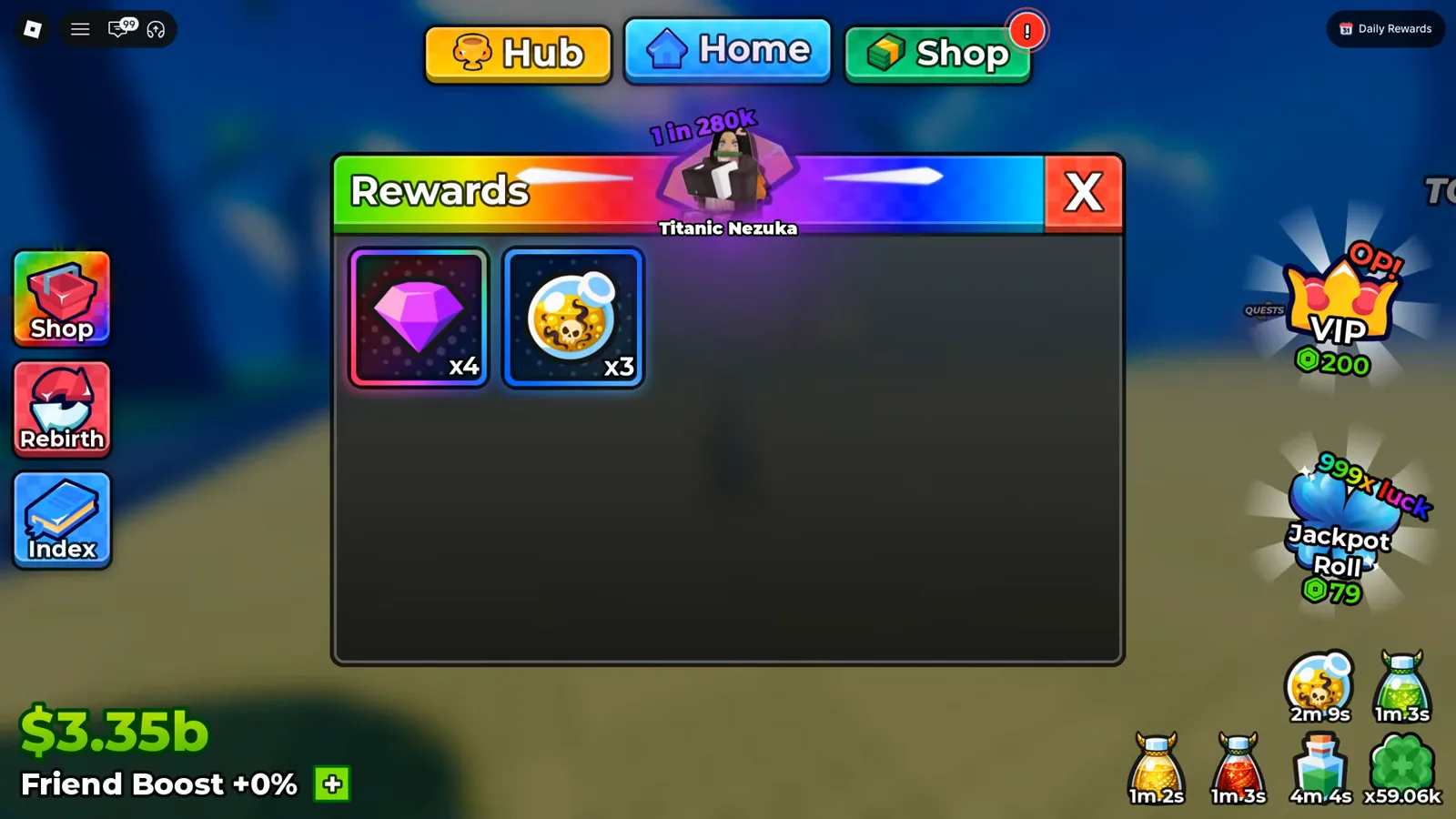
This is outcome, not odds — the number you actually got.
Watch the Rewards payout at 11:40
Rewards also land as physical pickups you walk over, which is where the “+4 Gems” toast at the top of this page comes from. The mechanics of running a tower unattended — Auto, the backpack cap, auto-sell — are on the Infinity Tower guide and the AFK farming guide.
The Quests Shop Gems Card: Tickets Into Gems
This is the one source that is not a drop, and it is the newest thing this page can add. The Quests panel has three tabs — Daily, Weekly and Shop — and the Shop tab sells a card labelled Gems carrying the same purple faceted jewel as every other screen on this page.
Its badge is the part worth reading carefully. It carries the orange Ticket glyph and reads 15 / 1, in the same format as everything else in the tab: Luck reads 15 / 199, Ultra Luck reads 15 / 599, and a second recording of the same tab, on an account holding a different ticket count, shows those same two cards reading 210 / 199 and 210 / 599. The trailing figure stays fixed per item while the leading figure follows the session, which is why we read the badge as tickets held over ticket price — and why the Gems card, at 15 / 1, means one Ticket per Gem. The panel itself labels neither number, and the creator’s narration on that frame reads the same card the same way: “these gems, each one costs one.”
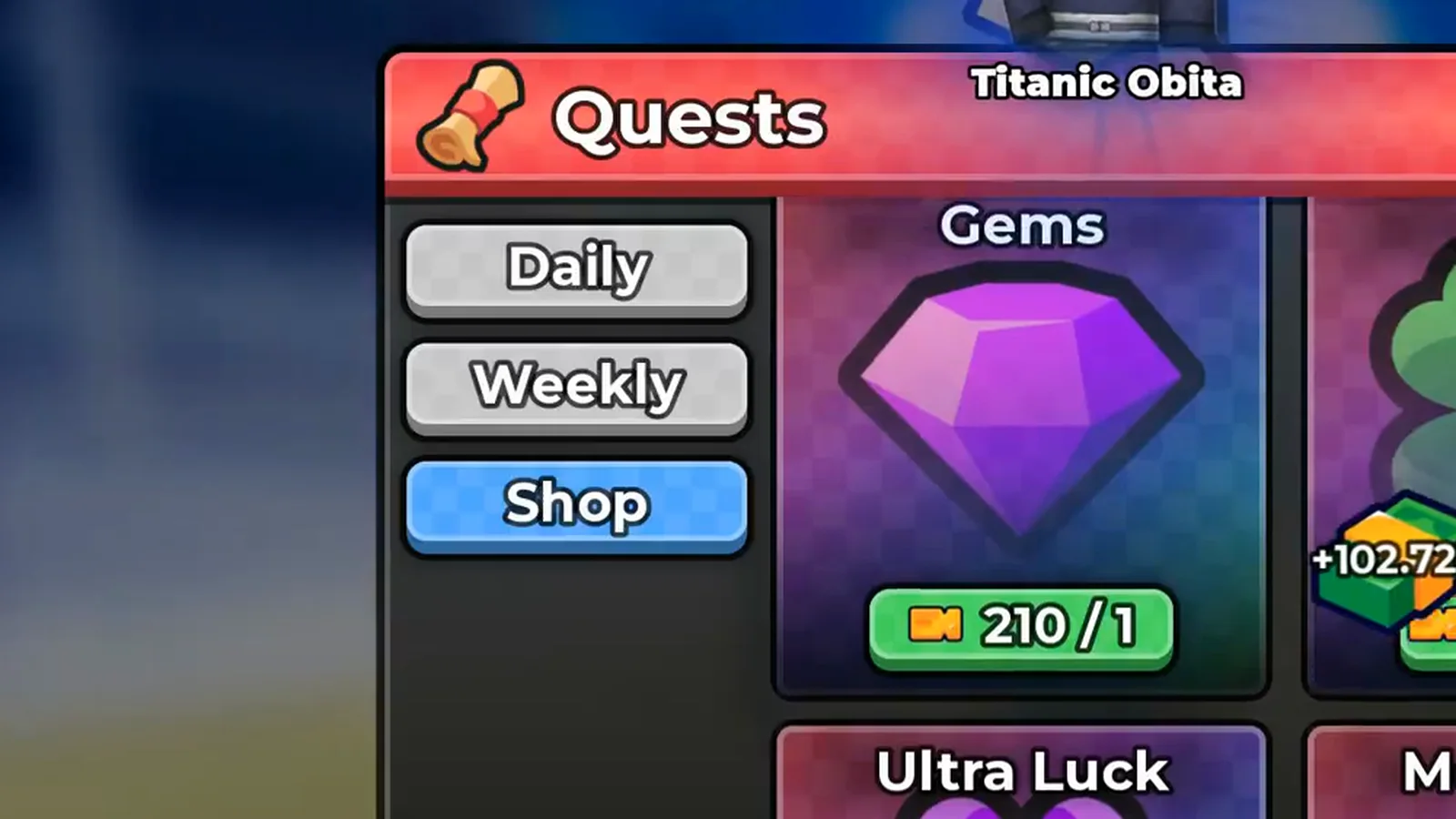
Two numbers on one badge, and the panel names neither. The item’s own figure is the one that never moves.
Watch the Quests Shop Gems card at 8:37
The card is listed among things the tab hands out, alongside Lucky Spins and Trait Rerolls, so the direction of the trade is Tickets in, Gems out. For the rest of the tab’s inventory — including the permanent-looking upgrades that sit under the same heading — the quests and tickets guide carries the full list; this page only claims the Gems line.
Group Rewards: Five Gems For Two Clicks
A panel called Group Rewards pays +5 Gems on the claim, in the same second as +5 Trait Reroll and +2 Lucky Spin. The frame is on our group rewards guide: the banner reads Group rewards claimed!, three named toasts land beside the hub’s GROUP CHEST, and a Roblox toast reading You've joined purin confirms the join in the same frame. We opened that capture ourselves and quote nothing from it that it does not print.
It is the cheapest source on this list by effort — joining a Roblox group and liking the game — and it is also the one with the least information attached. No frame states whether the claim repeats, and the chest beside it is still printing its E Open prompt after the payout, so the group rewards page keeps those two objects apart.
Daily Rewards: Thirty-Two Gems In Tile Five
The Daily Rewards board is the scheduled faucet. Its Day 5 tile holds a purple gem — the same faceted shape the Drops columns and the Grades panel print — with the count x32 under it, the largest single gem figure anywhere in our footage. What the board does not do is name its own items: the tile prints the icon and the count, and only Day 1 ever gets a name, from its claim toast.
The tile-by-tile read of that board, including the claim banner and the Next Reward In line, is on the daily rewards page — it is the same screen, so we link it rather than re-shooting it.
Codes: The One Route We Have Not Walked Ourselves
Codes are the fourth free route, and this page is deliberately vague about them. Our live codes page lists RELEASE, UPDATE1 and UPDATE2 as the codes currently live, and it attributes their reward lines — which include a Gems entry — to a games.gg table rather than to a redemption of our own. That page’s stated policy is to print no reward values for codes it has not redeemed, and we are not going to route around it here: with no frame of our own showing a code paying Gems, this page prints no per-code gem count.
What we can point at is a redemption that was captured, on the Lucky Spin vs Jackpot Spin page: a code entered in the Shop’s Codes tab that paid a Gems toast alongside Trait Rerolls and Lucky Spins. The redemption path itself — Shop → Codes → paste → Redeem — is on the codes page.
What Do Gems Buy In Anime Dice?
One sink, and it is a station rather than a menu. The Grades panel hangs off the GRADES stall in the hub. Its header carries the purple gem icon, and its roll button carries the same icon with an owned / per-roll counter beside it — 9/1 in the frame below, meaning a balance of nine and a price of one.
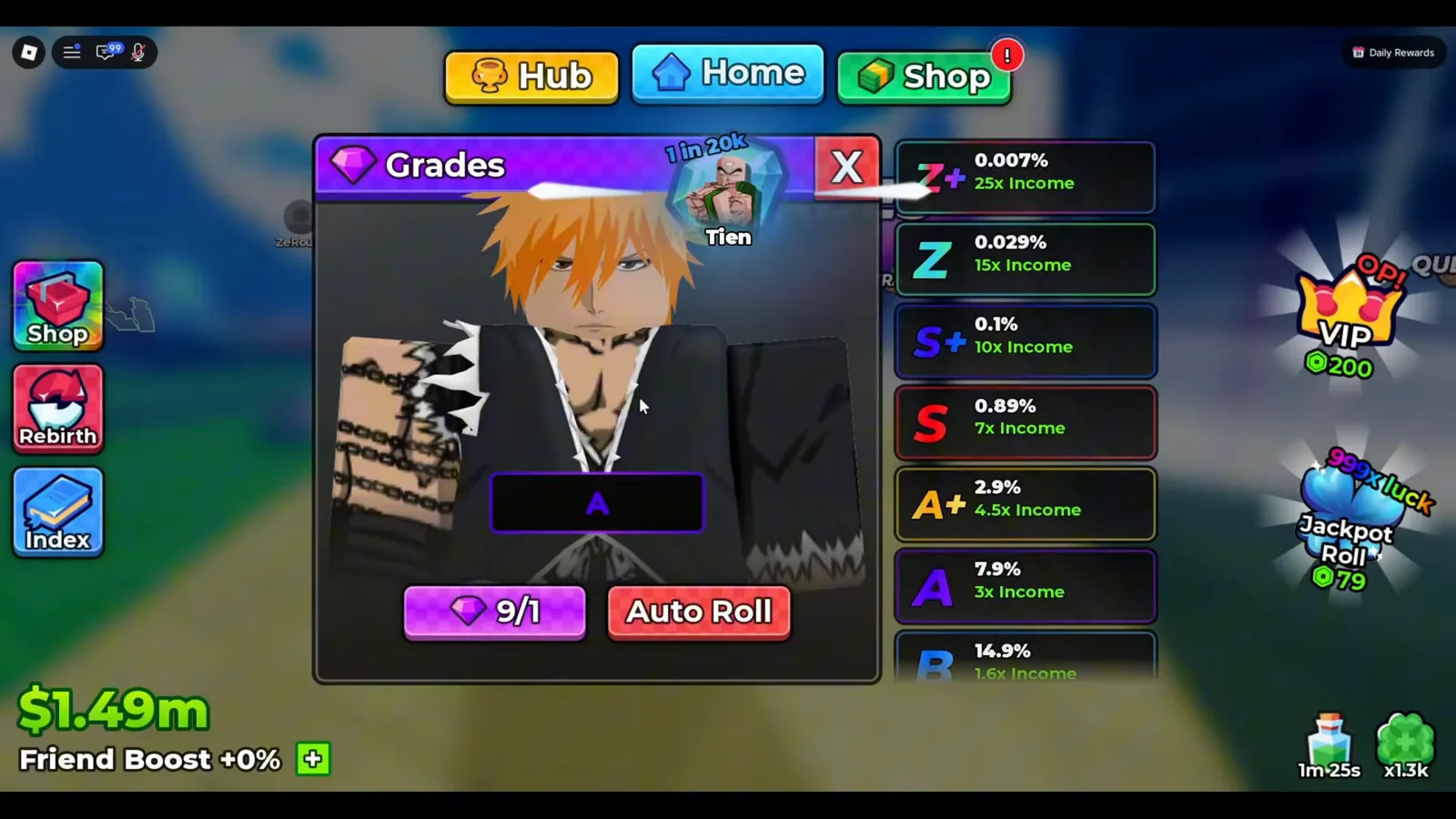
Grade is an income multiplier bolted onto a unit you already own — and Gems are what buy the attempts.
Watch the Grades roll cost at 4:30
The counter is the same shape in a newer, cleaner session: read at native resolution, Superlex Plays’ later UPD 5 recording prints the pill as 19k/1 under a unit holding a D, with the same purple gem glyph and the same Auto Roll button beside it (5:58). That is the whole pricing model across two patches and two accounts — the figure after the slash never moved.
What each Gem buys is explained on the Grades guide: a letter from the ladder, each with its own income multiplier and per-roll odds, printed on the panel you are rolling from. One attempt, one Gem, no guarantee — and a roll overwrites the grade the unit already had.
Does Anything Else Spend Gems?
We could not find a second sink, and after this rewrite the negative claim is more specific than it used to be.
The station that looks most like a gem sink spends the other currency. The Traits panel uses the same shape as Grades — a unit card, a current-value box, Roll and Auto Roll buttons — but its title bar carries the holographic crystal, not the purple jewel, and its buttons print no gem counter at all. Same layout, different currency, and the split is visible in one frame.
The rest of the economy is priced in cash. The unit level-up stalls on your plot print dollar figures — the board standing over the green pad reads $5.5k to take a unit from Lvl 7 > 8 — and when a stall is out of reach the rejection is a cash check: a red line across the screen reading “You can’t afford to level this up!” while the boards around it price in the millions. Gems never appear on that screen, in either state.
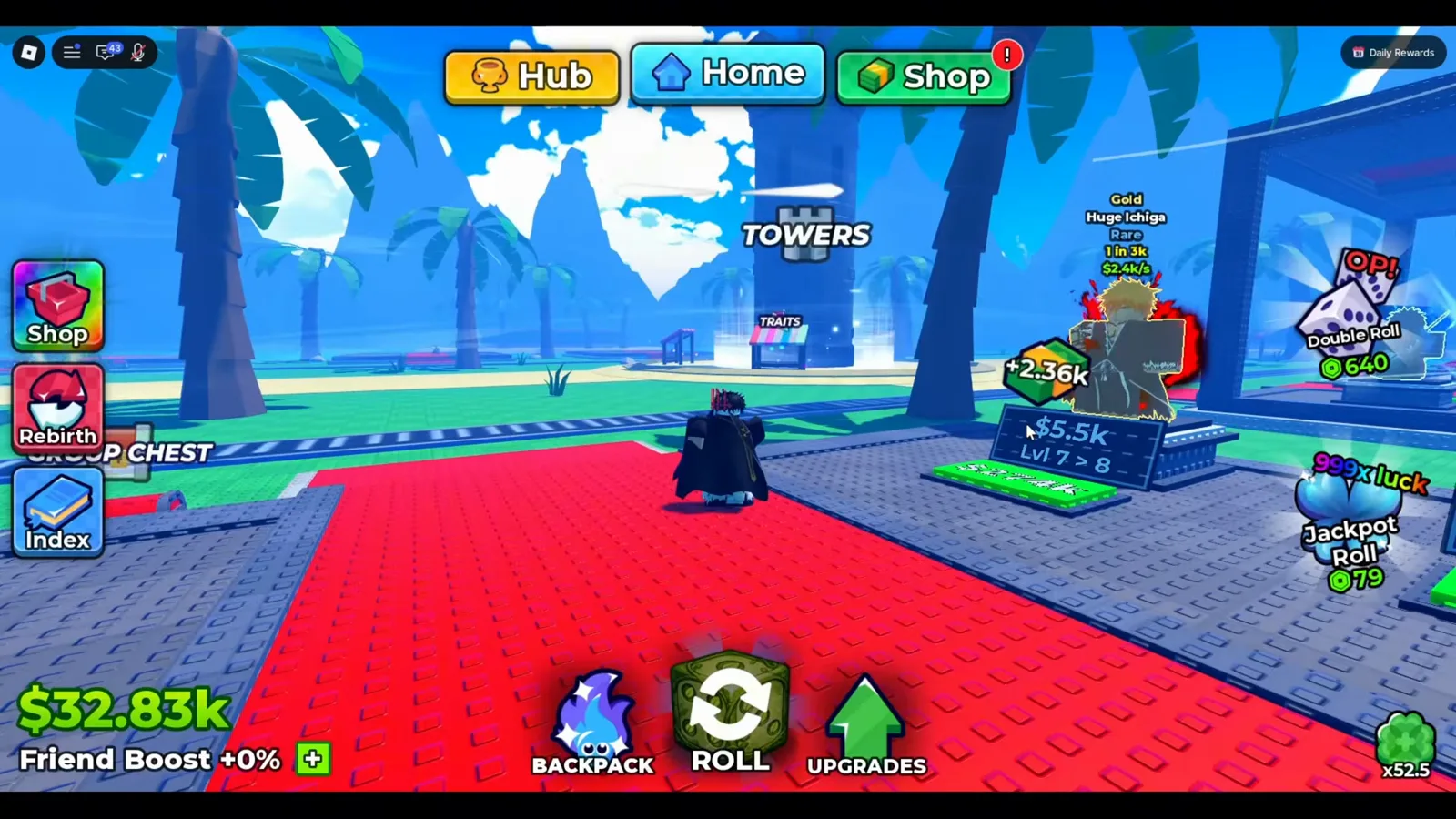
The green pads and the boards are dollars. Gems never appear on this screen.
Watch a level-up stall at 3:30
One layer up, the Upgrades hex tree — Money I, Luck I, Unit Storage I, Damage I — is cash too, and the dice shop is dollars all the way through. The Robux shop’s price pills carry the Robux hexagon, and no frame we checked printed a gem price in it. The spending order for the cash wallet is on the block and dice upgrade priorities page and the upgrade tree guide, and the base-versus-slot decisions behind it on the beginner guide.
How Do Gems Differ From Lucky Spins, Trait Rerolls and Tickets?
Four wallets, four icons, and mixing them up is the most common economy mistake in this game. The Backpack’s Items tab lays three of them out in a single row, which is the fastest way to keep the icons straight.
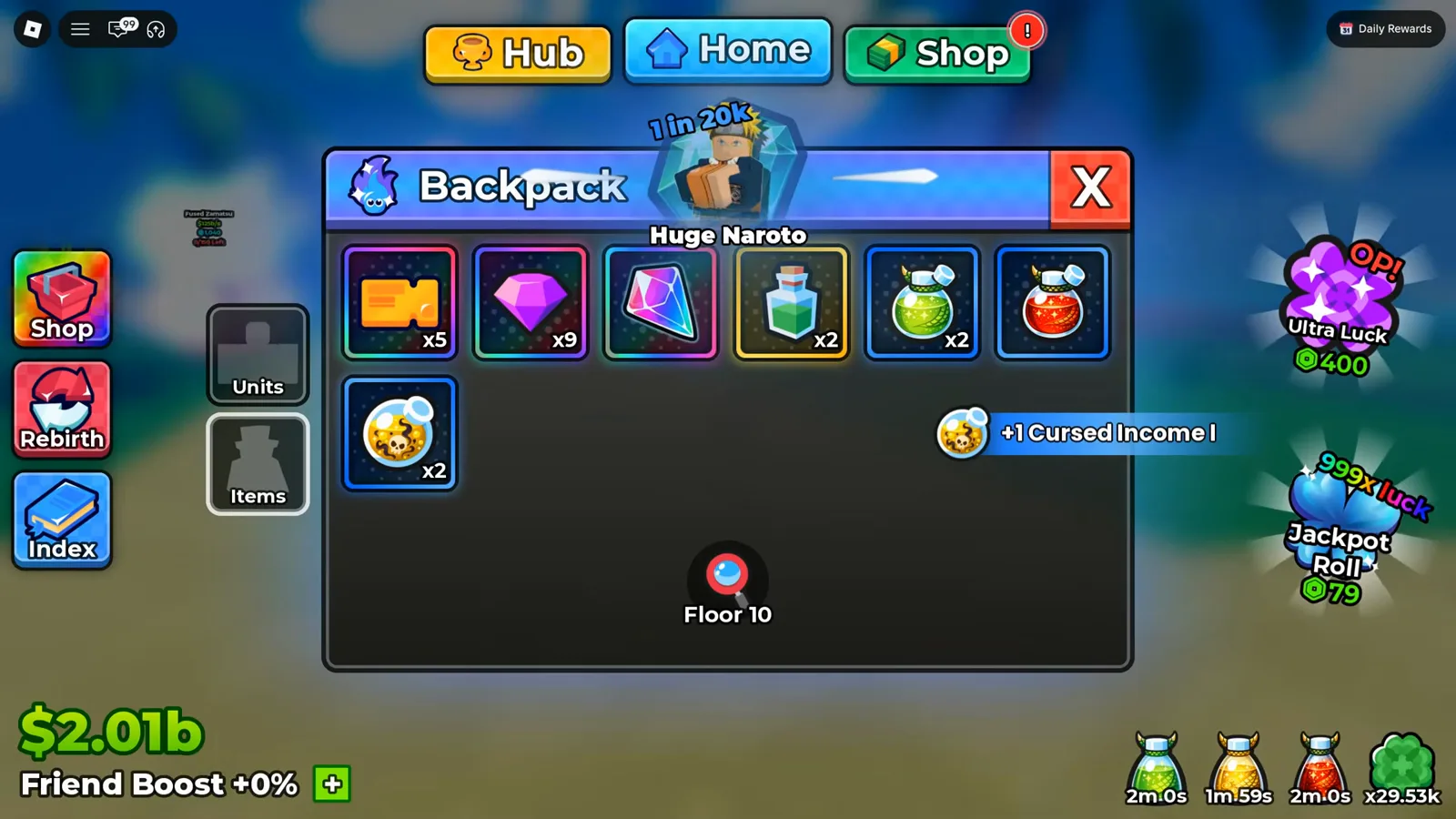
Three currencies, three icons — the stack that buys grade rolls is the purple one.
| Wallet | Icon you see | What it buys | Where it comes from |
|---|---|---|---|
| Gems | Purple faceted jewel | Grade rolls on a unit you own (income multiplier) | Tower Drops and Rewards, the Quests Shop Gems card, Group Rewards, the Day 5 daily tile, codes |
| Trait Rerolls | Holographic crystal, tooltip “Trait Reroll / Celestial” | A new roll of the traits on a unit you own | Tower drops, quests, the Quests Shop, Group Rewards, codes |
| Lucky Spins | Green four-leaf clover | Additional rolls for new units | Codes, dailies, Group Rewards, the Quests Shop |
| Tickets | Orange stub | Tower entry, and the Quests Shop tab | Daily and Weekly quest rows |
| Cash ($) | Green bills, $ counter | Unit level-ups, the Upgrades tree, better dice | Your placed units, offline generation |
The practical consequence: if a unit’s income is the problem, Gems and grade are the lever. If its trait line is the problem, the crystal is the lever, and Gems will not move it. And if you are short of Gems rather than short of a grade, the acquisition half above is the list to work — the Quests Shop conversion is the only one of the five you can repeat in a single sitting.
What Should You Spend Gems On First?
Since the only confirmed sink is grade rolls, the priority question is not what to buy but which unit gets the attempts.
- Only grade-roll units you are keeping. A grade multiplies that specific card’s income, so Gems spent on a unit you plan to sell next roll are gone. The pattern our sources show on camera is exactly this and no more: pick a named unit, spend a Gem, take whatever letter lands.
- Push the high-rarity cards first. A grade multiplier on a Legendary is worth multiples of the same multiplier on a Rare, so the tier list decides where Gems pay back: see the character tier list.
- Watch Auto Roll rather than trusting it. The toggle repeats rolls without your clicks but does not stop when a good tier lands — the caveat we documented in the AFK farming guide. Both long sessions on this page show the same shape: thousands of Gems spent in one sitting, and the creator only stopping once he decided the letter was good enough. If you cannot watch the screen, roll manually.
- Set traits before you sink more Gems into the same card. Grade and trait are different fields on the same unit, and traits are the crystal’s decision, not the Gem one — the ordering is in the reroll priority guide and the traits guide.
- Top up from the repeatable sources first. Join the group, claim the daily tile, and convert spare Tickets in the Quests Shop before you spend down a balance you cannot refill.
What Should You Read Next?
- Grades guide — the ladder, the odds, and the one Gem per roll, read off the panel
- Tower drops — every Drops column we can read, side by side
- Quests and tickets — the board that pays Tickets and the Shop tab they convert in
- Group rewards — the +5 Gems claim, the requirements, and the chest it does not open
- Daily rewards — the seven tiles, including the x32 gem on Day 5
- Live codes — the free faucet, with the no-values-for-reported-codes policy spelled out
- Lucky Spin vs Jackpot Spin — the trap that burns a granted spin before you can bank it
- Leaderboard guide — the ranked boards and the server roster that is not one
Related Articles
guides
Anime Dice Update 7: Rebirth Upgrade Points, Third Base Floor and New Dice
Anime Dice UPD 7 read off frames: the developer's own patch notes, the 6-path Rebirth Stats panel, and a purchase confirmation. Checked 7 October 2026.
guides
Anime Dice Money: Where Cash Comes From, Read Frame by Frame
Anime Dice money read frame by frame: the cash counter's k-to-oc suffix ladder, the $/s income every unit card prints, and the breakdown no screen ever shows.
guides
Anime Dice Probability and Roll Odds: The 1 in N Screens
Anime Dice prints unit odds as 1 in N and trait odds as percentages, never as one drop table. Frame-by-frame readings plus the arithmetic the game leaves out.
Was this helpful?
Thanks for the feedback!