Anime Dice Quests and Tickets: Daily, Weekly and Shop Tabs
Where the Quests board is in Anime Dice, what the Daily, Weekly and Shop tabs actually pay, and what Tickets buy — read off frames, one screen at a time.
Perguntas frequentes
Where is the Quests board in Anime Dice?
How many Tickets do daily quests give?
What are Tickets used for?
Can you buy Tickets with Robux?
What does the 15 / 20 on the Quests Shop tab mean?
How many Tickets does each card in the Quests Shop cost?
Where Is the Quests Board in Anime Dice?
Quests is a physical stall in the hub — the shared beach area you reach with the yellow Hub button at the top of the screen. It is marked by a floating QUESTS sign with a scroll icon, standing to the right of the glowing tower column and opposite TRADE — the trade booth reads on the trading guide when you walk up to it instead. Walk into Quests and a Quests panel opens, with three tabs stacked down its left edge: Daily, Weekly and Shop.
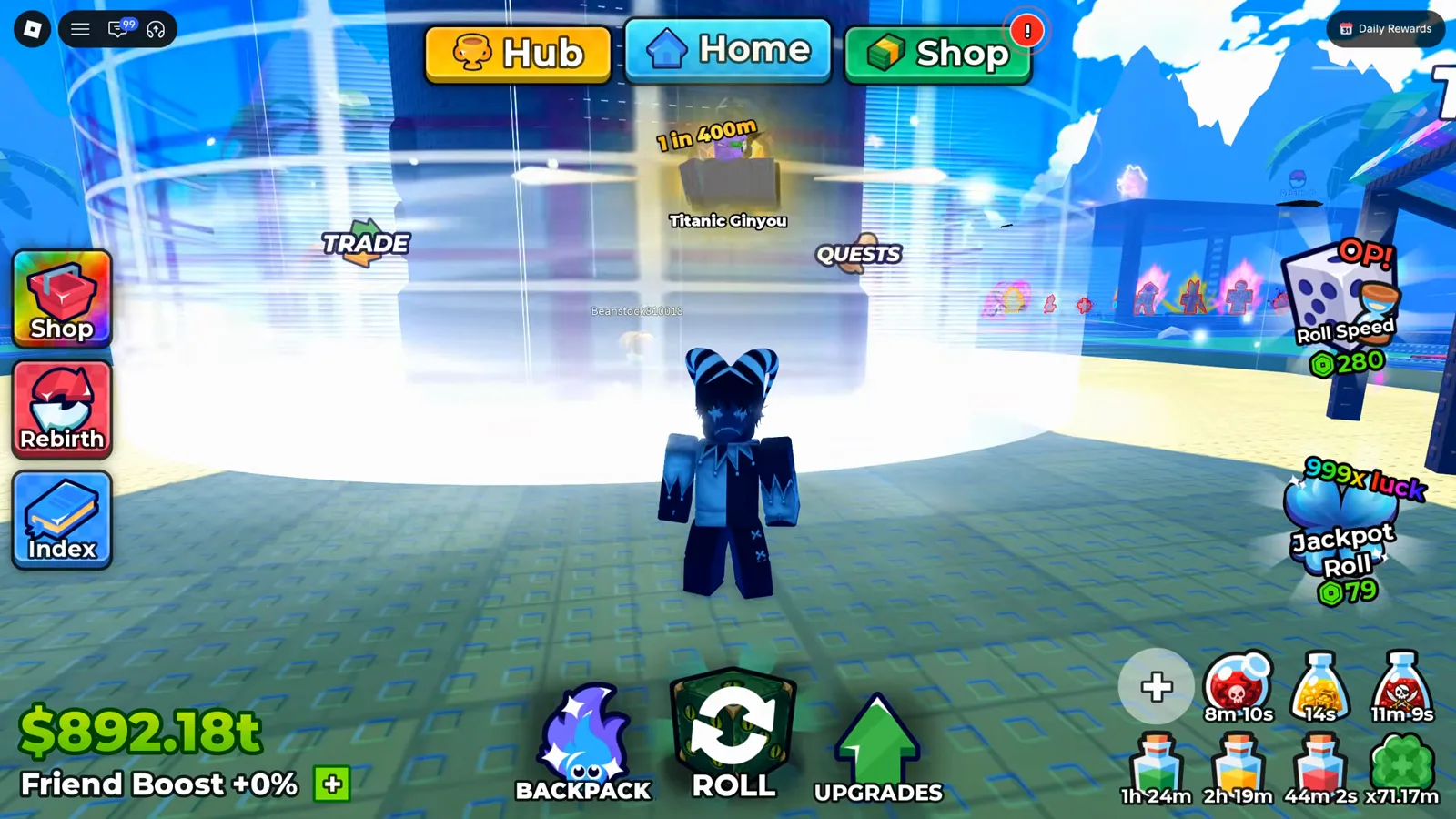
The QUESTS sign on the right of the tower column is the whole entry point.
Watch the hub QUESTS stall at 11:01
Every screen on this page was opened and read frame by frame in the creator captures credited below. The Shop tab was re-read on 26 September 2026 and now prints prices instead of a shrug; that correction is written out under the Shop heading, where the old wording used to sit.
Source: the Daily and Weekly frames below are from Superlex Plays’ HOW TO GET 100,000x LUCK DICE! + RAINBOW GRADES | Anime Dice! Roblox (September 2026), which opens all three tabs back to back inside the first two minutes, plus one hub shot from the same creator’s follow-up session HOW TO GET 0.007% GRADE! + 1 IN 125 BILLION UNIT | Anime Dice! Roblox. The Shop tab frames published on this page come from that creator’s later capture MY JOURNEY TO ETERNAL TRAIT! + REBIRTH 10 | Anime Dice! Roblox (24 September 2026, Shop tab around 4:56). The 15-Ticket balance that proves which side of a badge is the cost comes from LenzoBlox’s session, Shop tab at 8:31 (20 September 2026) — that capture has creator-added captions and stickers in the lower third, so we quote its numbers and publish no still from it. Every screenshot on this page is from a capture with no facecam, no burned-in captions and no channel watermark.

The session that opens the Daily, Weekly and Shop tabs one after another
What Does the Daily Quest Board Pay?
The Daily tab is a short scrollable list. Each row carries an icon tile, the goal text, a progress bar, a ticket icon with a number, and a Claim button that greys out and reads Claimed once collected. Under the panel header the game also prints a countdown — in our frame, Refreshes in 3h 6m.
These are the rows exactly as printed on the Daily board at UPD 3, one account snapshot — no official quest table is published:
| Quest row (as shown on the Daily board, UPD 3, one account snapshot) | Icon tile | Reward shown |
|---|---|---|
| Play for 30 minutes! | blue clock | 5 Tickets |
| Roll 1,000 times! | white die | 5 Tickets |
| Defeat 2 towers! | grey tower | 5 Tickets |
| Sell 500 units! | red cross | 5 Tickets |
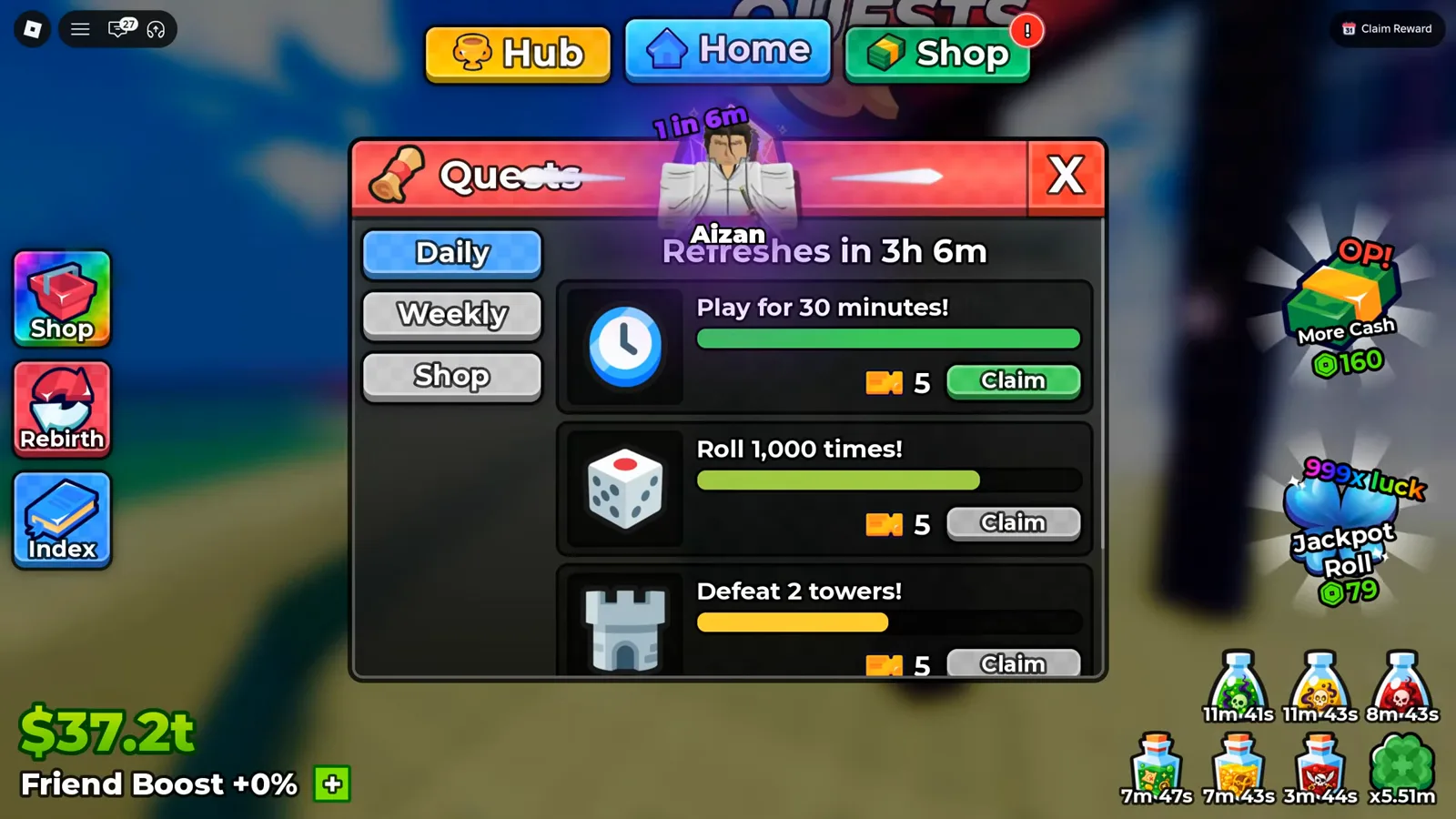
Read the tab, then read the countdown under the header — that is your reset clock.
Scrolling the same tab down gives the rest of the list, and it is worth noting what the panel does not do: nothing here is auto-collected. The Sell 500 units! row below sits at a full green bar with a Claimed button, while Roll 1,000 times! is still sitting on a grey Claim at roughly two-thirds progress.
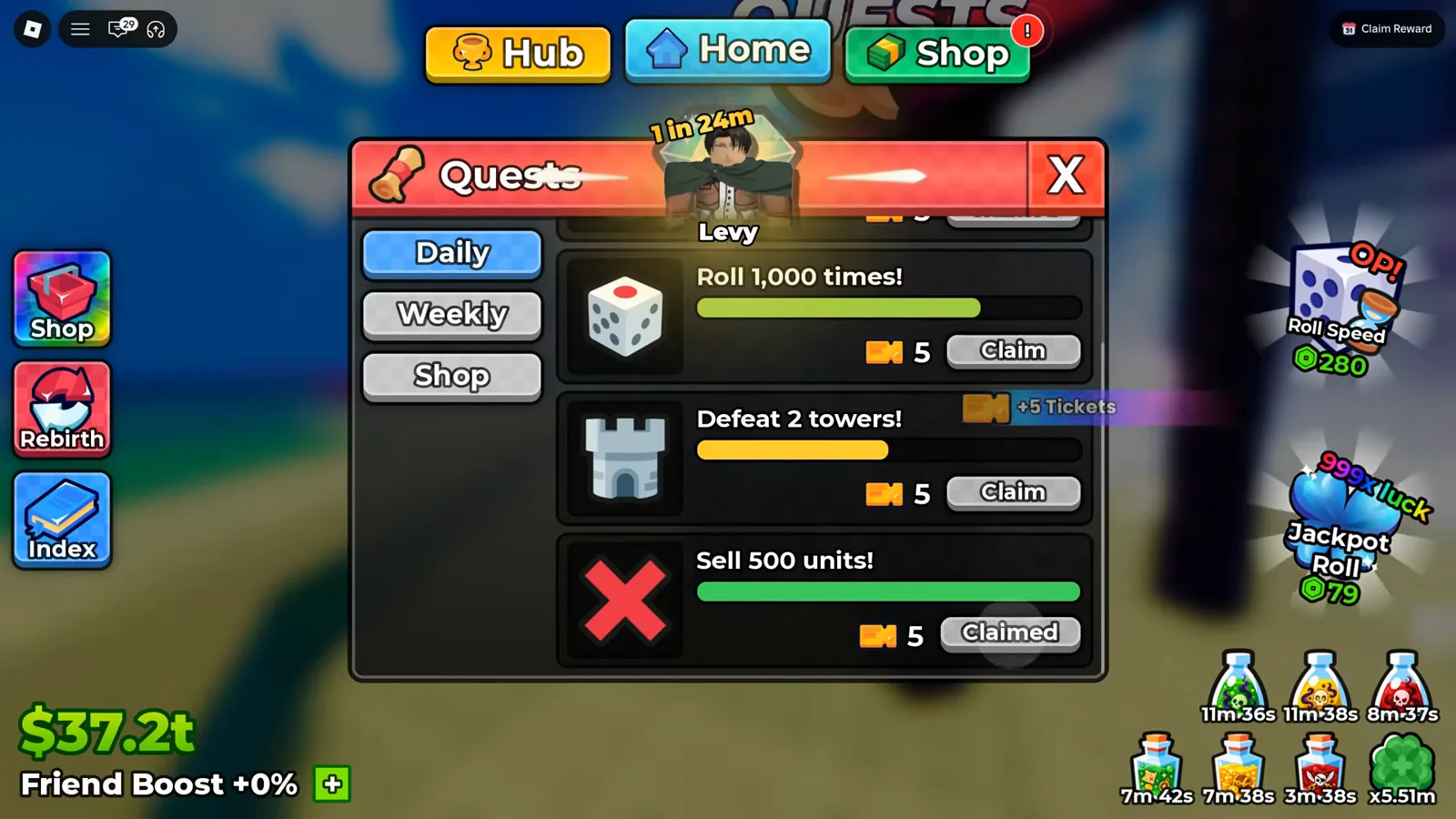
That flying +5 Tickets toast is the claim actually landing.
What Does the Weekly Quest Board Pay?
The Weekly tab is the same panel with the same row anatomy, scaled up: bigger goals, bigger ticket numbers, and a longer countdown printed in the header (Refreshes in 5d 3h in our frame).
| Quest row (as shown on the Weekly board, UPD 3, one account snapshot) | Icon tile | Reward shown |
|---|---|---|
| Play for 5 hours! | blue clock | 30 Tickets |
| Roll 7,500 times! | white die | 20 Tickets |
| Defeat 15 towers! | grey tower | 15 Tickets |
| Sell 5,000 units! | red cross | 20 Tickets |
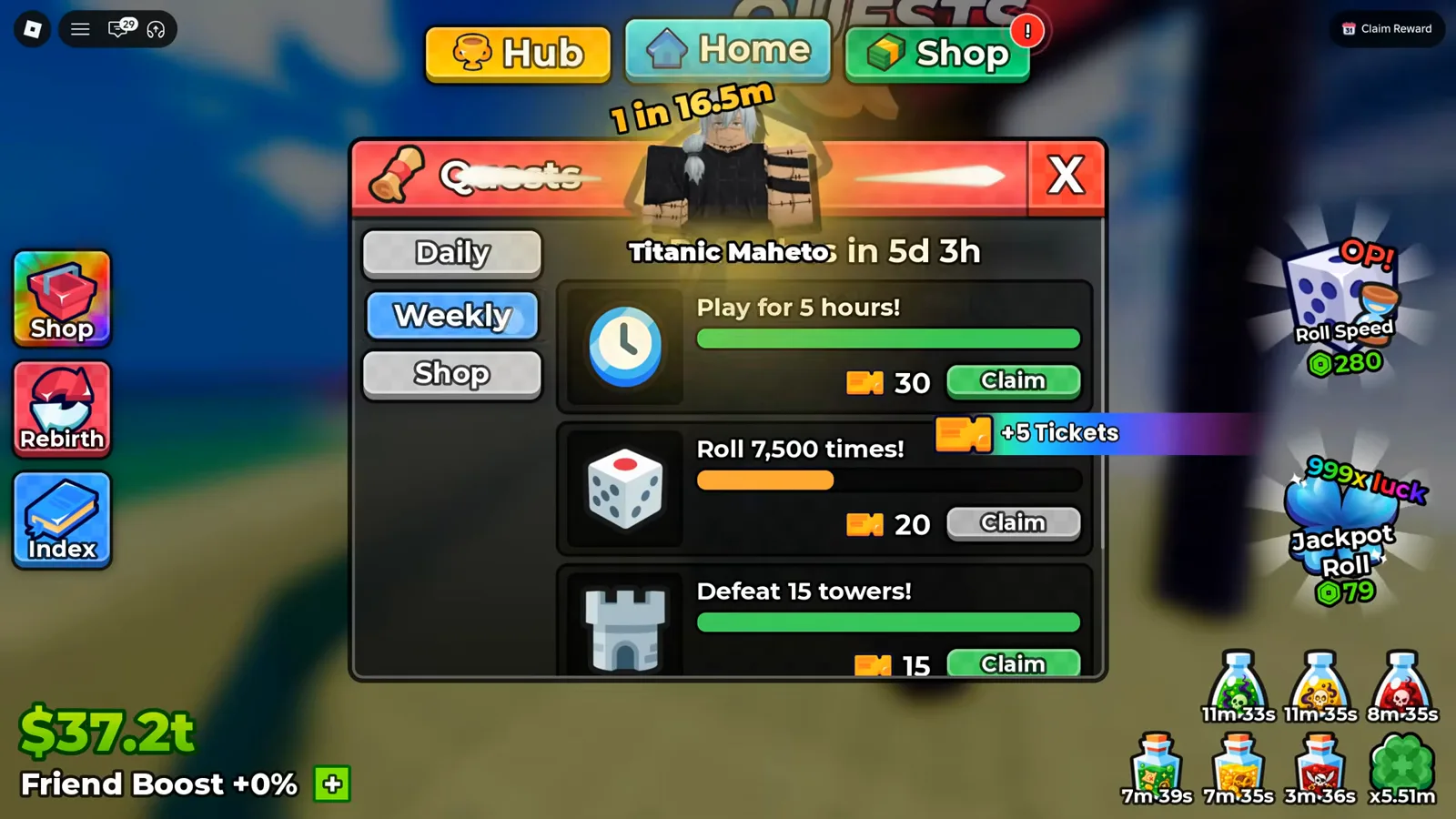
Three of the four Weekly rows in one frame — the fourth, Sell 5,000 units! at 20, is one scroll below it.
Watch the Weekly board at 1:53
Add the printed numbers up and one refresh cycle of this board was worth 20 Tickets daily plus 85 weekly on that account. That is arithmetic on the frame, not a published cap — and it is the ceiling a creator in our source was plainly unhappy about, saying of the daily board that “you only get what is that? 5, 10, 15? You only get 20 a day”, at around 8:25.
What Changed On The Weekly Board In UPD 5
That table is a UPD 3 snapshot, and the board has since moved. A UPD 5 frame of the same tab — RexonSIM’s session at 3:54 — prints three of the same four goals with two different prices:
| Quest row (as shown on the Weekly board, UPD 5, one account snapshot) | Reward shown | Same row at UPD 3 |
|---|---|---|
| Play for 5 hours! | 30 Tickets | 30 Tickets |
| Roll 7,500 times! | 25 Tickets | 20 Tickets |
| Defeat 15 towers! | 20 Tickets | 15 Tickets |
Sell 5,000 units! sits below the frame edge in that capture, so its UPD 5 price is not printed here. Two of the three readable rows went up by five tickets each, which lifts a full weekly cycle above the 85 the UPD 3 board summed to. The Daily board did not move: in the same session at 3:45 Roll 1,000 times! and Defeat 2 towers! still print 5 Tickets each.
The row worth noticing is Defeat 15 towers!. It is the only quest on either board that pays for doing towers, and towers are where the Drops columns hand out gems and Trait Rerolls — so the ticket that buys a tower run comes back out of the tower objective, on a two-day clock rather than a daily one.
What Are Tickets Used For?
Tickets are an inventory item first. Open the Backpack on its Items tab and the ticket sits as its own stack between the purple gem and the pink reroll crystal — in the frame below, 65 of them.
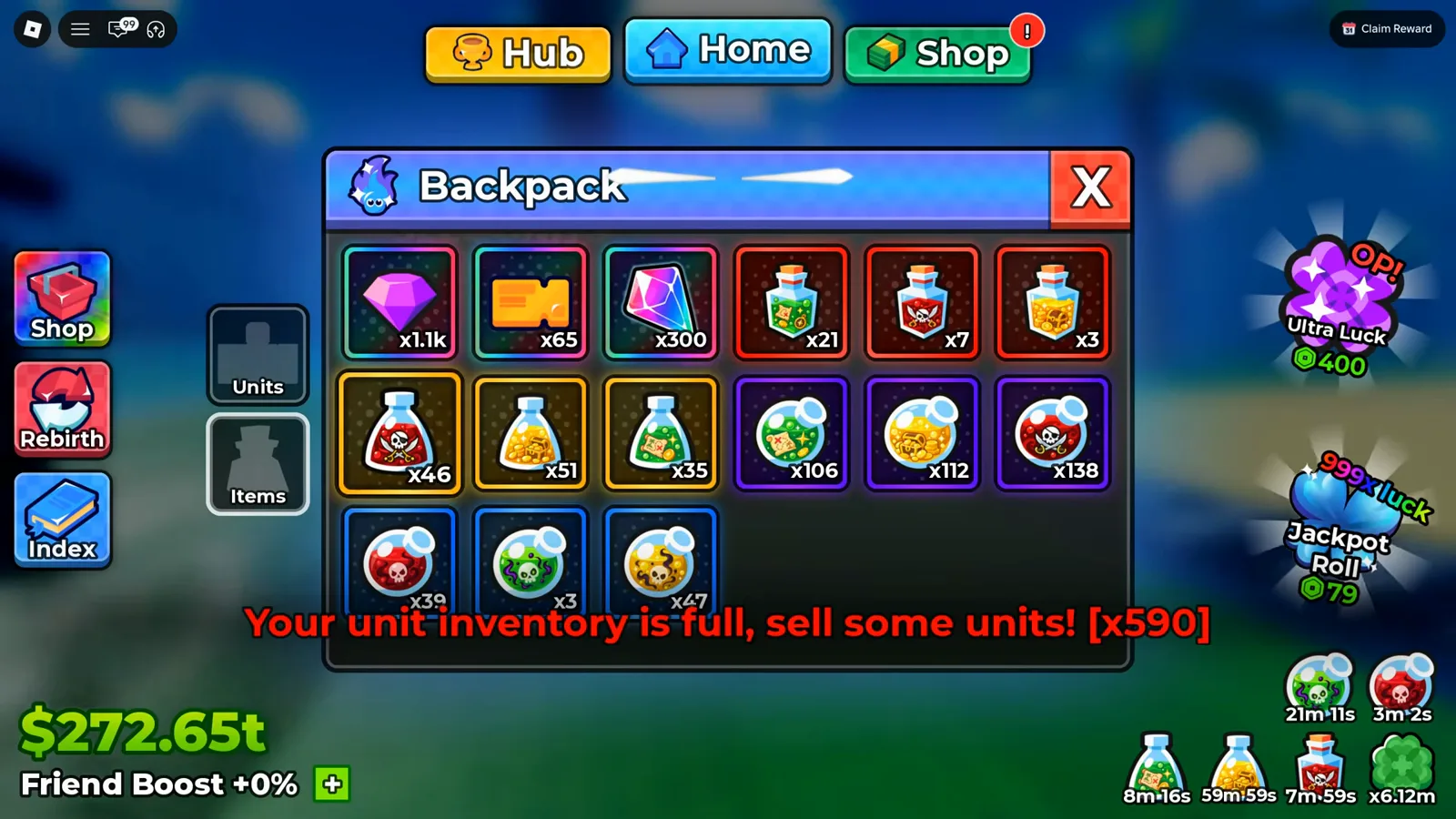
The same orange glyph the quest rows pay out is the item sitting in the backpack.
Watch the ticket stack at 9:31
Where they go is the towers. Ticket entries are what you spend to start a run in the Towers menu, so the quest board and the tower ladder are one economy — the floor-by-floor version of that is on the Infinity Tower guide, including which Drops column is worth the entry. The potions those Drops columns hand out are catalogued on the potions guide, and the ticket side of the budget is priced further down this page.
The dependency runs one way, and the creator in our source says it out loud while looking at his ticket balance: “the only way you get tickets is through quests”, at around 8:20. That is one player’s on-camera conclusion, not a rule the developer has published — but it matches every screen we checked, because the only place the ticket icon appears as an input is the Shop tab, and the only place it appears as an output is a quest row.
What Does the Shop Tab Inside Quests Sell?
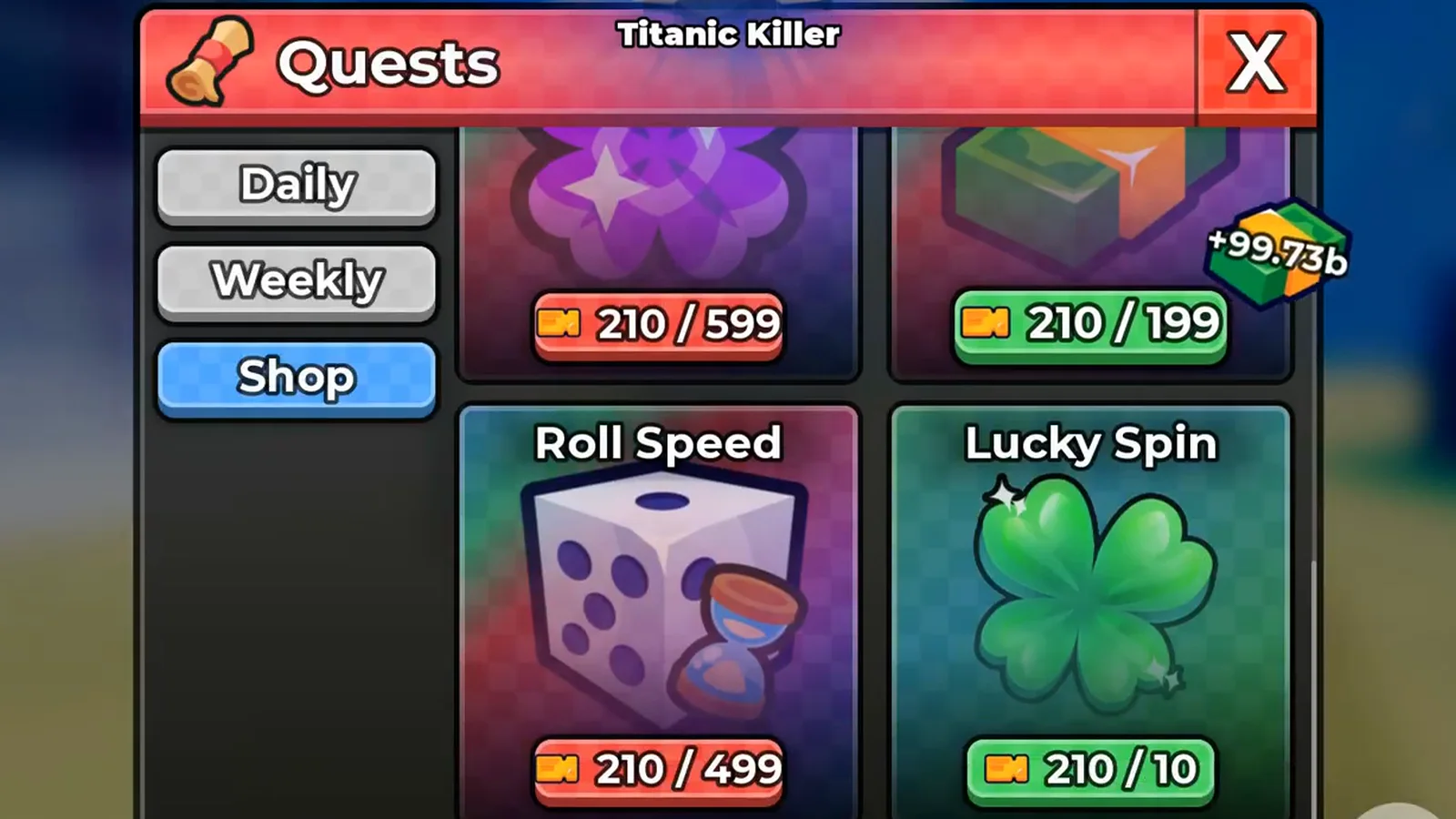
The third tab is a ticket shop: every card prints the same orange Ticket glyph the first two tabs pay out, followed by two numbers on a rounded pill. As of 26 September 2026 we can read both numbers, and this section replaces the older wording on this page that said their meaning was unknown.
The left number is your Ticket balance. The right number is the price. Two captures of the same tab settle it. In the earlier session behind the frame below the wallet held 60 Tickets and its Lucky Spin card printed 60 / 20; in a 20 September capture the wallet held 15 and the same card printed 15 / 20, with Trait Reroll beside it at 15 / 1. The right-hand figure did not move when the left-hand one did — which is only possible if the right-hand figure is what you pay.
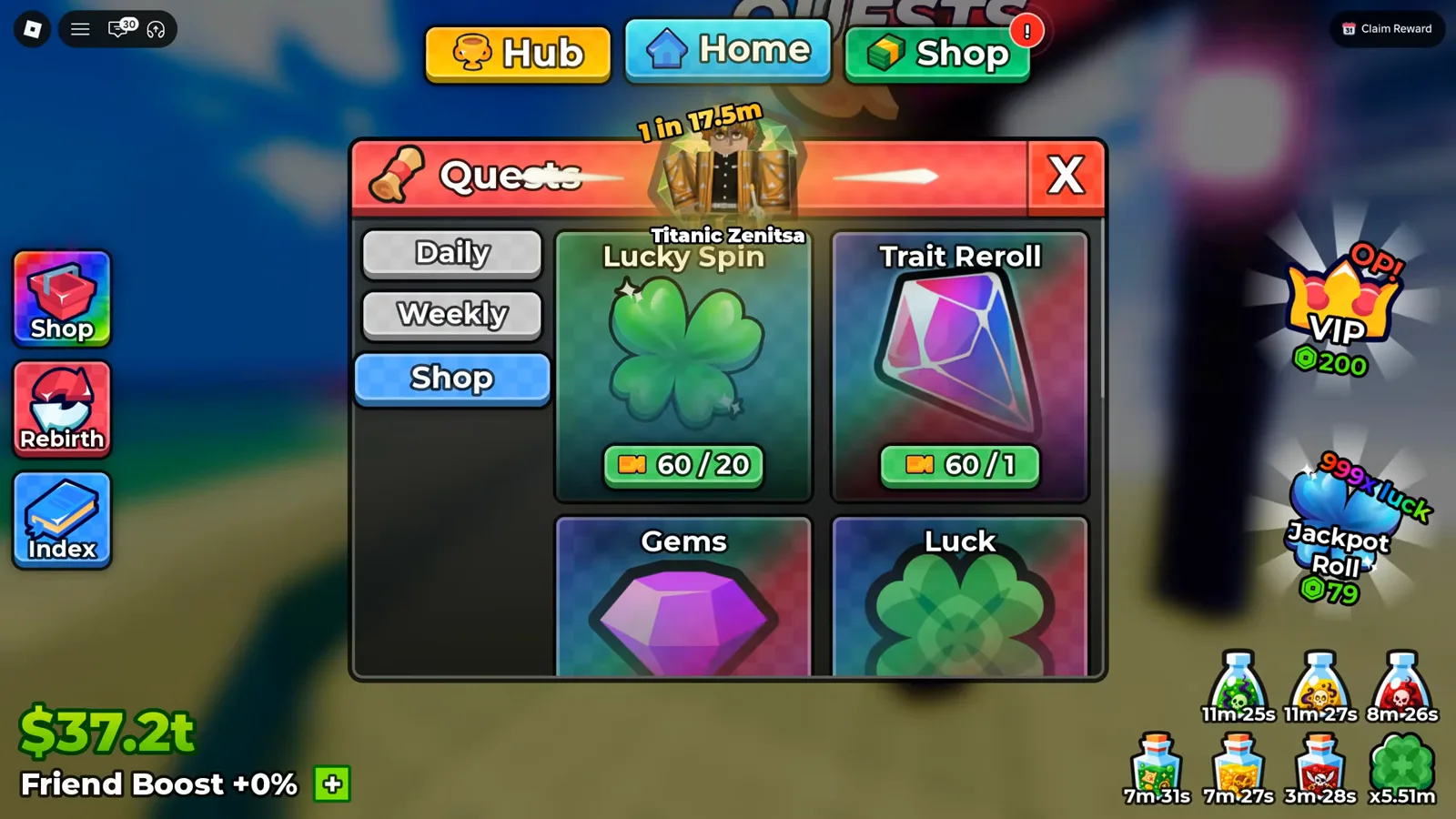
The earlier session at 60 Tickets — the same two cards, the same right-hand numbers, a different wallet.
Here are the prices, each one read off a pill whose card label sat in the same frame:
| Shop card | Art on the card | Ticket price (right-hand number) | Pill colour at a 15-Ticket balance |
|---|---|---|---|
| Lucky Spin | green four-leaf clover | 20 (10 in the later capture) | red |
| Trait Reroll | pink-and-blue crystal | 1 | green |
| Gems | purple gem | 1 | green |
| Luck | green four-leaf clover | 199 | red |
| Ultra Luck | purple four-leaf clover | 599 | red |
| More Cash | green and orange banknotes | 199 | red |
| Roll Speed | white die with an hourglass | 499 | red |
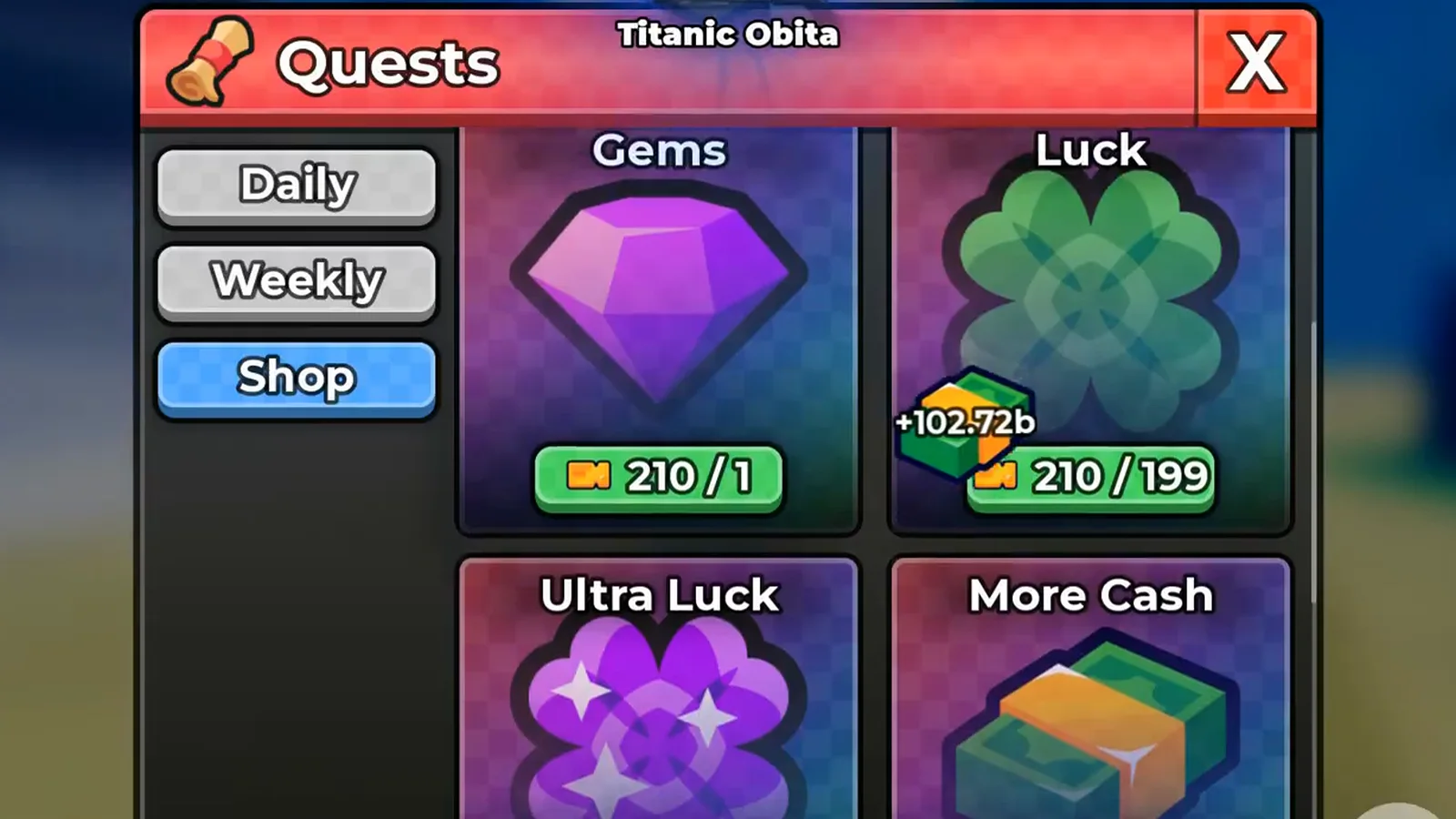
A 210-Ticket wallet: Gems at 1 and Luck at 199 are both affordable, so both pills are green.
None of that colour is decoration. The pill is the affordability check: green when your balance covers the price, red when it does not. At a 15-Ticket balance every 1-Ticket card is green while the 20-, 199-, 499- and 599-Ticket cards are red. The capture below shows the same rule from the other side, in one frame — with 210 Tickets banked, More Cash at 199 is green while Ultra Luck at 599 is red one card away.
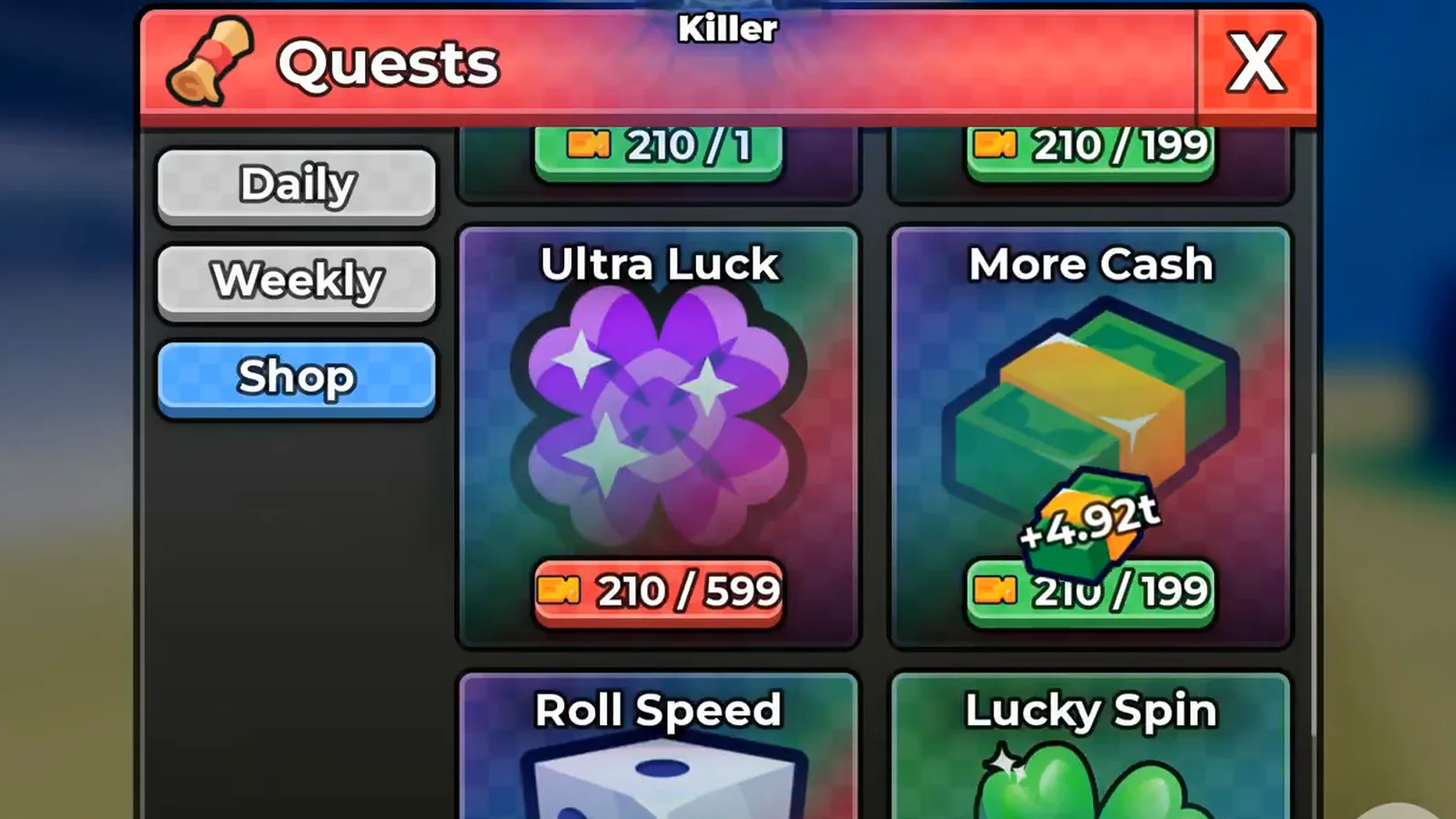
Same wallet, same screen, two pill colours — the price being compared against the balance.
One trap worth naming before any of this goes into a plan: Ultra Luck, More Cash, Luck and Roll Speed also exist elsewhere in Anime Dice as Robux gamepasses. The numbers on this tab are Tickets — the glyph on every pill is the same orange ticket the quest rows pay — so a 599 here is not a Robux price.
Roll Speed is the priciest card we could read; Lucky Spin is the one card whose price moved between captures.
Where those Lucky Spins end up once claimed — and the Auto Roll setting that consumes them on arrival — is written up in the Lucky vs Jackpot Spins guide. What the purchasable items are is covered elsewhere on the site: the pink crystal is the grade-reroll currency behind our reroll priority guide, and the purple gem counter is unpacked in the Gems usage guide.
How Do Quests, Tickets and a Tower Session Fit Together?
The loop the frames support, in order:
- Play toward the four Daily goals, since three of them are things you do anyway — being online, rolling, selling units. Only
Defeat 2 towers!asks for a specific action. - Claim before you log off. The bars fill while you are away, but the Claim button does not press itself, and the header countdown keeps running whether or not you collect.
- Spend the tickets on the tower whose Drops column you actually want, not on the highest difficulty name — the Infinity Tower guide covers reading a drop preview before committing an entry.
- Let the towers feed the reroll loop, since floors pay gems and reroll crystals as well as the tickets the board hands out; the spending order is on the reroll priority guide.
- Bank the away time, because quest progress and plot income both keep accruing while the window sits open — the offline earnings guide covers what continues after you close the app, and the AFK farming guide walks the same quest board inside a full away session.
Two loose ends we would rather flag than paper over. The panel header carries a unit card with its roll odds — Aizan 1 in 6m in one frame, Titanic Zenitsa 1 in 17.5m in another seconds later — and nothing on screen explains what that banner is for, so we describe it and stop. And the free spins and reroll currency that share this wallet with tickets also arrive from outside the game: redeeming live Anime Dice codes is the zero-grind side of the same budget. If you have a dated screenshot that settles either question — a Shop purchase actually going through, a card that prints its quantity, or an official quest list — send it through the contact page and we will credit it here.
Artigos relacionados
guides
Anime Dice Update 7: Rebirth Upgrade Points, Third Base Floor and New Dice
Anime Dice UPD 7 read off frames: the developer's own patch notes, the 6-path Rebirth Stats panel, and a purchase confirmation. Checked 7 October 2026.
guides
Anime Dice Money: Where Cash Comes From, Read Frame by Frame
Anime Dice money read frame by frame: the cash counter's k-to-oc suffix ladder, the $/s income every unit card prints, and the breakdown no screen ever shows.
guides
Anime Dice Probability and Roll Odds: The 1 in N Screens
Anime Dice prints unit odds as 1 in N and trait odds as percentages, never as one drop table. Frame-by-frame readings plus the arithmetic the game leaves out.
Isso foi útil?
Obrigado pelo feedback!