Anime Dice Rebirth Guide: Upgrade Points and the Six Paths
Anime Dice Rebirth at UPD 7, read frame by frame: one Rebirth is one Upgrade Point, the six Rebirth Stats paths, their levels, and the reset price we can prove.
FAQ
What does Rebirth do in Anime Dice?
What are the six Rebirth paths?
How many Upgrade Points does a Rebirth give?
How much does one level of Money give?
What is the Reset button on the Rebirth Stats panel?
What Does Rebirth Do in Anime Dice?
Rebirth is still tied to the red button on the left edge of the screen — Shop, then Rebirth, then Index — and the window that was open in our UPD 7 frames is titled Rebirth Stats. What it prints is the whole story of what the game now hands you for rebirthing: a counter reading Rebirth Points: N, and six upgrade paths you spend those points on. Our recording never catches the click between the left-edge button and that window, so we describe the window and not the route into it.
The in-game changelog spells the model out in four lines, and it is worth reading them exactly as printed:
Rebirths now have even more value!Every 1 Rebirth = 1 Upgrade PointSpend your points across 6 different Rebirth Upgrade pathsTons of new upgrades to unlock and progress through.
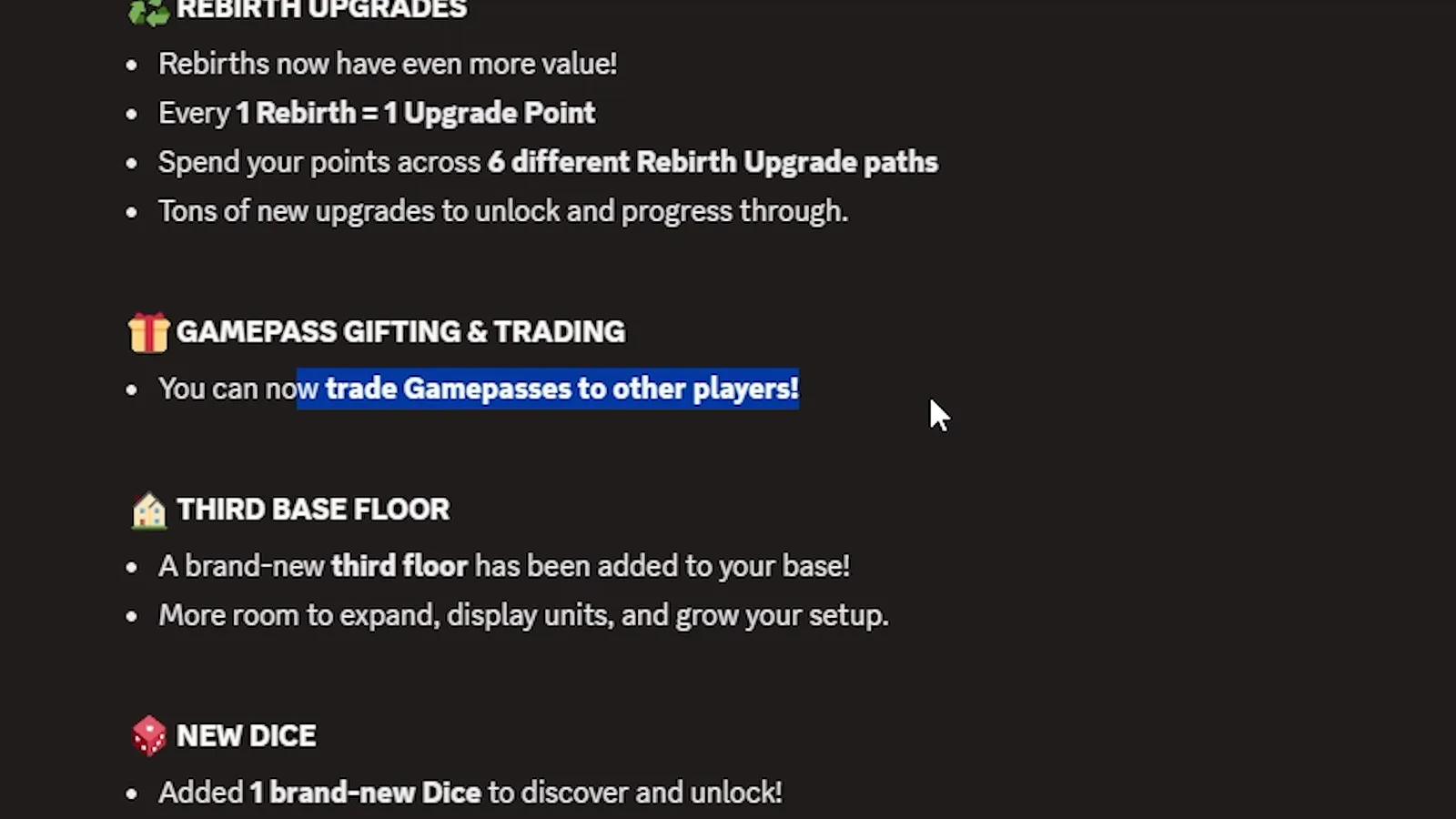
The change in the developer’s own words, captured in-game during the UPD 7 launch window.
Watch the changelog post at 8:10
Two limits on this page are worth stating before the numbers start. First, our UPD 7 recording never catches the rebirth click itself — no frame shows the cash-reset warning, the cost bar or a before-and-after multiplier pair. Second, everything this page used to publish about that older panel is still below, kept in its own section and dated, because those frames were real and the panel they came from is simply absent from every UPD 7 recording we hold.
Sources: the UPD 7 frames come from Xou Blox’s UPD 7 launch session (uploaded 2026-10-05), a no-facecam screen recording we checked at full resolution on 2026-10-11; the Rebirth Stats window is open from about 2:56 to 3:12 and the changelog post at about 8:00 to 8:30. The UPD 4 and UPD 5 material below keeps its original sources: RustScroll’s from-zero maxing run and RexonSIM’s UPD 4 luck session. The developer publishes no official rebirth table.

Xou Blox's UPD 7 session — the Rebirth Stats window is open from about 2:56
What Are the Six Rebirth Upgrade Paths?
Six rows, each with its own icon and each printing the same two values in the same order: a percentage in brackets, then a level.
| Path | Icon on the row | What the row prints |
|---|---|---|
Luck | green four-leaf clover | percentage, then Lv. N |
Money | green and orange cash block | percentage, then Lv. N |
Damage | blue sword | percentage, then Lv. N |
Health | red heart | percentage, then Lv. N |
Trait Luck | multicoloured prism | percentage, then Lv. N |
Grade Luck | pink diamond | percentage, then Lv. N |
The list is taller than the window, so it scrolls. Our first frame catches the top of the list — Luck (+0%) Lv. 0 on the first row — and our second frame, taken ten seconds later on the same account, has scrolled one row down and ends on Grade Luck (+0%) Lv. 0. Between them every one of the six paths is on screen at least once, which is how we can name the full set.
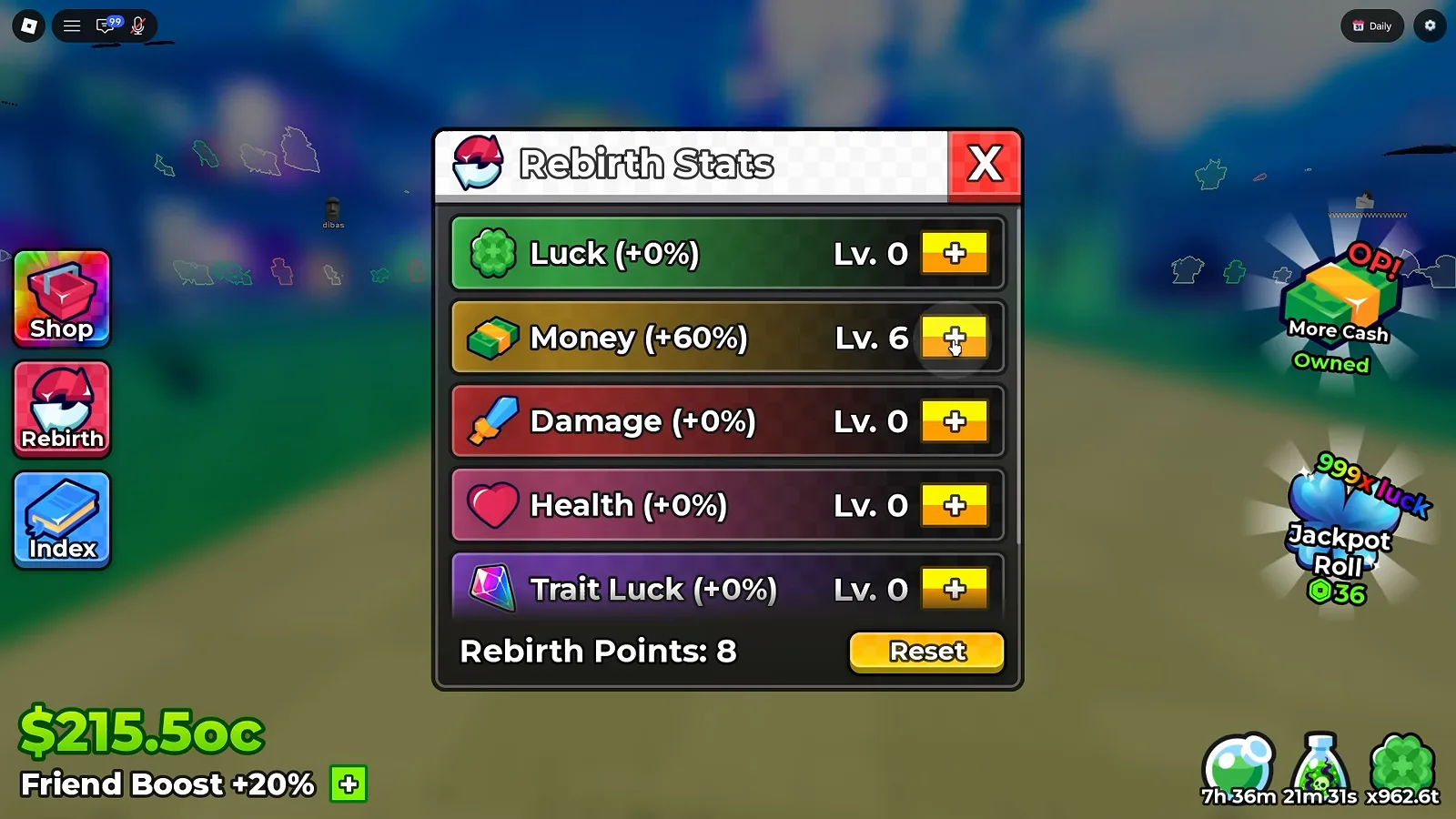
Top of the list: Luck first, Money already at level 6, and eight unspent points.
Watch the Rebirth Stats window at 3:00
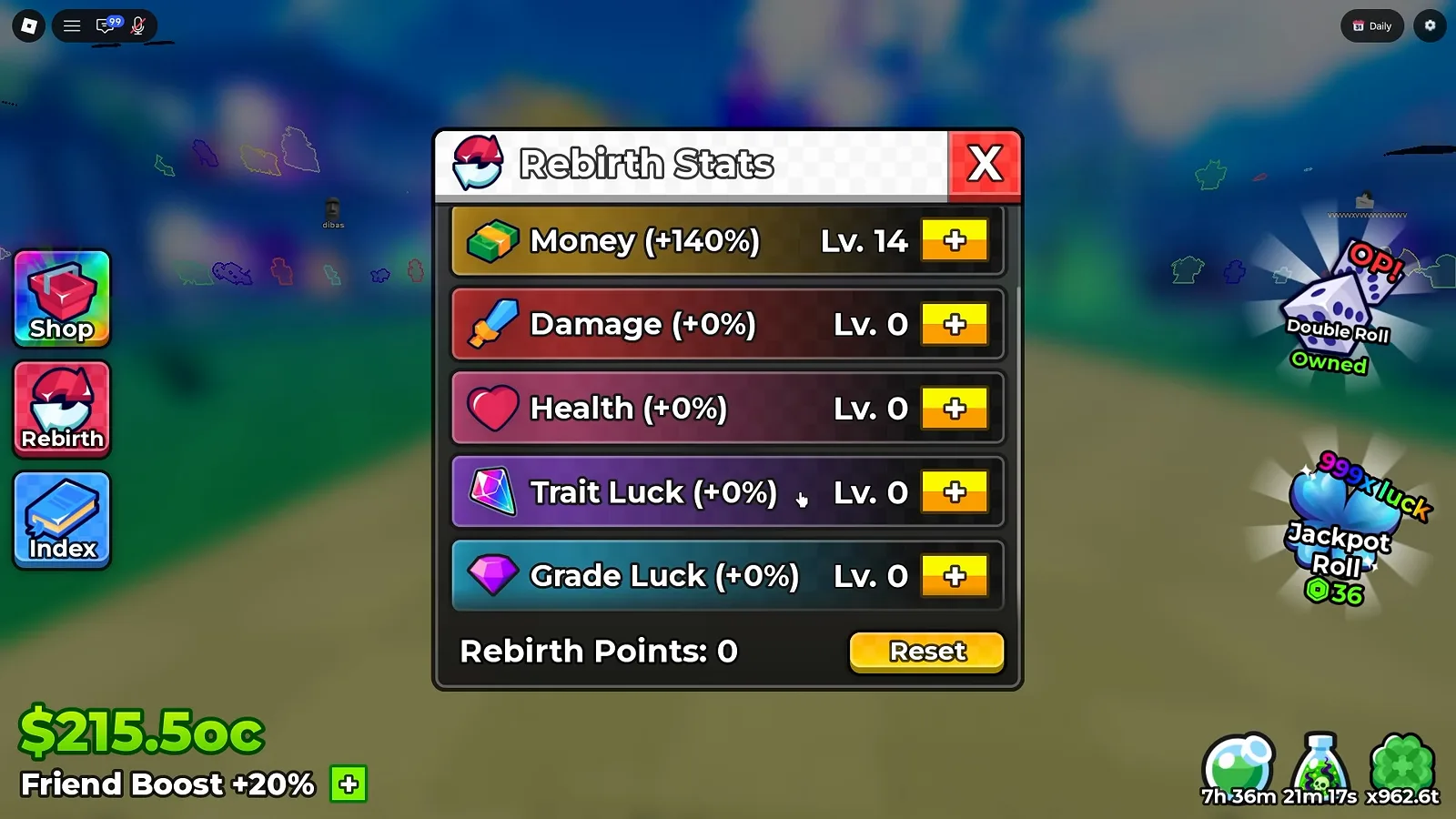
The same account ten seconds later: Money at +140%, and the counter down to zero.
Watch the scrolled window at 3:10
How Do Rebirth Points Buy Levels?
The counter at the bottom of the window is the wallet, and the two frames above are an accidental controlled experiment on the same account ten seconds apart:
| Frame | Money row | Rebirth Points |
|---|---|---|
| First frame | (+60%) Lv. 6 | 8 |
| Second frame | (+140%) Lv. 14 | 0 |
Eight points disappeared, Money gained eight levels, and its percentage gained eighty points. That divides three ways and all three agree: one point buys one level, and on this path one level prints +10%.
Two independent confirmations come from the same pair. The percentage known at level 6 is 60% and at level 14 is 140%, so the per-level step is flat across that span rather than tapering — and the point count is not a pool that grows with rebirthing, it is simply what you have not spent yet.
What Is the Reset Button For?
A yellow Reset button sits at the bottom-right of the window, beside the Rebirth Points counter. One contiguous frame catches a Robux purchase modal standing over the panel, and it is worth reading precisely because the panel’s own numbers are all percentages:
- Item name:
Reset Points - Price:
36with45crossed out beside it - Line under the price:
Saving 9 with Plus - Account balance shown top-right:
96,814
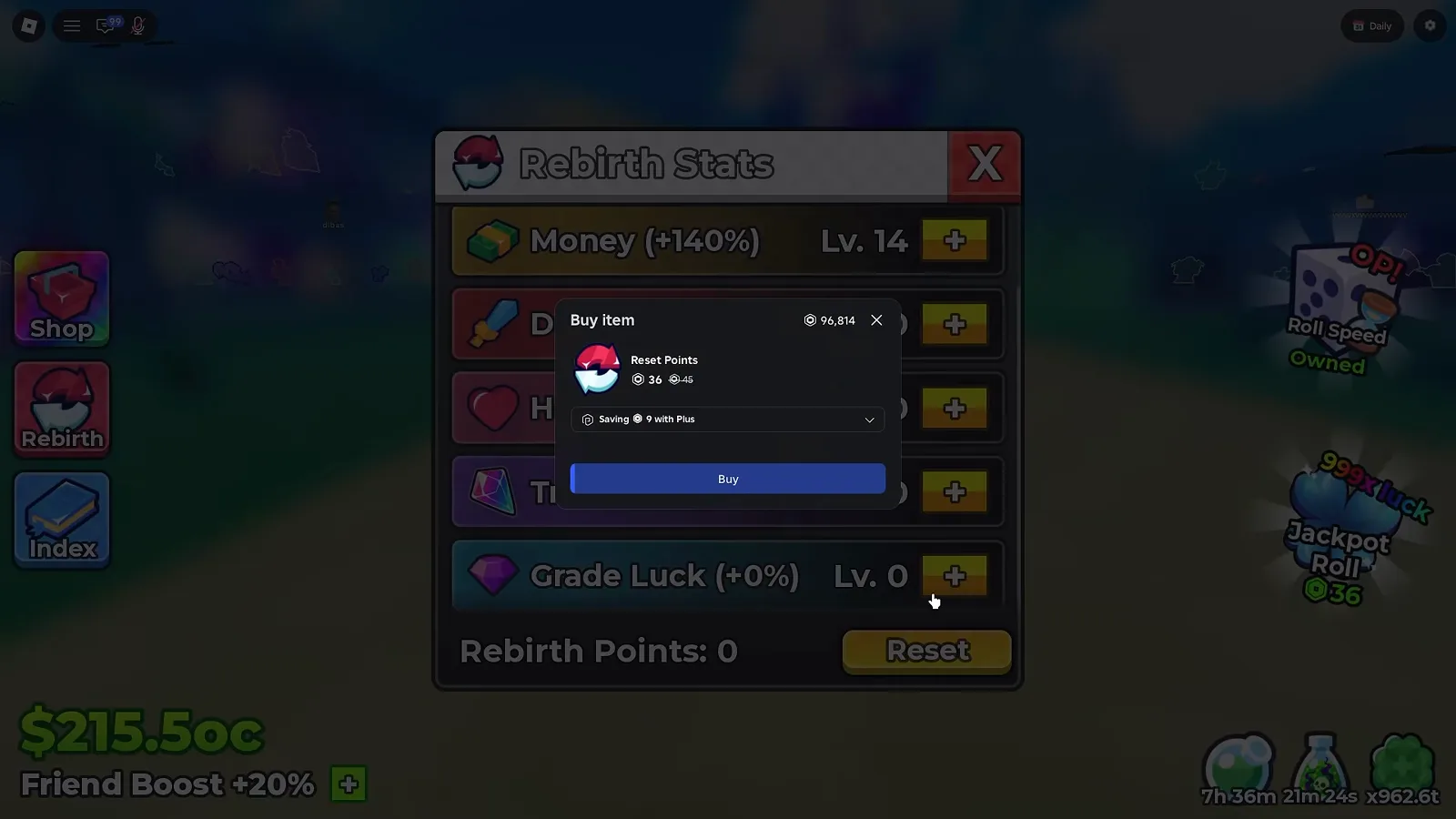
A Robux price for respec: Reset Points at 36, discounted from 45.
Watch the purchase modal at 3:05
What we will not do is invent the flow. The modal appears over the window in a five-second stretch, and in that stretch we cannot see which control was pressed — so treat Reset as “a reallocation action that has a Robux price attached” and nothing more specific than that.
Does Rebirth Still Take Your Cash?
On the older panel, yes — and that panel is what the rest of this section is about, because it is the only rebirth panel we have ever caught on camera. It is the UPD 4 and UPD 5 build, dated here on purpose.
That window printed two rows, one for Luck and one for Cash, each showing the multiplier you have and the multiplier the next rebirth buys: 3x Luck → 4x Luck directly above 3x Cash → 4x Cash. Between the rows sat a progress bar reading your current cash over the cost, and the middle of the window read Rebirthing resets your cash! in every frame we captured. The button stayed stone grey until the bar filled and turned green.
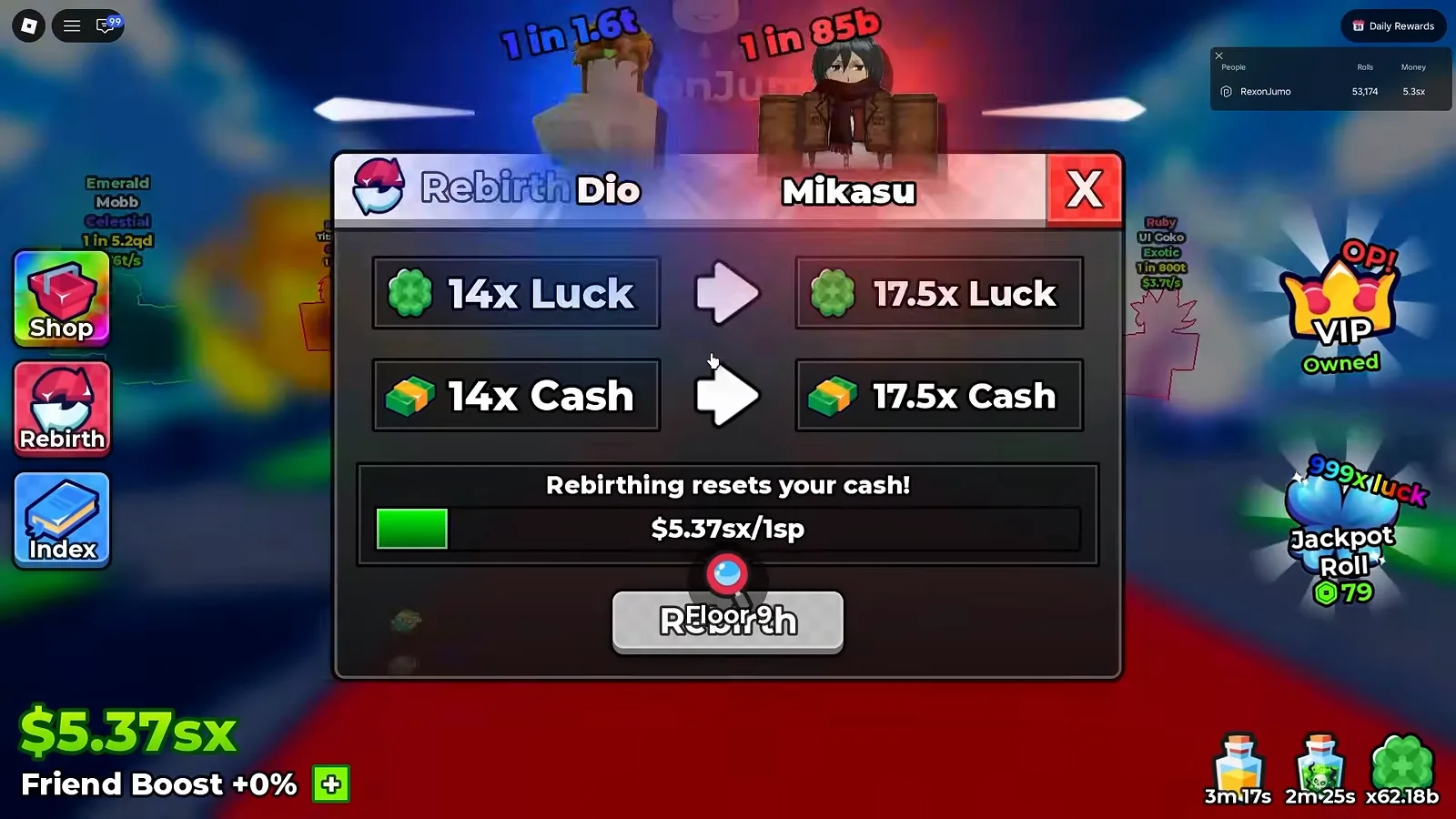
The reference frame for the older model — both rows, the reset warning and the price bar in one shot.
The pairs we captured across two accounts, each mid-step:
| Account stage | Luck row | Cash row |
|---|---|---|
| RustScroll, first-rebirth offer | 1x → 1.5x | 1x → 1.5x |
| RustScroll, right after its second reset | 2x → 2.5x | 2x → 2.5x |
| RustScroll, mid-game | 3x → 4x | 3x → 4x |
| RustScroll, right after that rebirth | 4x → 5x | 4x → 5x |
| RexonSIM, late UPD 4 | 14x → 17.5x | 14x → 17.5x |
| Plique Games, UPD 5 launch day | 30x → MAX | 30x → MAX |
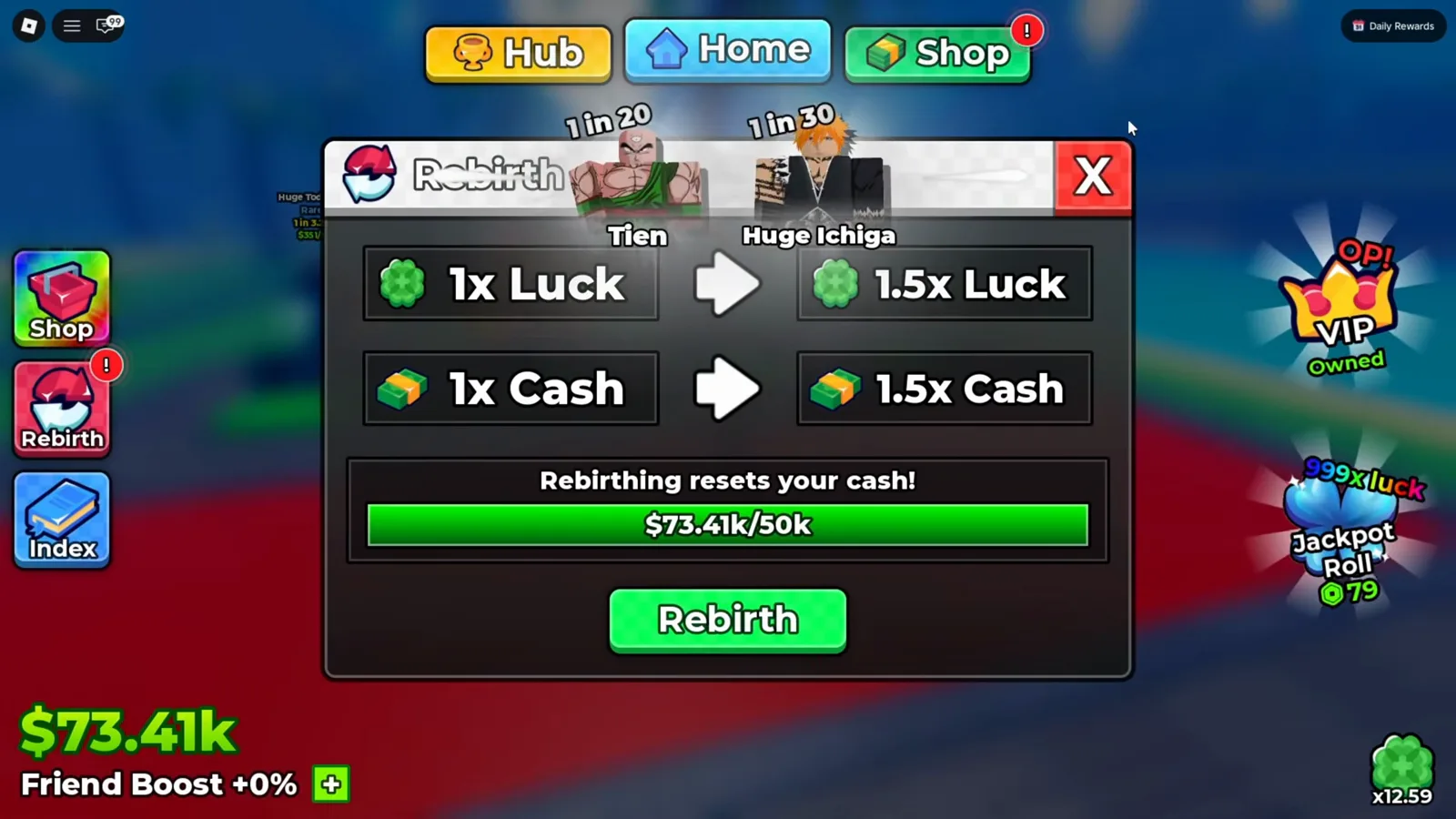
The earliest panel we captured — a brand-new account, one click from its first 1.5x.
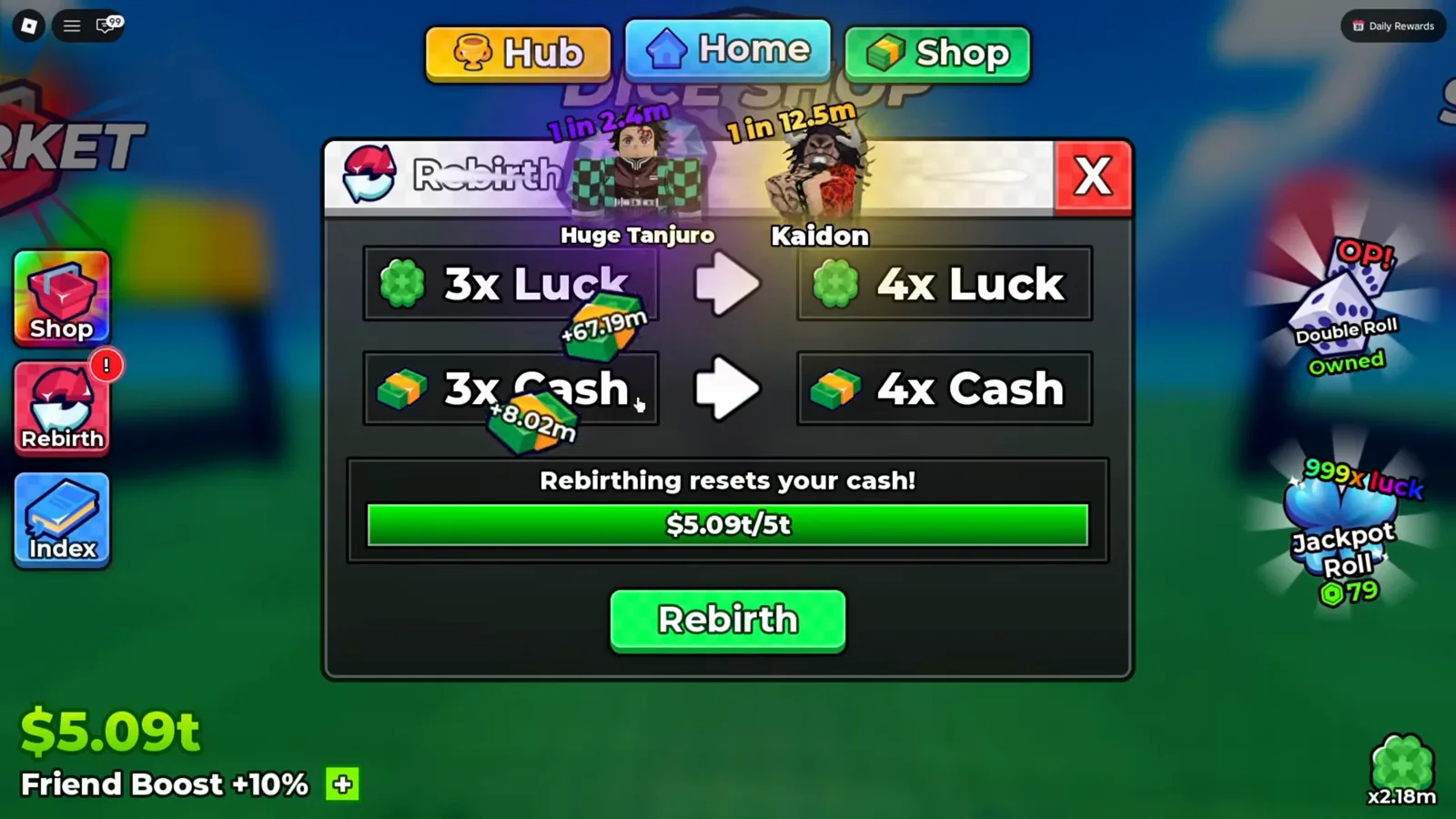
Five trillion banked, the bar full — this is what “ready” looks like.
The costs printed on that same panel, each with its evidence: 50k on RustScroll’s first-rebirth panel at 3:53 · 500m on the panel right after his second reset (8:59) · 5t at 38:11 · 500t posted as the next tier after the click · 1sp on RexonSIM’s late panel. Two more tiers exist only as speech: 50b (RustScroll, 20:37) and 10 Oc (the UPD 5 launch-day creator, no frame). The only jump watched live — 5t to 500t — was hundred-fold, and one observation is not a ladder.
Your cash is gone when you click. That is the entire price on that build: RustScroll’s balance reads $0 in the frame right after his sixth rebirth, and his second reset zeroes the wallet the same way.
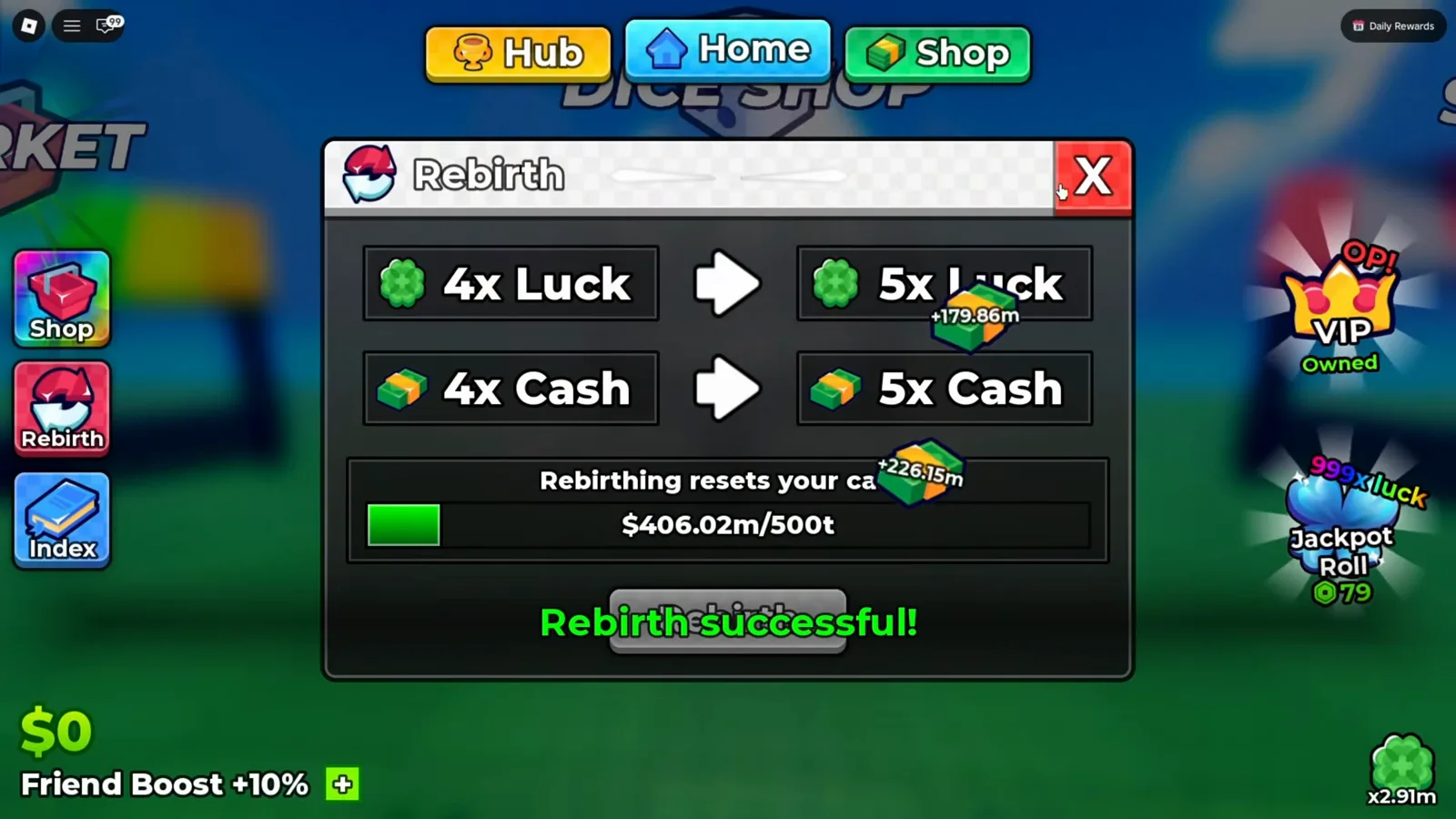
The moment of payment: banner up, wallet zeroed, the 500t target already posted.
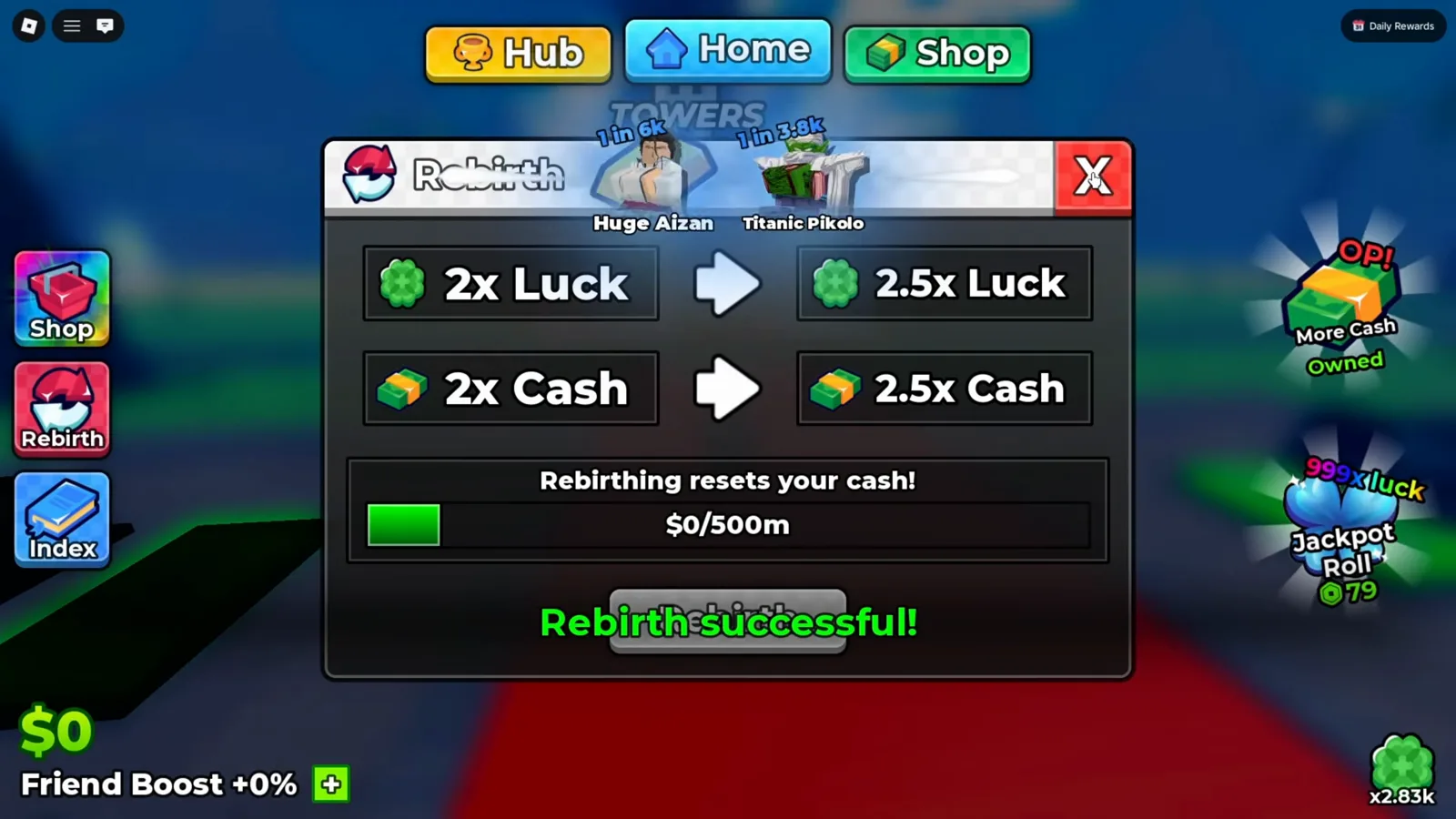
The same second of the cycle, earlier in the same run — zeroed again.
Your units stay. The creator says so at 3:40, and four seconds after his sixth rebirth his team is still standing on its pads and popping cash.
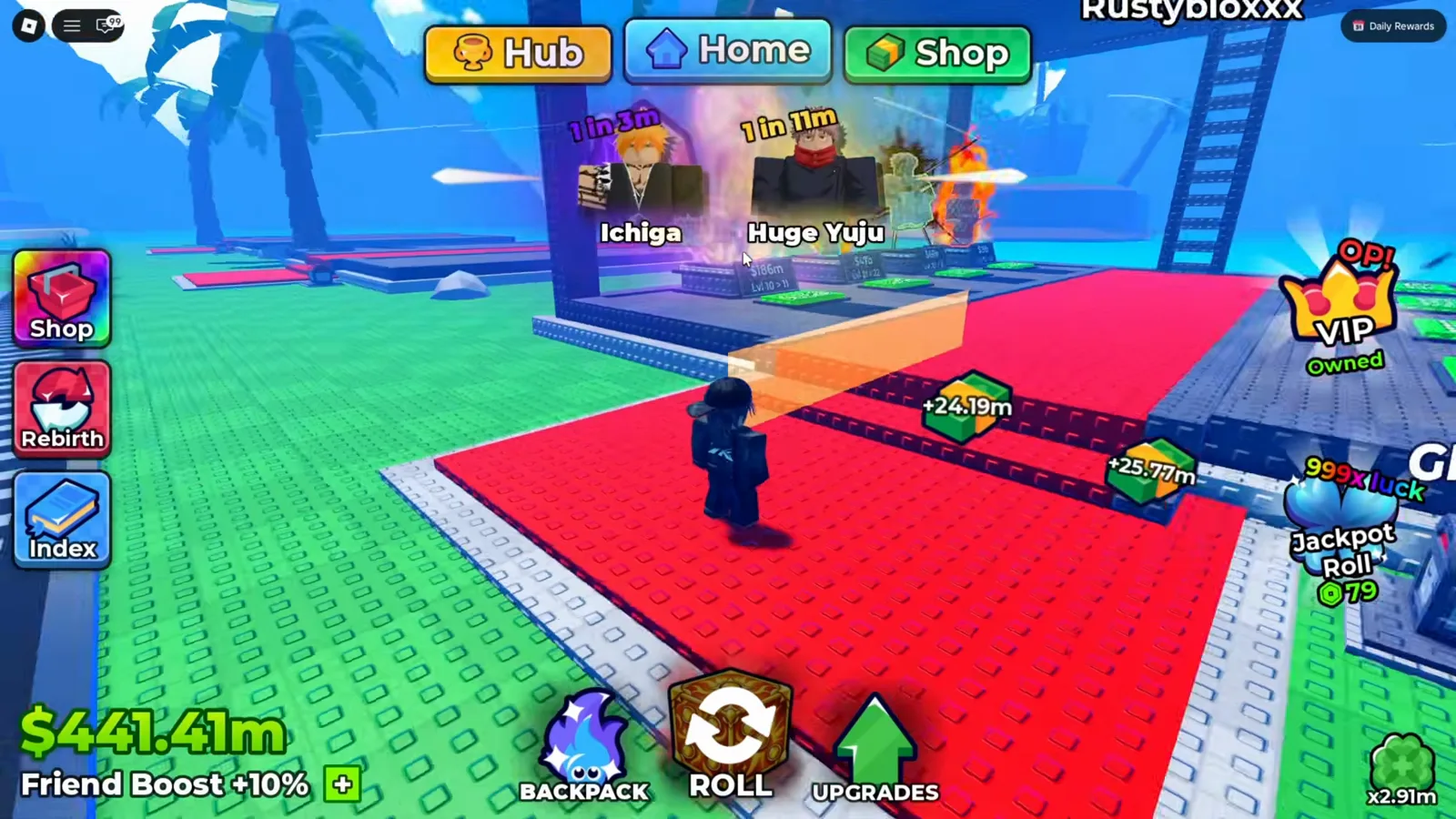
What survives a rebirth: the roster stays on its pads, and the counter climbs again within seconds.
Watch the team recover at 38:18
What we cannot do is carry that model forward as if it were current. The cash-reset warning and the cost bar belong to frames taken at UPD 4 and UPD 5, the UPD 7 window prints neither, and our UPD 7 recording never catches a rebirth click. If your panel still shows the two-row offer, this section is your reference; if it shows the six paths, the top of this page is.
When Should You Spend a Rebirth Point?
Three rules follow from what the window actually prints, and they are the rules we would follow with a counter showing points:
- Spend it the moment you have it. The counter is unspent currency; nothing on the panel prints interest or a cap, and our account walked into one frame with eight points sitting idle while five of six paths read zero.
- Feed Money first if you are still building cash. It is the only path with a measured rate on this page (+10% a level), and cash is what buys dice, plot levels and the cash nodes in the upgrade tree.
- Keep
Grade Luckin mind once your Grades ladder is your bottleneck. The row exists, it is one of the six, and the Grades panel rolls one Gem per attempt against odds that start getting expensive aboveS+.
The changelog post is also explicit that the tier count grew: its NEW REBIRTHS block reads Added 2 new Rebirths, with Push your progression even further and unlock stronger bonuses. printed underneath. That is worth reading alongside this window, since it says there are more rebirth tiers than the build our UPD 4 and UPD 5 frames captured. The full patch context lives in our Update 7 guide and the update history.
Numbers We Deliberately Did Not Print
We did not print a cost for the next rebirth at UPD 7 (no frame shows one), a max rebirth or a max level for any path (nothing on the window prints a ceiling), a rate for the five paths that stayed at zero, or a max Rebirth Points balance. We also did not print the reset as free — the only price attached to it in our frames is the 36 Robux item. If your window shows a path we have not measured, the contact page takes screenshots and credits them.
Related Articles
guides
Anime Dice Update 7: Rebirth Upgrade Points, Third Base Floor and New Dice
Anime Dice UPD 7 read off frames: the developer's own patch notes, the 6-path Rebirth Stats panel, and a purchase confirmation. Checked 7 October 2026.
guides
Anime Dice Money: Where Cash Comes From, Read Frame by Frame
Anime Dice money read frame by frame: the cash counter's k-to-oc suffix ladder, the $/s income every unit card prints, and the breakdown no screen ever shows.
guides
Anime Dice Probability and Roll Odds: The 1 in N Screens
Anime Dice prints unit odds as 1 in N and trait odds as percentages, never as one drop table. Frame-by-frame readings plus the arithmetic the game leaves out.
Was this helpful?
Thanks for the feedback!