Anime Dice Unit List: What the In-Game Index Actually Prints
The Anime Dice Index read frame by frame: the blue book button, the None, Huge and Titanic buttons, a ladder to 1 in 40qd and a second session ending at 1 in 4sp.
Perguntas frequentes
Is there an official unit list in Anime Dice?
What do the None, Huge and Titanic buttons in the Index switch?
What does the number on each Index card mean?
What is the rarest unit in the Anime Dice Index?
Is the Index the same as a tier list?
Why does Almait say Celestial in the Index and Secret I in the Backpack?
What parts of the Index could not be read?
What Is the Index in Anime Dice?
The Index is the game’s own unit registry: a scrollable grid of character portraits, one card per character, each stamped with the odds of rolling it. You reach it from a blue book button on the left rail, and it is the only screen in the client that lays the units out end to end.
It is also the screen this site had never seen. Our character tier list was built by transcribing nameplates one at a time off other people’s hub footage, and it ended with an explicit apology — the Index button had never once been opened on camera in anything we reviewed, and if it held a unit list with rates, that screen should have superseded the table.
It does not supersede it. It answers a different question. The Index is a registry: it sorts by ascending odds, prints no scores, ranks nothing, and never tells you which unit is worth your roll. A tier list is a ranking, and it has to be built by hand on top of the registry’s numbers. Those are two different intents, so they stay two different pages. What the Index does change is the raw material the ranking is made of — and that part is worth reading carefully, because some of it contradicts what we published in September.
Every screen below is a frame from one recording, opened and checked at full resolution:
Every frame on this page is read at native 1920×1080, and each one carries a deep link to the second it was taken from:
Sources: the captures on this page are frames from no-facecam, no-burned-caption screen recordings, each checked at full resolution on 22 September 2026: Plique Games’ UPD 5 session (about 11½ minutes, Portuguese narration with auto-translated English captions). The Index is open on screen from roughly 0:39 to 0:51 and appears nowhere else in the video, so every reading from that session comes out of those twelve seconds. Spoken lines are quoted from auto-generated captions and the wording is approximate; where a caption and the screen disagree, we print the screen. The developer publishes no changelog and no unit table — everything below is what the panel showed. One reading was re-checked on 29 September 2026 against a second, independent Plique Games recording (UPD 5 session, checked frame by frame at 1920×1080): its Index panel is open from about 2:33 to 2:46 and is where the right-edge icon count below is settled.
Second source, added 4 October 2026: the same panel is open in Xou Blox’s UPD 5 roll session — uploaded 20 September 2026, 22 minutes 07 seconds, Portuguese narration with auto-translated English captions — from about 0:30 to 0:34, and the three frames in the “second reading” section below were pulled from inside that window and re-read at native resolution on 2026-10-04. Frame honesty note: that upload carries creator caption cards burned over the picture at other seconds (an opening card at 0:12, a red
TODOSat 0:28,CURTIRat 0:36–0:38,REVANCHEat 0:40, white question marks at 0:48–0:56,COMENTA AÍ!at 4:00 and 20:12, and a burned1 in 2,500,000figure at 9:48). None of the frames used on this page contains any of them — each was checked at full resolution before publishing. Two of the three frames carry the game’s own floating cash toasts, which we leave in rather than hide, because they are part of the screen.

The Plique Games session in which the Index panel is opened, scrolled from 1 in 2 to 1 in 40qd, and closed — all inside twelve seconds near the start
How Do You Open the Index?
Third button down on the left rail, under Shop and Rebirth, a blue book with the word Index printed beneath it. One click opens the panel over the hub.
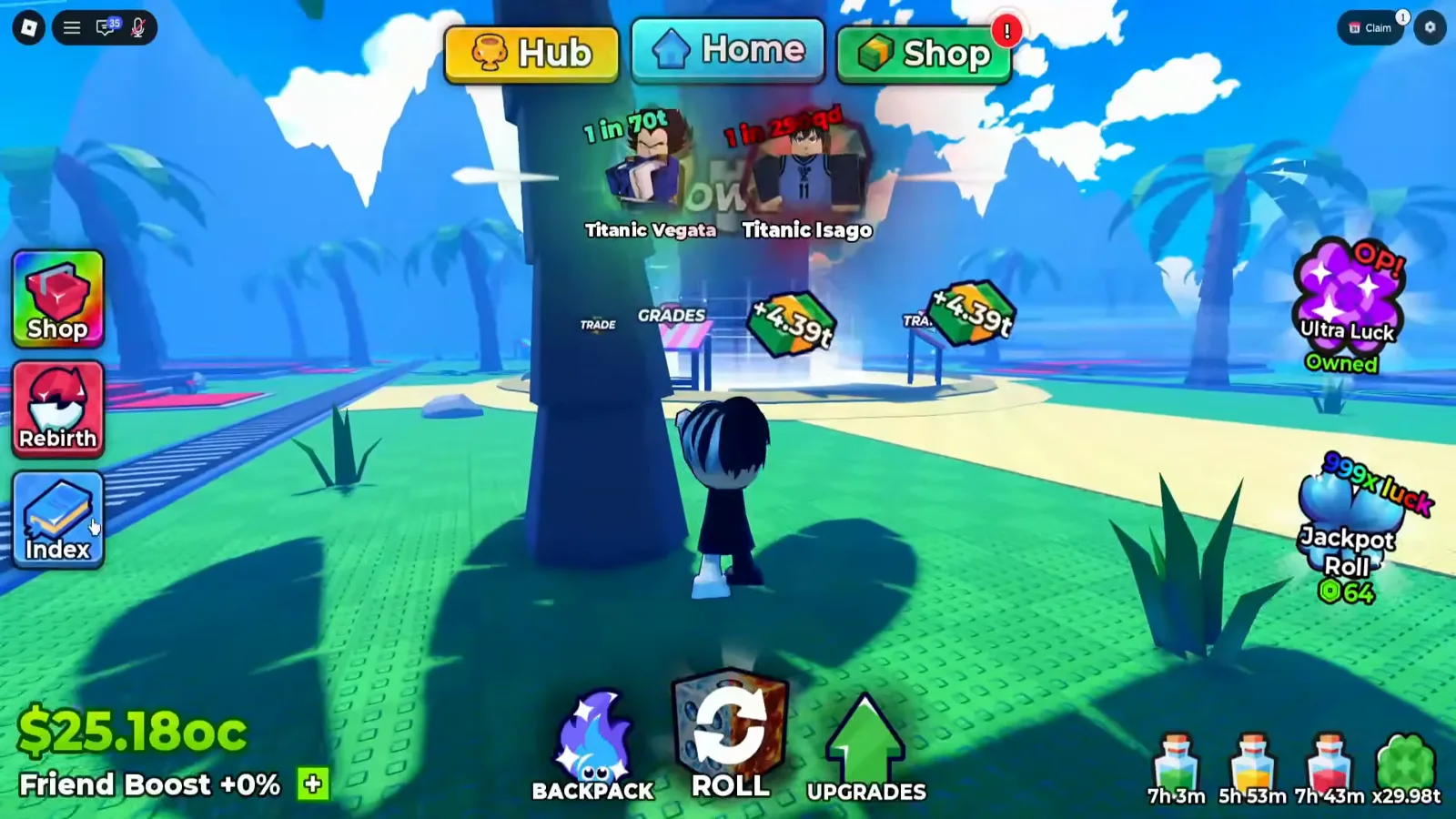
It has been in this corner the whole time. The button is visible in almost every hub frame the game produces.
Watch the cursor land on the Index button at 0:39
The panel that opens has a blue title bar carrying the same book icon, the word Index, and a red X at the right. Down the left edge sit three labelled buttons. Down the right edge, a scrollable column of unlabelled icons, six of them in view at a time. In between: a grid of four cards across, with a thin scrollbar at its right.
What Do the None, Huge and Titanic Buttons Switch?
We can read the three words. We cannot read what they do, and the obvious answer is wrong.
The buttons are stacked None (grey frame), Huge (blue frame), Titanic (red frame). Those are the game’s size prefixes — the same words that appear on hub nameplates as Huge Okarin and Titanic Angel, and on Backpack cards as Titanic Almait. So the natural guess is that they filter the grid to one size class, with the red frame marking the active one.
That guess does not survive the footage. The red frame on Titanic is present in every frame of the twelve-second window, including the frames whose cards are plainly not Titanic units — the panel’s opening screen lists characters at 1 in 2, 1 in 3, 1 in 4 and 1 in 6, and the one tooltip we caught in that band names the card Krillan with the word Common. No size prefix, quadrillion-scale odds nowhere in sight. And no frame shows any of the three buttons being clicked, or their styling changing.
So the red is a permanent colour, not a selection indicator. What the three buttons actually switch — size class, model variant, something else — is unconfirmed, and we are not going to print a rule we invented.
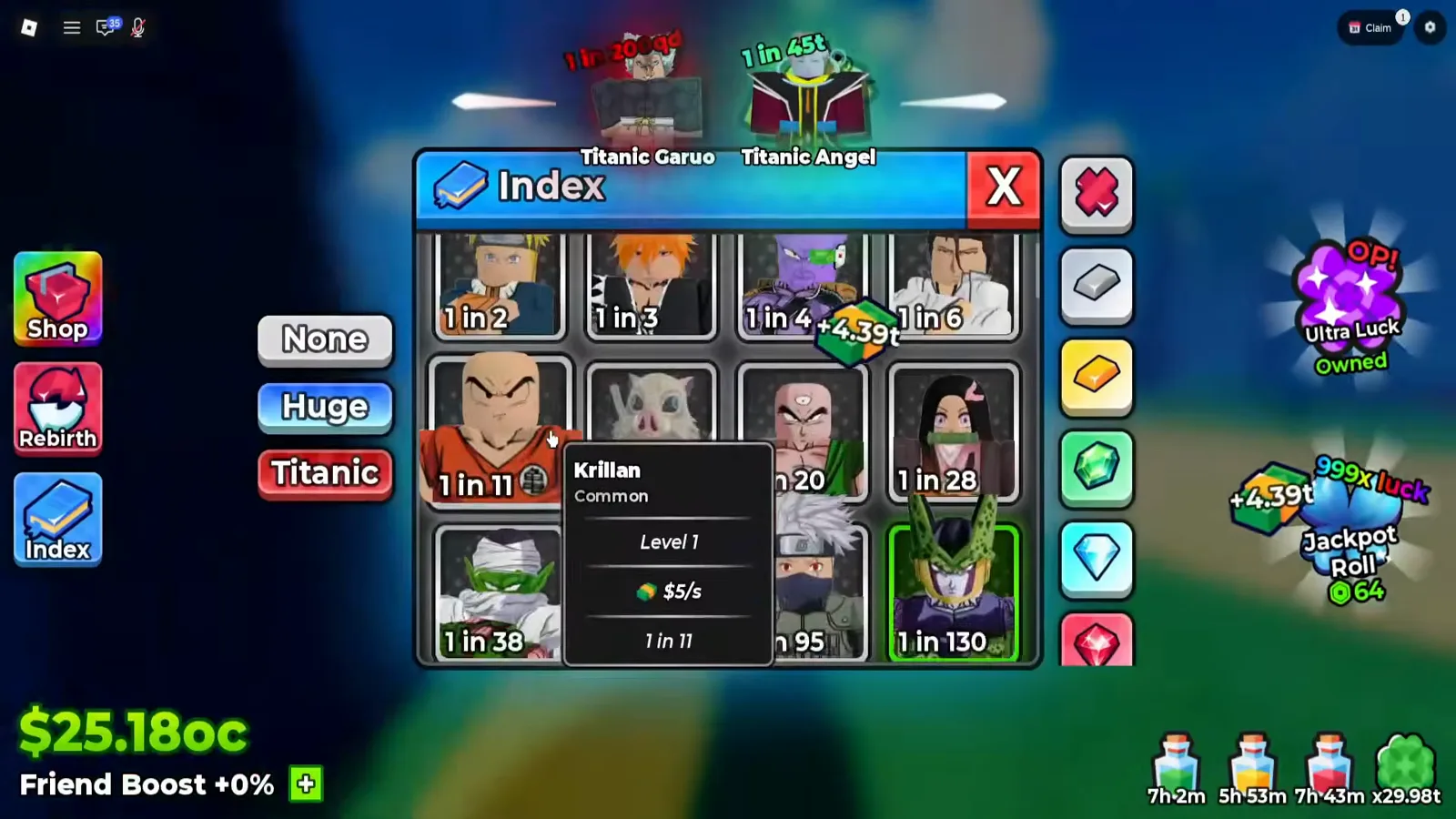
Ten of the twelve cards on this first screen are legible; the tooltip covers two. Note that the red Titanic frame is already here, at the bottom of the ladder.
Watch the panel open on the head of the ladder at 0:39
The icons down the right edge are equally unread, and the bar scrolls rather than stopping at six. A red crossed emblem sits at the top, then a grey ingot, a gold ingot, a green gem, a light-blue gem and a red gem fill the six slots in view — but re-checking the same panel in a second recording on 29 September 2026, the top slot holds the red emblem at 2:37, a grey ingot at 2:39, and a rainbow gem has newly scrolled in at the bottom. So the column carries at least seven different icons while never showing more than six. Those shapes reappear as corner badges on the Backpack’s unit cards, which is suggestive of a filter or a legend — but none of them is labelled, none is shown being pressed, and no tooltip opens on any of them.
What Does Each Index Card Print?
The card itself prints exactly one thing: a 1 in figure. Everything else lives in the tooltip, which opens on hover and carries four lines under the name.
Seven tooltips opened during the twelve seconds. All seven are transcribed below, in the order they appear on the ladder:
| Card as printed | Name | Word | Level | Income | Odds line |
|---|---|---|---|---|---|
| 1 in 11 | Krillan | Common | Level 1 | $5/s | 1 in 11 |
| 1 in 3.5k | Goko | Rare | Level 1 | $371/s | 1 in 3.5k |
| 1 in 100t | Katakury | Exotic | Level 1 | $14b/s | 1 in 100t |
| 1 in 1.1qd | Almait | Celestial | Level 1 | $80b/s | 1 in 1.1qd |
| 1 in 2qd | Garuo | Celestial | Level 1 | $123b/s | 1 in 2qd |
| 1 in 3.6qd | Bruly | Celestial | Level 1 | $189b/s | 1 in 3.6qd |
| 1 in 22qd | Griffin | Celestial | Level 1 | $705b/s | 1 in 22qd |
Three things fall out of that table, and all three matter.
The card number and the tooltip number are the same number. Seven for seven. The 1 in on the face of a card is that unit’s roll odds, in the format the client uses on nameplates, on Fusing slots and everywhere else — not a value, not a weight, not a score.
Every tooltip reads Level 1. Not the creator’s levels — his owned cards in the Backpack sit at all sorts of levels. A panel that shows every character at Level 1 is a catalogue, not an inventory.
Income rises with odds, all the way up. $5/s, $371/s, $14b/s, $80b/s, $123b/s, $189b/s, $705b/s against 1 in 11, 3.5k, 100t, 1.1qd, 2qd, 3.6qd, 22qd — monotonic across seven samples spanning eleven orders of magnitude. That is a per-character base income line, which is the number our tier list said the game never publishes.
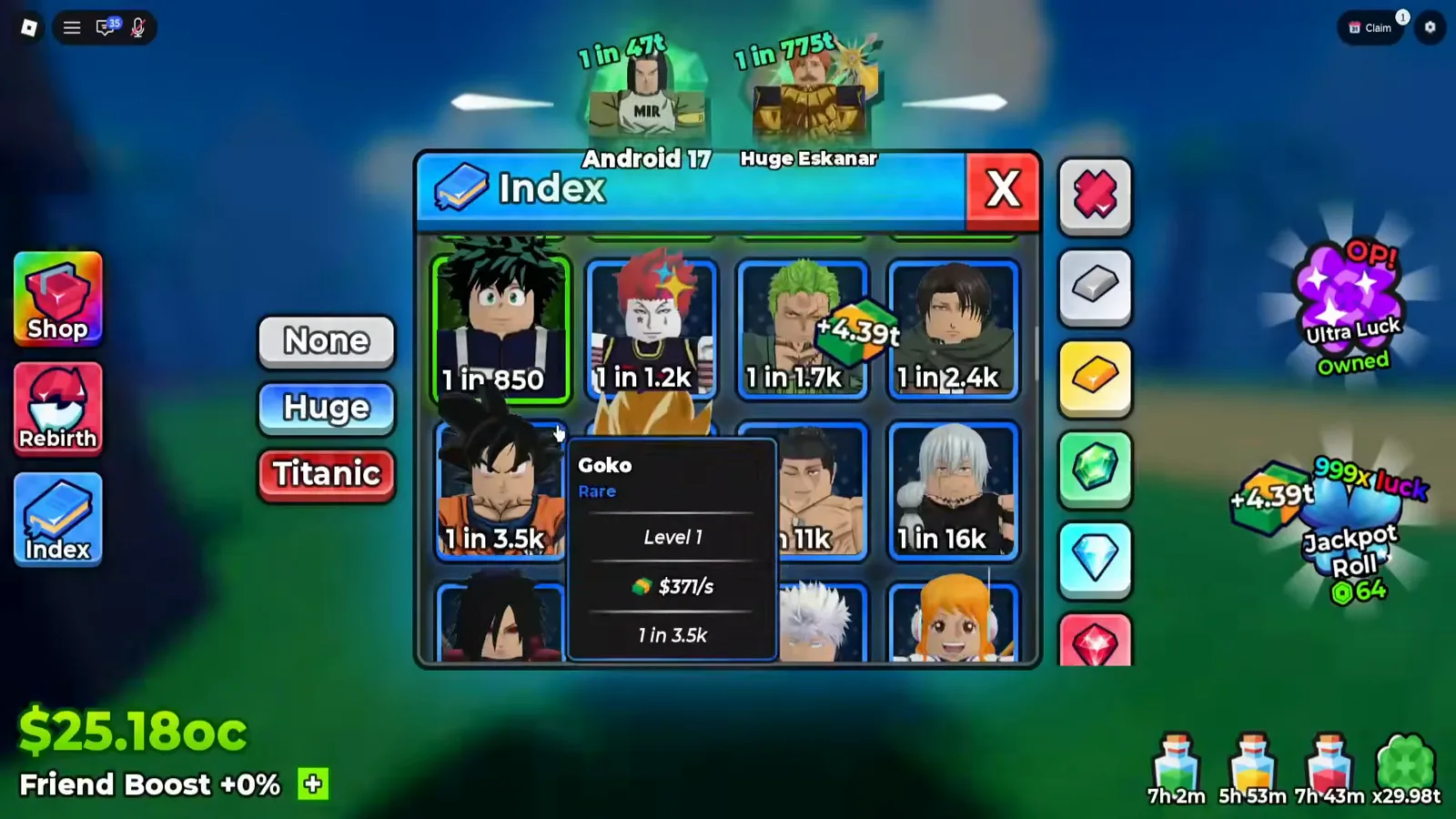
The odds labels climb left to right, then wrap — which is how we know this is one sorted list rather than a page of unrelated cards.
Watch the Goko tooltip at 0:40
What Is the Full Unit Odds Ladder?
Everything the creator scrolled past in twelve seconds, in order. Each value is read off the face of a card; the three gaps are stretches that crossed the viewport between our frames.
| Band | Cards as printed |
|---|---|
| Head | 1 in 2 · 1 in 3 · 1 in 4 · 1 in 6 · 1 in 11 · 1 in 20 · 1 in 28 · 1 in 38 · 1 in 95 · 1 in 130 |
| (gap) | |
| Thousands | 1 in 850 · 1 in 1.2k · 1 in 1.7k · 1 in 2.4k · 1 in 3.5k · 1 in 11k · 1 in 16k |
| (gap) | |
| Billions | 1 in 1.4b · 1 in 2.5b · 1 in 4.5b · 1 in 8b · 1 in 14b · 1 in 26b · 1 in 47b · 1 in 85b · 1 in 150b · 1 in 270b · 1 in 490b · 1 in 880b |
| (gap) | |
| Trillions | 1 in 1.6t · 1 in 2.9t · 1 in 5.2t · 1 in 9.4t · 1 in 17t · 1 in 31t · 1 in 56t · 1 in 100t · 1 in 180t · 1 in 330t · 1 in 600t |
| Quadrillions | 1 in 1.1qd · 1 in 2qd · 1 in 3.6qd · 1 in 6.5qd · 1 in 12qd · 1 in 22qd · 1 in 40qd |
That session’s list ends at 1 in 40qd. That is not an inference from where the scrolling stopped — at the bottom of the ladder the last row holds only two cards, and the two slots beside them are empty panel. What a two-card last row proves is the subject of the section below, where a later recording shows the same two-card ending at 1 in 4sp.
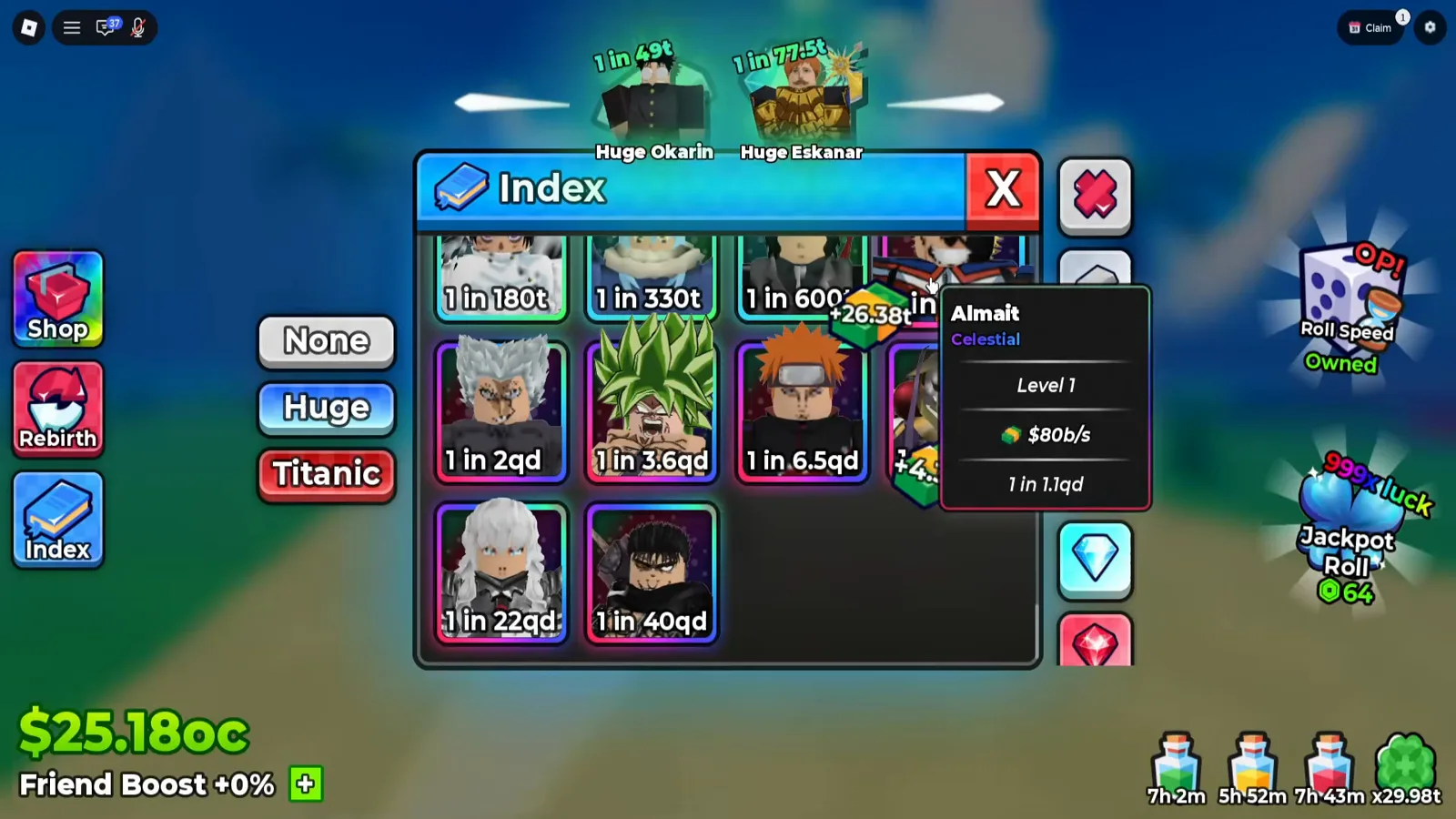
The Celestial band starts at 1 in 1.1qd and stops four entries up from where the creator stopped scrolling.
Watch the bottom of the ladder at 0:48
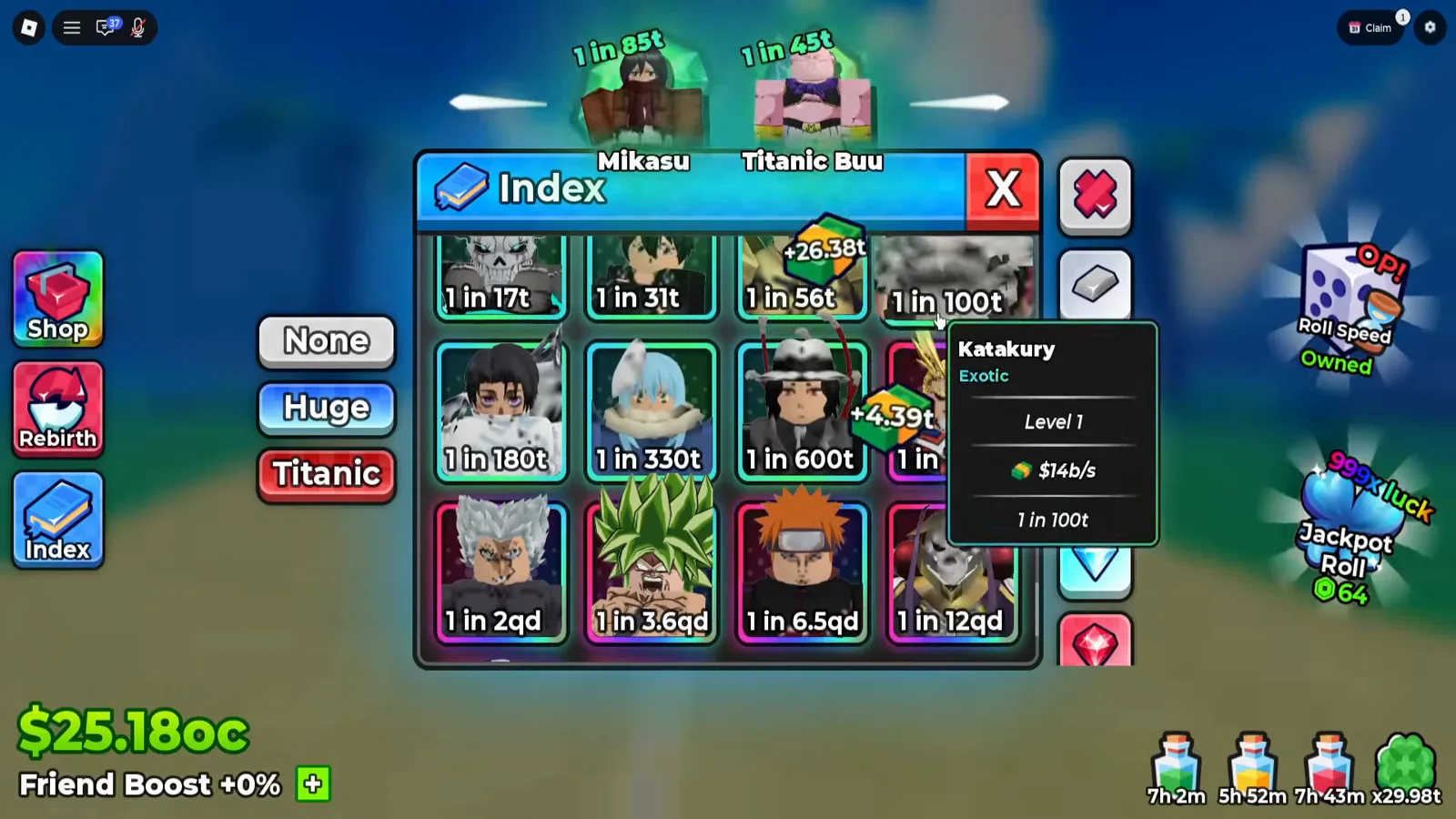
Exotic sits below Celestial on this ladder and above everything else we could hover — but with one sample we will not draw the rest of the staircase.
Watch the Katakury tooltip at 0:48
What Did a Second Session’s Index Show?
The ladder above is one session. This round the same panel turned up in a second, independent recording — Xou Blox’s roll session, uploaded 20 September 2026 — and it agrees with the first session on every structural detail while disagreeing with it on the one figure this page had been treating as a ceiling.
The furniture is identical: a blue title bar carrying the book icon and the word Index, a red X at the right, three labelled buttons down the left edge — None (grey), Huge (blue), Titanic (red) — a grid of unit cards in the middle, and a strip of unlabelled icons down the right edge. It is on screen from about 0:30 to 0:34, and the three frames below all come from inside that window.
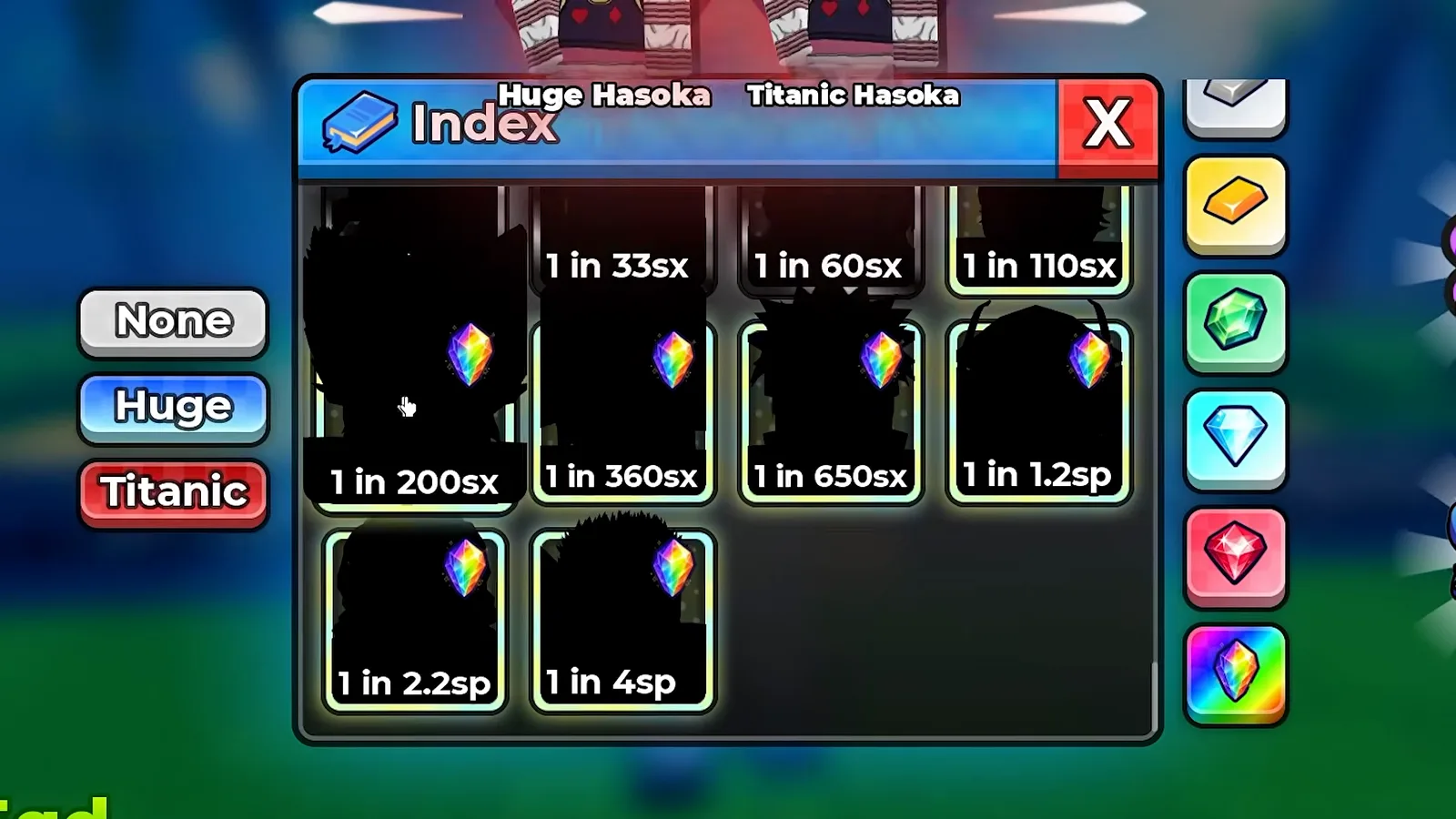
Four cards across. The two nameplates above the panel read Huge Hasoka and Titanic Hasoka — world signage floating behind the panel, not part of it.
Watch the Index panel with its size buttons and grid at 0:34
The grid is four cards across, and its last row holds two cards and two empty cells. Every card prints only its 1 in figure, in the same format the first session used. Read in order, the ten values in view are:
| Row | Cards as printed |
|---|---|
| First row (clipped at the top by the panel header) | 1 in 18sx · 1 in 33sx · 1 in 60sx · 1 in 110sx |
| Second row | 1 in 200sx · 1 in 360sx · 1 in 650sx · 1 in 1.2sp |
| Last row | 1 in 2.2sp · 1 in 4sp · (empty) · (empty) |
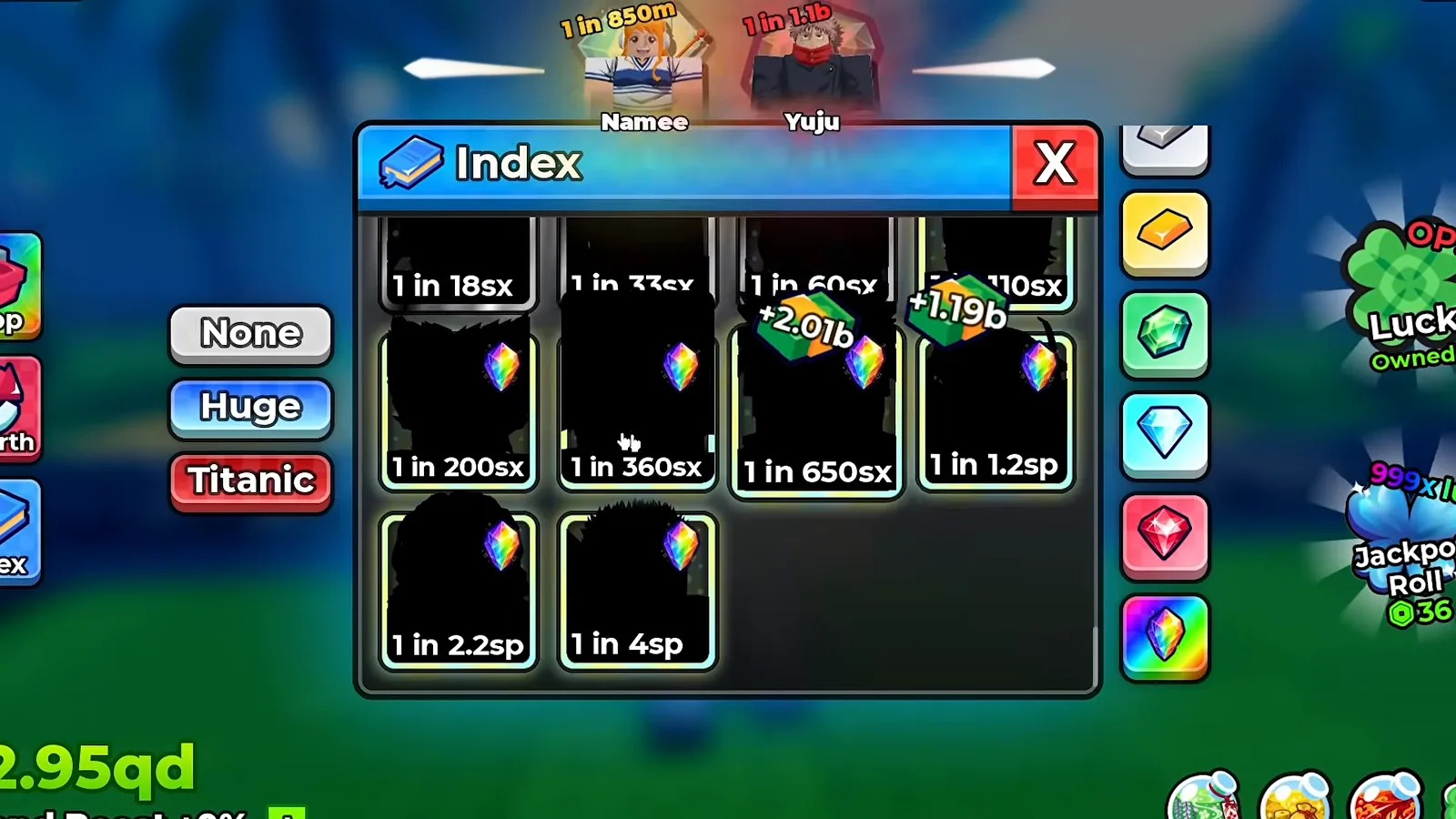
The only frame in the window where every one of the ten labels is clear of the dark portrait silhouettes. Two floating cash toasts cross the grid; the labels are not under them.
Watch the whole sx-to-sp grid with all ten odds at 0:32
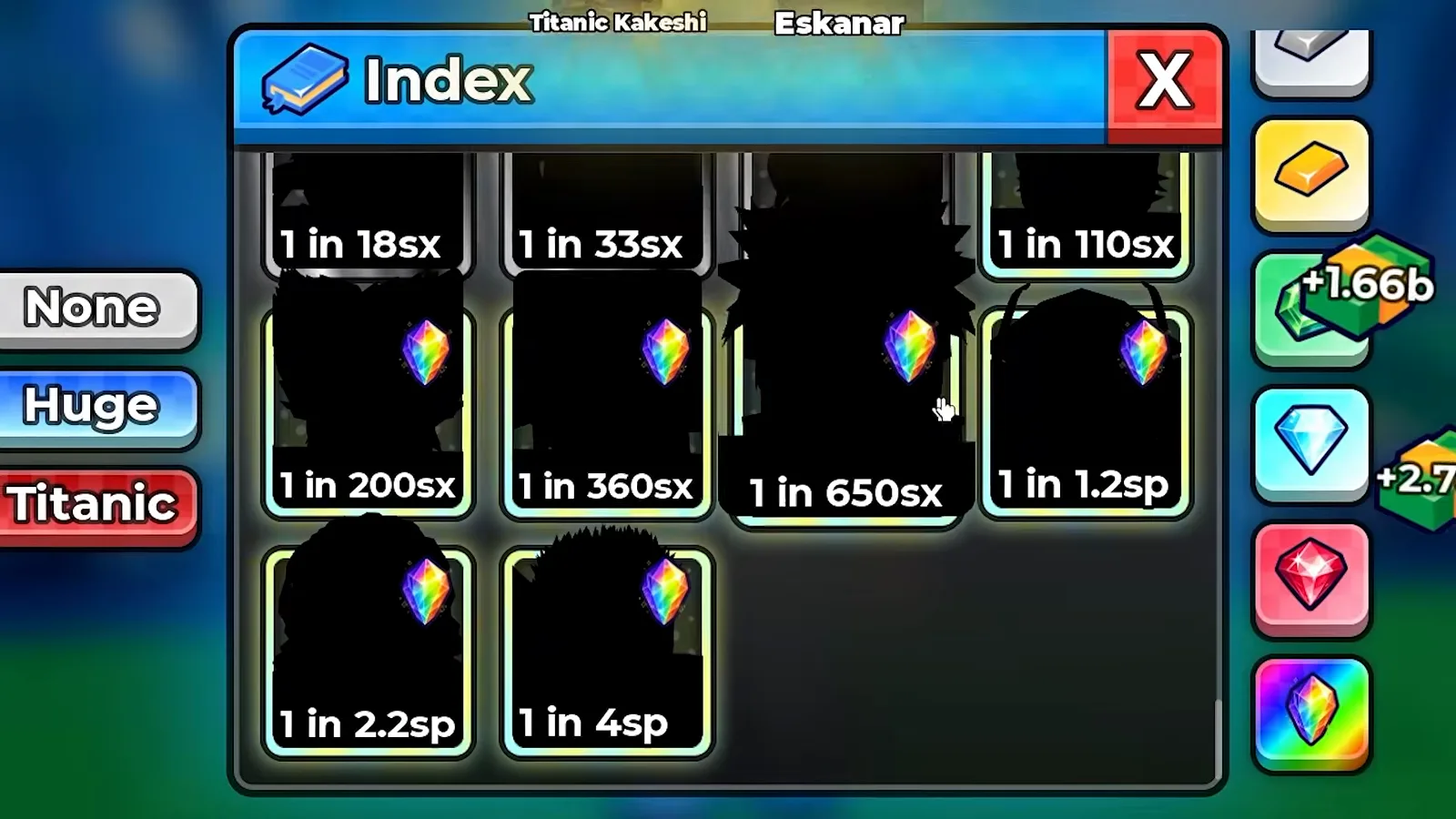
The same grid, two seconds earlier, with a different card covered. Every legible cell reads the same value in all three frames — which is how we know the panel’s contents did not change while it sat open.
Watch the same grid two seconds earlier at 0:30
That is a sorted ladder again — 18, 33, 60, 110, 200, 360, 650, then 1.2sp, 2.2sp and 4sp — and it ends the same way the first session’s list ended: in a row of two. But it ends about eight orders of magnitude further out — three steps on the client’s own suffix ladder, qd to qi to sx to sp, at a thousand apiece. The Plique session’s last card is 1 in 40qd; this session’s is 1 in 4sp, and every one of the ten values visible here sits beyond that ceiling.
What a 1 in figure actually claims, and what the game’s luck multiplier does to it, is not this page’s job: the roll odds page takes the same numbers apart. Neither is what the figures are worth — the Level 1 income line each card prints is one of the sources collected on the money hub page, and the board that ranks players on their rarest single pull is on the leaderboard page. This page’s job is the ladder, printed the way the panel prints it.
The strip down the right edge behaves the same way in this session: six tiles are in view at once, and not one of them is labelled. Top to bottom they are a silver ingot tile, a gold ingot tile, a green gem tile, a light-blue brilliant-cut diamond, a red brilliant-cut diamond and a rainbow crystal. No tooltip opens on any of them, none shows a hover state, and none is pressed in the window we captured. The earlier Plique recordings put a red crossed emblem in the top slot and scrolled a rainbow tile in at the bottom, so the strip clearly holds more than the six that fit — but exactly how many, and what any of them filters, is still not on any screen we have. Every card in the grid above also carries the same rainbow crystal badge in its corner, which is the last of the six tiles; whether that is a legend, a filter state or decoration is another thing the panel does not say.
How Does the Index Compare With Our Tier List?
This is the part that changes existing pages, so it is worth being exact about what agrees and what does not.
Where they agree. The tier list’s single highest reading was Angel at Mythical, 1 in 4.5b. The Index carries a card at exactly 1 in 4.5b, in the middle of its billions band. Two independent screens, two independent transcriptions, same number. And the tier list’s claim that odds belong to the card rather than to the rarity tier is corroborated by the Index itself — see the Almait problem below.
What the Index adds. Three rarity words the tier list has never printed: Common (1 in 11), Exotic (1 in 100t) and Celestial (1 in 1.1qd and above). The tier list’s own ceiling claim — that unit cards run Uncommon to Mythical and nothing sits above Mythical — is wrong against these frames. The ladder does not stop at Mythical; it keeps going for roughly four more orders of magnitude.
What the Index contradicts. The tier list says the game publishes no per-unit stat table and that income is a live value rather than a stat entry. The Index prints a Level 1 income for each character and it tracks odds monotonically across all seven tooltips we caught. That is a base income line, which is the thing the page said did not exist.
What neither screen explains. The Index lists one row per character at that character’s base odds. Your actual copies print their own. In the same session, 3:56, the Backpack shows a card reading Titanic Almait / Secret I / Level 1 / $63t/s / 1 in 11qi — same character the Index prices at 1 in 1.1qd and $80b/s, roughly ten thousand times rarer and nearly a thousand times richer. The game’s own roll feed, in the corner of the same frame, adds a third copy: Rainbow / Huge Almait / 1 in 11sx / $203qi/s.
It is not an isolated glitch. At 6:44 the Select roster hovers a card reading Griffin / Secret I / Level 1 / $3.7t/s / 1 in 220qd, while the Index’s Griffin sits one row up its own table at Griffin / Celestial / Level 1 / $705b/s / 1 in 22qd. Two characters, two inventory panels, the same disagreement: a word from the Celestial family in the catalogue and a Secret-series word on the copy. We cannot prove the two Griffins are the same entry — only that the client prints two different words and two different numbers for one name in two panels that both claim to say what a unit is.
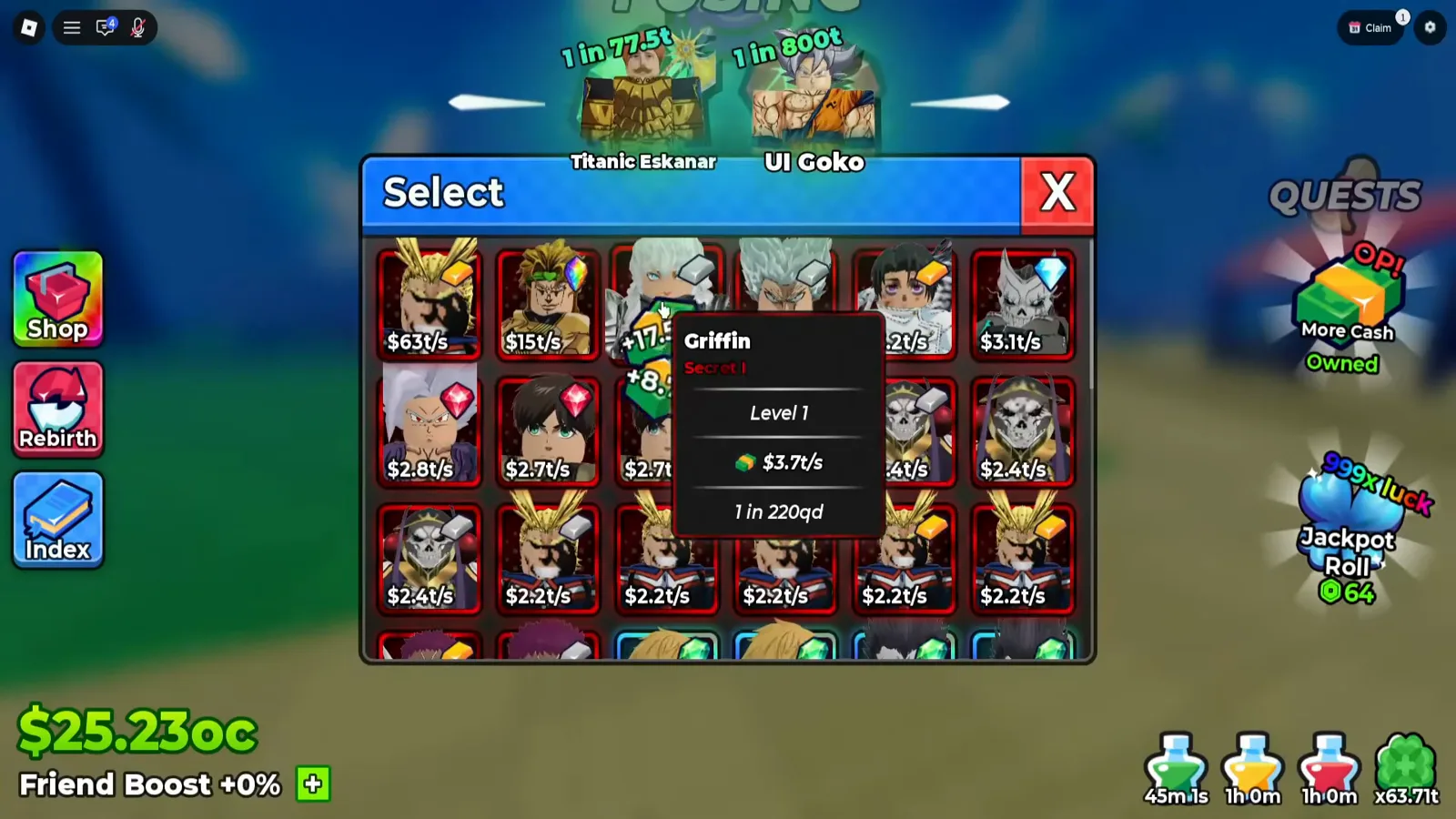
The Index ladder stops at 1 in 40qd. This copy prints 1 in 220qd — the client’s own roster holds figures its registry never reaches.
Watch the Griffin tooltip at 6:44
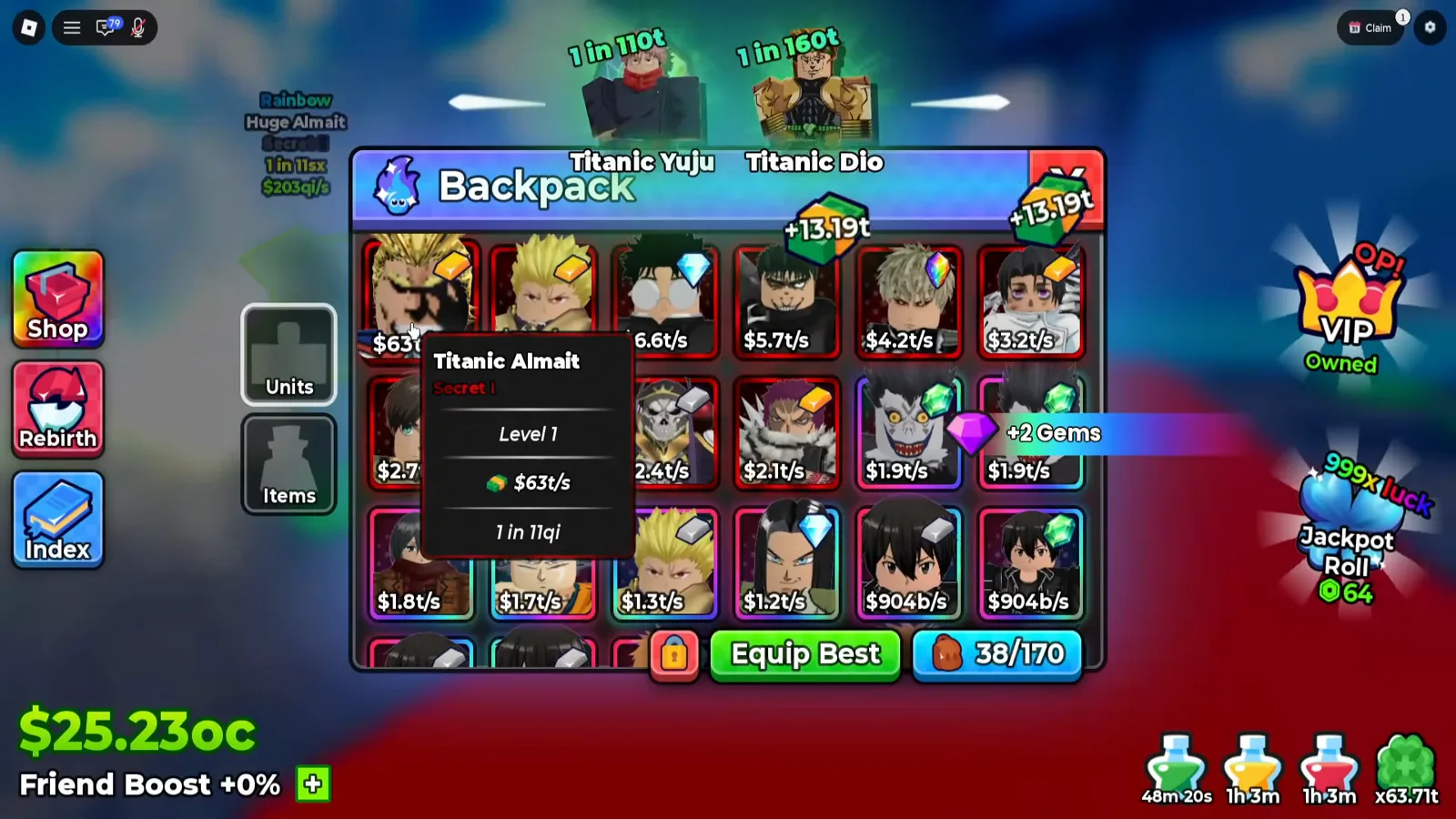
Three Almait numbers in one session. The Index gives you the character; the Backpack gives you the copy; the feed gives you the roll.
Watch the Backpack tooltip at 3:56
The Index has no Equip Best button and no capacity counter. The Backpack has both, plus its own Units / Items tabs. That is the cleanest structural proof that the two panels answer different questions — one asks what exists, the other asks what you are carrying.
So which number should you chase?
The Index figure, for planning. It is the advertised odds for the character itself, sorted low to high, and it is the only ladder the game lays out for you. The card figure, for judging what you actually pulled — because copies roll their own odds, and the Almait triple above shows how far apart those can be.
Neither number tells you whether a unit is good. That is still an editorial call, and it is the tier list’s job: which characters are worth the levels, which deserve a rerolled Grade multiplier, and which traits to spend Trade Shards on are covered there and on the best traits page. The Index hands you the roster; it does not rank it.
Artigos relacionados
guides
Anime Dice Update 7: Rebirth Upgrade Points, Third Base Floor and New Dice
Anime Dice UPD 7 read off frames: the developer's own patch notes, the 6-path Rebirth Stats panel, and a purchase confirmation. Checked 7 October 2026.
guides
Anime Dice Money: Where Cash Comes From, Read Frame by Frame
Anime Dice money read frame by frame: the cash counter's k-to-oc suffix ladder, the $/s income every unit card prints, and the breakdown no screen ever shows.
guides
Anime Dice Probability and Roll Odds: The 1 in N Screens
Anime Dice prints unit odds as 1 in N and trait odds as percentages, never as one drop table. Frame-by-frame readings plus the arithmetic the game leaves out.
Isso foi útil?
Obrigado pelo feedback!