Anime Dice Mutations: Diamond, Ruby, Emerald & Rainbow Cards
How Anime Dice mutations work: the Diamond, Ruby, Emerald and Rainbow labels, how they differ from rarity, grades and traits — verified frame by frame on video.
FAQ
What is a mutation in Anime Dice?
Is a mutation the same thing as rarity, a grade or a trait?
What do Huge and Titanic mean on an Anime Dice unit?
How many rarities does Anime Dice have?
Does a mutation make a unit stronger?
What Is a Mutation in Anime Dice?
A mutation is a small colored label that prints above a character’s name on its unit card — Diamond, Ruby, Emerald and Rainbow are the four we could read directly from the screen across four playthrough videos. Within the frames this page was built from, nothing changes about the character’s name or its rarity line: the mutation adds a word and a color to the top of the card. Two UPD 5 screens are less tidy — the in-game Index lists Almait as Celestial at 1 in 1.1qd while that same session’s Backpack holds a Titanic Almait at Secret I and 1 in 11qi — and that panel also prints a rarity word, Exotic, which no placed card here ever showed. In the Upgrades panel below, an Emerald-labeled Rare sits next to plain Rare and Epic units, which is the clearest place to see the label in context.
Everything on this page comes from frames we checked one by one:
Source: the screenshots and timestamps here are frames from the Superlex Plays series on Anime Dice, led by How to become UNSTOPPABLE in Anime Dice Roblox (September 2026), where the creator points at a Diamond unit and works out himself that the label is a mutation, not a trait. The other three sessions in the series — ROBLOX ANIME DICE.., How to become OVERPOWERED and HOW TO GET 100,000x LUCK DICE! + RAINBOW GRADES — corroborate the labels and the grade ladder.

The Superlex Plays session where the Diamond mutation label is identified on screen

The colored word above the name is the whole mutation system in one glance.
Watch the Emerald card at 9:45
Mutations, Rarity, Grades and Traits Are Four Different Systems
The single biggest source of confusion for new players is that one unit card stacks four independent labels. Keep them apart and everything else falls into place:
| System | Where it shows | What it controls | Seen in the footage as |
|---|---|---|---|
| Rarity | Its own line on the card | Base income tier of the character | Uncommon · Rare · Epic · Legendary · Mythical |
| Mutation | Colored label above the name | A distinct collectible version of a unit | Diamond · Ruby · Emerald · Rainbow |
| Grade | Letter in the Grades menu / unit card | Income multiplier on that unit | B · A · A+ · S · S+ · Z |
| Trait | Name + level on the Trait panel | Passive income / damage / health bonus | Health III, Damage levels, tiered traits |
This is not our guess — the creator runs into it live at the 13:13 mark when he pulls a Diamond card and says, in effect, “wait, isn’t that a trait? No — I think it’s a mutation.” He is separating the label from the trait panel, which is exactly the distinction that trips up players. For the trait side of that line, see the traits reroll priority guide.
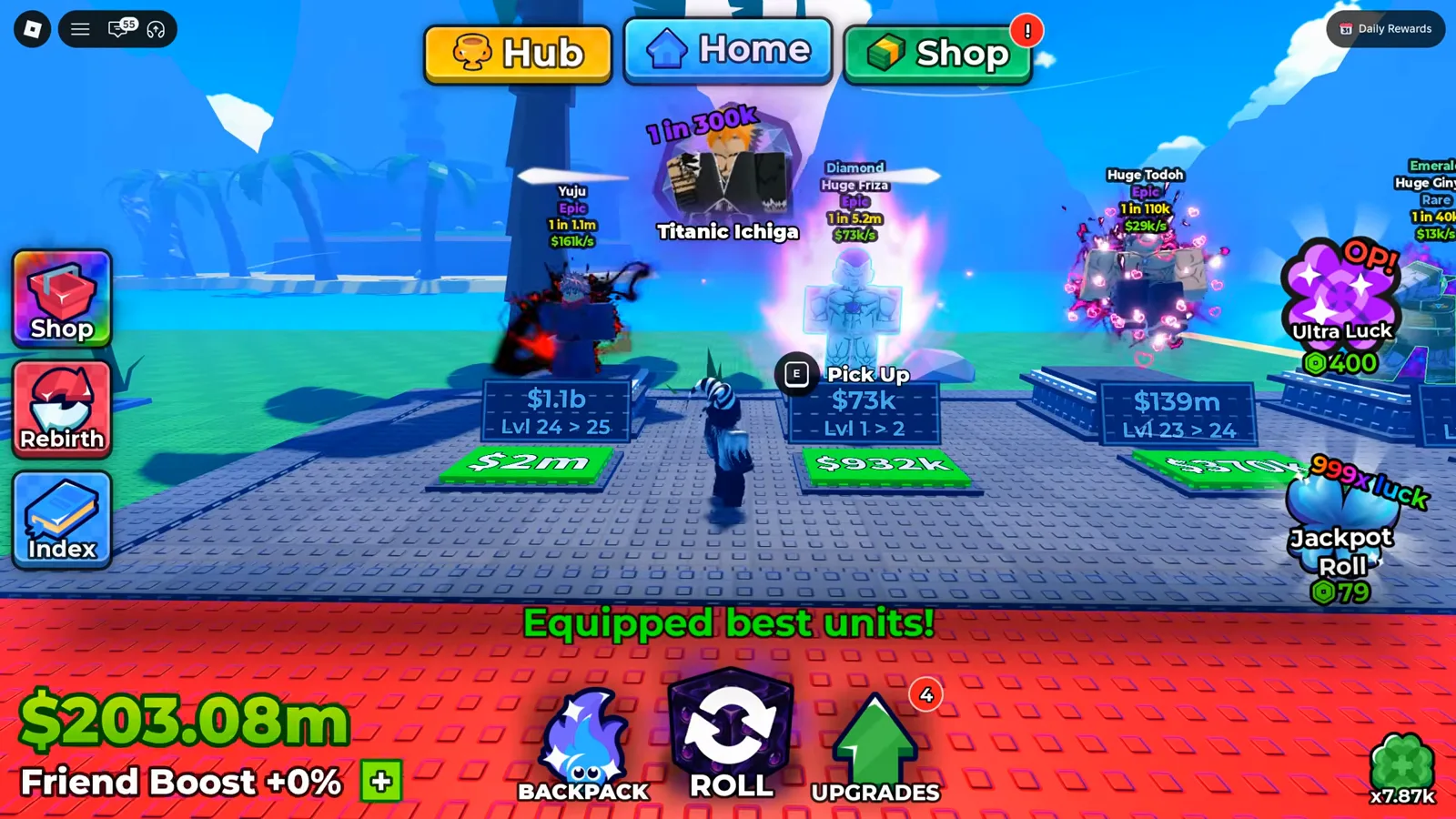
Read the card top to bottom: mutation label, then name, then rarity, then income.
Watch the labeled card panel at 4:00
Where Mutations Show Up on the Card
You do not open a special menu to see mutations — they live on the unit cards in the Upgrades and Backpack panels, in the slot just above the character’s name. In the frame below, two Legendary units carry Ruby and Diamond labels while a third, Titanic Friza, shows the same Legendary rarity with no mutation label at all. That is the proof that mutation and rarity are independent: the rarity line is identical across all three, but only two have the colored word.
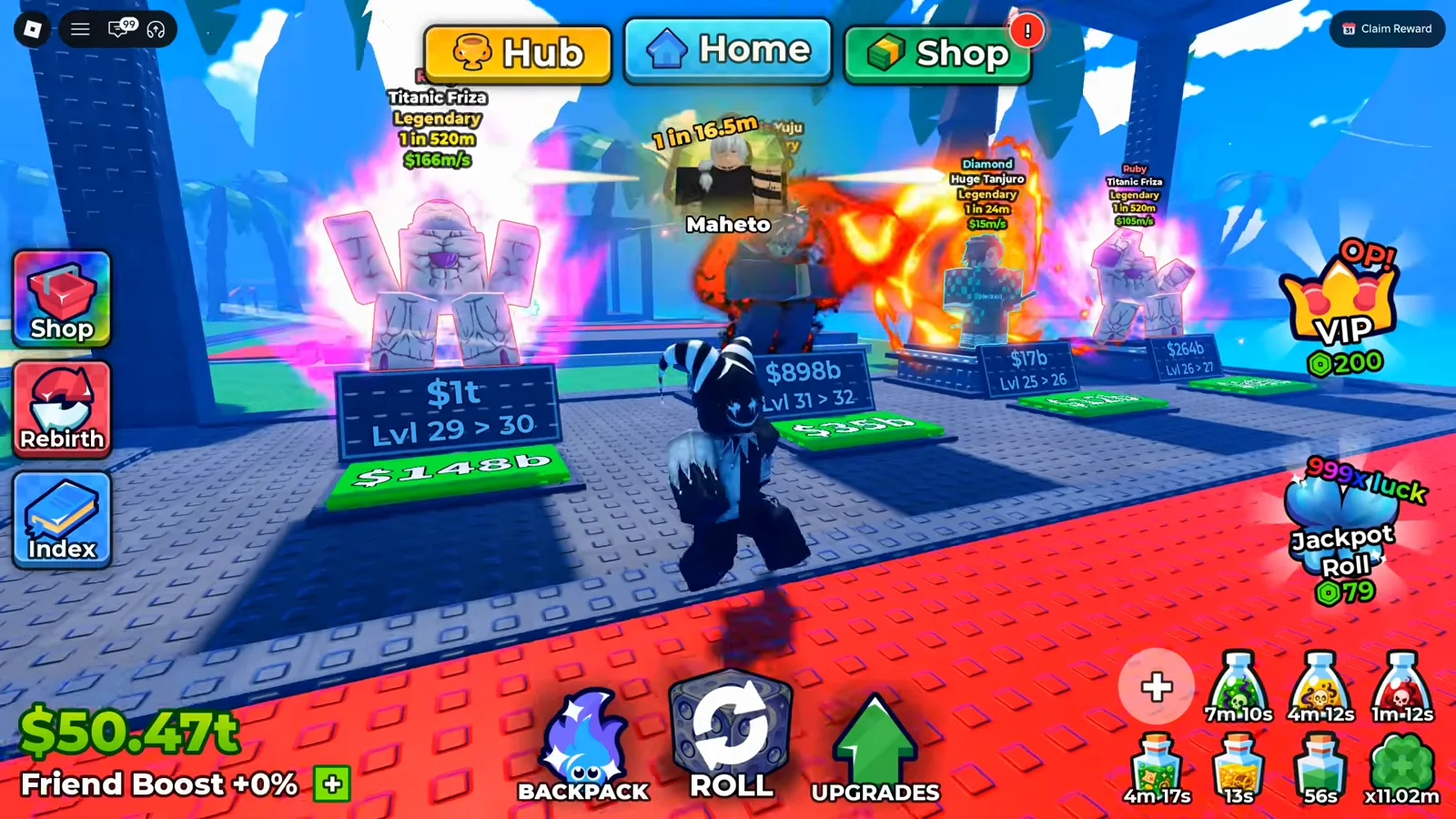
The label above Huge Tanjuro and Titanic Friza is the mutation; the word Legendary is the rarity.
Watch the Diamond reveal at 13:13
Huge and Titanic are not mutations
The words Huge and Titanic appear constantly in the footage (Huge Tanjuro, Titanic Friza, Huge Ginyou…). They are size prefixes inside the name itself, not the colored mutation label. A unit can wear a Huge or Titanic prefix and still carry a Diamond or Ruby tag above it, so don’t confuse the two — one belongs to the name, the other floats over it.
How Grades Stack on Top of Mutations
If mutations are a cosmetic label, the grade is where a unit’s income actually multiplies. Opening the Grades menu shows a ladder of letters, each carrying a bigger cash multiplier than the one below, with an Auto Roll toggle and a probability column beside every tier. Each attempt spends one shard from your stack (the panel prints the counter as owned/per-roll), and a higher letter means that unit prints more cash per second — independent of any mutation label it may carry.
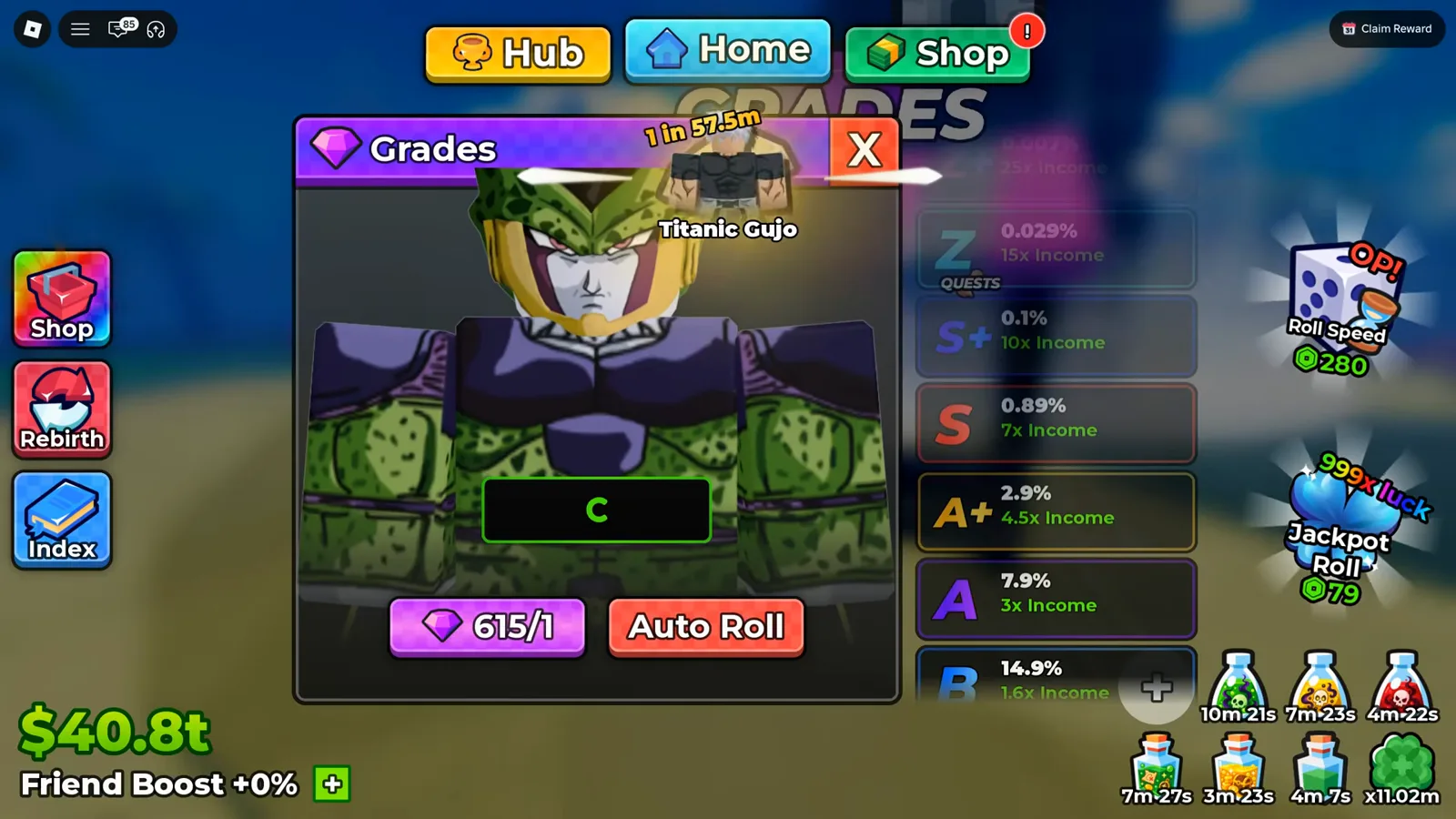
Every tier here is an income multiplier you can roll onto a unit you already own.
Because grade and mutation are different fields, they stack. In the next frame a Diamond-labeled Legendary carries a Grade of S+ — the mutation on top, the rolled grade multiplying its income below, on the same card.
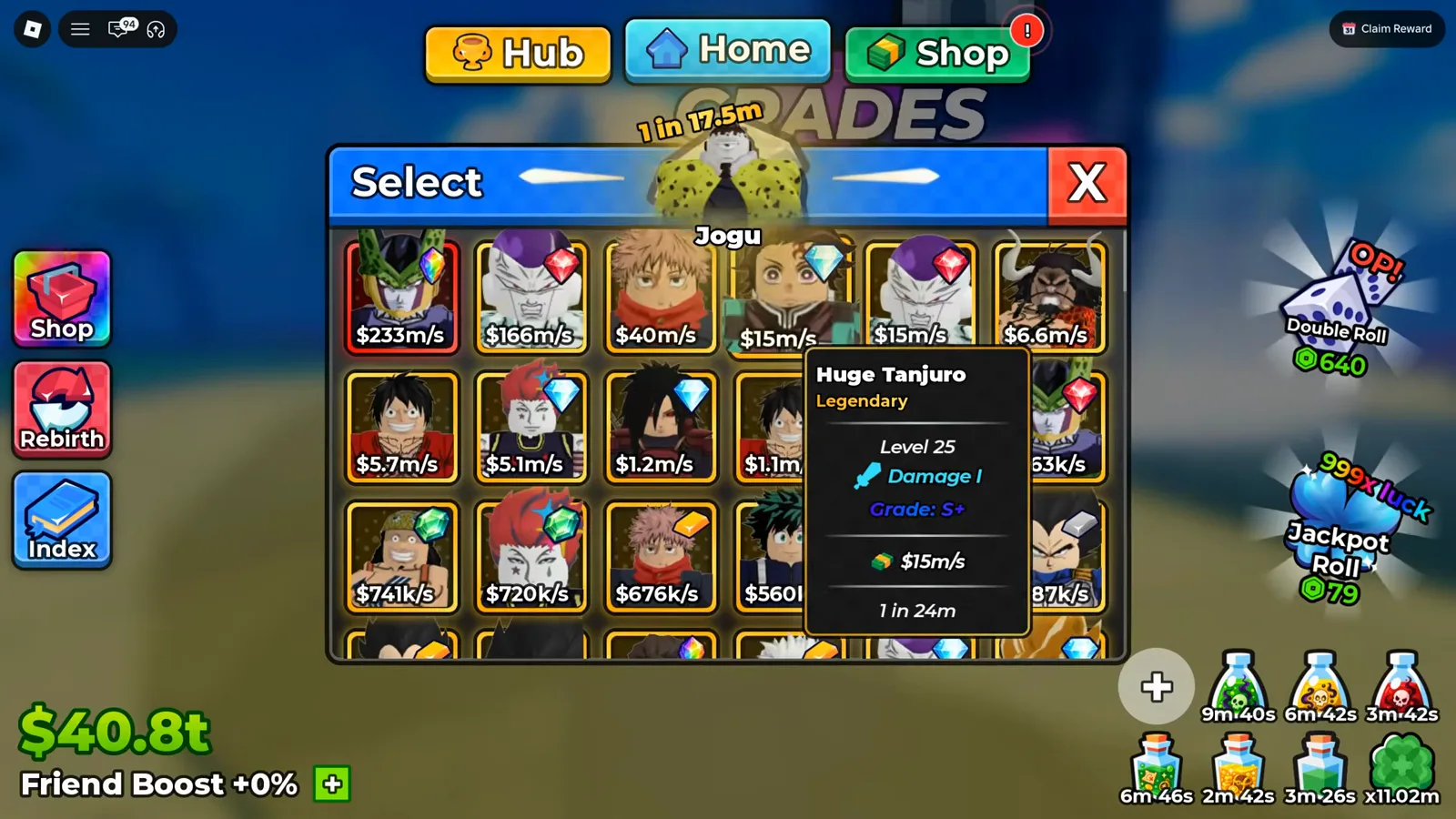
The Diamond tag does not change the rarity line; the S+ grade is what raises the income.
Watch the S+ grade on a Diamond card at 4:18
How Rarity Actually Drives Your Income
Mutations are the flashy part, but the tier that moves your economy is rarity and how fast you climb it. Across the four sessions the cards we could read span Rare → Epic → Legendary → Mythical, each tier printing dramatically more cash per second than the last. You reach the higher tiers by buying better dice and stacking luck, not by chasing mutation labels — a mutated Rare is still a Rare.
Mythical with a Rainbow label. The rarest card in the footage is a Mythical Huge Perfect Zell carrying a Rainbow label. It is the same two-field story: Mythical is the rarity, Rainbow is the mutation on top of it.
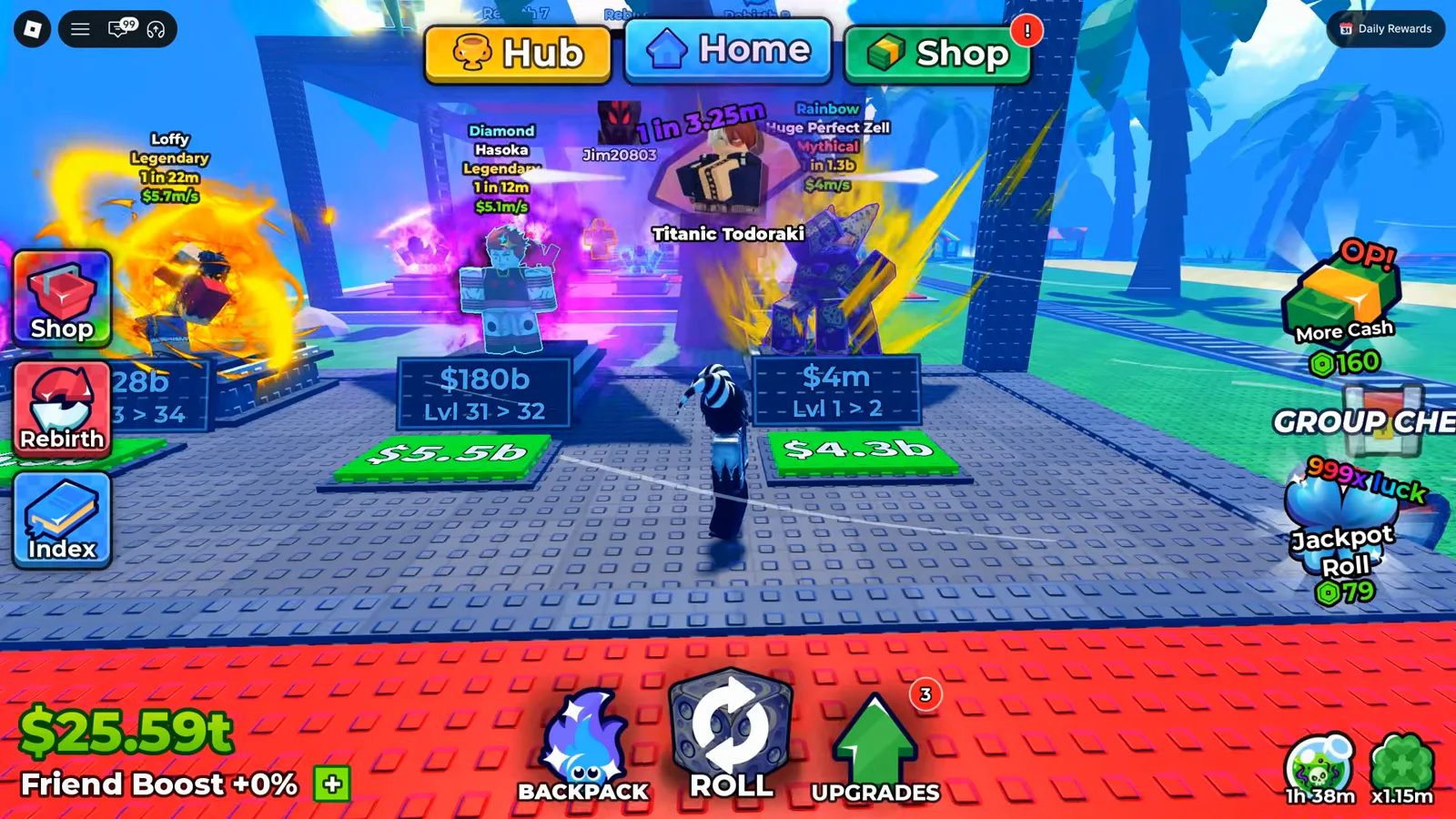
Rainbow is the label; Mythical is what actually makes it valuable.
Watch the Rainbow Mythical at 25:33
To climb that rarity ladder efficiently, the real decisions are slot-versus-block and when to spend luck — both walked through in the beginner progression guide and the block upgrade priorities guide. Once a high-rarity unit is sitting on your plot, pick its grade and traits with the character tier list and the traits guide, and top up your reroll currency from live Anime Dice codes before you sink shards into a card you are about to replace.
Related Articles
guides
Anime Dice Update 7: Rebirth Upgrade Points, Third Base Floor and New Dice
Anime Dice UPD 7 read off frames: the developer's own patch notes, the 6-path Rebirth Stats panel, and a purchase confirmation. Checked 7 October 2026.
guides
Anime Dice Money: Where Cash Comes From, Read Frame by Frame
Anime Dice money read frame by frame: the cash counter's k-to-oc suffix ladder, the $/s income every unit card prints, and the breakdown no screen ever shows.
guides
Anime Dice Probability and Roll Odds: The 1 in N Screens
Anime Dice prints unit odds as 1 in N and trait odds as percentages, never as one drop table. Frame-by-frame readings plus the arithmetic the game leaves out.
Was this helpful?
Thanks for the feedback!