Anime Dice Beginner Guide: Slots vs Block Upgrades Strategy
Anime Dice beginner strategy with frame-read numbers: what your first cash buys, what quests pay, what stays unpublished, and which old guide claims are wrong.
FAQ
What is the core progression loop in Anime Dice?
Should I upgrade blocks or buy more plot slots first?
How does offline AFK cash work in Anime Dice?
What is the fastest way to get Mythical units?
How do I increase my roll speed?
What Is The Core Progression Loop In Anime Dice?
Four steps, and you can see all four on one screen within two minutes of joining. Anime Dice is an incremental simulator: you roll a die to produce anime units, station them on your plot, and each stationed unit pays you every second whether you are watching or not.

The beginner-to-mid-game Anime Dice session every frame on this page was read from
- Roll. The
ROLLbutton sits bottom centre, next toBACKPACKandUPGRADES. - Place. Each unit on your plot prints its own nameplate: name, rarity, its “1 in …” odds, and its cash per second.
- Collect. Cash bills float off the plot and fly into your total when you walk over them — the frame below catches three mid-flight at +993, +440 and +988.
- Reinvest. The blue board under a unit shows its next level, the green pad under it shows the price. Same frame: a Gold Ginyou earning $77/s goes Level 1→2 for $308, a Silver Tien at $46/s for $184.
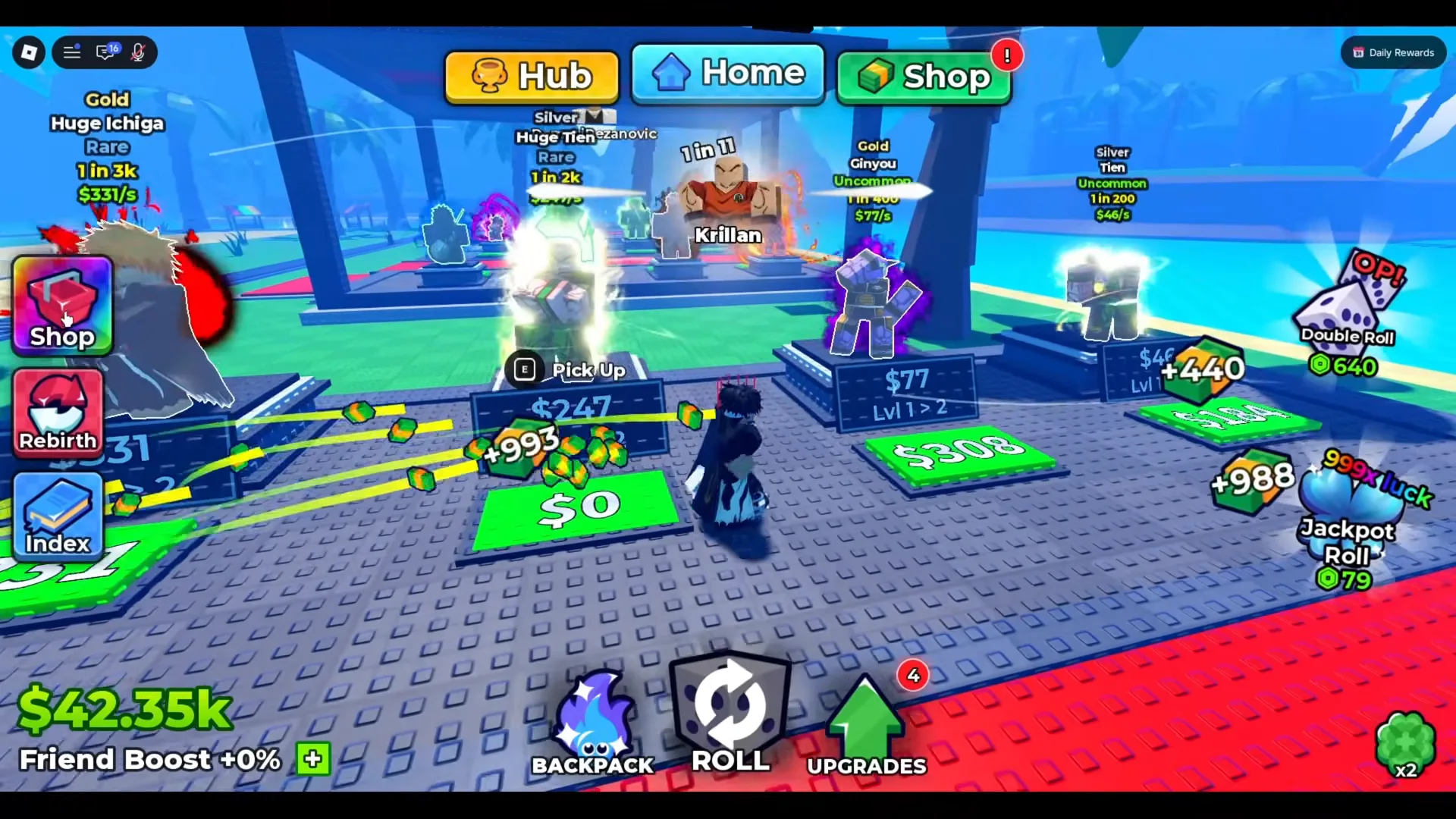
Nothing here is a table from a wiki — it is the client’s own text, at 1:58.
Before you spend an hour grinding it, redeem the live Anime Dice codes — this cycle pays Lucky Spins, Trait Rerolls and Gems, all of which the free loop otherwise feeds you slowly.
What Should A Beginner Spend Cash On First?
Buy the upgrade nodes in the order the game prices them. The UPGRADES tree is a hex grid, and in the first cluster four nodes are open with visible cash costs while the rest still read ?.
| Node | Cost as printed | Effect as printed |
|---|---|---|
| Money I | 250 | +25% |
| Luck I | 500 | — |
| Damage I | 1k | — |
| Unit Storage I | 2.5k | — |
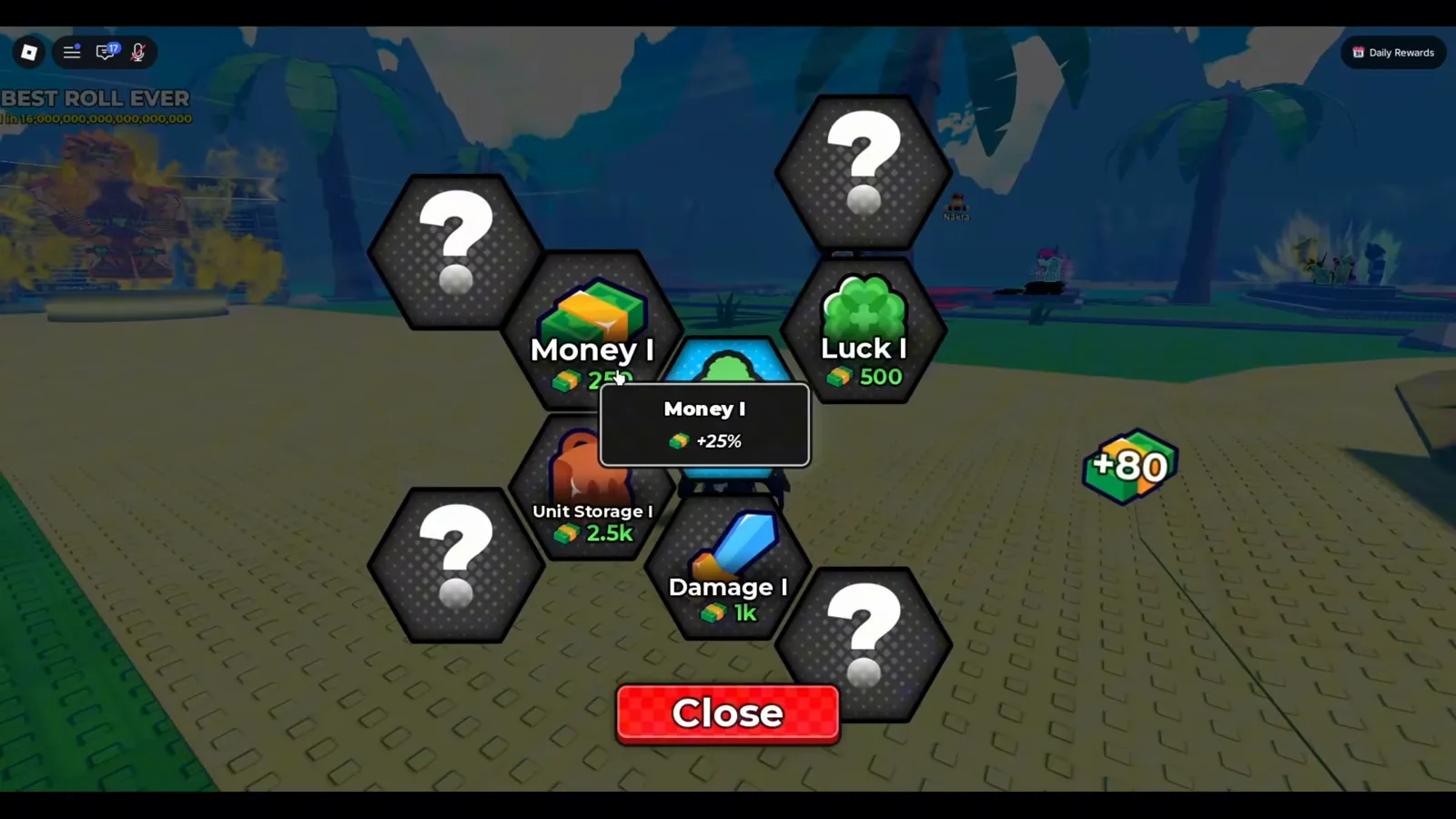
Five nodes are still hidden behind question marks, so this is the whole publishable early order — not the whole tree.
Two readings that save beginners money. Money I is the first thing the tree offers, at 250 — before any luck purchase — because it feeds the loop that buys everything else. And Unit Storage is inventory, not plot space: it is the number that makes the “your unit inventory is full, sell some units” warning stop appearing, which is a different problem from having nowhere to place an earner. The auto-sell setup that keeps that ceiling away is on the AFK farming guide.
Should You Upgrade Blocks Or Add Plot Slots First?
Slots first — but say the reason properly, because most versions of this advice are padded with numbers nobody has seen.
The mechanism is visible in the 1:58 frame: your income is a list of units, each printing its own per-second figure. Adding a slot adds an earner to that list immediately. A better block or a better dice does not add anything; it changes which units can appear on your next roll, which only pays off if you then place them. That ordering holds without needing a percentage.
What we cannot give you: a slot price list, a maximum slot count, or the per-block rarity mix. This site used to print all three — a cap of 12 characters, a Block 2 upgrade worth “+5% Rare”, and a claim that filling slots 3–5 triples income by 300%. None of those numbers appear anywhere in the client footage we checked, and they have been removed. The boards, the Backpack counter and the Unit Storage node that carry this mechanism are walked through on our plots and slots guide. The measurement protocol you can run instead — read your own cost, your own income, your own recovery time — is on the block upgrade costs guide.
For the unit side of the same decision, see the character tier list; for what the coloured labels on a pull actually mean, the mutations guide.
How Do Free Cash, Tickets And Quests Fit In?
Quests are the free layer most beginners skip, and they run on their own currency. The board at the hub has Daily, Weekly and Shop tabs; the Daily tab in the frame below lists three objectives, each with a 5 tickets line beside its Claim button, and the roll objective carries a cash figure too.
| Daily objective as printed | Reward as printed |
|---|---|
| Roll 1,000 times! | +280 cash and 5 tickets |
| Defeat 2 towers! | 5 tickets |
| Sell 500 units! | 5 tickets |
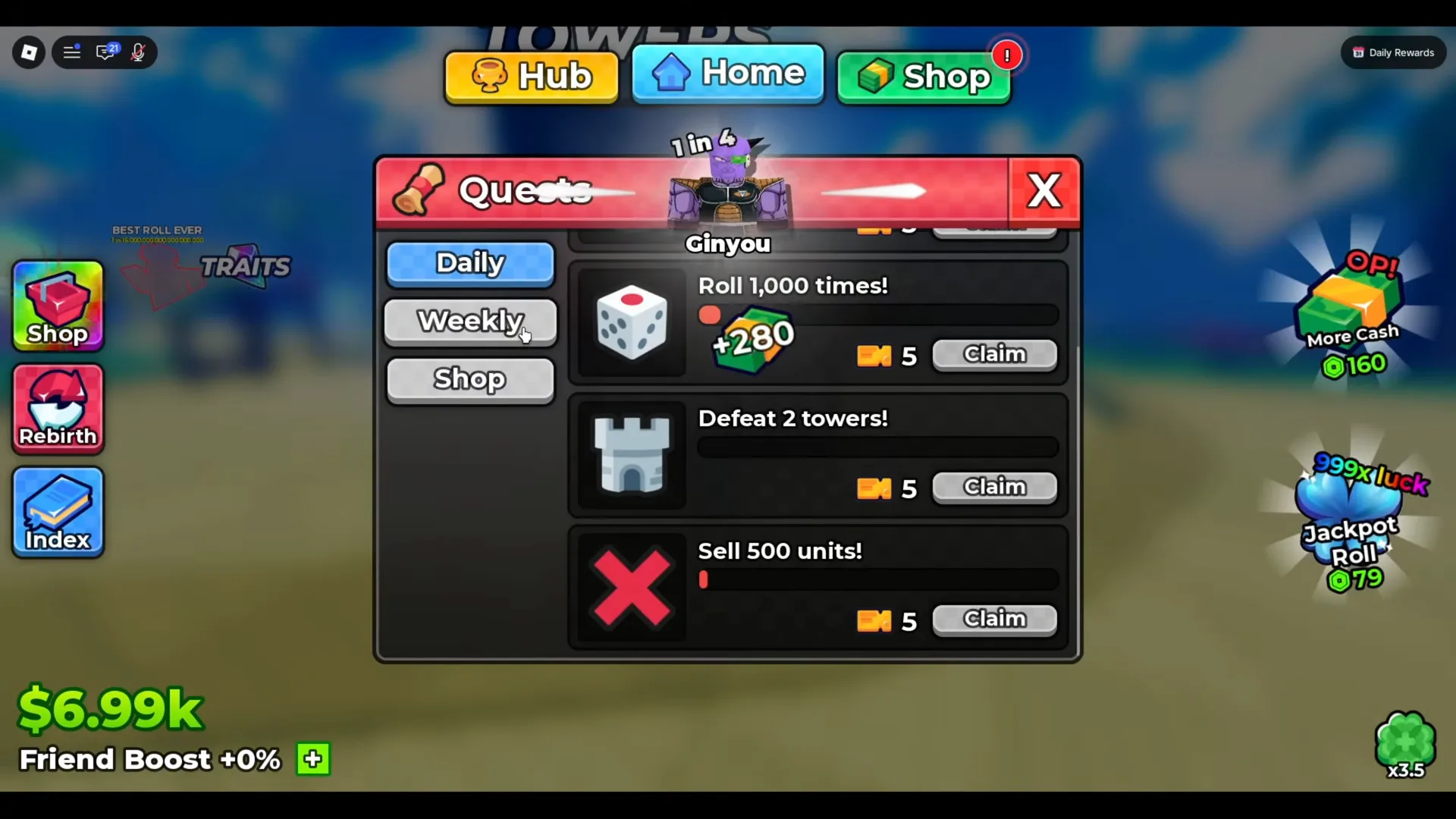
Read at 2:16, while the account balance was still $6.99k.
Tickets are spent on the Shop tab of the same panel: the frame below shows Gems and Luck as tiles with counters reading 0/1 and 0/199, with Ultra Luck and More Cash on the row underneath. What the panel makes clear is the shape of the exchange — tickets in, the same currencies the Robux shop sells out. What it does not label is which side of that slash is the ticket price and which is what you already hold, so we are not guessing at it.
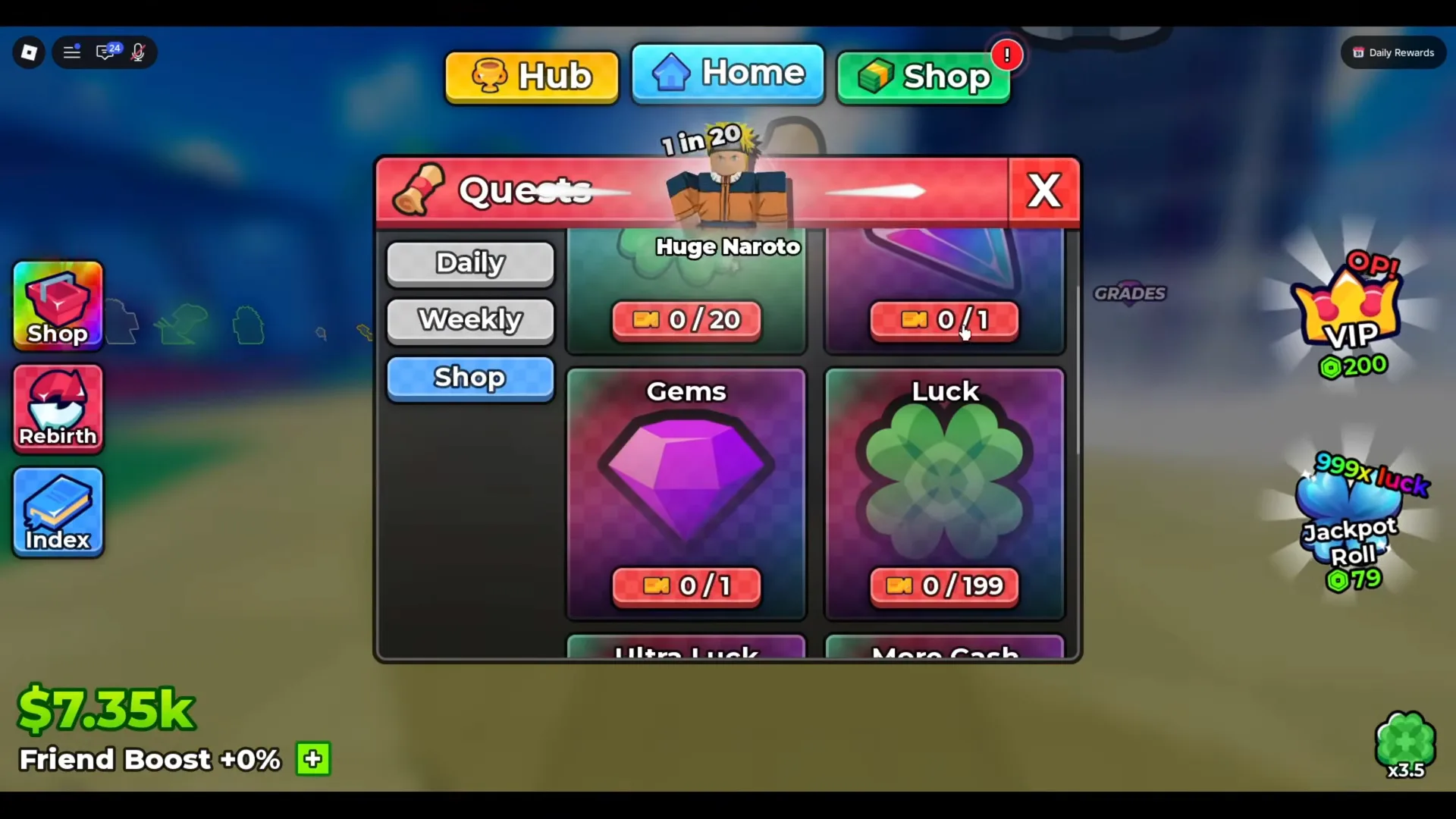
Read at 2:28. Note the purple gem here is the Grades currency, explained on the Gems guide.
How Do Offline Earnings Work For A New Player?
The official Anime Dice page on Roblox says it in its first line: money generates while you are offline. So the loop above keeps paying while the app is closed, and a returning beginner walks into a pile of cash.
That is the whole of what can be stated as fact. The offline rate, any storage cap, and whether grades and traits count the same way while away are all unpublished — we print no number for them here, and the four-step protocol for measuring your own is on the offline earnings page.
What a beginner should actually do before closing the app: fill every plot slot with the best earners you own, set an auto-sell rule so a long session does not bounce off the inventory ceiling, and clear a few tower floors, since tower battles keep fighting after you press Fight. The full hands-free setup is on the AFK farming guide.
How Do You Roll Better Units Without Spending Robux?
Luck, bought with cash. The Dice Shop is a cash menu, and it prices dice by the luck they carry — in the frame below, the equipped Ice die is Rare at 100x Luck, and the next step up, Magma, is Epic at 200x Luck for $30m.
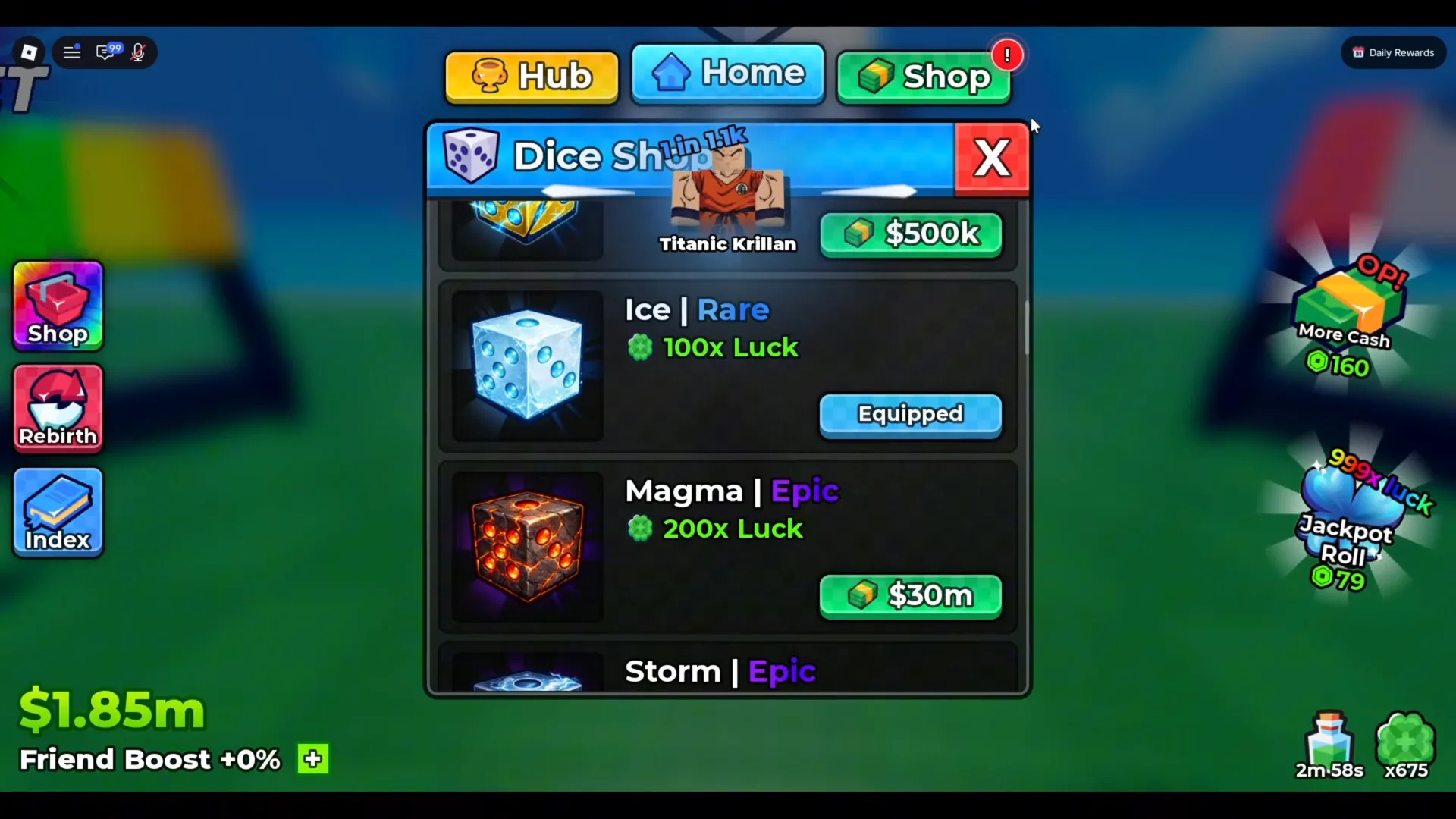
Read at 3:40 with $1.85m banked. The update history tracks how the dice ladder has grown.
The free ordering that falls out of this: keep buying Money I-style income nodes → save toward the next dice tier → spend tickets on Luck from the Quest Shop → claim codes for Lucky Spins and rerolls. Robux shortens the same path rather than unlocking a different one; the paid layer is itemised on the Robux shop guide.
What Is The Fastest Way To Get Mythical Units?
Raise luck, then keep rolling — there is no screen in this game that trades you a specific character. The unit cards we could read run Uncommon → Rare → Epic → Legendary → Mythical and stop there: Huge Perfect Zell at 1 in 1.3b, Angel at 1 in 4.5b. Luck comes from the die you equip and the Luck nodes in the upgrade tree, which is why the ordering above matters more than any pull target you set for yourself. Nothing we read shows a block tier that guarantees a top-rarity pull, so hoarding rolls toward “Block 4” is a plan built on a number the client never printed.
Two words that circulate attached to that tier belong to dice instead: the same Dice Shop panel lists Lunar as Mythical at 25,000x Luck and Galaxy as Divine at 50,000x Luck. A guide that talks about a “Mythic unit” or a “Divine character” has merged two menus, and the real ranking logic is on the character tier list.
How Do I Increase My Roll Speed?
Not with in-game cash, in the client we checked. The only roll-speed item in the footage we read is the Roll Speed gamepass at 315 Robux, whose own description reads “Rolls faster!” — it is on the Robux shop price list alongside Double Roll and VIP. There is no roll-speed node in the upgrade tree we could read, and no trait that speeds anything up, because the Traits panel only offers Income, Damage and Health multipliers. The older claims on this page — that “agility traits” cut roll time, and that a spawn-lobby shop sells roll speed for base cash — had no source and are gone.
Related Articles
guides
Anime Dice Update 7: Rebirth Upgrade Points, Third Base Floor and New Dice
Anime Dice UPD 7 read off frames: the developer's own patch notes, the 6-path Rebirth Stats panel, and a purchase confirmation. Checked 7 October 2026.
guides
Anime Dice Money: Where Cash Comes From, Read Frame by Frame
Anime Dice money read frame by frame: the cash counter's k-to-oc suffix ladder, the $/s income every unit card prints, and the breakdown no screen ever shows.
guides
Anime Dice Probability and Roll Odds: The 1 in N Screens
Anime Dice prints unit odds as 1 in N and trait odds as percentages, never as one drop table. Frame-by-frame readings plus the arithmetic the game leaves out.
Was this helpful?
Thanks for the feedback!