Anime Dice Infinity Tower: Difficulty Tiers & Floor Rewards
Where the Infinity Tower is in Anime Dice, what each Towers difficulty tier means, how to set a team, and what floors drop — checked frame by frame on video.
FAQ
Where is the Infinity Tower in Anime Dice?
What difficulty tiers does the Towers menu have?
How do you set up a team for a tower run?
Can you leave a tower battle running?
What do tower floors drop?
Where Is the Infinity Tower in Anime Dice?
There is no Infinity Tower quest giver and no separate game mode to load. The towers live in the hub — the shared area you reach with the yellow Hub button at the top of the screen — as a glowing column of light. Walk into it and a Towers panel opens with a scrollable list; the Infinity Tower is the last row in that list.
Every screen on this page was opened and read frame by frame from two sessions:
Source: the captures and timestamps below are frames from Shensu’s I Went from NOOB to PRO in Roblox Anime Dice! (September 2026), which is the session that walks the Towers menu, the team panel and the battle HUD end to end, plus one late-run battle frame from Superlex Plays’ How to become OVERPOWERED in Anime Dice. A third session, CHALLS’ Anime Dice Guide!, corroborates the floor-loss behaviour but its footage carries burned-in captions, so we used it as a fact source only and screenshot nothing from it.

The NOOB-to-PRO session whose hub, Towers menu and battle frames this guide is built from
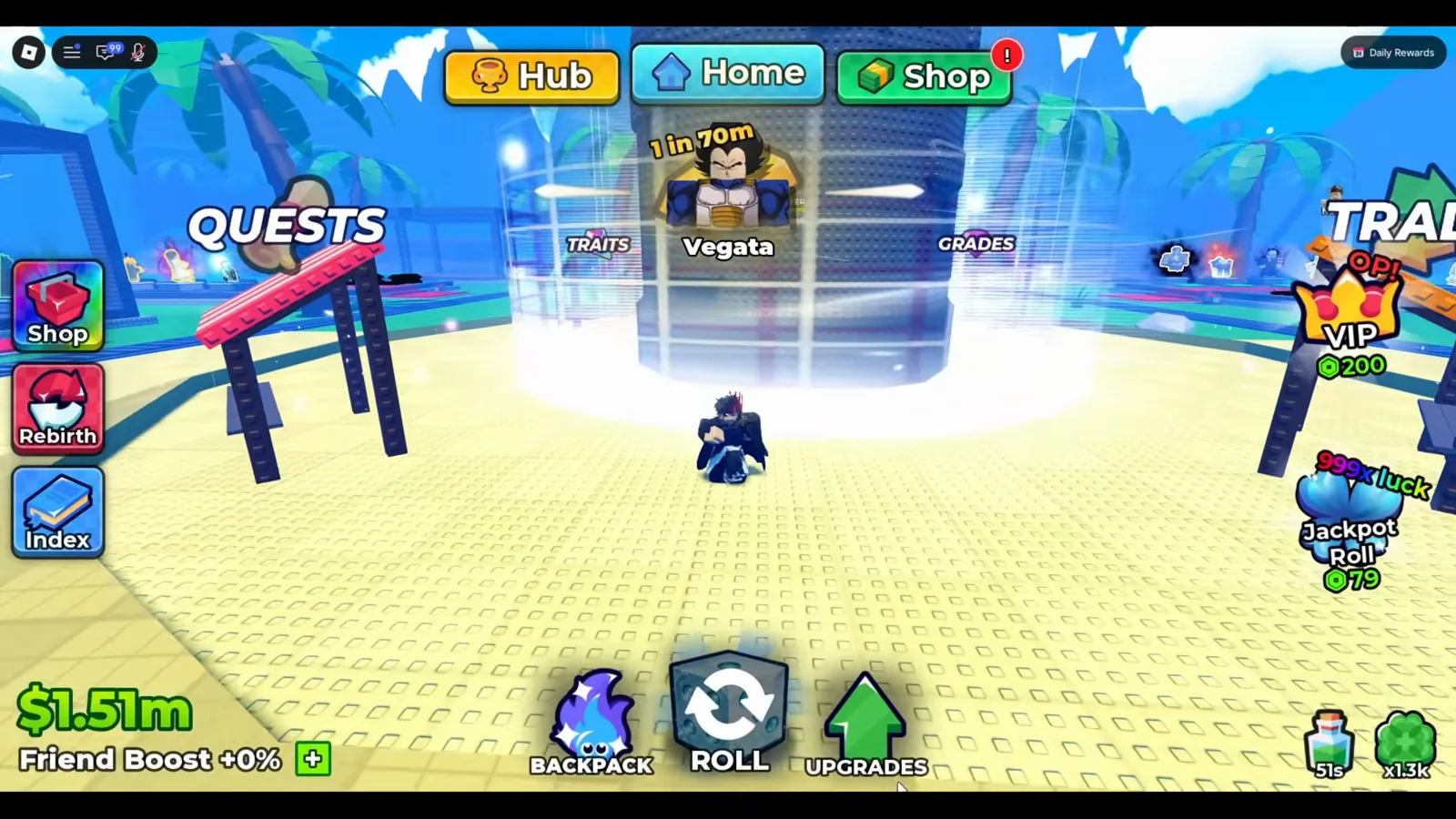
Walk into the light column and the Towers panel opens.
What Difficulty Tiers Does the Towers Menu Have?
Each row in the Towers panel carries the tower’s name plus a coloured subtitle underneath it, which is the difficulty, and a green Play button. Reading the list top to bottom across the two frames below gives you the whole ladder the game was showing at UPD 3:
| Tower | Difficulty subtitle | Where it sits in the list |
|---|---|---|
| Dragon Tower | Easy | top row |
| Cursed Tower | Medium | second |
| Pirate Tower | Hard | third |
| Infinity Tower | Infinity | bottom row |
Note what that means for the search term itself: “Infinity Tower” is not a special mode bolted onto the game — it is the fourth entry in the same list, and its difficulty label is just the word Infinity reusing the tower’s name.
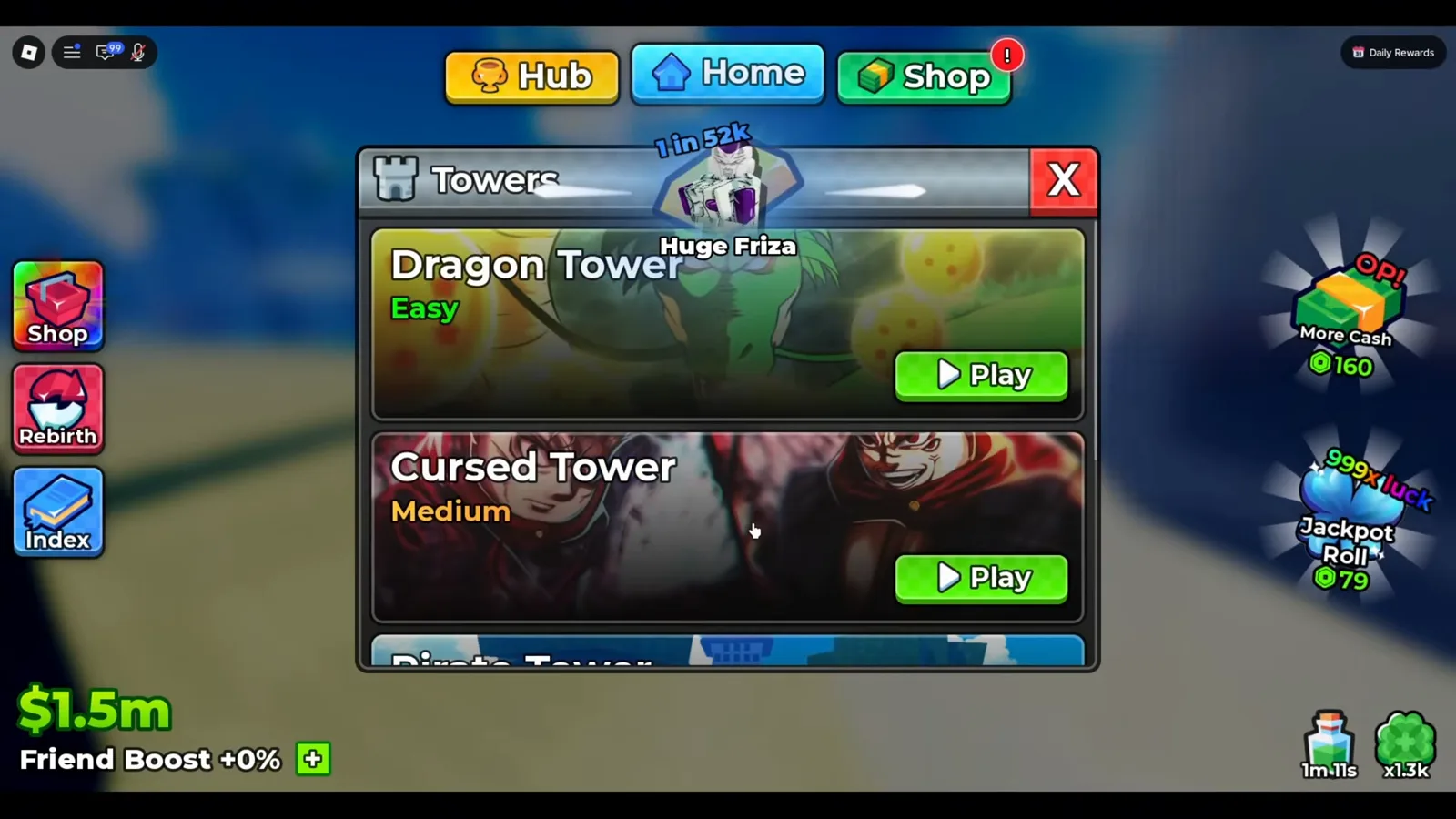
Difficulty is printed under each tower name, not on a separate screen.
Watch the top of the Towers list at 4:40
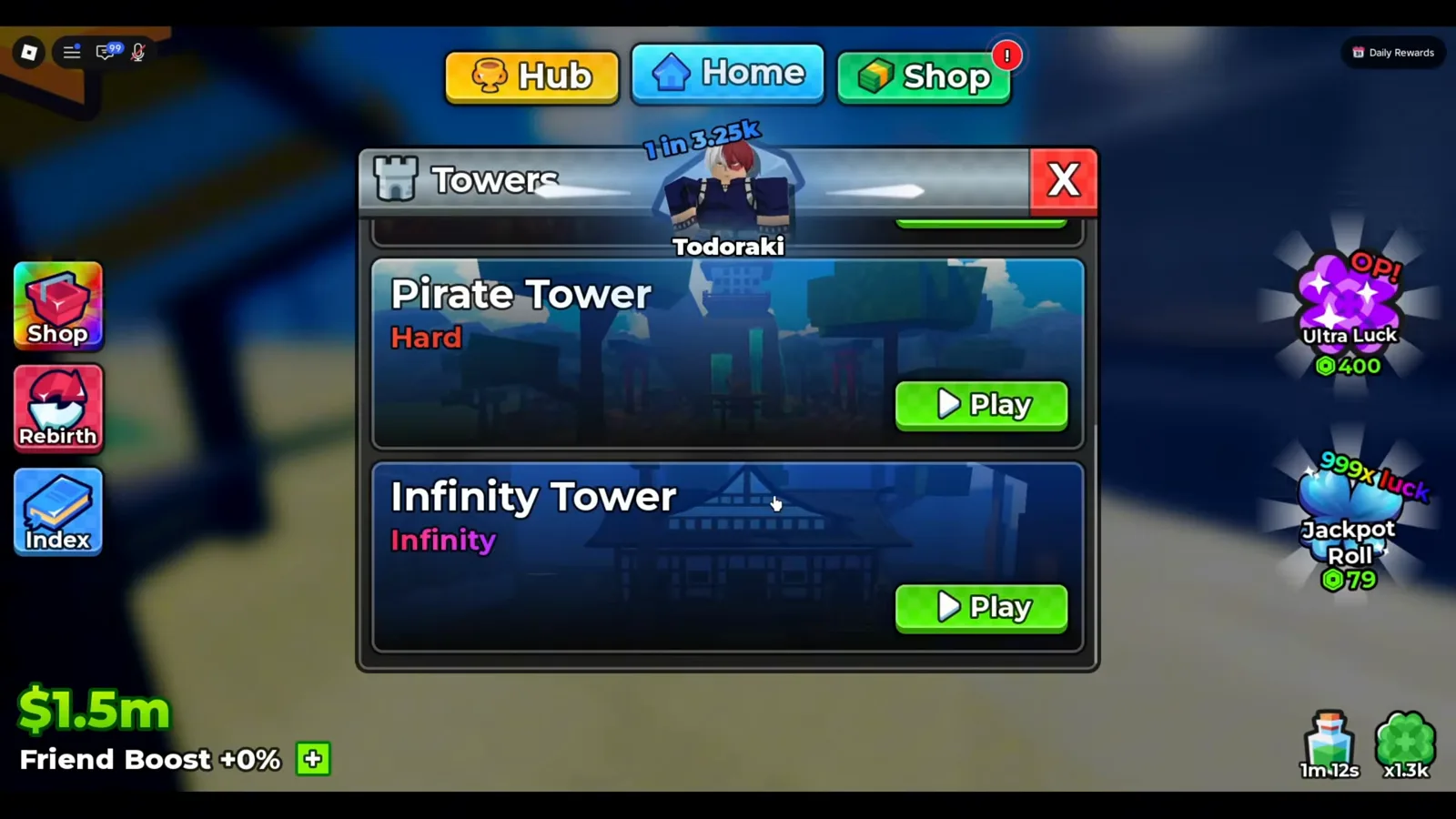
Infinity Tower is the last row of the same list, not a second portal.
Watch the Infinity Tower row at 4:40
UPD 4 has since inserted a fifth row directly above Infinity — the Hidden Leaf Tower, which we read off the menu in its own page.
How Do You Set Up a Team for a Tower Run?
Tapping Play opens that tower’s own panel, and it does three jobs at once. Under the heading Your Team there are four slots, empty ones marked with a ”+”. Below them sit Equip Best (green) and Fight (blue). Down the right-hand side is the Drops column — the tower’s loot preview.
Equip Best is the one-tap answer: it fills the four slots with the strongest units the game can see. If you want manual control, tap a ”+” slot instead and a Select overlay opens over your roster, each card showing its cash-per-second income and a coloured corner badge for its mutation.
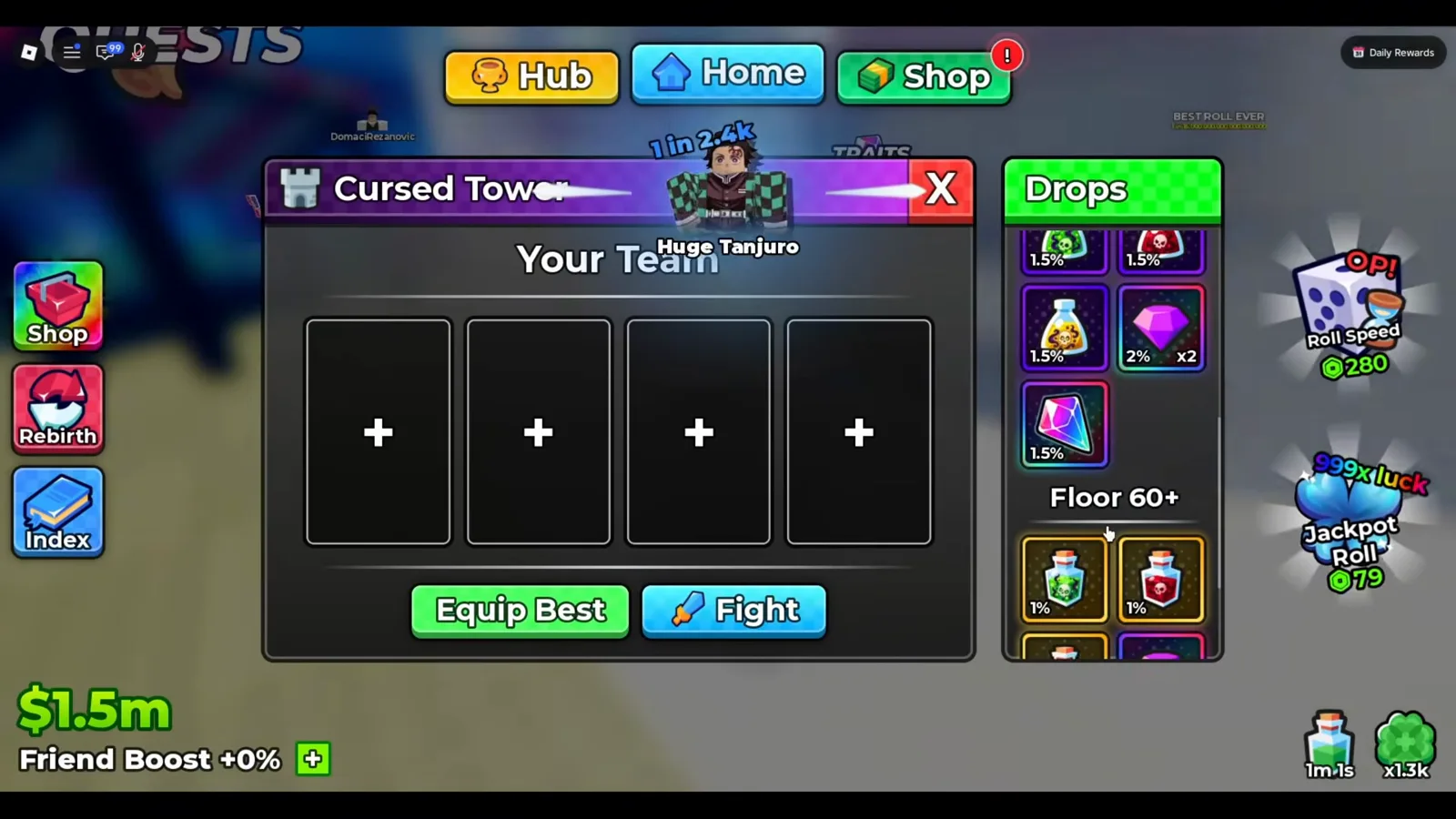
Four slots, two buttons, and the drop preview you should read before committing a ticket.
Watch the Cursed Tower panel at 4:48
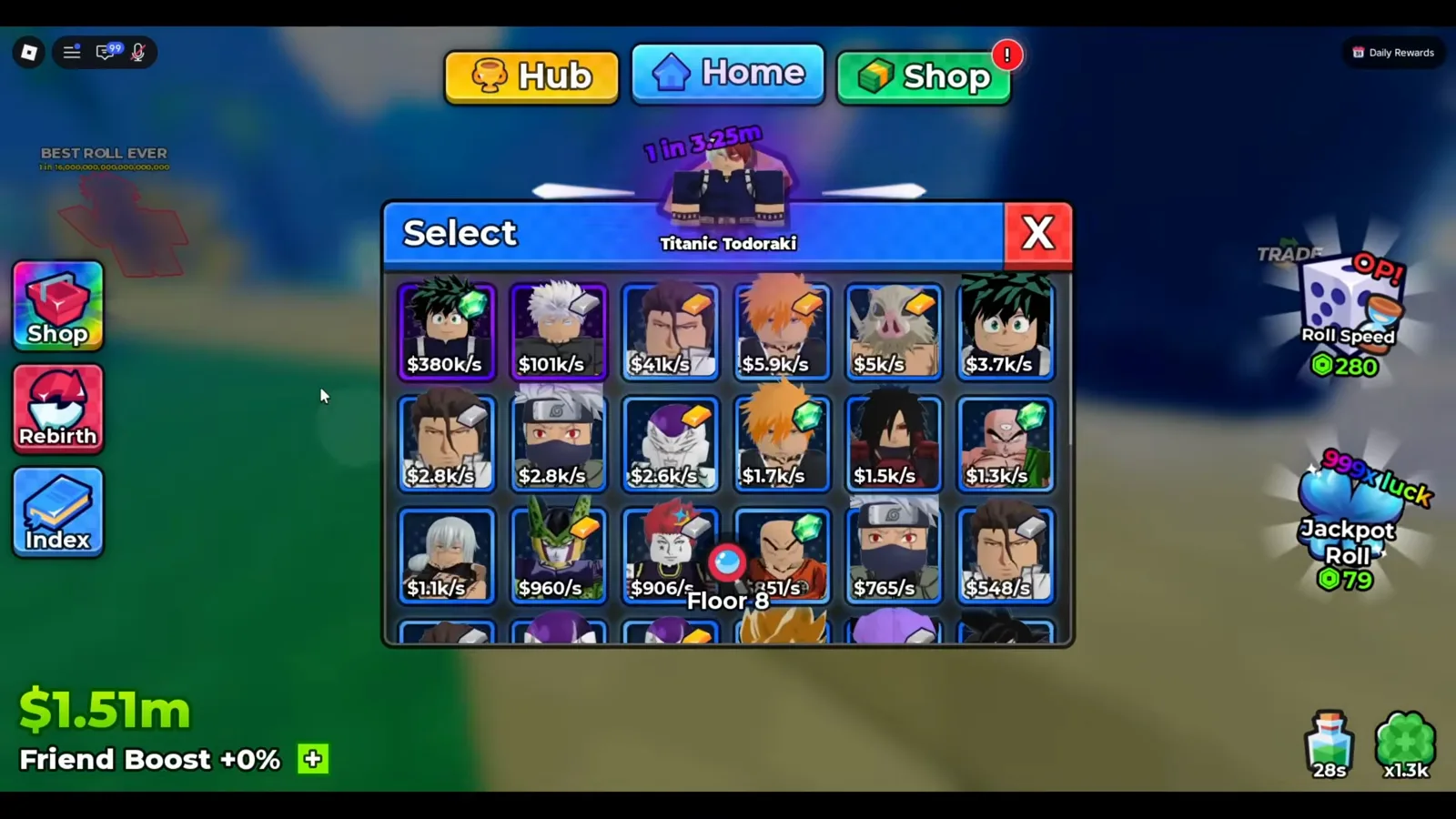
Manual picks come from the same grid the Backpack uses.
One thing both walkthrough players confirm: you do not have to de-equip a unit to send it into a tower. The same cards printing income on your plot are eligible for the team slots, which is what makes a tower run compatible with an idle session instead of replacing it.
Can You Leave a Tower Battle Running?
Press Fight and the battle screen takes over. Its entire HUD is on one row: the floor number across the top, your unit card and the enemy card side by side — each with a sword icon for damage and a green bar for health — and beneath them a Hide magnifier plus Exit and Auto buttons.
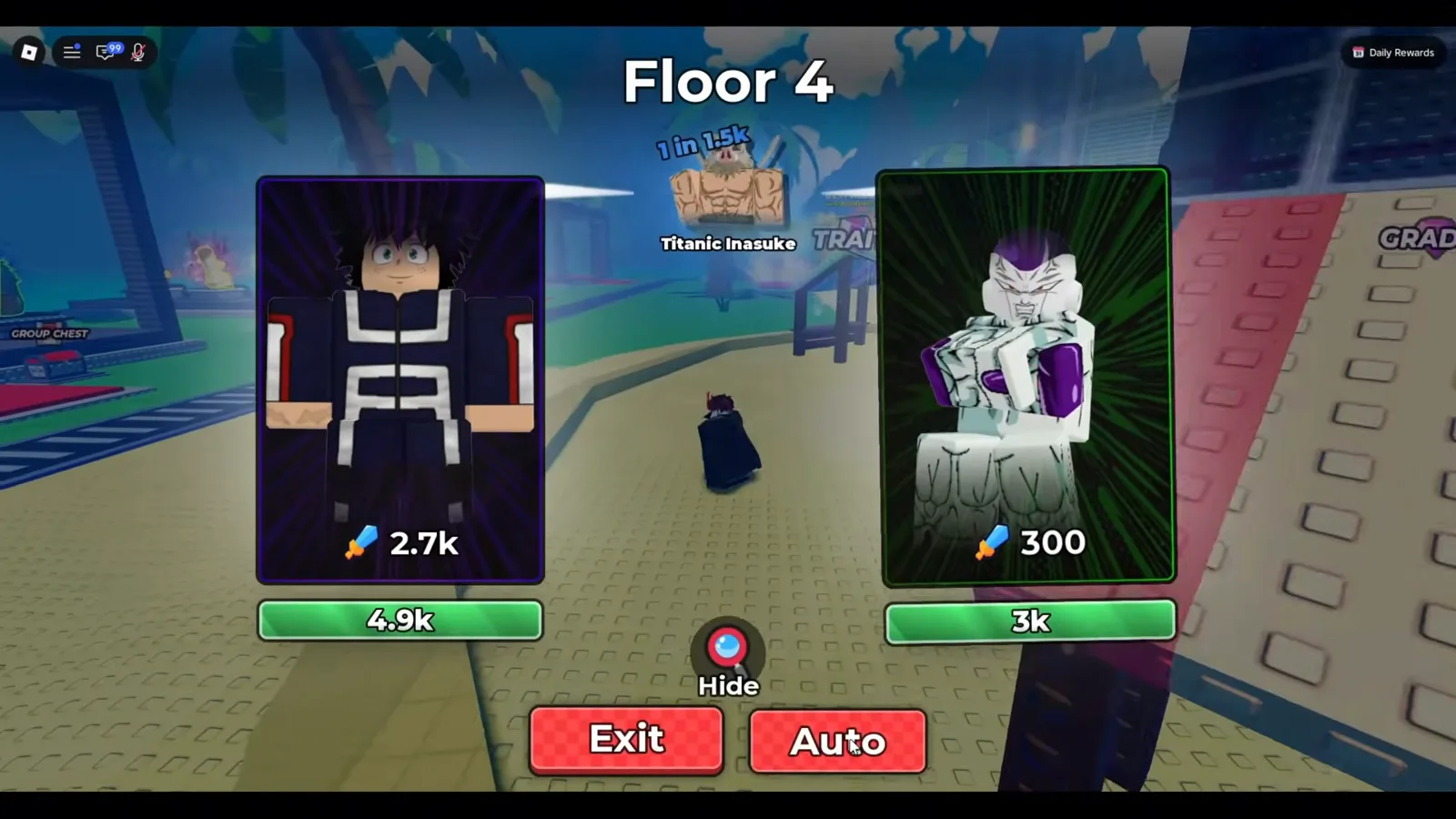
Auto is what turns this screen into an away-time machine.
The floor counter is the same shape whether you are four floors in or seventy-nine — only the numbers move.
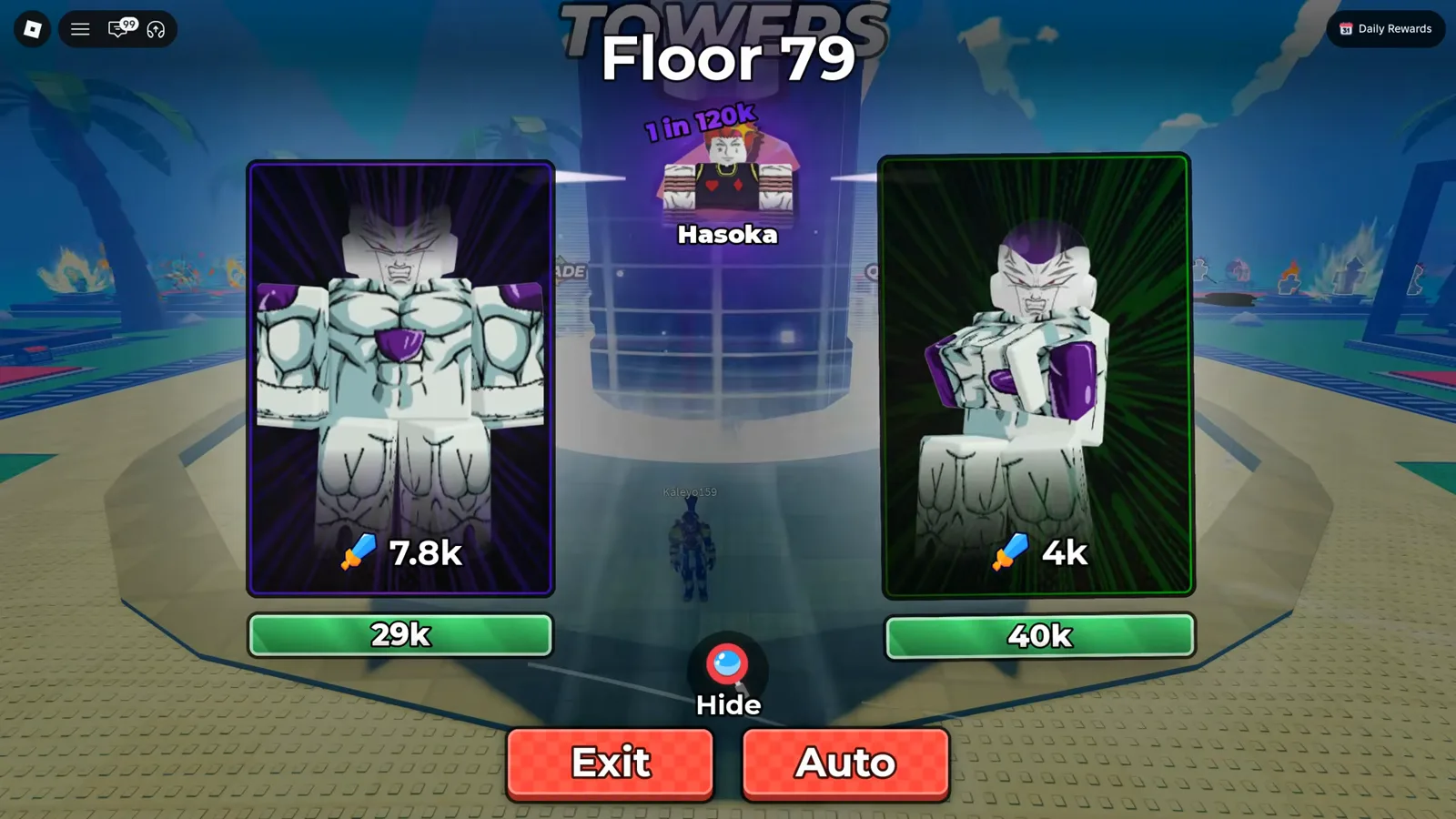
Deep floors use the screen you already learned.
Watch the Floor 79 battle at 10:00
What Do Tower Floors Drop?
The Drops column on each tower panel is the honest answer to “what am I getting for this ticket”, and it is split into bands: a top band available from the start, and further bands under floor headers. Across the towers we could read, the same few icons repeat — potions, a purple gem, and a pink crystal. UPD 5 footage has since read those headers tower by tower, and they are not one threshold: the Hidden Leaf and Slayer Towers gate their second band at Floor 25+ and their third at Floor 60+, while the Infinity Tower gates its star-potion band at Floor 150+. The per-tower percentages, the two different Infinity readings, and the potion tooltips are on the dedicated tower drops page, which supersedes the “Floor 50+ or Floor 60+” phrasing this section used before that capture existed.
That pink crystal is worth naming precisely, because it is the item players search for: hovering it in the Dragon Tower’s drop list prints the tooltip “Trait Reroll”, filed under the Celestial line. The purple gem is the currency covered in our Gems usage guide. Both come out of tower floors, which is why a tower run and a reroll priority plan belong in the same session.
When a run ends, the Rewards panel shows what you actually collected that trip rather than the odds of it — see the gem and potion payout frames in the Gems guide.
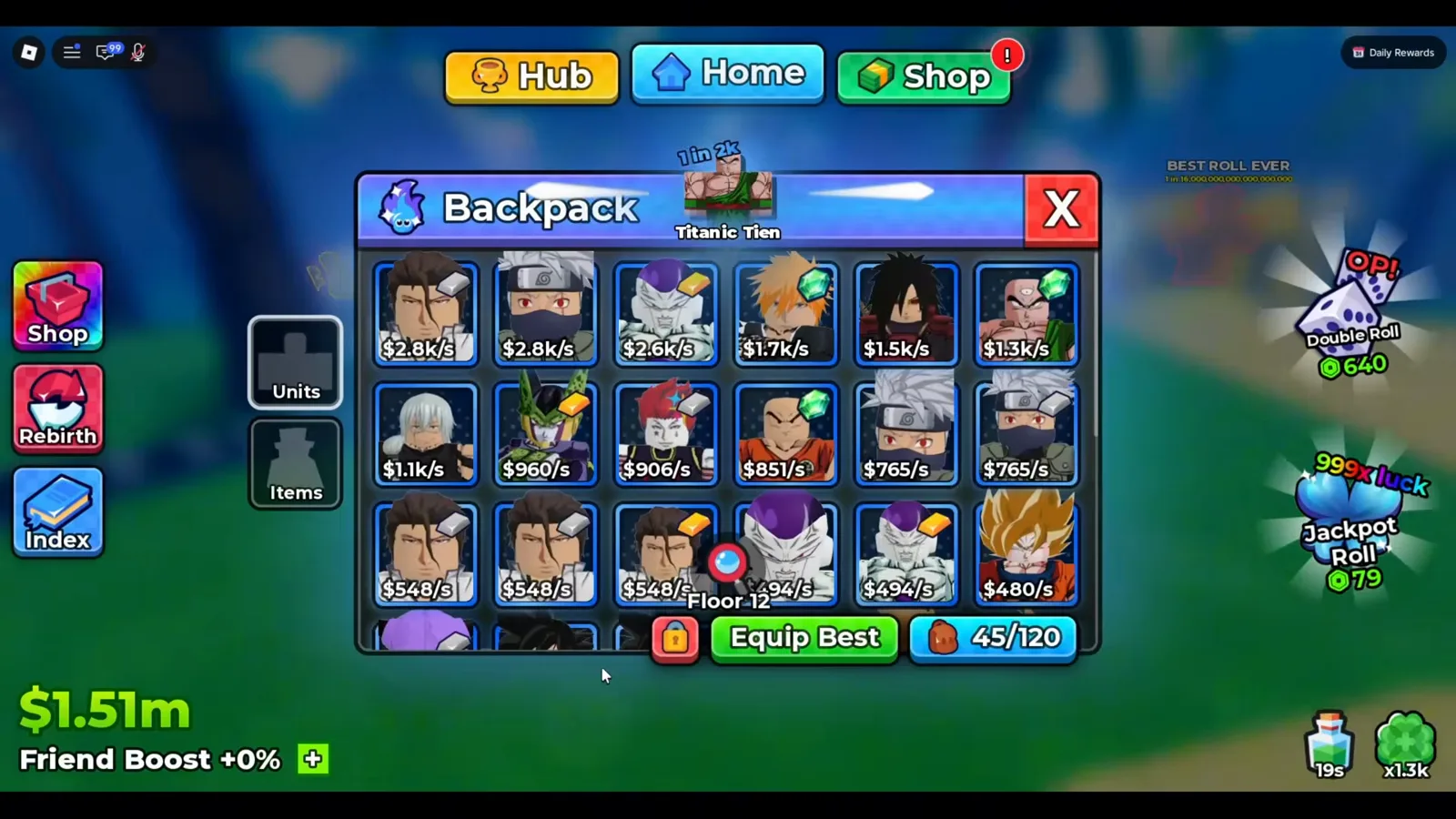
45/120 — the storage number is your real session timer.
Rolls keep landing while the tower fights, so a deep run ends the same way in every walkthrough: the backpack fills, the “sell some units” notices stack, and the session converts to cash at the selling NPC. That cap, not a floor limit, is what bounds an away session — the offline earnings guide covers what keeps running after you close the app.
What Should You Upgrade When a Floor Stops You?
Both players in our sources reached the same conclusion on camera: the Damage branch of the Upgrades tree exists for the towers. In the frame below the tree is a hex grid of nodes priced in cash — Money I (+25%), Luck I, Unit Storage I, Damage I — with the not-yet-reachable nodes rendered as grey ”?” hexes.
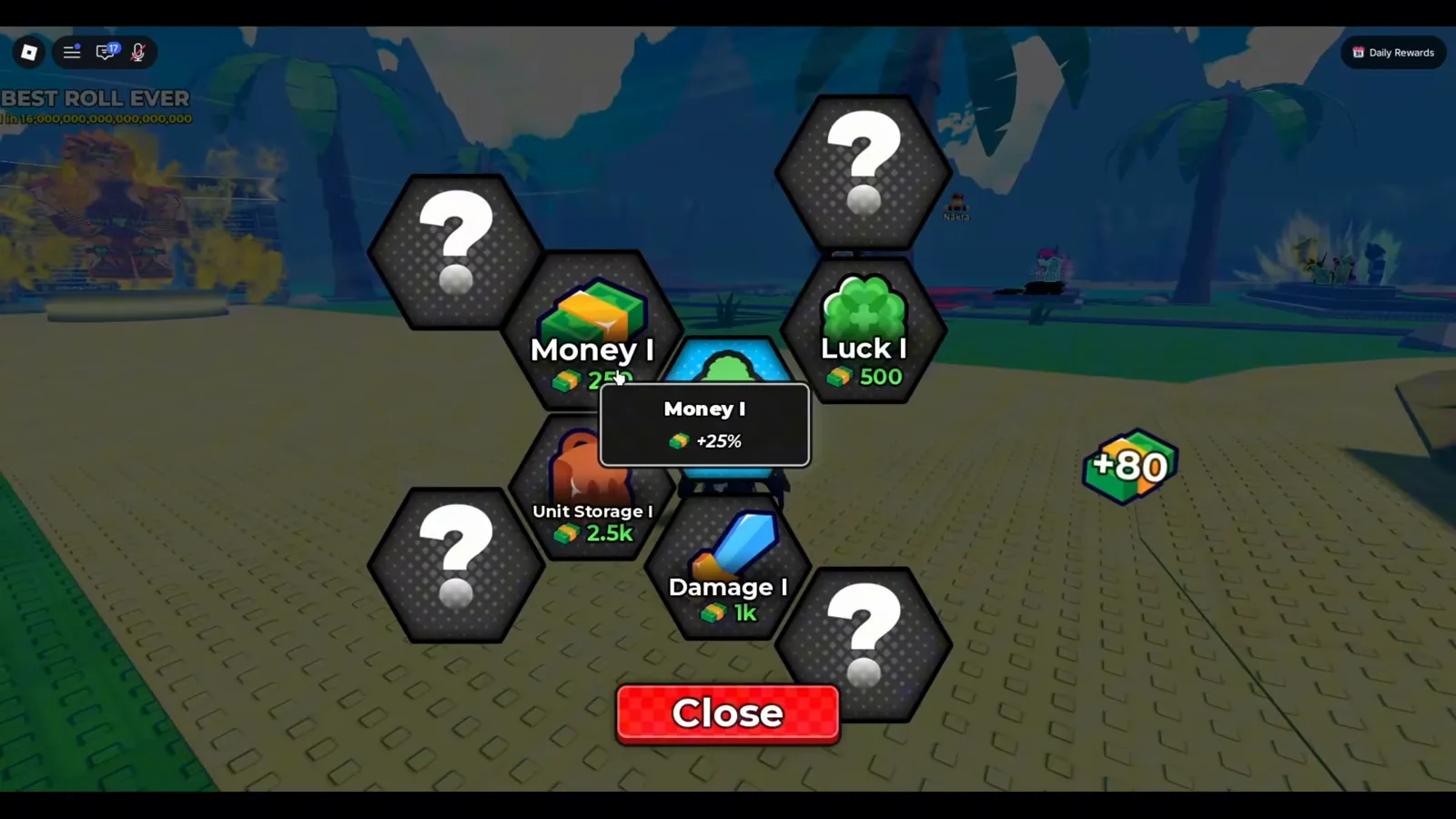
Locked hexes show as ”?” until the node before them is bought.
Watch the Upgrades tree at 2:00
So when a floor stalls you, in order of what the screens support:
- Re-run Equip Best first. A better unit may already be sitting unequipped in your Backpack — the tab is right there.
- Level the units you are sending, not the prettiest card. Unit level-ups are priced in cash on the plot stalls, and the game tells you plainly when a stall is out of reach.
- Push Damage in the Upgrades tree — it is the node both walkthrough players tie to tower combat.
- Then fix income, because every one of the above is paid for in cash: see the block and dice upgrade priorities for the spending order, and the character tier list for which units are worth the levels at all.
How Do Tickets and Quests Feed Tower Runs?
Tower entries are a spendable resource, and the faucet is the quest board — the QUESTS stall you can see on the left of the hub frame at the top of this page. Daily and weekly goals pay small ticket bundles, and one of the recurring goals is literally a tower objective, so the loop is: clear quests, bank tickets, spend them on the tower whose Drops column you actually want. Superlex puts the dependency in one line while looking at his ticket balance — “the only way you get tickets is through quests”, at 8:19 — and notes that the daily and weekly boards are finite per refresh cycle. The AFK farming guide documents the quest board screen and the ticket amounts we could read.
Two things the footage settles about the economy:
- Towers give tickets back, rarely. Opening a finished run’s Rewards panel on camera, Superlex states it plainly: “you do actually get tickets from the towers. It’s just very rare. We have a lot of trait rerolls and gems” — watch it at 9:29. Treat ticket refunds as a bonus, not a funding loop.
- Infinity Tower is not the early-game pick. The same creator’s stated judgment, with the Towers list on screen, is that he does not “see the benefit to go in the infinity tower” on an under-powered team, and adds that “the only way you get tickets is through quests” — at 7:55 and at 8:19. That is one creator’s opinion about entry cost, not a published mechanic, and we flag it as such.
For the free-to-play side of the same wallet, redeeming live Anime Dice codes is where spins and reroll currency come from before you spend anything on a climb.
Where Is the Line Against Scripts?
Searching “Infinity Tower” eventually lands you on auto-play executors. This wiki does not cover them, and the reason is not just rulebook caution: everything a tower script would automate — the fight itself, the grade rerolls, the selling — already has an in-game button (Auto, Auto Roll, auto-sell rules). The AFK farming guide lays out that legal setup step by step, and the update history tracks which of these systems arrived in which patch.
Third-party executors modify or automate the Roblox client from outside the game, which violates the Roblox Terms of Use and can cost you the account whose balance you were trying to inflate.
Related Articles
guides
Anime Dice Update 7: Rebirth Upgrade Points, Third Base Floor and New Dice
Anime Dice UPD 7 read off frames: the developer's own patch notes, the 6-path Rebirth Stats panel, and a purchase confirmation. Checked 7 October 2026.
guides
Anime Dice Money: Where Cash Comes From, Read Frame by Frame
Anime Dice money read frame by frame: the cash counter's k-to-oc suffix ladder, the $/s income every unit card prints, and the breakdown no screen ever shows.
guides
Anime Dice Probability and Roll Odds: The 1 in N Screens
Anime Dice prints unit odds as 1 in N and trait odds as percentages, never as one drop table. Frame-by-frame readings plus the arithmetic the game leaves out.
Was this helpful?
Thanks for the feedback!