Anime Dice Plot Slots: Level Signs, Storage and Backpack Counter
Anime Dice plot slots read off frames: the Lvl line and cash figure on a plot sign, the green pad under a unit, the Backpack counter and the Unit Storage node.
常見問題
What are plot slots in Anime Dice?
What does the sign on a plot show?
How many plot slots do you get in Anime Dice?
What is the counter in the Backpack?
How do you increase unit storage in Anime Dice?
Where do you sell units in Anime Dice?
Do plot levels and unit income use the same number?
What Are Plot Slots in Anime Dice?
A plot slot is one seat on the deck in your home area, and one unit stands on it. The client signs each slot out in the world rather than in a menu, and it signs it three times over: a board stands at the plot printing a cash figure above a level line, a green pad sits on the floor in front of the unit standing there, and the unit itself carries a nameplate that floats above its head with its name, its rarity word, its roll odds and its cash per second.
That is the whole layout, and what none of those three signs prints is a slot number, a slot price, a maximum, or any label naming what the board’s cash figure buys. Everything here is read off frames, and the full gap list sits in the section near the bottom of this page.
Sources: the six stills below come from two recordings. The first is Cx’s 24-minute Anime Dice session (uploaded 2026-09-18, 24 minutes 47 seconds), which is clean of creator furniture — no facecam, no burned-in captions, no channel watermark. The second is Plique Games’ UPD 5 session (uploaded 2026-09-21, 14 minutes 30 seconds); part of that video carries a facecam overlay in the top-right corner, so every frame taken from it was checked for one, and the 1:00 still used here comes from the opening minute, which has none. Both were checked frame by frame at full resolution on 25 September 2026. The developer publishes no changelog and no documentation of the plot or storage systems — see our update history for how thin the official record is.

The session the plot signs, nameplates and Backpack counter on this page were read from — the Backpack opens at 5:06
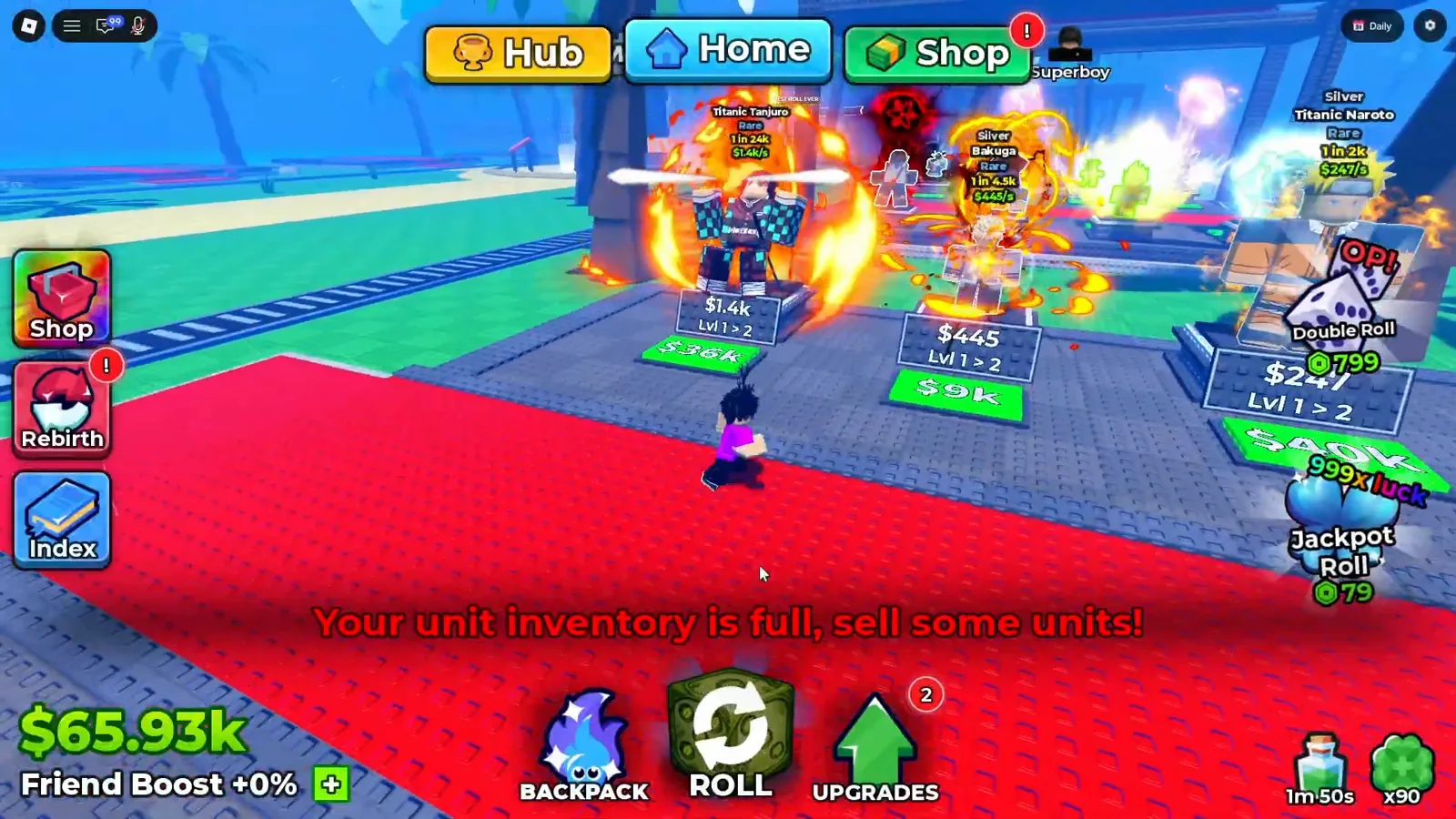
The full signage of a single plot in one frame. The red line across the deck is the game’s own inventory warning, not an overlay.
What Does the Sign on a Plot Print?
Two lines on a dark blue board that stands at the plot, always in this order:
- A cash figure, with one of the game’s own suffixes —
$1.4k,$150m,$10oc. - A level line, which the client writes as
Lvl A > B.
There is no third line, and neither line is labelled. Every reading below is legible in a still on this page:
| Board, as printed | Where it was read |
|---|---|
$1.4k above Lvl 1 > 2 | 4:52, first recording |
$445 above Lvl 1 > 2 | 4:52, first recording |
$146m above Lvl 16 > 17 | 18:56, first recording |
$150m above Lvl 20 > 21 | 18:56, first recording |
$93m above Lvl 19 > 20 | 18:56, first recording |
$10oc above Lvl 60 > 61 | 1:00, second recording |
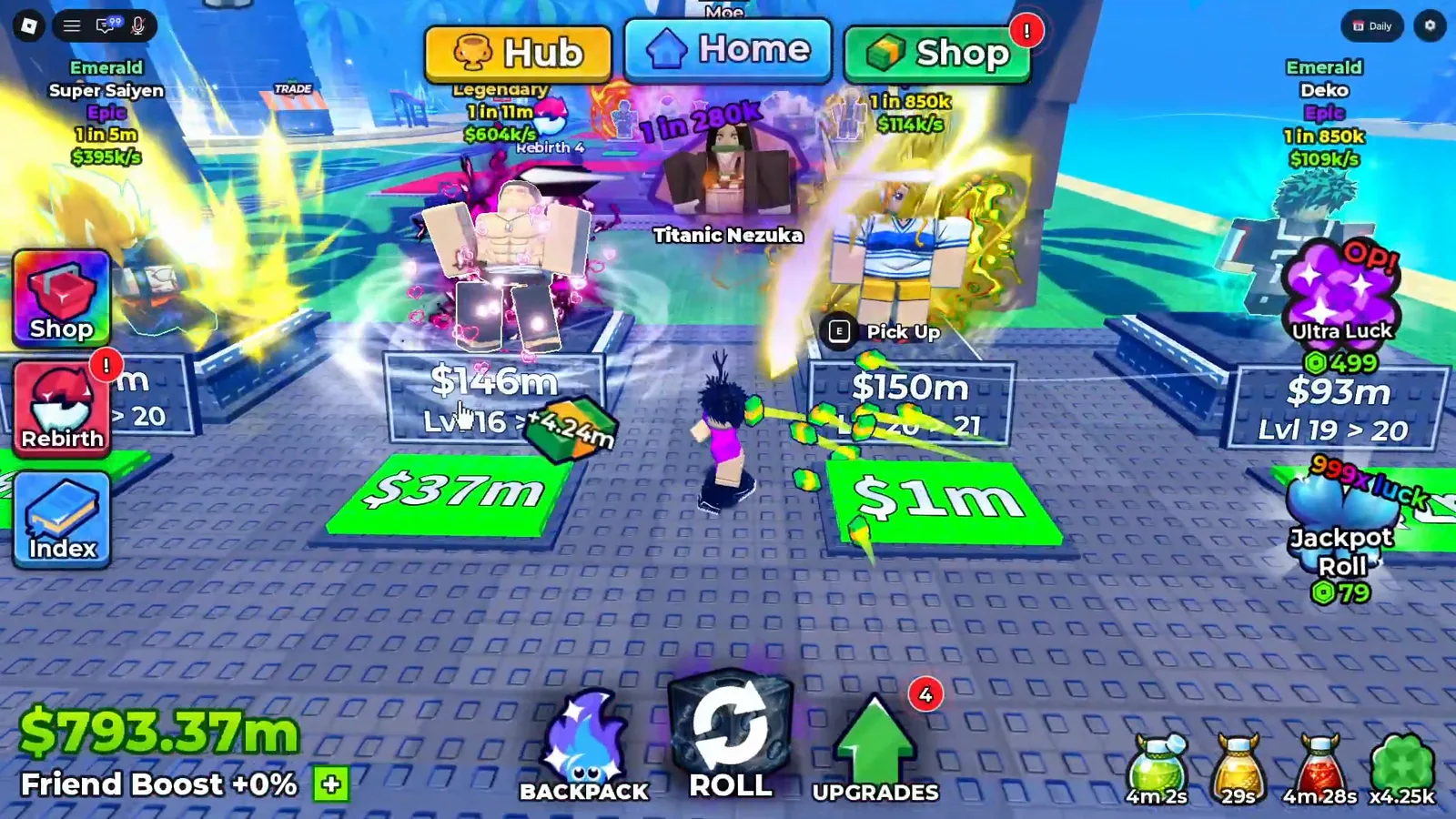
Two of the four boards in this frame. The pads below them carry their own figures, $37m and $1m.
The green pad is a separate sign, and it prints a separate number. In the 4:52 still the board over one unit reads $1.4k while the pad in front of that same unit reads $36k — the pad is the larger figure, and our beginner guide read the same pair as the price of the next level for that unit. Reproducing that as a rule is where we stop, because the client itself never says it.
What the board’s own cash figure measures is a question two recordings answer differently. At 4:52 the board over a placed unit prints the same digits as that unit’s nameplate — $1.4k on the board, $1.4k/s on the nameplate. In the late-game recording a board prints $10oc above Lvl 60 > 61 while a Celestial unit’s nameplate in the same frame prints $1.9t/s. Two readings, orders of magnitude apart, and no label on either line — so this page prints the strings and refuses to name the number. The spending question that sits next to it, whether cash goes into a slot or into a block, is worked through on the block upgrade priorities page.
What Do the Units Standing on a Plot Show?
A placed unit carries its own nameplate, and the nameplate is the densest read-out in the game. Top to bottom it prints the mutation word if it has one, the name, the rarity word, the 1 in … roll odds, and the cash per second. In the 4:52 still that is Rare / 1 in 24k / $1.4k/s on one unit and Rare / 1 in 4.5k / $445/s on the next.
Those are the same three fields our character tier list transcribes card by card, and the 1 in … format is the client’s only public rarity measure — the same string the Index panel prints on a catalogue row and the Fusing slots print on an input slot.
Two interactions live on the plot itself. A placed unit offers a Pick Up prompt with an E key glyph when the cursor is on it, and mid-session the plot prints a Put Back button on a unit being moved, which is how a unit already on the deck goes back to the Backpack. Neither prompt is explained anywhere on screen; we report the strings as they appear.
What Does the Backpack Counter Measure?
The Backpack is a panel, not a place. Its title bar reads Backpack beside a red X, its left edge carries Units and Items tabs, and the middle is a grid of owned cards, each printing only its cash per second — $77/s, $62/s, $37/s and so on. Hovering one opens a black tooltip with four lines: the name, the rarity word, Level 1, the cash per second again, and the roll odds.
The number that matters for slots sits at the bottom of the panel, right beside the green Equip Best button: a small backpack icon and a fraction.
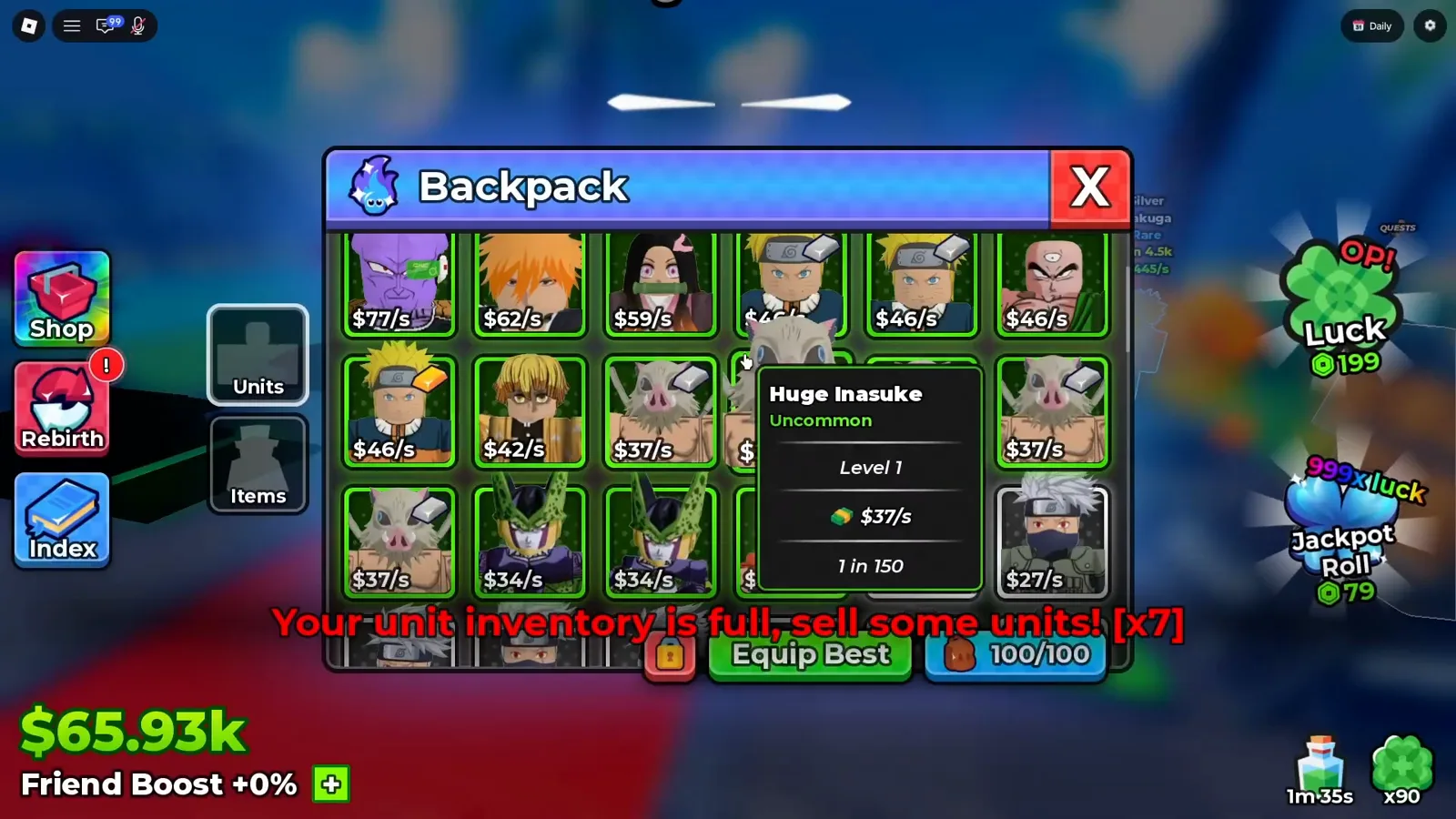
5:06. The counter reads 100/100 — and the bracketed count on the warning behind the panel reads 7.
Watch the Backpack counter at 5:06
Read that number the way the frame deserves. 100/100 is one account’s counter in one second on one client, and the world warning Your unit inventory is full, sell some units! with a bracketed [x7] beside it says the ceiling was reached, which is why the panel was open at all. What we will not do is call 100 the maximum: the same panel prints different denominators in other sessions on this site, and the Index panel is the clearest proof that the two panels answer different questions — the Index has no capacity counter and no Equip Best button at all.
What Raises the Unit Storage Number?
The Upgrades hex tree. Open it from the green UPGRADES arrow at the bottom of the screen and one of the named branches on it is Unit Storage, drawn as a backpack hex. Hovering the tier-IV node opens a tooltip the size of a business card:
| Tooltip line | As printed |
|---|---|
| Name | Unit Storage IV |
| Effect | a backpack icon and +10 |
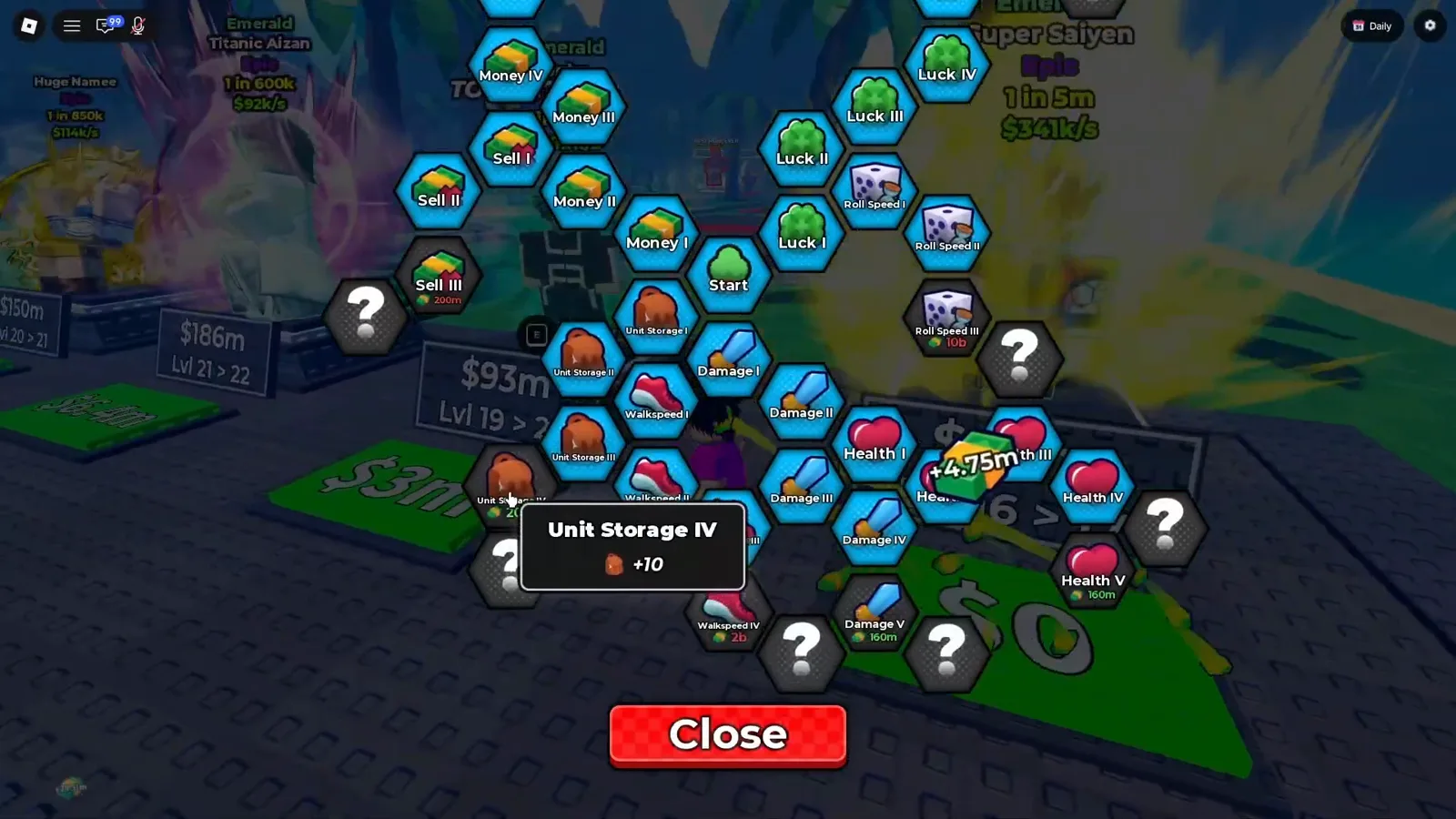
The whole storage branch in one frame, with the tier-IV effect — +10 — finally legible.
Watch the Unit Storage IV tooltip at 18:10
Two things this frame is careful about. The +10 is the game’s own text, not our arithmetic, but it does not say +10 of what — slots, or units, or capacity — so we quote it and stop. And the price is not on this node: the visible prices in this frame belong to other hexes, and the tier-I storage node’s 2.5k was read in an earlier session and is documented on the Upgrades tree guide, which covers the whole hex map branch by branch.
The practical reading is the same one our beginner guide and the AFK farming guide both land on: Unit Storage is an inventory fix, not plot space. It is the node that makes the red warning stop appearing, and it does nothing for how many units you can stand on the deck.
Where Do Units Leave Your Plot?
At a stall in the world, not through the Backpack. The building is signed SELL UNITS, and standing at its counter prints a four-line menu into the world itself rather than into a panel:
- I want to sell this!
- I want to sell my inventory!
- Edit auto sell settings!
- Goodbye!
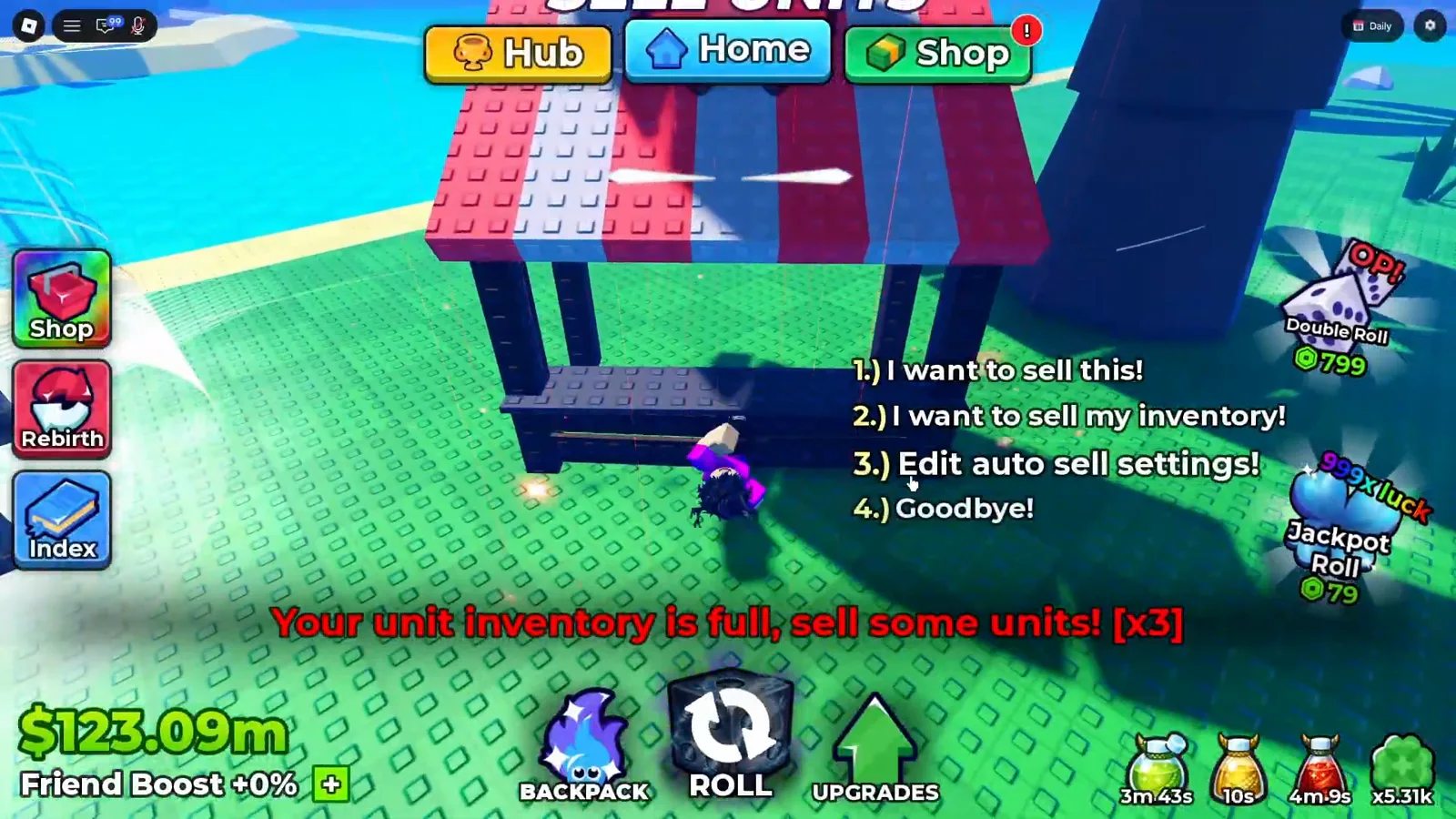
The stall, its menu, and the same inventory warning the Backpack panel carries.
Watch the SELL UNITS menu at 19:15
Option three is the one worth knowing about before a long session, because the auto-sell rules are what stop a plot run from bouncing off the same ceiling the Backpack counter was showing — the setup is walked through on the AFK farming guide.
How High Do Plot Levels Go?
Sixty, at least, and the frames show the ladder rather than a ceiling. The deepest line we could read is from the second recording, one minute in, on a plot whose board is fully legible:
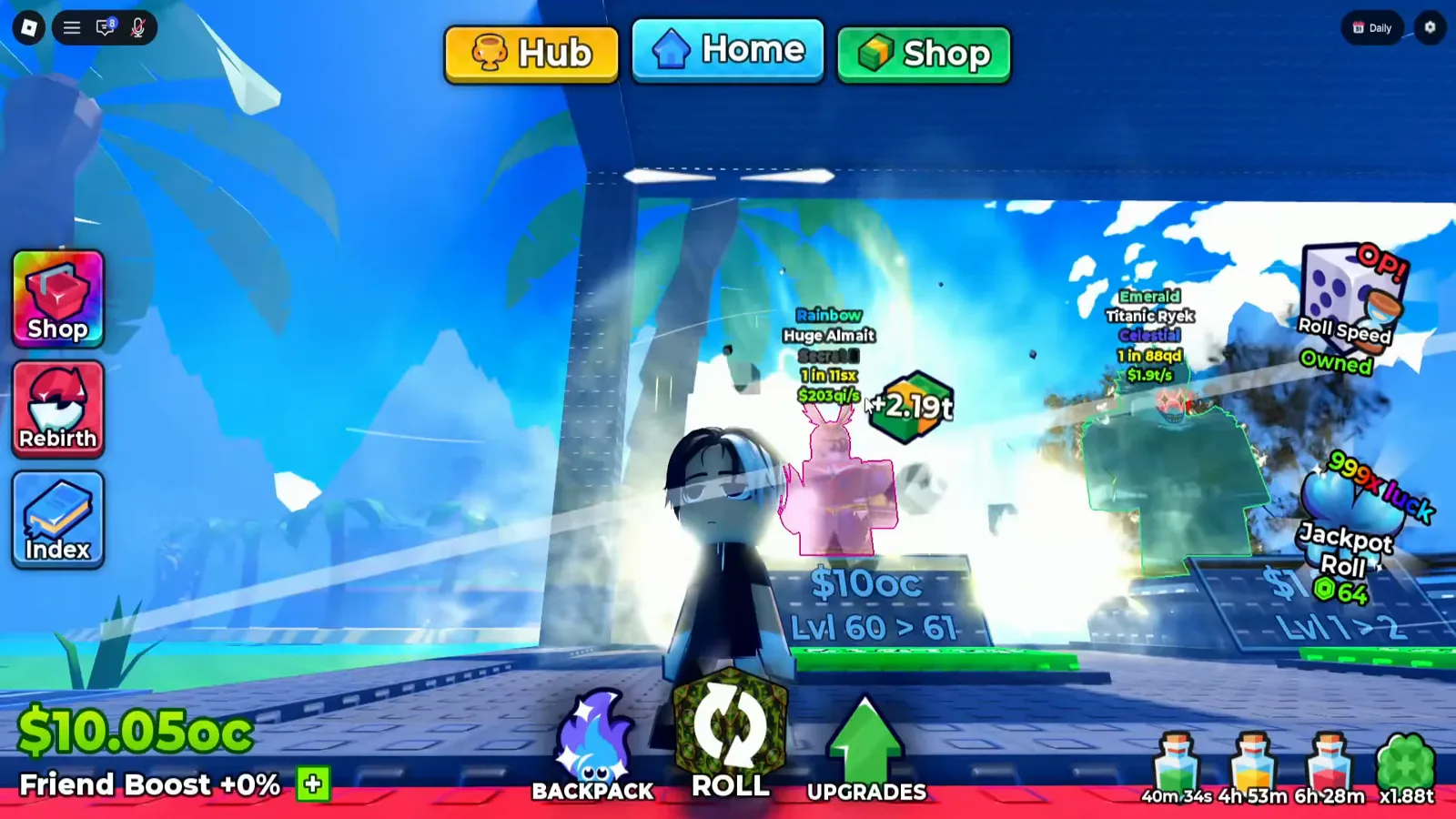
1:00. $10oc and Lvl 60 > 61, on a display whose cash counter reads $10.05oc.
Watch the level 60 sign at 1:00
oc is the largest cash suffix we have seen on a plot sign anywhere, and it arrives on the same board format as $1.4k did four hours of gameplay earlier — same two lines, same order. That is the whole shape of plot levelling we can support: the number and the level both climb, the format never changes, and no frame states a top.
What Could We Not Read?
Every line below is a real gap in the footage, not an oversight:
- How many plots you have, or can have. No slot counter, no purchase panel, no unlock order, no maximum. If plot expansion is sold anywhere, none of our recordings opens that screen.
- What a plot level changes. The board prints a level and a figure and nothing else. No multiplier, no income effect, no cap.
- What the board’s cash figure measures. One frame matches a unit’s nameplate income exactly, another does not come close. We print both and name neither.
- What
+10on Unit Storage IV counts. Slots, units or capacity — the tooltip prints the number and no unit. - The base storage capacity. The
100/100reading is one second on one account. Nothing prints the starting value or the ceiling. - What the pad’s figure buys. The beginner guide read the same pad as a per-unit level price; this page’s frames never label it, and the pad and the board disagree on which number is larger in different frames.
- The stall’s last two options in practice. We read
Edit auto sell settings!andGoodbye!, but no frame on this page opens the settings screen or shows what it contains.
If your client prints one of these — a slot counter for plots, a storage cap, or a sharp shot of the auto-sell settings — a dated screenshot through the contact page settles it and gets credited here.
What Should You Read Next?
- Beginner guide — the slots-before-blocks order this page’s boards sit behind
- Block upgrade priorities — the other half of the same cash decision
- Upgrades tree — every hex branch, including the storage nodes priced here
- Index and Backpack — why those two panels are not the same inventory
- AFK farming — the auto-sell setup that keeps the storage warning away
- Live codes — free spins and rerolls before you spend on a slot
相關文章
guides
Anime Dice Friend Boost: The HUD Bonus That Reads +10%, Then +0%
Frame-verified Anime Dice Friend Boost readout: where it sits in the bottom-left HUD, the +10% and +0% frames, and what no screen ever explains.
guides
Anime Dice Luck: Dice, Potions, Rebirth, Gamepasses and Server Luck
Anime Dice luck sources read off full-resolution frames: dice rows, potion stacks, rebirth, Luck hex nodes and gamepass cards — plus the server luck gap.
guides
Anime Dice Group Rewards: What the Panel Pays and What It Asks For
Anime Dice's Group Rewards panel read off frames: two requirements, a claim that pays 5 Trait Reroll, 5 Gems and 2 Lucky Spin, and the hub's GROUP CHEST.
這篇對你有幫助嗎?
感謝你的回饋!