Anime Dice Upgrade Tree: Money, Luck, Damage & What to Buy First
How the Anime Dice Upgrades hex tree works: the Money, Luck, Damage and Unit Storage branches, what nodes cost, and what to buy first — read frame by frame.
常見問題
How do you open the Upgrades tree in Anime Dice?
What branches does the Upgrades tree have?
What do the grey question-mark hexes mean?
How much does an upgrade node cost?
Which branch should you upgrade first?
What Is the Upgrades Tree, and Where Do You Open It?
The Upgrades tree is a honeycomb of floating hexagon nodes you buy with cash, and it lives behind the green UPGRADES button at the bottom-centre of the screen — the upward arrow wedged between BACKPACK and ROLL. Press it and the game does not pop up a flat menu; the nodes unfold in the world around a central Start hex, and a red Close button appears underneath.
Every screen on this page was opened and read frame by frame from one session:
Source: the captures and timestamps below are frames from Shensu’s I Went from NOOB to PRO in Roblox Anime Dice! (September 2026), the run that walks straight into the Upgrades tree around the two-minute mark, hovers individual nodes so their tooltips print, and keeps buying until the deeper tiers appear. A companion page, our Infinity Tower guide, screenshots the same video’s Towers menu — this page deliberately uses different frames and stays on the upgrade economy.

The session whose UPGRADES button, hex tree and node tooltips this guide is built from
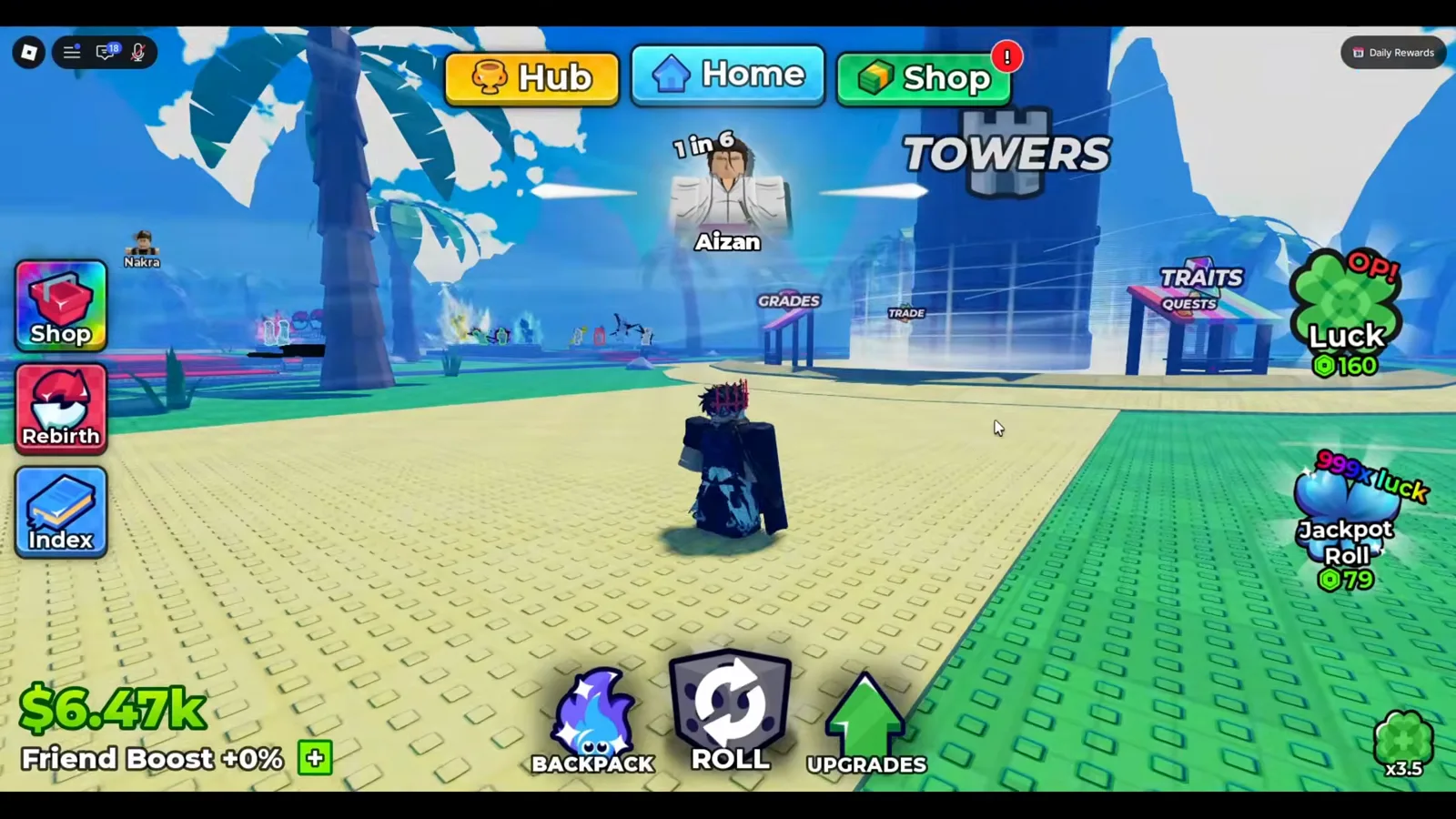
That arrow is the whole entry point; everything below is what opens behind it.
Watch the UPGRADES button at 2:06
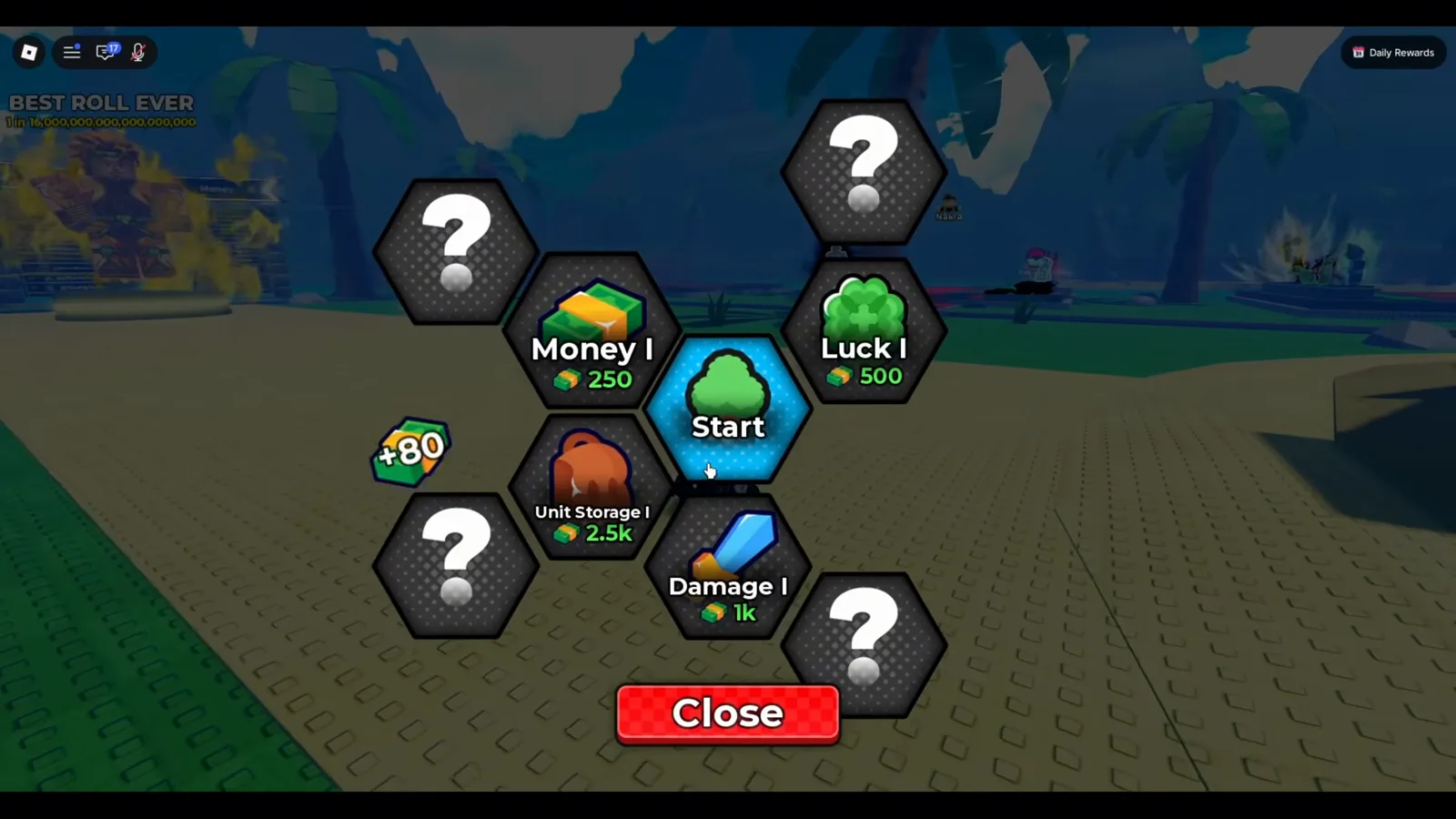
Four buyable branches, one Start node, and four grey ”?” hexes waiting to be unlocked.
Watch the freshly opened tree at 2:01
What Do the Money, Luck, Unit Storage and Damage Branches Do?
Reading the tier-I ring left to right, the game names four branches and gives each an icon that says what it touches. Hovering a node prints a small black tooltip with its effect — in the frame below the cursor is on Money I and the tooltip reads +25%.
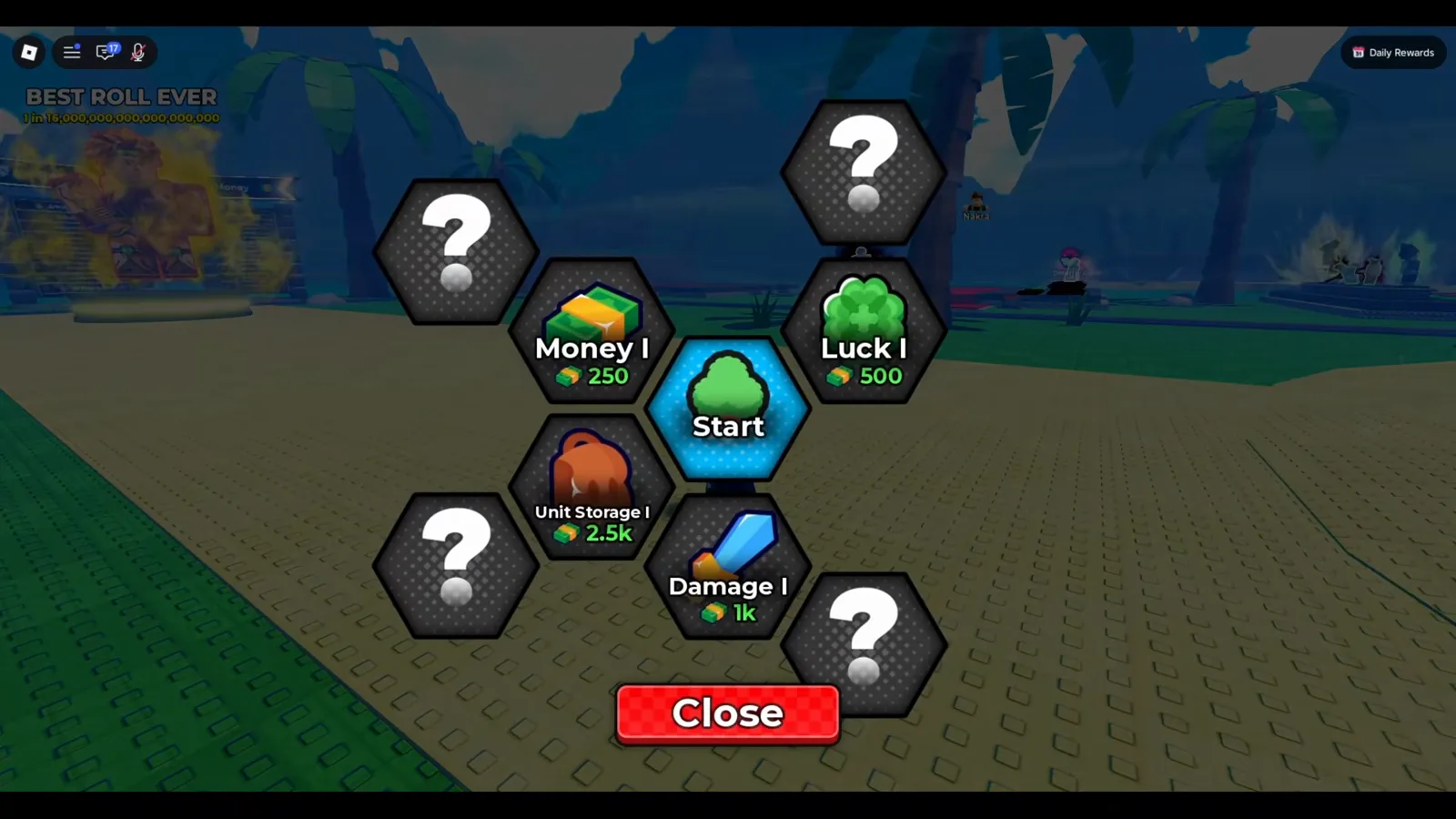
The four branches and their opening prices, straight off the screen.
Watch the four branches at 2:03
| Branch | Icon | What it raises | Tier-I cost (as shown) |
|---|---|---|---|
| Money | cash stack | cash generation — Money I tooltip reads +25% | $250 |
| Luck | four-leaf clover | roll luck (numeric effect not legible on screen) | $500 |
| Unit Storage | backpack | how many units you can carry (slot count not printed) | $2.5k |
| Damage | sword | unit damage — the branch tied to tower combat | $1k |
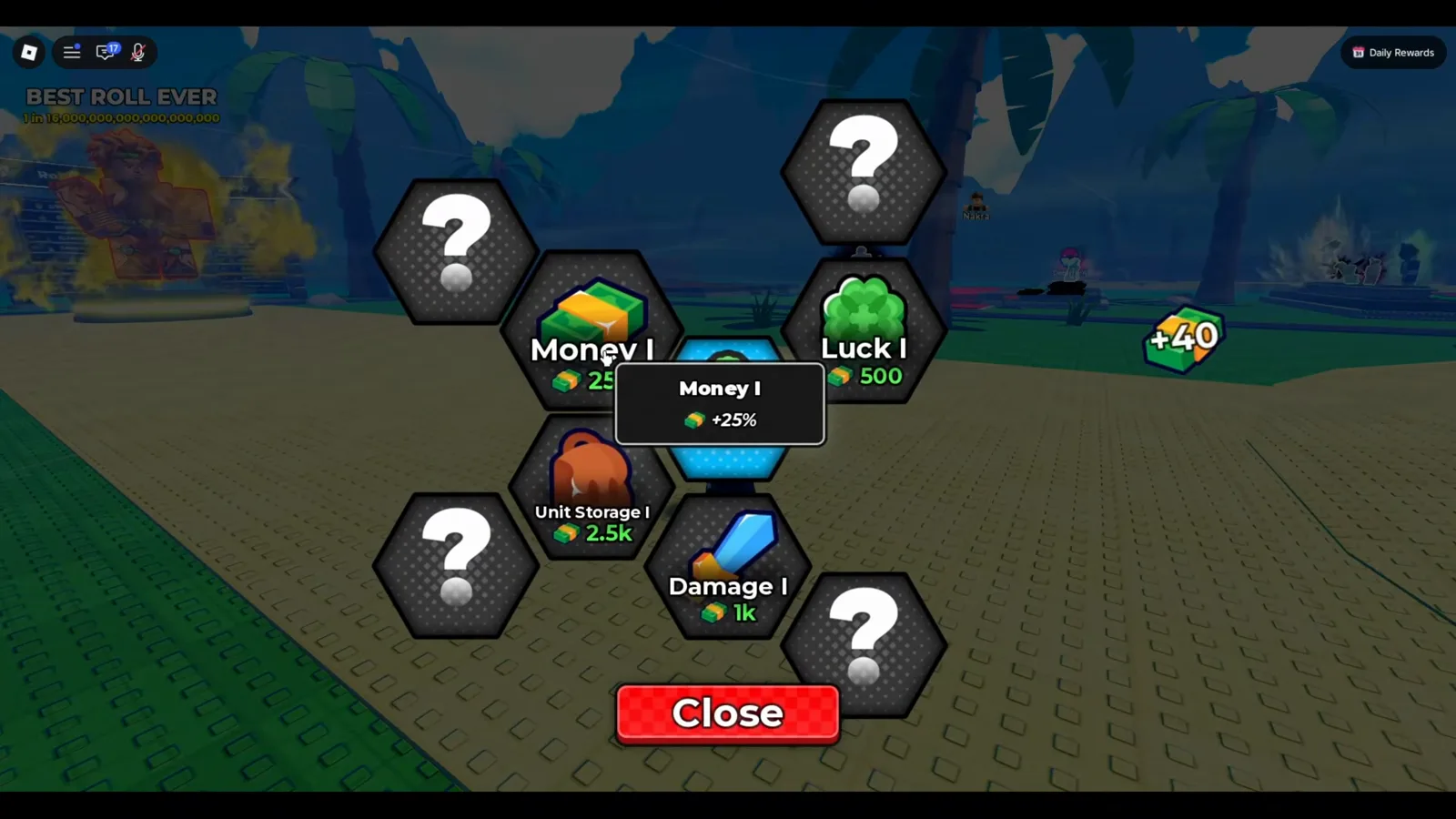
Money I is a +25% raise to your cash rate — the only node effect we could read at tier I.
Watch the Money I tooltip at 2:04
Is There a Fortune Branch? The Frame That Says Yes
When this page was written we named four branches, because four is what the tier-I ring prints. A later frame from a UPD 5 client shows the honeycomb running further than that ring suggests — and it carries the first legible tooltip we have ever captured on a luck-family node.
The frame is a wide shot of the tree with two clover-icon chains side by side. The left chain reads Luck and we can count VII through XIV in it, each a blue hex with a green clover. The right chain reads Fortune, its hexes carrying a purple clover, and we can count V through IX. Hovering the end of that second chain pops the small black tooltip, and it is fully legible:
| Tooltip line | As printed |
|---|---|
| Name | Fortune IX |
| Effect | +6x, beside a green clover icon |
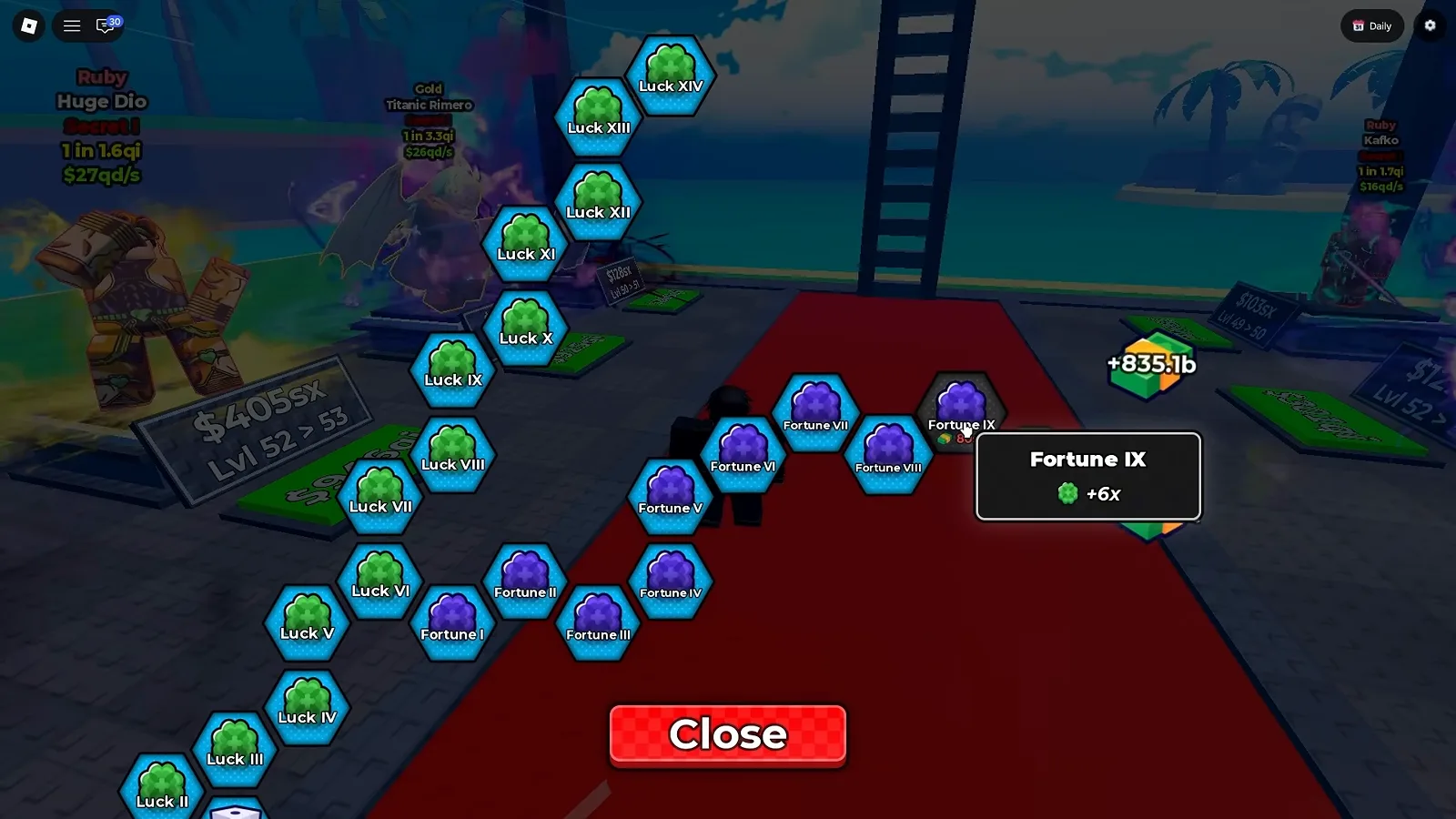
Two chains, two clover colours, one printed multiplier. The +6x is the game’s own text, not our arithmetic.
Watch the Fortune IX tooltip at 10:22
That matters for how you read everything above this section. Our tier-I frames never opened a Luck tooltip, which is why the comparison above gives the Luck nodes a cost and an icon but no number — and that still holds for Luck I. What we can now say is that the luck family does print multipliers deeper down, at least on the Fortune side of it, and that the game’s own figure at the top of the chain we reached is +6x.
What the frame does not settle, stated plainly:
- What
+6xmultiplies. The tooltip prints a clover and a number and nothing else. It does not say luck, or drops, or anything else. - Whether Fortune and Luck are the same stat on two tracks. They are two named chains with two icon colours, which is a difference the screen shows; whether it is mechanical or cosmetic, no frame says.
- Where either chain starts. We counted Fortune from V and Luck from VII because those are the lowest numbers inside this one frame. The tree continues off-screen in both directions.
- Why Fortune IX sits in a dark hex while V through VIII are blue. It reads as a not-yet-reachable position, but no label on the screen says so, so we report the colour and stop there.
Prices are the other thing this frame will not give you. The upgrade plots visible behind the panel print their own cash costs — $728x at Lvl 50 > 51, $105sx at Lvl 49 > 50 — but those are plot levels, not hex prices, and nothing in the frame links a number to a Fortune node. Treat every figure on this page as one account’s snapshot on one client, because that is exactly what it is.
What Do the Grey ”?” Hexes Mean, and How Does the Tree Grow?
The outer ring of the freshly opened tree is grey hexes stamped with a ”?”. Those are nodes you cannot buy yet — the game only reveals a hex once the node in front of it has been purchased. Watch the same tree a few seconds later, after the walkthrough has spent cash on the tier-I nodes:
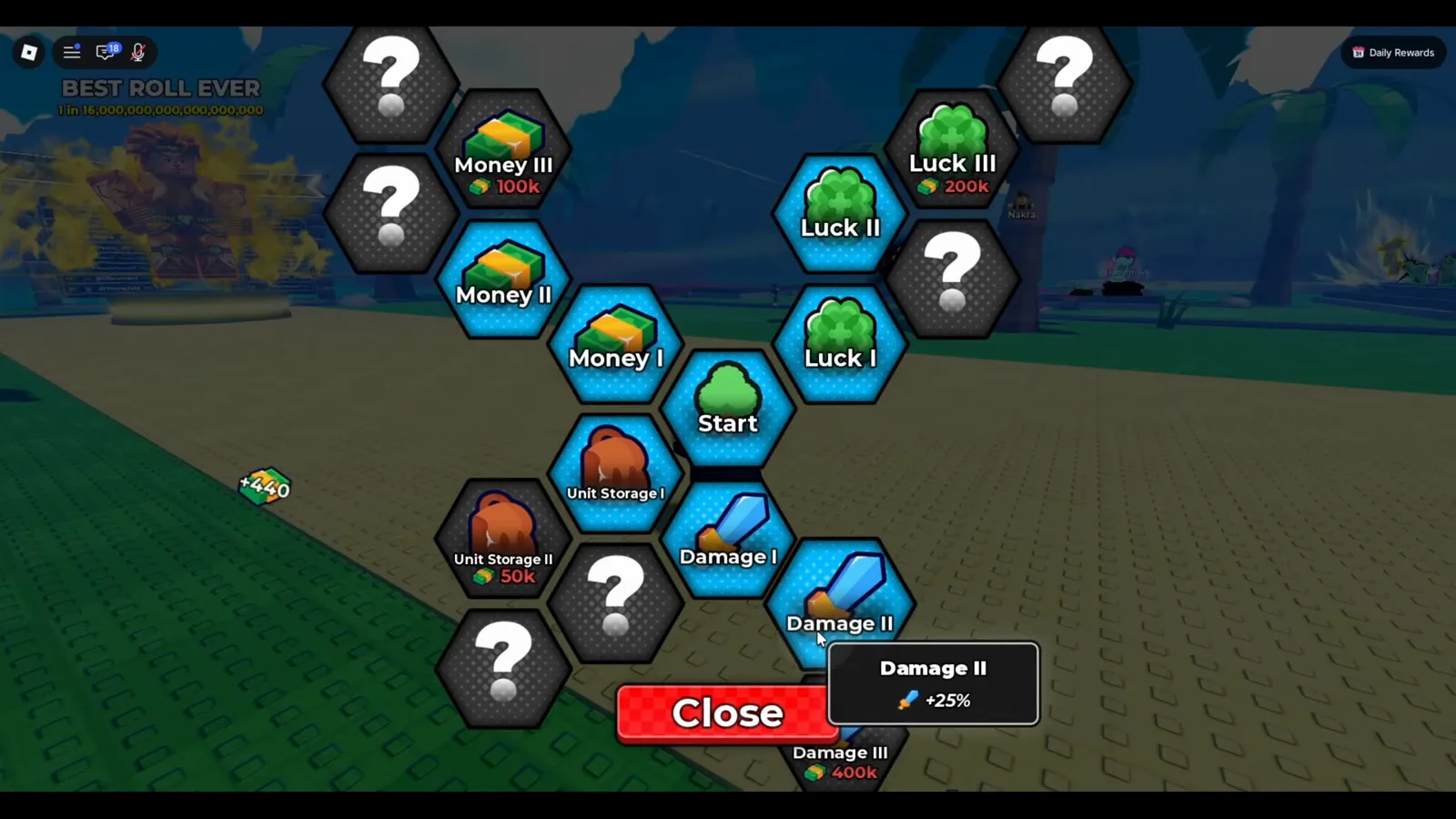
The ”?” positions are now real nodes: Money III $100k, Luck III $200k, Unit Storage II $50k, Damage III $400k — and Damage II reads +25%.
Watch the unlocked tiers at 2:05
Two things fall out of comparing that frame with the first one. First, the tree genuinely grows outward — the ”?” hexes that ringed the tier-I nodes become named II and III nodes once you buy the tier before them, while new outermost hexes stay ”?”. Second, the price curve is steep: the same branch that opens at $250 (Money I) is asking $100k by Money III. The block and dice upgrade priorities cover the parallel cash-vs-luck spending question on the plot side; the tree is the other half of the same wallet.
What Should You Upgrade First?
The tree never states a recommended order, so this is the sequence the screens and the surrounding economy support — not a leaked spreadsheet:
- Money, early and often. Every node on this tree is priced in cash, and Money I is a flat +25% to your cash rate (tooltip, above). Raising income first is what makes the $2.5k, $50k and $100k nodes reachable at all; the fuller spending order lives in block and dice upgrades.
- Luck, next. The clover branch is what weights rolls toward the rare, high-multiplier units — which is the whole point of rolling. See which units are worth pulling in the character tier list, and how to spend the pulls in the Traits guide.
- Damage, only when a tower stops you. The sword branch is the one the walkthrough ties to tower combat (“there’s also damage as well — I think it’s for the tower”), and Damage II confirms it with a +25% tooltip. If you are not pushing floors yet, leave it; the Infinity Tower guide covers exactly when the Damage branch starts paying for itself.
- Unit Storage, as a fix. Buy it when your backpack fills mid-session, not on a timer — the deeper tiers jump fast ($2.5k to $50k by Unit Storage II).
Two free-to-play levers sit outside the tree but feed the same wallet: redeeming live Anime Dice codes funds spins and rerolls before you spend a dollar on a node, and the Gems usage guide explains the separate currency the tree deliberately does not charge in — every node here is cash.
相關文章
guides
Anime Dice Update 7: Rebirth Upgrade Points, Third Base Floor and New Dice
Anime Dice UPD 7 read off frames: the developer's own patch notes, the 6-path Rebirth Stats panel, and a purchase confirmation. Checked 7 October 2026.
guides
Anime Dice Money: Where Cash Comes From, Read Frame by Frame
Anime Dice money read frame by frame: the cash counter's k-to-oc suffix ladder, the $/s income every unit card prints, and the breakdown no screen ever shows.
guides
Anime Dice Probability and Roll Odds: The 1 in N Screens
Anime Dice prints unit odds as 1 in N and trait odds as percentages, never as one drop table. Frame-by-frame readings plus the arithmetic the game leaves out.
這篇對你有幫助嗎?
感謝你的回饋!