Anime Dice Update 6: Release Date, New Dice and Verified Changes
Anime Dice Update 6 landed on 27–29 September 2026. Two clean sessions verify two new top-tier dice, an 11-step Grade Skip grid, Gears slots and the Towers panel.
FAQ
When did Anime Dice Update 6 come out?
What is actually new in Anime Dice Update 6?
Are there new codes in Anime Dice Update 6?
What are Gears in Anime Dice?
Is the Grade Skip Confirmation grid new in Update 6?
Is there an official Anime Dice Update 6 patch notes list?
What Is in Anime Dice Update 6?
UPD 6 is the sixth numbered content patch, and the Roblox page title now reads [⚙️UPD 6]. Confirmed on screen from two clean recordings: two Dice Shop rows this site had never captured, a Backpack Gears tab holding five named equipment slots, the complete eleven-button Grade Skip Confirmation grid, and the Towers panel. The developer published no notes for it, and this page does not invent any.
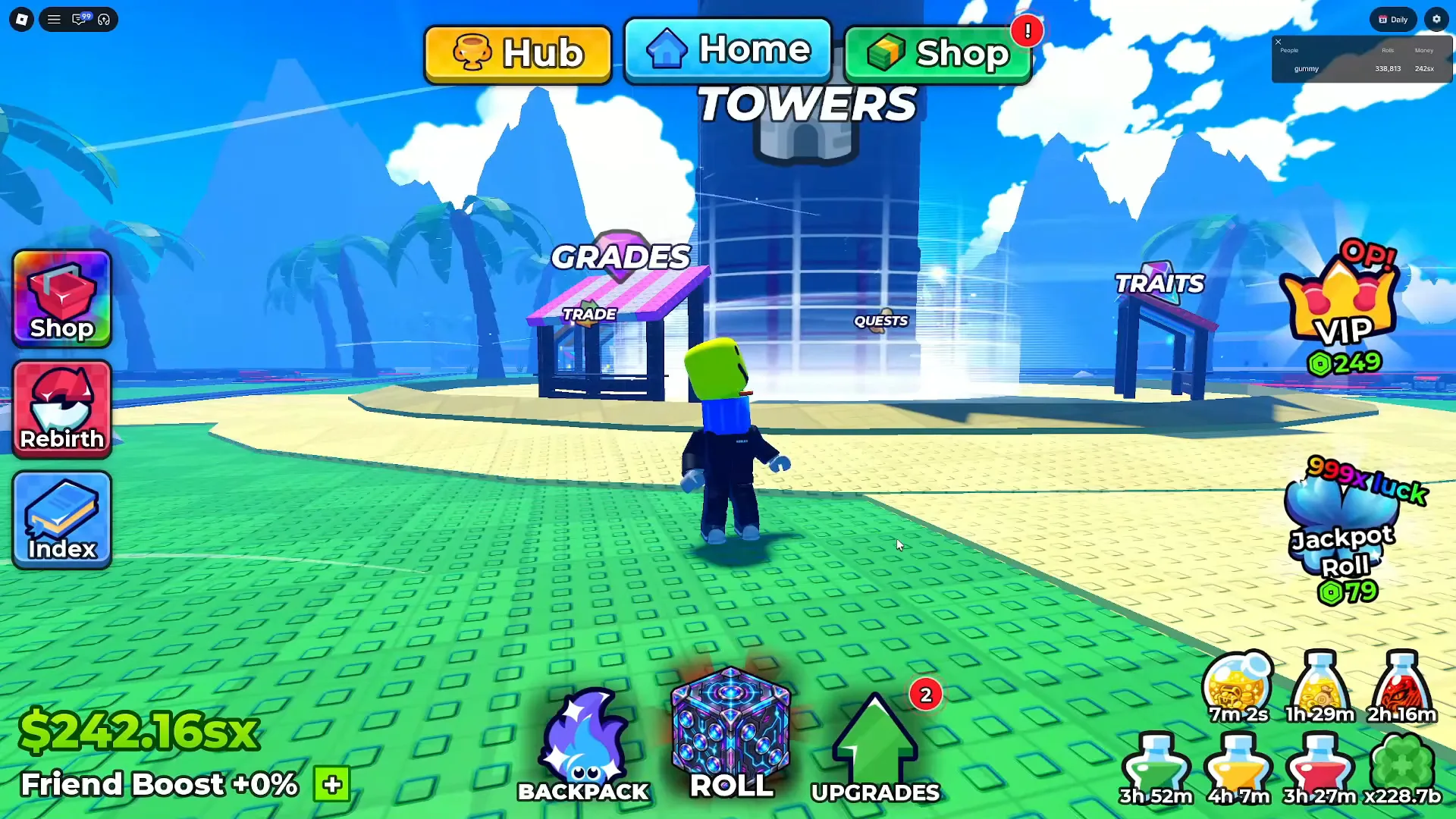
The hub is the only screen that shows the whole update at once — a world map rather than a menu.
Sources: every frame on this page comes from two JuniorGummy screen recordings of the UPD 6 build — a 202-second session uploaded 27 September 2026 and a 182-second session uploaded 28 September 2026. Both are clean: we screened every second of both files at one frame per second and found no burned-in captions, no facecam and no channel watermark in either. Every string was then re-read at native 1920×1080 (or a 2× crop of it) on 2026-09-29. We quote no spoken line from either recording, because nothing on this page rests on narration. The developer still publishes no patch notes — the Roblox page title is the entire official record, exactly as our update history explains.

JuniorGummy's 202-second UPD 6 session — the Dice Shop, the Grades grid and the Gears tab, all read for this page
The Update 6 Checklist, Graded by Evidence
Every row below is one claim, with the class of evidence it stands on and nothing inferred between rows. The three classes are kept apart on purpose: what a frame prints, what Roblox publishes, and what circulates without either.
| What | Evidence class | What we actually have |
|---|---|---|
Title tag [⚙️UPD 6] | Official | Roblox page title, checked 29 September 2026 |
| Live 27–29 September 2026 | Official (conflicting) + community-recorded | v1 endpoint says 29 September 05:08Z; v2 endpoint says 27 September 18:34Z; UPDATE 6 code videos already uploaded 27–28 September |
| 74,982 playing · 45,365,424 visits · 106,777 favourites | Official | Roblox API read, 29 September 2026; a re-read the same evening gave 74,736, i.e. live jitter |
Alchemy | Secret II 2,000,000,000x Luck · $5oc | Verified in footage | Dice Shop frame; no UPD 5 capture of ours contains the row |
Radiant | Heavenly 5,000,000,000x Luck · $100oc | Verified in footage | Same panel, same frame |
Toxic · 150,000,000x Luck · $750sx | Verified in footage | The row our UPD 5 page could only print by position — now named |
Grade Skip Confirmation, eleven buttons | Verified in footage | Grid frame below; the same grid is also on our settings guide from a pre-UPD 6 capture that prints ten buttons, with no infinity slot in it — so the grid is not evidence of a change, and when the extra slot appeared cannot be dated |
Confirm? · “skip this grade” · Skip / Keep | Verified in footage | The dialog a tap on that grid opens |
Backpack Gears tab, five named slots | Verified in footage | Equipment outline frame below, on both source recordings |
Towers panel with difficulty pills | Verified in footage | Nightmare and Infinity pills plus a purple Extreme card |
| Printed odds move inside one session | Verified in footage | Traits rail read twice, 55 s apart in game time: Eternal 0.0025% → 0.0028% |
| Gears drop from towers · own rarity ladder | Creator-stated (burned caption, picture-banned) | Read on our gears guide, not from this page’s sources |
UPDATE6 · 400KLIKES | Reported (unverified here) | Names only on this page; status lives on the codes page |
| Official patch notes | — | Still none. The gap stays a gap |
| Anything else that changed | Undeterminable | Two sessions show a build, not a diff |
The last row is the one that matters most. A release-date page can tell you the patch is out; it cannot tell you what a diff would tell you. We have no pre-UPD-6 capture of most of the panels below, so the honest label for them is present in the UPD 6 build, not added in UPD 6.
Update 6 Release Date: Why Two Official Dates Disagree
Roblox publishes the same universe through two endpoints, and on 29 September 2026 they disagreed by roughly a day and a half. The v1 games endpoint stamped updated at 2026-09-29T05:08:27Z; the v2 groups-games endpoint stamped the same universe at 2026-09-27T18:34:39Z. Both are official, neither is wrong about what it measures, and we are not going to pick one and quietly drop the other.
The community record leans early. YouTube guides titled UPDATE 6 were already being uploaded on 27 and 28 September, and the two recordings this page is built from were uploaded on those two days as well — both showing what the panels now print. That is consistent with the v2 stamp and consistent with a rolling release where some servers updated before the endpoint that hits this page caught up.
What we will print without hedging is the plate, because it is a single read: name = "[⚙️UPD 6] Anime Dice", playing = 74,982, visits = 45,365,424, favoritedCount = 106,777, maxPlayers = 9, creator = More & More Games. A second read the same evening returned 74,736 concurrent, which is what a live counter does.
The concurrency series this site has been tracking reads 26,616 (13 September) → 45,806 (22 September) → 55,194 (25 September) → 48,671 (26 September) → 74,982 (29 September). UPD 6 more than doubled the 26 September figure, and every previous update in this series produced a smaller bump.
Two New Dice Above Frostfire — and the Row Update 5 Could Not Name
The Dice Shop’s top end moved up a currency. Our frame reads Alchemy | Secret II at 2,000,000,000x Luck for $5oc and Radiant | Heavenly at 5,000,000,000x Luck for $100oc; the row above them shows 950,000,000x Luck priced $250sp with its name scrolled past the panel’s top edge. No UPD 5 capture we hold contains either of the two new rows, and the UPD 5 page recorded Frostfire at 950,000,000x Luck for $250sp as the top of that ladder — so oc now prices the ceiling where sp used to.
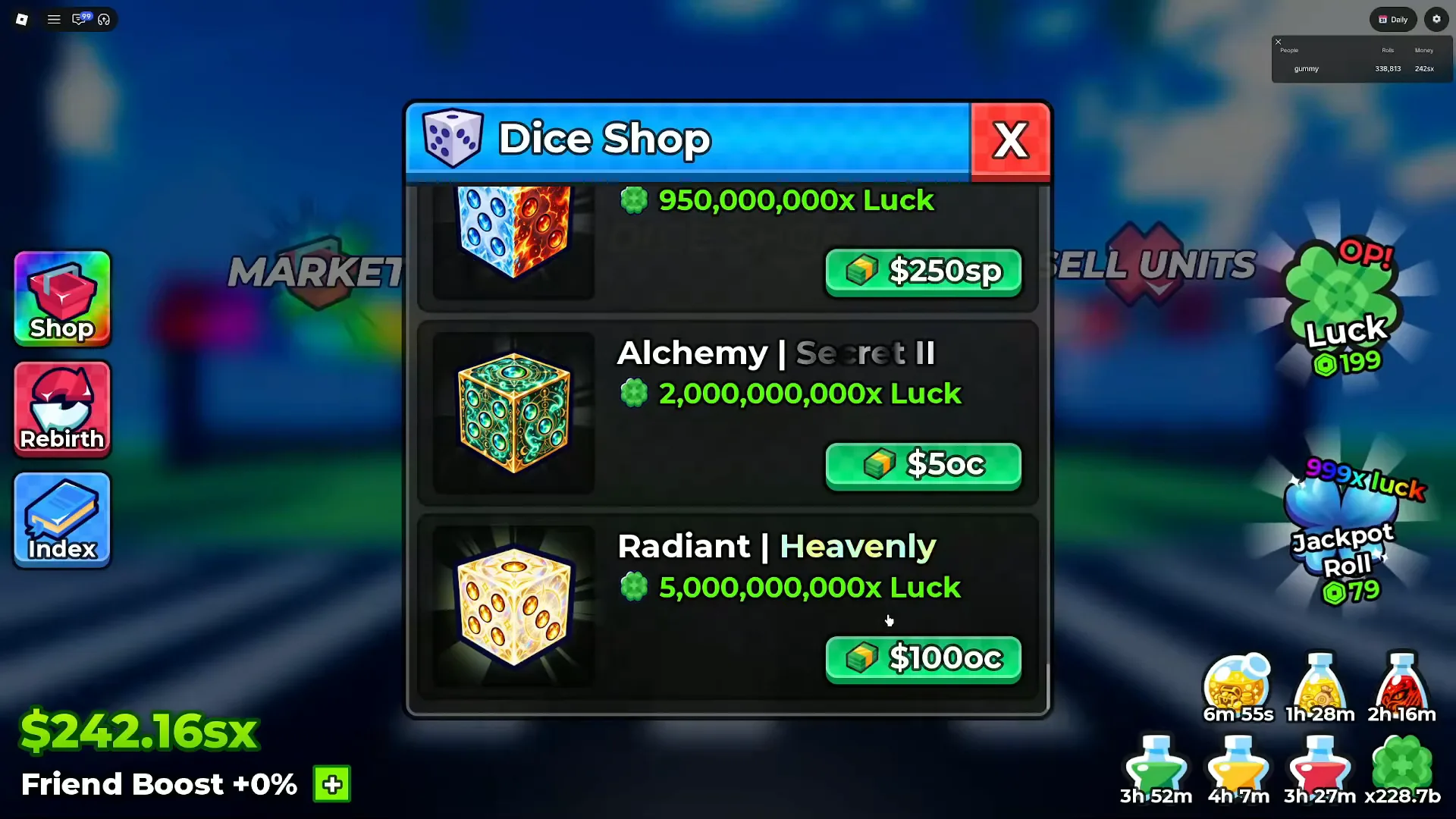
The top row’s name still never scrolls in. Its value and its $250sp tag are all the frame gives.
Watch the Dice Shop top end at 0:05
The same panel six seconds later settles something this site left open for a week. Our UPD 5 page found a green row at 150,000,000x Luck carrying an Equipped button whose name sat above the panel’s visible edge, and could only file it by position — the row where Toxic sits. The UPD 6 frame prints the full line: Toxic | Secret I, 150,000,000x Luck, $750sx. Two things come out of it. The value and the price are now on the record. And the rarity tag reads Secret I, where the UPD 4 frames behind our dice shop ladder read Secret II for the same name — two captures, two labels, and no way from here to tell a re-tag from a misread, so that page now carries both readings rather than one.
The Grade Skip Confirmation Grid: Eleven Buttons From D to Infinity
Tapping the Grades station opens a panel headed Grades whose first action is a grid titled Grade Skip Confirmation — eleven bordered buttons, not the nine the ladder’s letters would suggest. Row by row the frame reads D, C, B; A, A+, S; S+, Z, Z+; and then two slots this site has never been able to name: a red Japanese kanji and an infinity symbol.
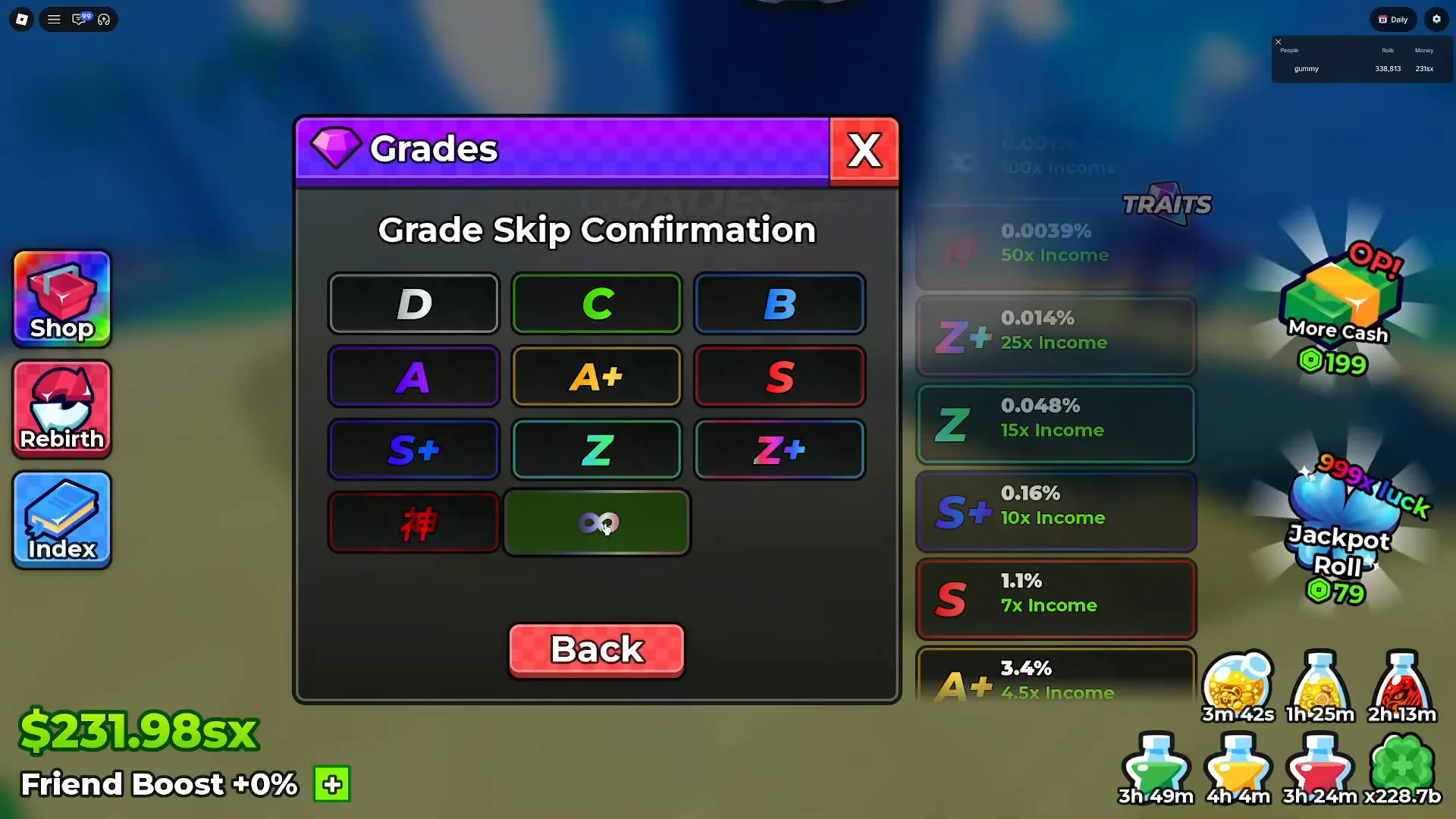
The grid is wider than the ladder this site transcribed. Two of the eleven slots only exist as symbols.
Behind the panel, the Grades rail prints what each tier is worth: the infinity row at 0.001% with 100x Income, the kanji row at 0.0039% with 50x Income, then Z+ 0.014% / 25x, Z 0.048% / 15x, S+ 0.16% / 10x, S 1.1% / 7x and A+ 3.4% / 4.5x, with the lower letters below the frame’s edge. Which letters are new is a question this page cannot answer: our grades guide had already seen a dimmed 0.001% line above Z+ on a 24 September capture, so the top of the ladder predates UPD 6, and the kanji tier has no pre-UPD-6 read on file at all.
What the frame does add is the interaction the settings guide could only infer. Selecting a tier opens a Confirm? dialog that asks “Are you sure you want to skip this grade?”, prints the target and its odds on one line — ∞ - 0.001% in our frame — and offers a red Skip and a green Keep. That is a yes-or-no prompt tied to skipping a grade, and it is why the two pages now describe the same grid from two angles instead of one.
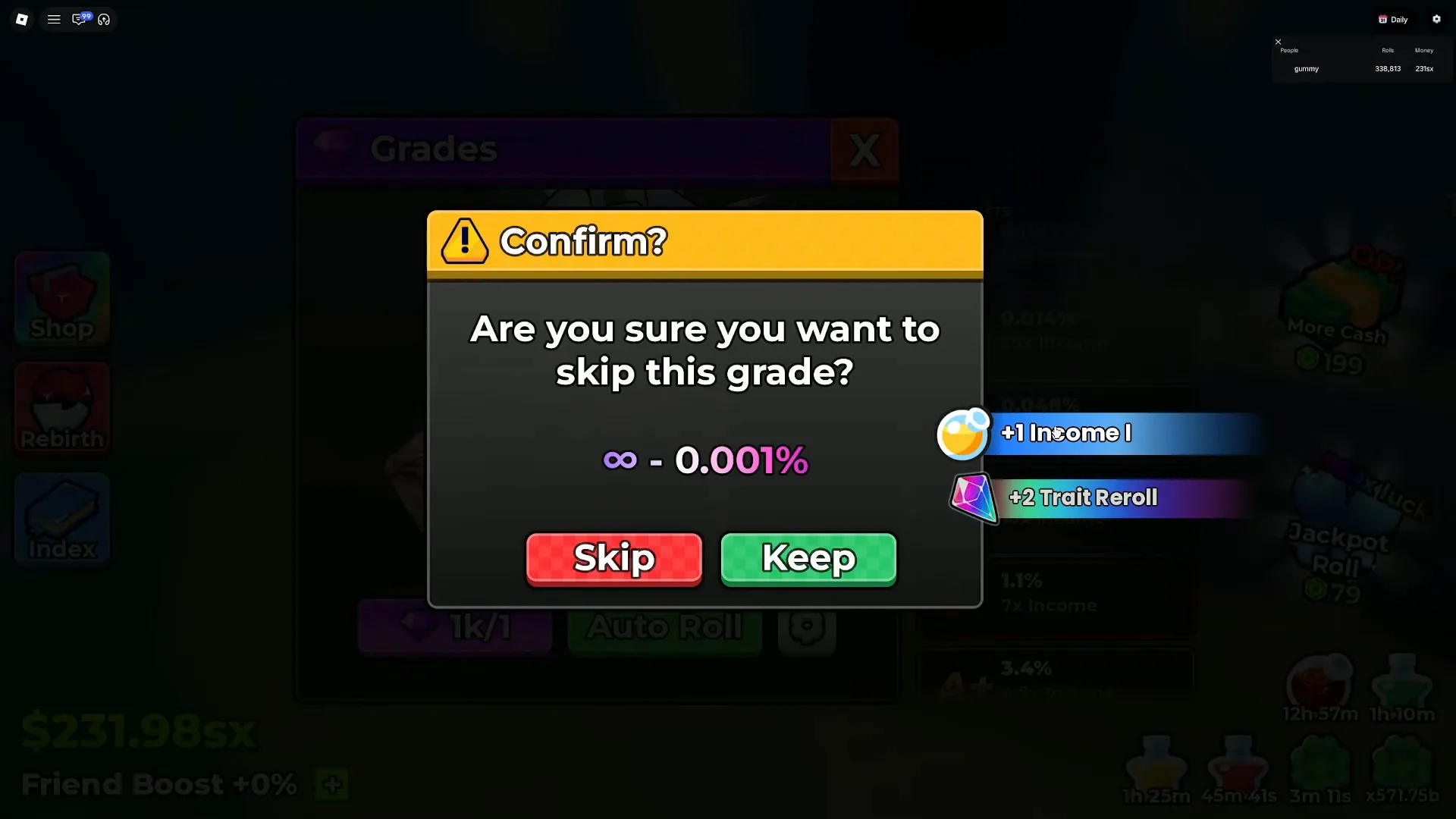
The odds line is the client stating the chance of the grade you asked for, at the moment you asked for it.
Watch the skip confirmation at 2:20
Gears Land in the Backpack: A New Tab and Five Slots
Gears are the update’s headline feature on our gears guide, and its receiving end is visible here. The Backpack panel carries three tabs — Units, Items and Gears — and on the account in our main frame the Gears tab body is an equipment layout: five empty outlined slots labelled Head, Torso and Back down the left side of the avatar, Upper and Waist down the right, and nothing else on the panel.
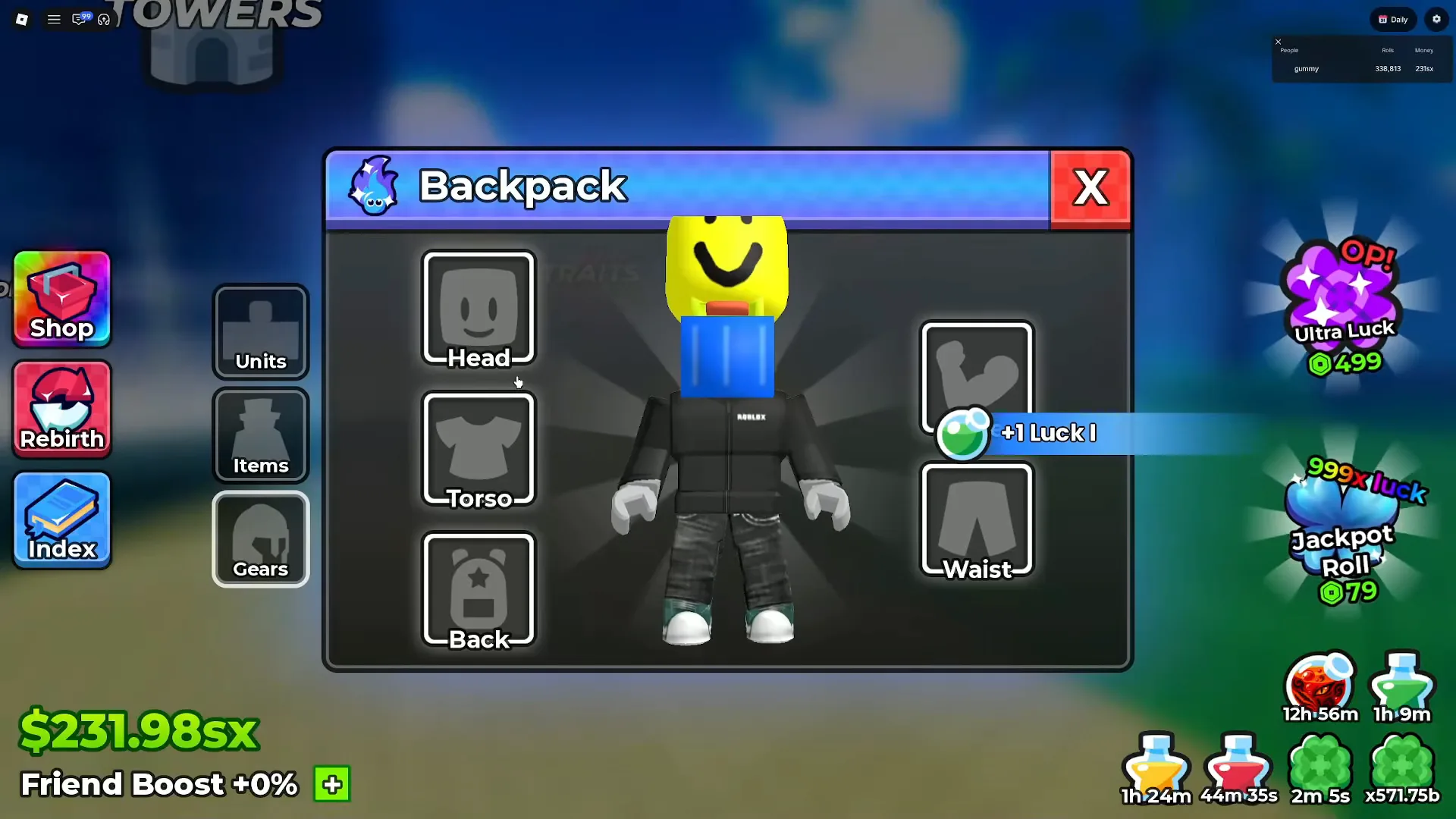
Five slots, all empty, on an account that is far enough along to be rolling at 999x luck.
Both source recordings print the same five slots in the same two-column layout, so this is not a panel mid-animation. Opening an empty slot is answered by a single line of body copy: “You don’t own any gear for this slot yet.” The second account’s Gears tab shows the other state — owned gears as a tile grid, one tile carrying an x9 stack badge — and hovering a tile prints a tooltip with its name, rarity and effect: Nezuka's Bamboo | Rare | +10% at 1:44 in that recording, and Shizui's Tanto | Rare | +15% around 2:02. How a gear travels from that tile grid into one of the five named positions, whether it can be taken back out, and what those positions do beyond the printed bonus are all outside what these two recordings show — the gears guide carries what footage has established and labels the rest.
Our 26 September reconnaissance of an earlier session described the Backpack as a two-tab panel with no equipment slot in sight. Whether Gears is new in UPD 6 or was simply never opened on camera before, we cannot tell from two captures, and we are not going to call it either way.
The Towers Panel, Where the Gear Drops Live
The Towers panel is the other half of the gears story: a scrolling list of tower cards, each with its own art, a coloured difficulty pill and a green Play button. Our frame reads Slayer Tower marked Nightmare in red and Infinity Tower marked Infinity in magenta, with a card above them carrying a purple Extreme pill whose name has scrolled past the panel’s top edge.
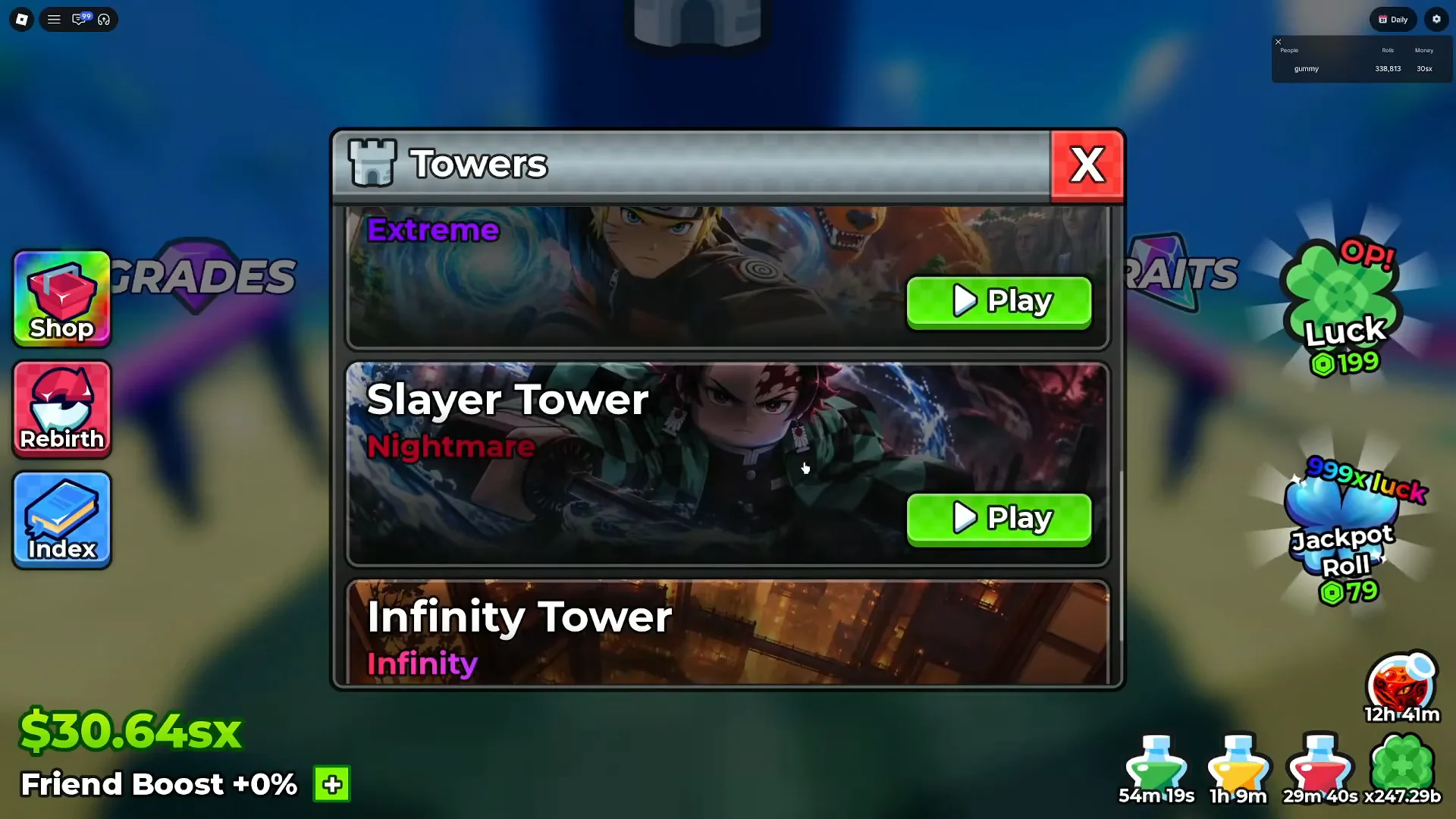
The panel states a difficulty per tower. What each tower drops is on the Drops column beside it.
Watch the Towers panel at 0:24
We are stopping at the pills deliberately. This site’s tower pages, the drop table and the new gears guide already carry the tower list, the per-floor drop brackets and the gear tooltips; the job here is to place the panel in the update, not to re-transcribe it. What these two recordings add is the panel’s own labels as read: Nightmare on the Slayer Tower card, Infinity on the Infinity Tower card, and an Extreme pill on the card above them whose name has scrolled out of the panel in every capture we hold — so no frame lets us attach that pill to a tower name. The Drops column docked to the right of the tower panel prints its own floor brackets and percentage tiles, and we are not printing a table of those here either.
Update 6 Codes Are a Codes-Page Problem
Two tokens circulate for this patch: UPDATE6 and 400KLIKES. We print the names and stop there — no rewards, no expiry, no promise that either still works, because a code is only worth printing when its status is current, and status belongs on the codes page where it is checked as verifications land.
The naming pattern is the credible part. UPDATE6 continues the UPDATE1-onward sequence our update history maps to the numbered patches, and the milestone-style name matches the concurrency codes that page already tracks. Neither token appears in a frame of the two recordings this page is built from, so neither gets a reward line here.
What We Could Not Verify
Four things stay outside the evidence: whether the new-looking panels arrived with UPD 6, how a gear is equipped or removed, the codes’ rewards, and the exact release moment. None of them is denied — each is simply not printed by any screen we can check or published by the developer.
Which Anime Dice Pages Pair With Update 6?
Pair this page with the guides UPD 6 touches: the system page for gears, the ladder for where the two new dice rows sit, the tiers page for the grid above, and the codes page for the tokens.
- Anime Dice codes — live and expired status, updated as verifications land
- Gears guide — the system behind the
Gearstab this page only frames - Update history — the numbered-patch timeline UPD 6 extends
- Update 5 — the previous round’s frame-verified inventory, and the gap this page closes
- Dice shop ladder — the full ladder, with both
Toxicrarity readings - Grades guide — the tier ladder and the gem cost behind the skip grid
- Settings guide — the same
Grade Skip Confirmationgrid, read as a stop list
Related Articles
guides
Anime Dice Gears: Rarities, Bonuses and Where They Drop
Anime Dice gears are UPD 6 tower-drop equipment worn in the Backpack's Gears tab. We read six of them frame by frame: name, rarity word and bonus row.
guides
Anime Dice How to Sell Units: the SELL UNITS Stall and Auto Sell
Anime Dice how to sell units, read frame by frame: the SELL UNITS stall menu, the inventory Confirm? panel and its $2.6k payout, and the Auto Sell odds field.
guides
Anime Dice Leaderboard: The Three In-Game Boards Explained
The Anime Dice leaderboard read frame by frame: three ranked in-world boards headed Rarest, Rolls and Money, plus the server roster the game also shows.
Was this helpful?
Thanks for the feedback!