Anime Dice Friend Boost: The HUD Bonus That Reads +10%, Then +0%
Frame-verified Anime Dice Friend Boost readout: where it sits in the bottom-left HUD, the +10% and +0% frames, and what no screen ever explains.
FAQ
What is the Friend Boost in Anime Dice?
Where does the Friend Boost appear on screen?
Why does the Friend Boost read +0%?
Does the Friend Boost last the whole session?
What does the Friend Boost percentage multiply?
Is the Friend Boost connected to the Roblox group or to Group Rewards?
Can you raise the Friend Boost by adding friends?
What Is the Friend Boost Readout in Anime Dice?
The Friend Boost is not a menu, not a panel and not a place you walk to. It is one line of the HUD, printed whether or not anything else is open, and it is one of the easiest things in the game to read and one of the hardest to explain.
Its whole design is two lines in the bottom-left corner of the screen. The cash counter takes the first line — a yellow-green figure with a dark outline, reading $426.81qi in the frame below. Directly under it sits the second line: Friend Boost +10%, set in white bold with a black outline. Immediately to the right of that text is a small green rounded-square button carrying a white +. To the right of the whole cluster runs the row of client buttons — BACKPACK, ROLL and UPGRADES — which the boost line sits to the left of in every frame we captured.
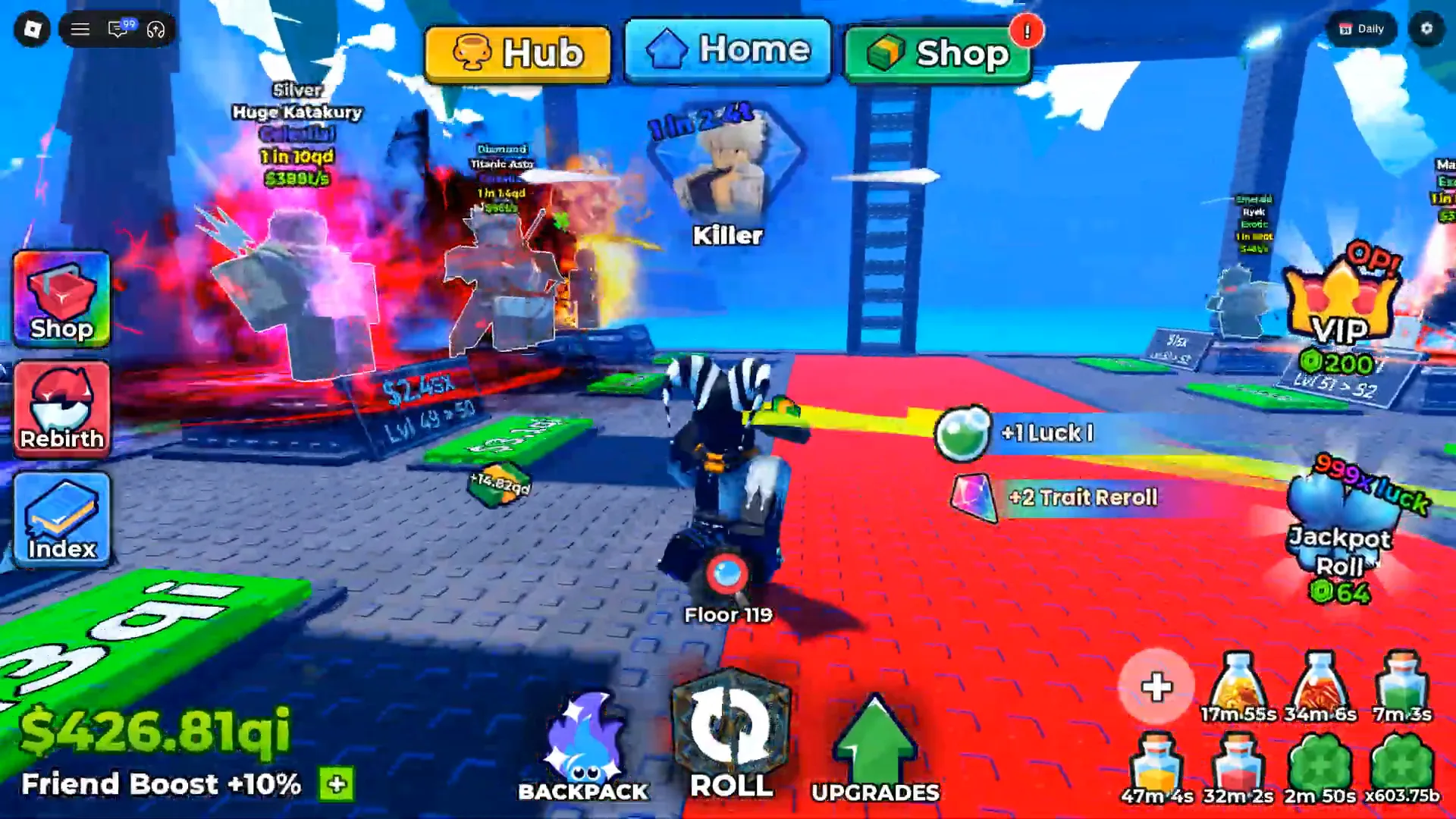
The complete readout. Two lines and a button, and nothing on screen explaining any of them.
Watch the +10% readout at 11:00
That is the full anatomy, and it is worth stating what is not in it. There is no timer beside the percentage, no counter, no friend icon, no progress bar and no second line of detail. It is two lines of text and one button, in the same place at every moment we sampled — including frames where the Grades panel, the Traits panel and the Quests board were open over the middle of the screen. The HUD does not react to what is in front of it: with the Grades panel up, the readout holds the bottom-left corner and the Daily button and gear icon hold the top-right one, unchanged. Our Settings panel guide reads that gear and the four rows behind it.
The one part of that corner that does move is the cash figure above the boost line. It carries in-game unit suffixes rather than plain numbers — sx in the frames from about five minutes, qi in the frames from about eleven minutes — and inside the qi frames alone it falls from $426.81qi to $168.89qi, then edges back up to $169.28qi. We print it only as a label of which second a frame came from, never as a trend and never as a measure of the bonus.
Sources: the six frames on this page come from three clean recordings by three different creators. Superlex Plays, MY JOURNEY TO ETERNAL TRAIT! + REBIRTH 10 | Anime Dice! Roblox (uploaded 2026-09-24, 24 minutes 44 seconds) supplies the four +10% and +0% frames; Cx, I Went Noob To PRO in Anime Dice Roblox (uploaded 2026-09-18, 24 minutes 47 seconds) supplies the mid-session +0%; Plique Games, ATUALIZAÇÃO ANIME DICE NOVA MÁQUINA, PERSONAGENS E MAIS! ADEUS TOP 1 GLOBAL (uploaded 2026-09-19, 14 minutes 30 seconds) supplies the session-open +0%. A fourth independent reading comes from Xou Blox’s session, CHASING the IMPOSSIBLE ROLL in ANIME DICE!! (1 in 4 Septillion) (uploaded 2026-09-20, 22 minutes 06 seconds), whose
Friend Boost +10%line is already published on our group rewards page. Every reading above was checked frame by frame at native 1920×1080 on 25 September 2026. All three recordings are clean of creator furniture — no facecam, no burned-in captions, no channel watermark — which is exactly what makes a bottom-left corner readable at all. The developer publishes no changelog and no documentation for this readout; see our update history for how thin the official record is.

The session the +10% and +0% frames come from — the Friend Boost line holds the bottom-left corner through the whole recording
What Did the Frames Actually Print?
Ten readings, four independent sessions, and two values. That is the entire dataset this page is built on.
| Recording | Channel | Second | Cash line above the boost | Friend Boost line |
|---|---|---|---|---|
7no0WtTqIZ8 | Superlex Plays | ≈300s | $6.49sx | +10% |
7no0WtTqIZ8 | Superlex Plays | ≈600s | $9.76sx | +10% |
7no0WtTqIZ8 | Superlex Plays | ≈660s | $426.81qi | +10% |
7no0WtTqIZ8 | Superlex Plays | ≈700s | $426.83qi | +10% |
7no0WtTqIZ8 | Superlex Plays | ≈1200s | $168.89qi | +0% |
7no0WtTqIZ8 | Superlex Plays | ≈1400s | $169.28qi | +0% |
5ciWl3L3u9g | Cx | ≈3s | $0 | +0% |
5ciWl3L3u9g | Cx | ≈340s | $616.7k | +0% |
dnDGEAYAHw0 | Plique Games | ≈5s | $16.64oc | +0% |
7o8_jwTZ3Rc | Xou Blox | ≈960s | $863.66t | +10% |
Rows without a picture on this page were read at native resolution from the same recording and are cited by timestamp only — the same standard we used for the two tertiary timestamps on the group rewards page.
Two things fall out of that table immediately. The first is that only two values ever appear: +10% and +0%. Across four sessions, four accounts and upload dates spanning a week, never a third number, never a +5%, never a +50%, and never a blank. The second is that both values appear on accounts at very different stages — +0% on an account with $0 banked and on an account with $616.7k banked, in the same week.
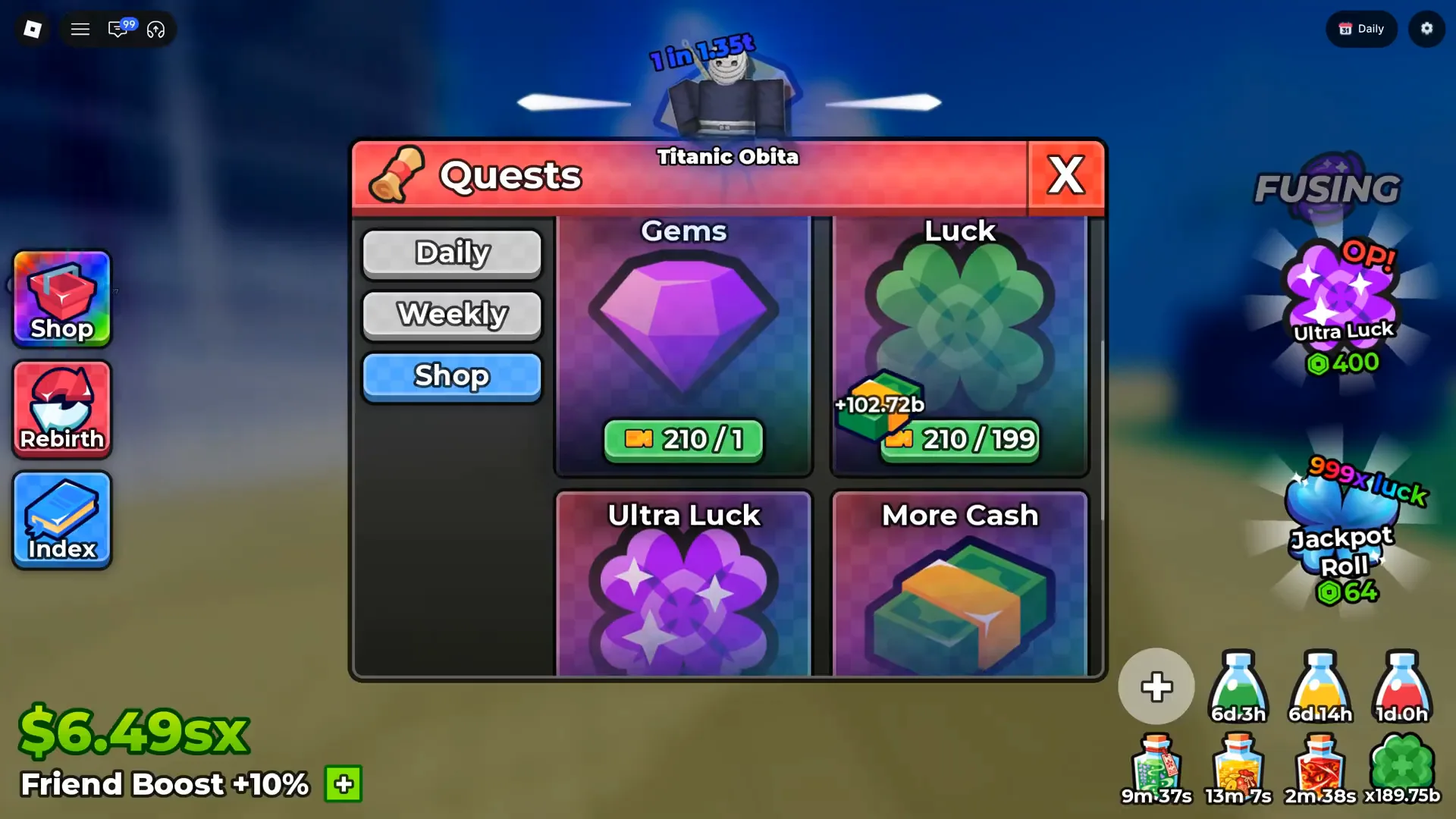
≈300s. The earliest +10% reading we shipped, taken with the Quests board open and the readout untouched by it.
Watch the early +10% readout at 5:00
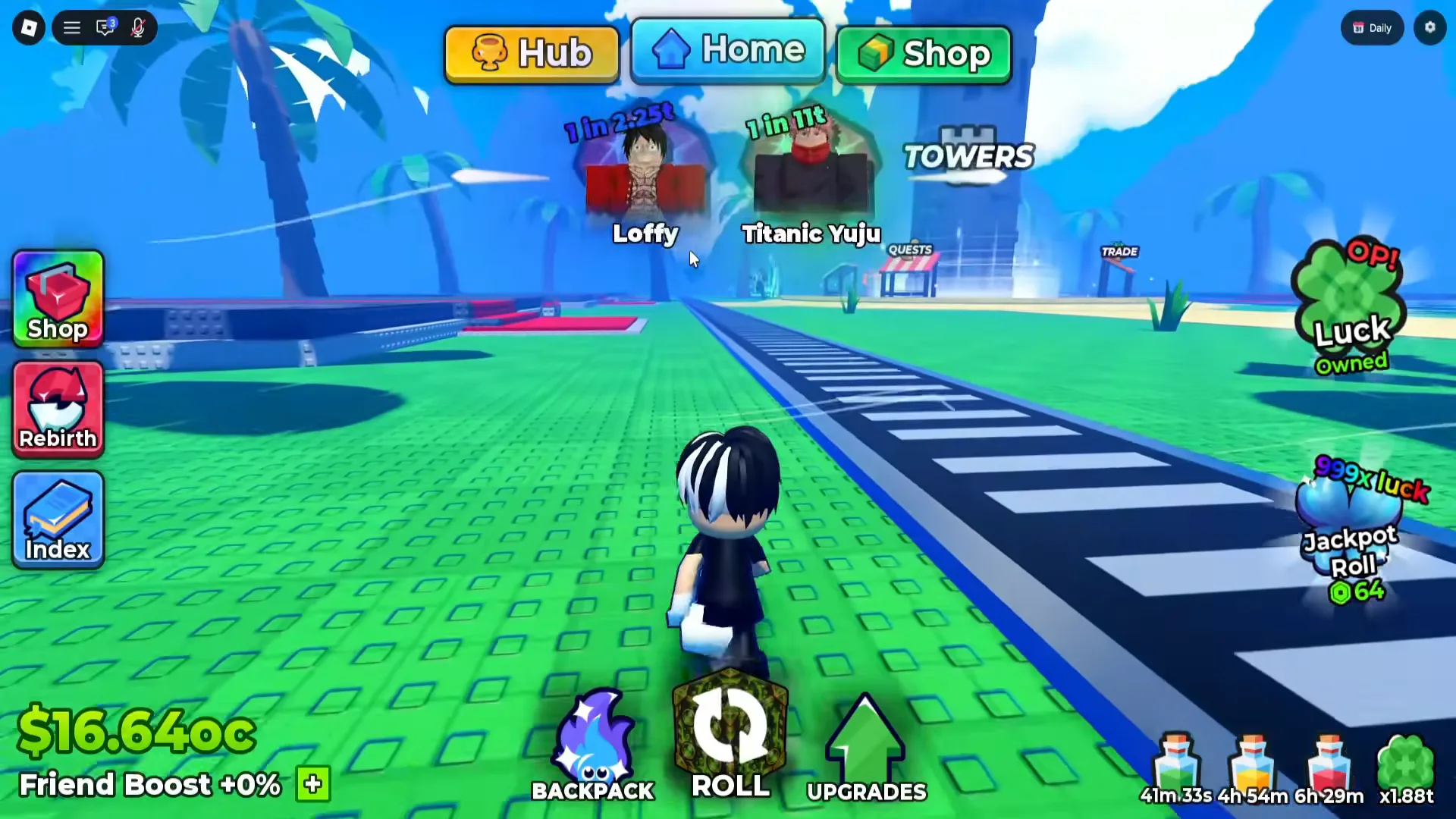
≈5s in Plique Games’ session. A third channel, a session that has barely started, and the same +0%.
Watch the session-open readout at 0:05
Does the Bonus Stay for the Whole Session?
No — and this is the finding that makes the readout worth a page. The bonus is present early in a session and gone later in the same session.
The recording we hold the most frames from is Superlex Plays’ session, and it gives us both states on one account without a relog between them. At roughly 300 seconds the line reads +10% above $6.49sx. At roughly 600 seconds it still reads +10%, and at roughly 660 and 700 seconds the same session still prints +10%. Then, later in that same recording, the line reads +0% — at roughly 1200 seconds above $168.89qi, and again at roughly 1400 seconds above $169.28qi.
Two hundred seconds separate those last two frames, and the value does not move back between them. That rules out the simplest innocent explanation, that we caught one unlucky frame during a redraw. It also rules out the readout being an account-level constant: nothing about the account changed between the +10% frames and the +0% frames except that time passed inside one continuous play session.
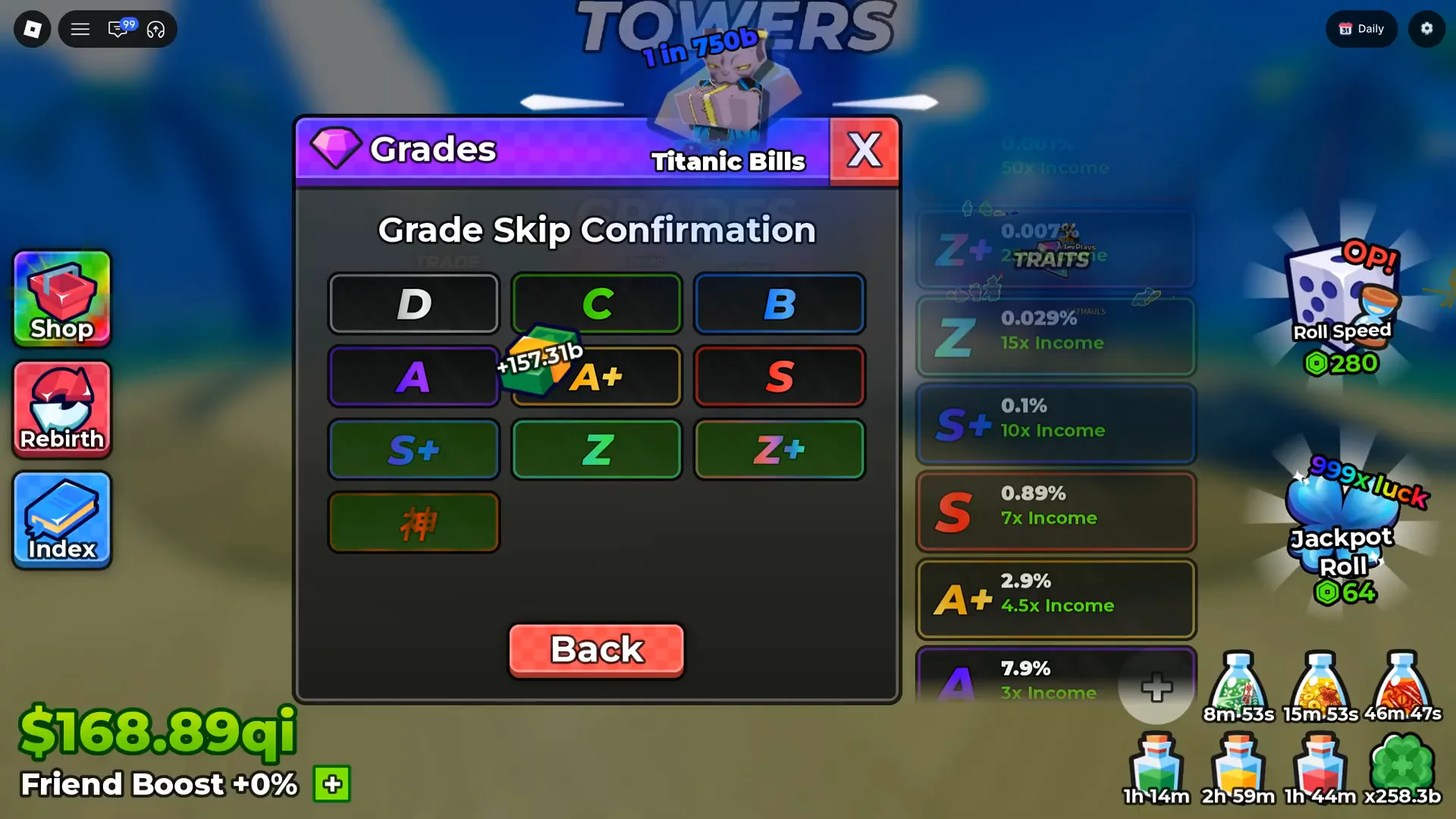
≈1200s. No relog and no restart between this frame and the +10% frames — the bonus simply is not there any more.
Watch the first +0% frame at 20:00
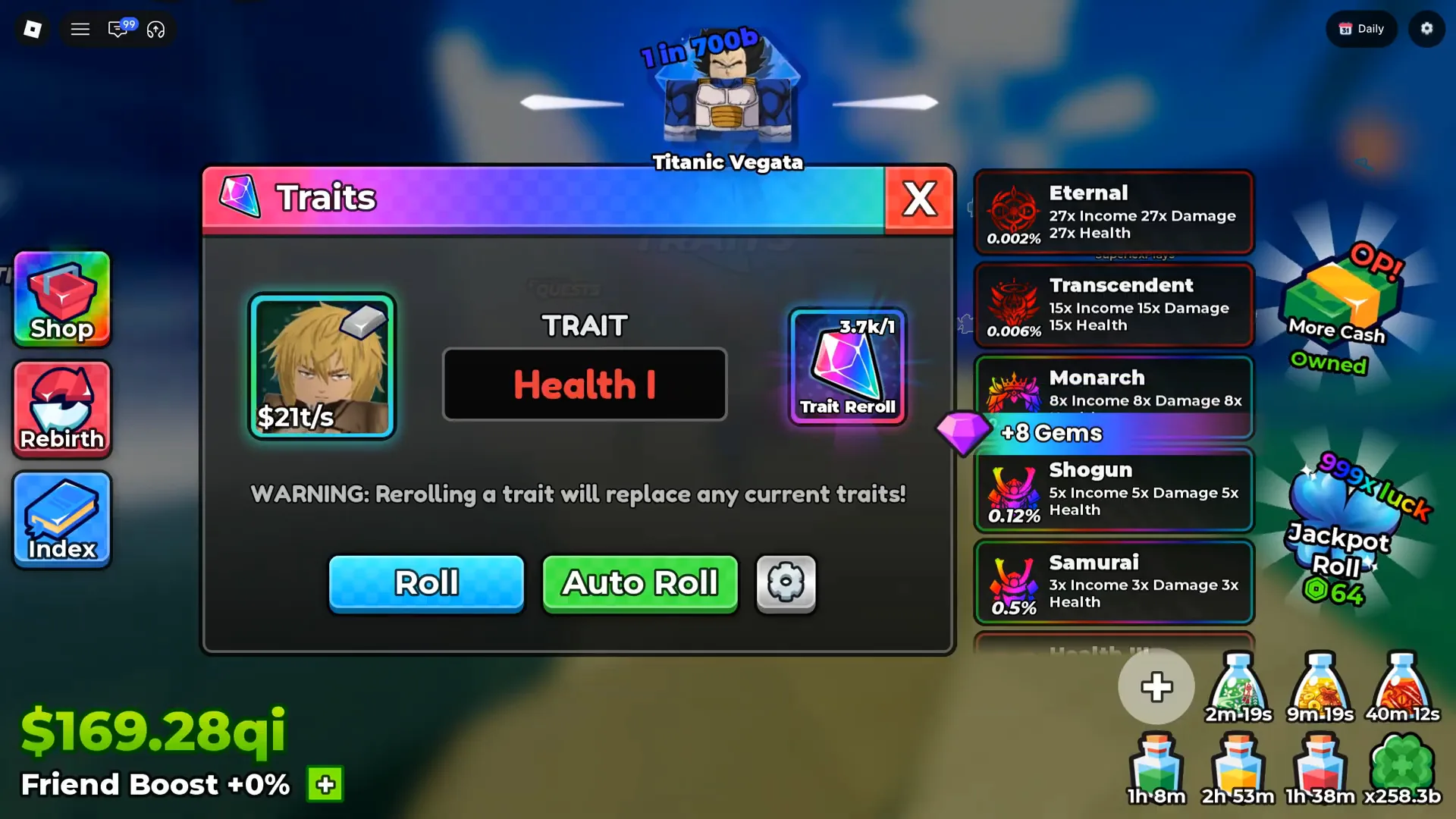
≈1400s. The +0% state is not a one-frame flicker — it holds across another 200 seconds.
What the frames do not give us is why. Nothing on screen marks the moment the value changed — no banner, no toast, no popup, no tick on the readout itself. We have two states sampled minutes apart and no frame from the seconds in between, so this page cannot say whether the drop was tied to an action the player took, to something the client did on its own, or to a threshold nobody printed. Read the frames as: the bonus was there early, it was not there later, and the game never told the player either way.
Do Other Accounts Read the Same?
Yes, and the value does not track progress. Two further creators give us the other state at two very different points in an account’s life.
Cx’s recording is the clearest of the two because it gives us both ends of one session. At roughly three seconds in, the HUD reads $0 on the cash line above Friend Boost +0% — a session that has just opened, with nothing banked. At roughly 340 seconds the same session has climbed to $616.7k on that first line, and the boost line still reads +0%. The account grew by six figures while the percentage did not move at all.
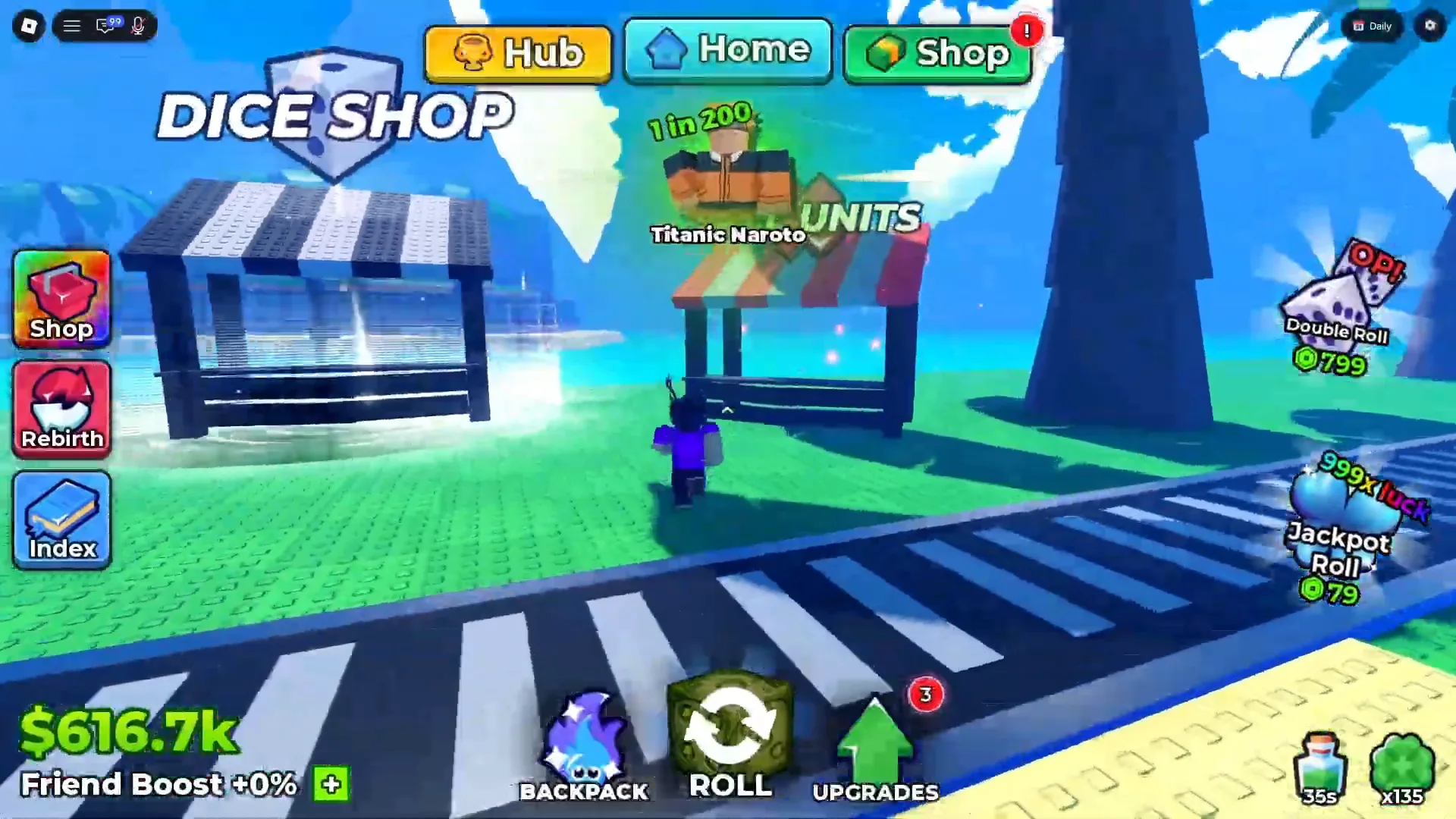
≈340s in Cx’s session. A second channel, a much larger cash total, the same +0%.
Watch the second-channel readout at 5:40
Plique Games’ recording adds a third channel and a third account: about five seconds after the hub loads, the corner reads $16.64oc above Friend Boost +0%, with the green button sitting there unclicked. And the fourth session, Xou Blox’s, is the one where the same readout reads +10% — that frame is already published on our group rewards page, which is where we first noticed this line at all.
So the honest summary of the spread is narrow. Four sessions and four accounts produce two values, and the value does not correlate with how much cash sits above it, with how new the session is, or with which creator is playing. We have no frame that shows any account moving from +0% up to +10%, and no frame that shows the change happening in either direction.
What Does the Friend Boost Percentage Multiply?
Nothing on any screen says. This is the question the label invites and the question the game never answers, so the answer has to be stated as a refusal rather than a guess.
Here is what we looked for and did not find, across all four recordings. There is no tooltip — the percentage is plain text, and no frame shows a cursor resting on it or any hover state. There is no rate table, no breakdown line and no second figure that the +10% could plausibly be modifying. There is no panel behind it: the boost line is part of the HUD, drawn in the corner whether a menu is open or not, and no frame shows anything that reads as its settings screen or its detail view. And there is no label on the cash counter tying the two together — the two lines are stacked in the same corner and that is the whole of their printed relationship.
There is one related trap worth naming, because the same part of the HUD does carry real multipliers elsewhere. The Traits panel prints its own income and damage figures — Eternal at 27x, Transcendent at 15x in the frame we shipped from the late session — and those are read straight off a panel that names what each one multiplies. Our best traits page works through that ladder column by column. The Friend Boost line does not work like that. It prints a percentage with no subject, and no frame joins it to the trait multipliers sitting on the other side of the screen in the same second.
Does the Friend Boost Come From the Group or From Friends?
Neither link is supported, and both are worth refusing explicitly because both are the obvious guess.
The Roblox group. Our group rewards page documents a frame in which the Group Rewards panel is open and the bottom-left corner reads Friend Boost +10% in the same second. That page already refuses to connect them, and this page refuses it from the other direction. The two things coexist on one screen; nothing on either screen names the other, and the group panel’s own printed reward row is Trait Reroll, Gems and Lucky Spin — no boost line, no percentage. A shared frame is not a shared mechanic.
Joining friends. The word Friend in the label is the only reason this guess exists, and the label is all there is. No frame shows a friend list, a friends counter or any social panel at all. No frame prints a per-friend value, a maximum or a step size. And in every frame across every recording, the green + button sits immediately to the right of the percentage and is never clicked — we do not have a single frame of that button being pressed, so this page cannot tell you what it opens, what it asks for, or whether it has anything to do with friends at all.
What Could We Not Read?
The section that keeps the page honest. Every line below is a real gap, not an oversight:
- What the green
+button opens. It is in every single frame of all four recordings, immediately right of the percentage, and it is never pressed. We have no frame of its panel, its menu, its cost or its list. - What the percentage multiplies. Cash, income, luck, drops — no frame says, and no tooltip, rate table or breakdown line exists anywhere in our footage.
- What raises the value. Whether a player can change it at all, and whether anything other than time does. We never see a value move in either direction.
- How long the value lasts. Whether it is per-session, per-account or per-server, and what ends it. We see
+10%and+0%inside one session and no frame of the moment it changed. - Whether
+10%and+0%are the only values. Two values appear across four sessions, which is a fact about our footage and not a published maximum. No frame prints a cap, and this page prints none. - Whether the label’s word “Friend” means Roblox friends. Nothing on screen defines it. No friend list, no friend counter, no social panel appears in any frame.
- What the cash suffix means. The figure above the boost line moves through in-game unit suffixes —
sxearly,qilater — and no frame explains the scale or the conversion.
If your client closes one of these — the + panel, a hover tooltip, a frame of the percentage changing — a dated screenshot through the contact page settles it and gets credited here.
What Should You Read Next?
- Group rewards — the panel that shares a frame with this readout, and the page that first refuses the link between them
- Best traits — the multiplier ladder that actually prints what it multiplies
- Settings — the other HUD and client controls we can read off frames
- Daily rewards — the login board, read tile by tile
- Lucky versus jackpot spins — the trap that catches a spin claimed at the wrong moment
- Live codes — the free faucet that changes most often
Related Articles
guides
Anime Dice Luck: Dice, Potions, Rebirth, Gamepasses and Server Luck
Anime Dice luck sources read off full-resolution frames: dice rows, potion stacks, rebirth, Luck hex nodes and gamepass cards — plus the server luck gap.
guides
Anime Dice Plot Slots: Level Signs, Storage and Backpack Counter
Anime Dice plot slots read off frames: the Lvl line and cash figure on a plot sign, the green pad under a unit, the Backpack counter and the Unit Storage node.
guides
Anime Dice Group Rewards: What the Panel Pays and What It Asks For
Anime Dice's Group Rewards panel read off frames: two requirements, a claim that pays 5 Trait Reroll, 5 Gems and 2 Lucky Spin, and the hub's GROUP CHEST.
Was this helpful?
Thanks for the feedback!